How Much Ram Do I Really Need for My Laptop or Desktop

So, how much RAM do you really need? For most everyday tasks, 8GB of RAM is enough. But if you game, edit videos, or run heavy software, you will want 16GB or even 32GB. This guide breaks down the exact RAM amounts for every use case so you can make the right choice without overspending.
Let us start with a simple truth. Most people buy more RAM than they actually need. Others buy too little and wonder why their computer crawls every time they open a few browser tabs.
The question “how much RAM do I need” does not have one single answer. It depends entirely on what you do with your computer. A student writing essays has very different needs from a gamer running the latest AAA titles. And a video editor has completely different requirements from both.
This guide will walk you through everything you need to know. We will cover what RAM actually does, how much you need for different tasks, and whether an upgrade is worth your money. By the end, you will know exactly what RAM capacity makes sense for your setup.
RAM stands for Random Access Memory. Think of it as your computer’s short-term memory. When you open an app, a browser tab, or a game, it loads into RAM. This lets your processor access the data almost instantly.
Without enough RAM, your system starts swapping data to your hard drive. This is called virtual memory, and it is painfully slow. Your computer freezes, apps crash, and everything feels sluggish. That is the number one sign you need more RAM.
Key Takeaways
- 8GB of RAM is the sweet spot for basic tasks like browsing, email, and office work.
- 16GB of RAM is ideal for gaming, photo editing, and moderate multitasking.
- 32GB or more makes sense for professional video editing, 3D rendering, and heavy workloads.
- Your operating system already uses a chunk of RAM, so check what is left before buying more.
- Upgrading RAM is one of the easiest and cheapest ways to speed up an older computer.
- Mixing RAM sticks can cause issues, so always match the type, speed, and size.
- More RAM does not always mean faster speeds — RAM speed and latency also matter.
📑 Table of Contents
What Does RAM Do and Why Does It Matter?
RAM is the bridge between your processor and your storage drive. Your CPU processes data, and your storage drive holds data long-term. RAM holds the data your computer is actively using right now.
Here is a simple way to think about it. Your hard drive or SSD is like a filing cabinet. It stores everything, but it takes time to pull things out. RAM is like your desk. Everything on your desk is right there, ready to use. The bigger your desk, the more files you can have open at once.
When you have enough system memory, your computer runs smoothly. You can switch between apps without waiting. Your browser can handle dozens of tabs. Games load faster and run more stably.
But when you run out of RAM, your computer slows down dramatically. This is because it has to constantly shuffle data between your storage and memory. The result is lag, stuttering, and frustration.
Two main specs matter when you look at RAM: capacity and speed. Capacity is measured in gigabytes (GB). Speed is measured in megahertz (MHz). Both affect performance, but capacity usually matters more for everyday users.
How Much RAM Do You Need for Different Tasks?
This is the section most people care about. Here is a breakdown of RAM needs by use case. These numbers reflect what most users will experience in real-world scenarios.
Basic Use: 4GB to 8GB
If you only use your computer for browsing the web, checking email, watching videos, and light document work, 8GB of RAM is plenty. Four gigabytes can still work for very basic tasks, but 8GB gives you breathing room.
With 8GB, you can comfortably run:
- Web browsers with 10 to 15 tabs open
- Microsoft Office or Google Docs
- Streaming services like Netflix or YouTube
- Light photo editing in basic apps
- Background apps like Spotify or messaging tools
4GB is really the bare minimum today. Windows 10 and Windows 11 already use around 3GB to 4GB of RAM just idling. So with only 4GB total, you will feel limited fast.
Mid-Range Use: 16GB
16GB is the current sweet spot for most PC users. This amount handles multitasking beautifully and covers most modern workloads. If you are unsure how much RAM to buy, 16GB is a safe bet.
With 16GB of RAM, you can comfortably do all of the following:
- Run most modern games at medium to high settings
- Edit photos in Adobe Photoshop or Lightroom
- Stream content while browsing and working
- Run virtual machines or development environments
- Use multiple heavy apps at the same time
For many gaming laptops and mid-range desktops, 16GB is the recommended starting point. It gives you room to grow and handles almost anything a typical user throws at it.
Heavy Professional Use: 32GB and Beyond
32GB of RAM is for power users. Video editors working with 4K footage, 3D modelers, architects running CAD software, and data scientists all benefit from this much memory.
With 32GB or more, you can:
- Edit 4K video without constant rendering pauses
- Run multiple heavy applications at once
- Work with large datasets in Excel or programming environments
- Train machine learning models
- Stream and game at the same time with heavy background tasks
64GB and 128GB setups exist too, but they are really only for specialized workstations. For 99% of home and office users, 32GB is more than enough.
| Task Type | Minimum RAM | Recommended RAM |
|---|---|---|
| Basic browsing and office work | 4GB | 8GB |
| Gaming | 8GB | 16GB |
| Photo editing | 8GB | 16GB |
| Video editing | 16GB | 32GB |
| 3D rendering and CAD | 16GB | 32GB+ |
| Programming and development | 8GB | 16GB |
| Running virtual machines | 16GB | 32GB+ |
How Much RAM Do You Need for Gaming?
Gaming is one of the most RAM-hungry activities for regular users. Modern games demand more memory than ever before. The exact amount depends on the types of games you play and what else you run in the background.
For competitive esports titles like Valorant, League of Legends, or Fortnite, 8GB of RAM is often enough. These games are optimized to run on lower memory. But even then, having a few background apps open can push you past the limit.
For AAA titles like Cyberpunk 2077, Hogwarts Legacy, or Starfield, 16GB is the recommended minimum. These games load large worlds and textures into memory. With only 8GB, you may experience stuttering or long load times.
If you want to stream your gameplay on Twitch while playing, bump your requirements up. Streaming uses a lot of extra memory. In that case, 32GB gives you a comfortable buffer. You can find more details on how much RAM for a gaming laptop in our dedicated guide.
Also keep in mind that RAM speed matters for gaming, especially with AMD processors. Faster RAM can improve frame rates in some scenarios. But the difference is usually small compared to the impact of having enough capacity.
How to Check How Much RAM You Currently Have
Before you decide to buy more RAM, check what you already have. It is very easy to find out how much memory your computer is using right now.
On Windows, press Ctrl + Shift + Esc to open Task Manager. Click the “Performance” tab and then select “Memory.” You will see your total RAM, how much is being used, and how much is available.
On a Mac, click the Apple menu and choose “About This Mac.” You will see your total memory right on the overview screen. For more detailed info, open Activity Monitor and check the Memory tab.
If you want a deeper look at your system, you can also follow our detailed guide on how to check RAM on your laptop for step-by-step instructions.
Once you know your current RAM, compare it against what your typical workload demands. If you are consistently using 80% or more of your available memory, an upgrade will make a noticeable difference.
Can You Upgrade Your RAM?
The good news is that upgrading RAM is one of the simplest and most cost-effective ways to boost your computer’s performance. Whether you have a laptop or a desktop, adding memory is usually straightforward.
For desktops, it is even easier. Most desktop computers have 2 to 4 RAM slots on the motherboard. You just need to buy compatible sticks, open the case, and snap them into the slots. No software or drivers needed in most cases.
Laptops are a bit trickier. Many modern laptops have soldered RAM, which means you cannot upgrade it. Before buying a laptop, always check whether the memory is upgradeable. Some laptops have a single accessible slot, while others have none at all.
If you are not sure how to physically add memory, check out our guide on how to upgrade RAM on your laptop for a full walkthrough.
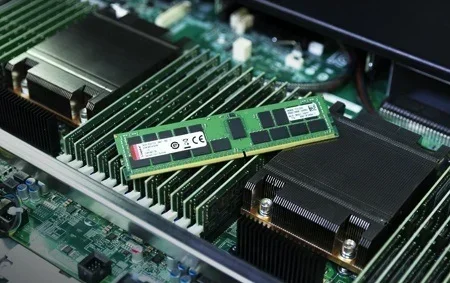
When buying new RAM, make sure you match the type (DDR4 or DDR5), the speed (MHz), and the form factor (DIMM for desktops, SO-DIMM for laptops). Mixing different types can cause compatibility issues or prevent your system from booting.
Common Mistakes People Make with RAM
There are a few mistakes that people make when thinking about RAM. Avoiding these will save you money and frustration.
Mistake 1: Buying way more RAM than you need. If you only browse the web and write documents, 64GB of RAM is a waste of money. Stick to what your actual workload requires.
Mistake 2: Ignoring RAM speed. Capacity is not everything. Faster RAM can improve performance in some tasks, especially gaming and certain professional workloads. Check your motherboard’s supported speeds before buying.
Mistake 3: Mixing RAM sticks carelessly. Putting a 4GB stick with an 8GB stick can work, but it often runs in “flex mode” and does not perform as well as matched pairs. Try to buy kits that are sold together.
Mistake 4: Assuming more RAM fixes everything. If your computer is slow, RAM might not be the problem. A slow hard drive, an outdated processor, or too many startup programs could be the real culprit. Diagnose the issue first.
Mistake 5: Forgetting about your operating system. A 32-bit operating system can only use about 4GB of RAM, no matter how much you install. Make sure you are running a 64-bit version of Windows or macOS to take full advantage of your memory.
Is 8GB Enough in 2024 and Beyond?
This is a question we get asked a lot. The short answer is: it depends. 8GB is still workable for basic tasks and light gaming. But as software becomes more demanding, 8GB is increasingly becoming the bare minimum rather than the ideal.
Windows 11 alone uses more memory than Windows 10 did. Modern web browsers like Chrome eat up RAM with every tab you open. And games continue to demand more memory with each new release.
If you are building a new computer or buying a laptop today, we strongly recommend starting with 16GB. The price difference between 8GB and 16GB is small compared to the performance and longevity you gain. It is the best investment for future-proofing your system.
For users who want to know more about specific RAM amounts and their costs, check out our article on how much 8GB RAM costs for a laptop to understand pricing better.
Final Thoughts
So, how much RAM do you really need? For most people, 16GB hits the perfect balance between performance and value. It handles gaming, multitasking, and creative work without breaking the bank.
If you are on a tight budget and your usage is light, 8GB will get you by. But if you do professional work or want your computer to stay fast for years, 32GB is worth the investment.
The key is understanding your own needs. Think about what apps you use daily, how many tabs you keep open, and what kind of work you do. Match your RAM to that reality. You will save money and get a computer that actually feels fast.
Upgrading your memory is one of the easiest ways to breathe new life into an older computer. It is cheap, simple, and the results are immediate. Whether you are using a desktop computer or a laptop, the right amount of RAM makes all the difference.
Frequently Asked Questions
Is 8GB of RAM enough for gaming?
8GB can work for older or less demanding games. But for modern AAA titles, 16GB is strongly recommended. With only 8GB, you may experience stuttering, long load times, and crashes when running the game alongside a browser or background apps.
Can I mix different RAM brands or sizes?
You can mix RAM, but it is not ideal. Different sizes and speeds can cause your system to run in compatibility mode, which reduces performance. For best results, use matched pairs or a single kit of RAM sticks sold together.
Does more RAM make your computer faster?
More RAM helps if you are running out of memory. If your computer already has enough RAM for your tasks, adding more will not make it faster. The real speed gains come from upgrading your processor or switching to a faster SSD.
How do I know if I need more RAM?
Open Task Manager on Windows or Activity Monitor on Mac and check your memory usage. If you regularly see usage above 80% during normal tasks, you likely need more RAM. Common signs include slow performance, apps crashing, and difficulty multitasking.
What is the difference between DDR4 and DDR5 RAM?
DDR5 is the newer generation of RAM. It offers higher speeds, better efficiency, and improved performance compared to DDR4. Not all motherboards support DDR5 yet, so check your motherboard specs before buying. DDR4 is still perfectly fine for most users and is more affordable.
Should I upgrade RAM or buy a new computer?
If your computer is otherwise in good shape but feels slow, upgrading RAM is a great first step. It is cheap and easy. But if your processor is outdated or your storage drive is slow, those upgrades may give you a bigger boost. Evaluate your whole system before deciding.