Best Laptop for 4k Video Editing
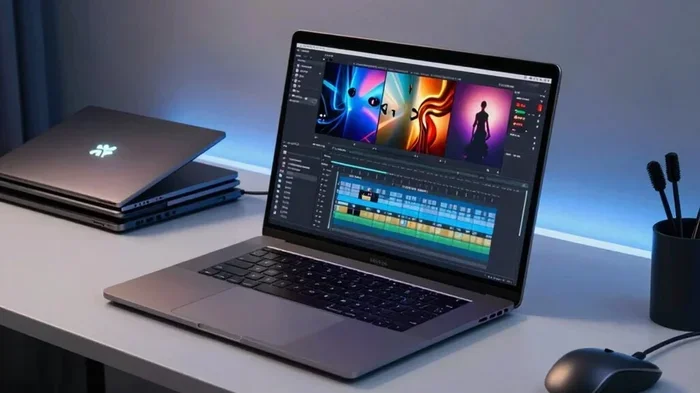
Choosing the best laptop for 4K video editing means balancing a powerful GPU, a fast processor, and a stunning display. Whether you are a beginner or a seasoned content creator, this guide breaks down the key specs, top options, and practical tips to help you make a confident decision. You will learn exactly what hardware matters most and how to avoid common buying mistakes.
Editing 4K video is one of the most demanding tasks you can throw at a laptop. The files are massive, the timelines are heavy, and the rendering times can test even the best machines. That is exactly why picking the best laptop for 4K video editing requires more than just looking at flashy specs on a box.
Whether you are building a YouTube channel, editing short films, or creating social media content in 4K, the right laptop can make or break your workflow. A machine with a weak processor will stutter on the timeline. One with poor color accuracy will show you the wrong colors. And a laptop without enough RAM will crash when you add too many clips.
This guide walks you through everything you need to know. We will cover the essential specs, highlight what to look for, and give you practical advice so you can buy with confidence. Let us dive in.
Key Takeaways
- GPU Power Matters Most: A dedicated graphics card is the single most important component for smooth 4K editing and rendering.
- Display Quality Is Crucial: A high-resolution screen with excellent color accuracy makes a huge difference in your final output.
- RAM and Storage Speed Up Workflows: At least 16GB of RAM and a fast SSD will keep your timeline running without lag.
- Portability Does Not Mean Compromise: Many thin and light laptops now deliver desktop-class performance for video work.
- Budget Options Exist: You do not need to spend a fortune to find a capable 4K editing machine.
- Software Compatibility Matters: Always check that your chosen laptop supports the video editing tools you plan to use.
📑 Table of Contents
- Why 4K Video Editing Needs a Powerful Laptop
- Key Specs to Look For in a 4K Editing Laptop
- Top Features That Set Great 4K Editing Laptops Apart
- Common Mistakes People Make When Buying a 4K Editing Laptop
- How to Choose the Right Laptop for Your Editing Style
- Final Thoughts on Finding the Best Laptop for 4K Video Editing
Why 4K Video Editing Needs a Powerful Laptop
4K video has four times the resolution of standard 1080p. That means each frame contains over eight million pixels. Your laptop has to decode, process, and display all of that data in real time while you cut, trim, and add effects.
When you scrub through a timeline, the laptop is reading the file, decoding the codec, and rendering a preview on the fly. If any part of that chain is too slow, you get lag, dropped frames, or a frozen screen. A powerful laptop for 4K editing handles all of this without breaking a sweat.
The Role of the Processor
The CPU is the brain of your machine. It handles decoding video files, running the editing software, and managing background tasks. For 4K work, you want a modern multi-core processor. Intel Core i7 and i9 chips or AMD Ryzen 7 and 9 processors are excellent choices. These chips have multiple cores that share the workload, which means smoother playback and faster exports.
If you are on a tighter budget, a mid-range processor can still handle basic 4K editing. But for complex projects with color grading, effects, and multi-track timelines, you will want the extra power. Think of it this way, the processor sets the ceiling for how fast and smooth your editing experience will be.
Why the Graphics Card Is Non-Negotiable
The GPU takes over the heavy lifting when it comes to rendering and previewing video. A dedicated graphics card with its own memory is essential for 4K editing. Integrated graphics found in budget laptops simply cannot keep up with the data demands of high-resolution footage.
Cards like the NVIDIA RTX series or AMD Radeon RX series offer hardware acceleration that speeds up exports and makes real-time previews possible. If you want smooth playback while adding transitions, color correction, and effects, a strong GPU is not optional, it is a must. You can learn more about which graphics cards perform best in our guide on best graphics cards for video editing.
Key Specs to Look For in a 4K Editing Laptop
Not all laptops are created equal, and not every machine that claims to handle 4K video actually delivers. Here are the specs that truly matter when choosing a laptop for 4K video editing.
RAM: The More, the Better
Random Access Memory is where your laptop stores active data for quick access. When you are editing a 4K timeline with multiple clips, effects, and audio tracks, everything lives in RAM. Less RAM means your laptop has to swap data to the slower storage drive, which causes lag and slowdowns.
For comfortable 4K editing, aim for at least 16GB of RAM. If you work on complex projects or use resource-heavy software, 32GB or more is ideal. Many laptops allow you to upgrade RAM later, but it is always better to start with enough memory from day one.
Storage Speed and Capacity
4K video files are huge. A single minute of 4K footage can easily take up several gigabytes. You need fast storage to keep up with reading and writing these large files during editing. An NVMe SSD is the gold standard for speed.
Capacity matters too. A 512GB SSD fills up fast with 4K projects. Look for at least 1TB of SSD storage, or consider a setup with a smaller SSD for your operating system and software paired with a larger hard drive for storing finished projects and raw footage.
Display Quality and Color Accuracy
You can have the most powerful laptop in the world, but if the screen cannot show you accurate colors, your edits will look wrong on other devices. For 4K video editing, look for a display with at least a 1080p resolution, though a 4K screen is a major bonus.
Color accuracy is measured in sRGB or DCI-P3 coverage. A screen that covers 100% sRGB or at least 90% DCI-P3 will give you reliable color representation. Brightness matters too, aim for a display with at least 300 nits. A high-quality screen helps you judge exposure, contrast, and color grading with confidence. Check out our guide on best computer monitors for video editing if you also want to pair your laptop with an external display.
Top Features That Set Great 4K Editing Laptops Apart
Beyond the core specs, several features can make a big difference in your day-to-day editing experience. These are the details that separate a good laptop from a great one.
Thunderbolt and USB-C Ports
Thunderbolt 3 or 4 ports offer blazing-fast data transfer speeds and can also connect to external GPUs or high-resolution displays. If you plan to expand your setup with external storage or a monitor, having Thunderbolt ports is a huge advantage. USB-C ports with DisplayPort support can also drive external displays, giving you more flexibility in your workspace setup.
Battery Life and Portability
Editing 4K video drains battery quickly, especially during rendering. If you plan to edit on the go, look for a laptop with a battery that can last at least 6 to 8 hours under light use. Keep in mind that heavy editing tasks will reduce battery life significantly, so having access to a power outlet is still important.
Portability is another factor to consider. Some creators prefer a lightweight machine they can carry to shoots or edit on location. Others prioritize screen size and performance over weight. Finding the right balance depends on your workflow and how you work.
Cooling System Performance
4K editing pushes a laptop’s hardware to its limits, which generates a lot of heat. A good cooling system keeps the internal temperatures in check, preventing thermal throttling that slows down performance. Laptops with dual fans, heat pipes, and well-designed vents handle sustained workloads much better than those with basic cooling.
If you notice your laptop getting very hot or slowing down during long editing sessions, a cooling mat for laptop can help. It improves airflow and keeps temperatures lower, which preserves performance over time.
Common Mistakes People Make When Buying a 4K Editing Laptop
Even experienced buyers can fall into traps when shopping for a video editing laptop. Here are the most common mistakes and how to avoid them.
Skimping on the GPU
The most frequent mistake is prioritizing the CPU over the GPU. While the processor matters, the graphics card does the heavy lifting for video rendering and real-time previews. A laptop with a weak dedicated GPU will struggle with 4K footage no matter how strong the CPU is.
Ignoring Display Quality
It is tempting to focus only on internals and ignore the screen. But if your display cannot show accurate colors, you will make editing decisions that look wrong on every other device. Always check the display specs before buying, and prioritize color accuracy and brightness.
Choosing Too Little Storage
4K files eat storage space fast. A 256GB SSD might seem fine at first, but you will run out of room quickly once you load in raw footage and project files. Always opt for more storage than you think you need, or plan for external storage solutions.
Forgetting About Software Requirements
Different editing software has different hardware requirements. Programs like Adobe Premiere Pro, DaVinci Resolve, and Final Cut Pro all have recommended and minimum specs. Before you buy, check the requirements for the software you plan to use and make sure your chosen laptop meets or exceeds them.
How to Choose the Right Laptop for Your Editing Style
Every content creator has a different workflow, and the best laptop for you depends on how you work. Here is a quick breakdown to help you decide.
If you are a solo creator who edits short-form content like YouTube videos or social media clips, a mid-range laptop with a solid GPU and 16GB of RAM will serve you well. You do not need a top-of-the-line machine for basic 4K cutting and simple effects.
If you work on longer-form projects like documentaries, short films, or commercial videos, you will benefit from a higher-end setup. Look for a laptop with 32GB of RAM, a powerful GPU, and a large, color-accurate display. Faster export times and smoother timeline performance will save you hours of frustration over time.
For professionals who work on multiple projects simultaneously or handle complex color grading, a workstation-class laptop is worth the investment. These machines offer the highest-end components and are built to handle the most demanding tasks without breaking a sweat.
No matter your style, always prioritize the components that matter most for video editing. A strong GPU, plenty of RAM, fast storage, and a great display will do more for your workflow than any extra bells and whistles.
Final Thoughts on Finding the Best Laptop for 4K Video Editing
Finding the best laptop for 4K video editing comes down to understanding your needs and matching them to the right hardware. Focus on the GPU, processor, RAM, storage, and display quality, and you will have a machine that handles 4K footage with ease.
Do not fall for marketing hype or focus on specs that do not matter for video work. A great editing laptop balances power, display quality, and portability in a way that fits your specific workflow. Take your time, compare options, and choose the machine that gives you the best experience for the projects you create.
The right laptop is an investment in your craft. When you have a machine that keeps up with your creative vision, you can focus on what really matters, making great content. Happy editing!
Frequently Asked Questions
What makes a laptop good for 4K video editing?
A good 4K editing laptop needs a powerful dedicated GPU, a fast multi-core processor, at least 16GB of RAM, and a color-accurate display. These components work together to handle large 4K files, smooth timeline playback, and fast rendering without lag or crashes.
Can I edit 4K video on a budget laptop?
Yes, but with limitations. Budget laptops can handle basic 4K editing if they have a dedicated GPU and at least 16GB of RAM. However, complex projects with effects and color grading will run slower. For serious work, investing in a more capable machine is recommended.
How much RAM do I need for 4K video editing?
16GB of RAM is the minimum for comfortable 4K editing. If you work on complex projects with multiple tracks and effects, 32GB or more will give you a much smoother experience. More RAM means your laptop can handle larger timelines without slowing down.
Do I need a 4K display on my editing laptop?
A 4K display is not strictly required, but it is very helpful. It gives you more screen space for timelines and panels, and it lets you view your footage at its native resolution. At minimum, choose a display with excellent color accuracy and at least 1080p resolution.
Is a gaming laptop good for 4K video editing?
Many gaming laptops are excellent for 4K video editing because they come with powerful GPUs and fast processors. However, they may sacrifice display color accuracy and battery life. If you choose a gaming laptop, look for one with a high-quality display and good cooling.
What software works best on a 4K editing laptop?
Popular choices include Adobe Premiere Pro, DaVinci Resolve, and Final Cut Pro. Each has different hardware requirements, so check the recommended specs before choosing. DaVinci Resolve is especially GPU-heavy, so a strong graphics card will make a noticeable difference in performance.