Can a Laptop Charge Another Laptop
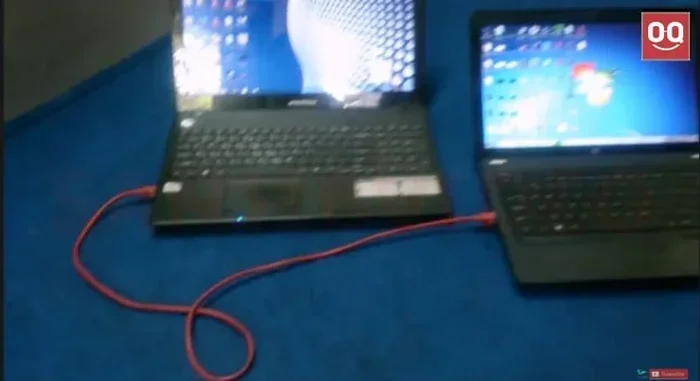
Yes, a laptop can charge another laptop in certain situations, mainly through USB-C ports with power delivery support. This method works when one laptop has enough battery power and the right output capability. However, it is not as fast or efficient as using a wall charger, and there are some important safety considerations to keep in mind.
Have you ever been in a situation where your laptop battery is dying, and you do not have your charger nearby? Maybe you are at a coffee shop, traveling, or simply forgot your adapter at home. The thought might cross your mind: can a laptop charge another laptop? It sounds unusual, but the answer is yes, under the right conditions. This guide will walk you through everything you need to know about laptop-to-laptop charging, including how it works, what you need, and the risks involved.
Laptop charging has evolved a lot over the years. Modern laptops use USB-C ports that can do more than just transfer data. They can also deliver power to other devices. This is called USB-C power delivery, and it opens up some interesting possibilities. But just because you can do something does not mean you should do it all the time. There are limits, risks, and better alternatives to consider.
In this article, we will cover the science behind this, the methods you can use, and the safety steps you should take. By the end, you will know exactly whether charging a laptop with another laptop is a good idea for your situation.
Key Takeaways
- Laptop-to-laptop charging is possible using USB-C ports with power delivery support, but it is slower than a wall charger.
- Not all laptops support this feature. You need compatible hardware and sufficient battery power on the source laptop.
- Overheating is a real risk. Charging another device can put extra strain on your laptop.
- Power delivery standards matter. USB-C PD determines how much power can be transferred between devices.
- Use this method only in emergencies. It is not a replacement for a proper charging solution.
- Check your laptop specs before attempting to charge another device from it.
📑 Table of Contents
- How Does Laptop-to-Laptop Charging Work?
- Can Every Laptop Charge Another Laptop?
- Is It Safe to Charge a Laptop With Another Laptop?
- How Fast Can a Laptop Charge Another Laptop?
- When Should You Use Laptop-to-Laptop Charging?
- Common Mistakes to Avoid
- Better Alternatives to Laptop-to-Laptop Charging
- Final Thoughts
How Does Laptop-to-Laptop Charging Work?
The idea of one laptop charging another might seem like magic, but it is actually straightforward. It all comes down to how modern laptops handle power through their USB-C ports. When a laptop supports USB-C power delivery, its port can both receive and send power. This means the same port that charges your laptop can also be used to charge something else.
USB-C Power Delivery Explained
USB-C power delivery, or PD, is a standard that allows devices to negotiate power levels. When you connect two laptops with a USB-C cable, they talk to each other. They decide how much power should flow from one to the other. This negotiation happens automatically. You do not need to press any buttons or change any settings in most cases.
The power output depends on your laptop’s hardware. Some laptops can send up to 100 watts through USB-C. Others might only manage 45 watts or less. The more power your laptop can send, the faster it can charge the other device. But remember, sending power also drains your own laptop battery faster.
The Role of the Charging Cable
Not just any USB-C cable will work for this. You need a cable that supports power delivery and has the right wattage rating. A cheap or damaged cable might not handle the power transfer safely. It could overheat or fail to charge the other laptop at all.
Here are some quick tips for choosing the right cable:
- Look for cables rated for at least 60 watts or higher.
- Choose cables from reputable brands.
- Check that the cable supports USB-C PD.
- Avoid very long cables, as they can reduce power efficiency.
Can Every Laptop Charge Another Laptop?
The short answer is no. Not every laptop can charge another laptop. It depends on the hardware, the ports, and the power delivery capabilities. Let us break this down so you know what to look for.
What You Need for Laptop-to-Laptop Charging
Before you try to charge one laptop from another, make sure both devices meet these basic requirements:
- USB-C port with power delivery support: Both laptops need a USB-C port that can send power, not just receive it.
- Sufficient battery level: The source laptop needs enough charge to share power without dying itself.
- Compatible USB-C cable: The cable must support the right power rating.
- Enabled power delivery: Some laptops need you to enable this feature in the settings.
If any of these are missing, the charging will not work. It is as simple as that. Check your laptop manual or the manufacturer website if you are unsure about your model’s capabilities.
Laptops That Support This Feature
Most modern laptops from brands like Dell, HP, Lenovo, Apple, and Asus support USB-C power delivery. However, the amount of power they can send varies. For example, some ultrabooks are designed to be very power-efficient and may not send much power at all. Gaming laptops, on the other hand, often have larger batteries and more powerful USB-C outputs.
Here is a simple comparison of what to expect from different types of laptops:
Ultrabooks and thin laptops: These usually have smaller batteries and may only send 45 to 65 watts. They are better for slowly topping up another laptop, not for fast charging.
Gaming laptops: These often have bigger batteries and more powerful USB-C ports. They can sometimes send up to 100 watts, making them better candidates for charging another laptop.
Older laptops without USB-C PD: If your laptop only has USB-A ports or older USB-C ports without power delivery, you cannot charge another laptop from it. Period.
Is It Safe to Charge a Laptop With Another Laptop?
Safety is the biggest concern when you start charging a laptop from another laptop. The short answer is that it is generally safe, but there are risks you should understand.
Overheating Risks
When your laptop sends power to another device, it works harder. This extra work generates heat. If your laptop is already warm from running demanding tasks, adding charging duties can push the temperature higher. Overheating can damage internal components and reduce the lifespan of your laptop.
You should never leave two laptops connected and charging unattended for long periods. If you notice either laptop getting very hot, disconnect them right away. For more on overheating risks, check out our article on can a laptop explode from overheating.
Battery Health Considerations
Charging another laptop drains your own battery. If you do this frequently, it can wear down your battery faster over time. Lithium-ion batteries have a limited number of charge cycles. Every time you use your battery, you use up one of those cycles.
Here are some tips to protect your battery health:
- Only use this method in emergencies.
- Keep your own battery level above 20 percent before sharing power.
- Avoid charging another laptop while your own laptop is running heavy applications.
- Let your laptop cool down before attempting to share power.
Power Surge and Compatibility Issues
Although rare, power surges can happen when two devices negotiate power delivery. If the laptops are not compatible, one might try to push more power than the other can handle. This could damage the USB-C port or the battery of either device.
To minimize this risk, always use laptops from the same or similar power delivery standards. Avoid connecting very old laptops with very new ones, as their power negotiation protocols might not match.
How Fast Can a Laptop Charge Another Laptop?
The charging speed depends on several factors. It is almost always slower than using a wall charger. Here is what affects the speed.
Factors That Affect Charging Speed
Several things determine how fast one laptop can charge another:
- Power output of the source laptop: A laptop that can send 100 watts will charge the other device faster than one that can only send 45 watts.
- Battery size of the receiving laptop: A larger battery takes longer to charge, no matter what the source is.
- Cable quality: A poor-quality cable can limit the power transfer significantly.
- Background tasks on the source laptop: If the source laptop is running heavy tasks, less power is available for charging the other device.
Real-World Charging Speed Examples
In real-world tests, charging a laptop from another laptop typically takes two to three times longer than using a wall charger. For example, if a wall charger can charge your laptop from 0 to 50 percent in one hour, a laptop-to-laptop charge might take two to three hours for the same result.
This is because wall adapters are designed to deliver consistent, high-wattage power. A laptop battery, on the other hand, is designed to power the device itself, not to act as a charger for something else.
When Should You Use Laptop-to-Laptop Charging?
While it is not the ideal way to charge your laptop, there are situations where it makes sense.
Emergency Situations
The best time to use this method is when you are in a real pinch. Maybe you are at an airport, a remote work site, or a friend’s house, and your charger is not available. A quick top-up from another laptop can give you enough power to finish an important task or make a phone call.
Travel and Outdoor Work
If you are traveling and have limited access to power outlets, having two laptops can be an advantage. You can share power between them to keep at least one device running. Just make sure you plan ahead and know the battery levels of both devices.
For tips on managing your laptop power while traveling, you might also want to read about how much power a laptop uses when plugged in.
Temporary Workarounds
If your charger broke and you are waiting for a replacement, laptop-to-laptop charging can buy you some time. It is not a long-term solution, but it can keep you working for a few more hours until you get a proper charger.
Common Mistakes to Avoid
People often make mistakes when trying to charge one laptop from another. Here are the most common ones and how to avoid them.
Using the Wrong Cable
This is the number one mistake. Not all USB-C cables are created equal. A standard data cable might not support power delivery at all. Always use a cable that is specifically rated for USB-C PD and matches the wattage you need.
Ignoring Battery Levels
Do not try to charge another laptop when your own battery is below 20 percent. You will drain both laptops quickly, and neither will have enough power to be useful.
Running Heavy Tasks While Charging
If you are gaming, editing video, or running demanding software on the source laptop, do not try to charge another device at the same time. This will overload the system and could cause overheating or shutdown.
Forcing the Connection
If the laptops do not recognize each other or the charging does not start, do not force it. Check the cable, the ports, and the power delivery settings. Forcing a connection that is not working can damage the ports.
Better Alternatives to Laptop-to-Laptop Charging
While charging a laptop from another laptop works, there are better options that are faster and safer.
Portable Power Banks
A high-capacity USB-C power bank is a much better solution for on-the-go charging. These devices are designed to deliver consistent power and often have higher wattage outputs than a laptop battery. Look for power banks rated at 65 watts or higher for the best results.
Carrying a Spare Charger
The simplest solution is to always carry a spare charger. They are lightweight and take up very little space in a bag. A spare charger ensures you are never stuck without a power source.
Using a Universal Adapter
A universal laptop adapter can work with multiple laptop brands and models. They are affordable and come with interchangeable tips for different laptops. This is a great backup option for travelers.
Final Thoughts
So, can a laptop charge another laptop? Yes, it can, and it is a useful trick to know. But it should be treated as an emergency backup, not a regular charging method. The process relies on USB-C power delivery, compatible hardware, and the right cable. It works best when you understand the limitations and risks involved.
Always prioritize safety. Watch for overheating, protect your battery health, and use this method only when you really need it. For everyday charging, stick with your original charger or a quality power bank. Your laptops will last longer, and you will avoid unnecessary wear and tear.
Now that you know how laptop-to-laptop charging works, you can make informed decisions about when and how to use it. Keep this knowledge in your back pocket for those moments when you really need it. And always remember to carry your charger whenever possible.
Frequently Asked Questions
Can I charge my laptop from another laptop using a USB-C cable?
Yes, you can charge your laptop from another laptop using a USB-C cable, but only if both laptops support USB-C power delivery. The source laptop must be able to send power through its port, and the receiving laptop must be able to accept it. Use a high-quality cable rated for the correct wattage to ensure safe charging.
How long does it take to charge a laptop from another laptop?
It typically takes two to three times longer than using a wall charger. The exact time depends on the power output of the source laptop, the battery size of the receiving laptop, and the quality of the cable. Expect a slow top-up rather than a fast charge.
Will charging another laptop drain my battery faster?
Yes, sending power to another device drains your own battery. Your laptop has to work harder to both power itself and charge the other device. This uses up your battery charge cycles faster, so use this method sparingly.
Is it safe to leave two laptops connected for charging overnight?
No, it is not safe. Leaving two laptops connected and charging unattended can lead to overheating, battery damage, or even a fire hazard. Always monitor the charging process and disconnect both devices once the receiving laptop has enough charge.
Can a gaming laptop charge a regular laptop faster?
Gaming laptops often have larger batteries and more powerful USB-C ports, so they can sometimes deliver more wattage. This means they may charge a regular laptop faster than a thin ultrabook could. However, the speed still depends on the specific power delivery capabilities of both devices.
What should I do if my laptop does not support USB-C power delivery?
If your laptop does not support USB-C power delivery, you cannot charge another laptop from it. In this case, consider using a portable power bank or carrying a spare charger. These alternatives are safer and more effective for keeping your devices powered on the go.