Do 2tb Usb Sticks Exist
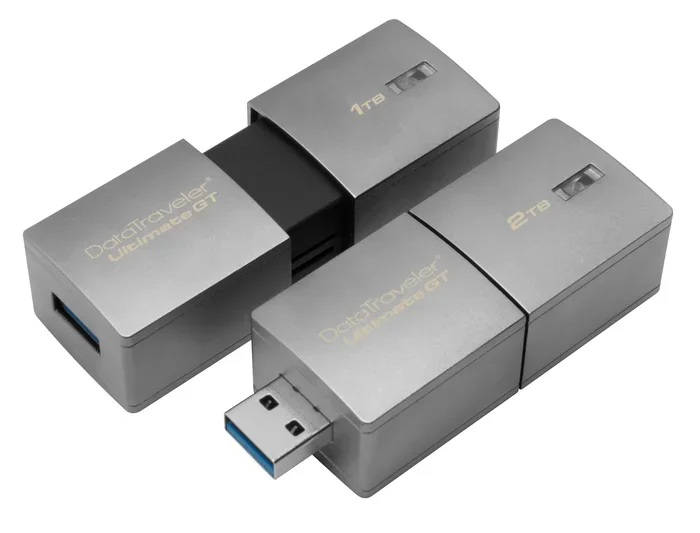
Yes, 2TB USB sticks exist, but they are rare, expensive, and often not what they seem. Most products marketed as 2TB USB flash drives are actually external SSDs or, worse, counterfeit devices. If you need 2TB of portable storage, your best bet is to look at portable SSDs and M.2 NVMe SSDs in USB enclosures that offer real speed and reliable capacity.
The question “Do 2TB USB sticks exist?” comes up a lot. And the answer is more complicated than you might think. A true 2TB USB flash drive does exist. But finding one that is real, reliable, and worth your money is a different story entirely.
Most people picture a small thumb-sized drive when they hear the words USB stick. These little devices have been around for decades. They plug right into any USB port and let you carry files wherever you go. But 2TB of storage in that tiny form factor? That is where things get tricky.
If you need a lot of portable storage, you have options. And some of them might surprise you. This guide covers everything you need to know about 2TB USB sticks. We will look at what is real, what is fake, and what you should buy instead.
Key Takeaways
- True 2TB USB flash drives exist but are extremely rare and pricey.
- Most “2TB USB sticks” are actually external SSDs in disguise.
- M.2 NVMe SSDs in USB enclosures offer a great alternative.
- Counterfeit 2TB drives are a real problem in the market.
- USB 3.0 and USB-C speeds vary greatly between products.
- Portable SSDs give you 2TB capacity with much better performance.
📑 Table of Contents
The Truth About 2TB USB Sticks
So, do 2TB USB sticks exist? The honest answer is yes. But they are not common. And they are not always what they appear to be.
A real 2TB USB flash drive uses advanced NAND flash memory packed into a tiny USB connector. The technology exists. Companies have made them. But they are expensive. A genuine 2TB USB stick can cost several hundred dollars. And even then, the speed is often slower than you would expect.
Here is why most people end up confused. Many products sold online as “2TB USB sticks” are not real USB flash drives at all. They are external solid state drives shaped to look like USB sticks. Some are outright fakes that use fake memory chips to lie about their capacity.
The market for high-capacity USB storage is full of misleading claims. That is why it pays to know what you are looking for. Understanding the difference saves you money and protects your data.
Why Traditional USB Flash Drives Do Not Come in 2TB
USB flash drives, also called thumb drives or memory sticks, have come a long way. You can easily buy a 1TB USB flash drive today. But 2TB is a completely different ball game.
The reason comes down to technology and cost. USB flash drives use NAND flash memory. Packing 2TB of NAND into a tiny USB form factor is very hard. The chips needed are expensive to produce. The controllers must handle huge amounts of data in a small space.
Here is what makes a 2TB USB stick so challenging:
- NAND flash chips at 2TB capacity are still very new and costly.
- The USB controller must manage high data loads without overheating.
- The small size limits heat dissipation and batteryless operation.
- Manufacturing yields for large-capacity USB chips are still low.
Because of these factors, most manufacturers focus on larger external drives instead. They put the same NAND chips into bigger enclosures with better cooling. This gives you more capacity at a lower price. It also gives you faster speeds and better reliability.
The Counterfeit Problem You Need to Know About
One big reason to be careful is the counterfeit market. Many sellers on online marketplaces list fake 2TB USB sticks. These drives use low-capacity flash memory and lie about their size. When you fill them up, your files get corrupted or simply disappear.
How can you spot a fake? Here are some tips:
- Check the price. If a 2TB USB stick costs less than 100 dollars, it is probably fake.
- Look for trusted brands like SanDisk, Samsung, or Kingston.
- Read reviews carefully. Fake products often have suspicious feedback.
- Test the drive with tools like CrystalDiskMark or H2testw.
Always buy from reputable sellers. A fake 2TB drive can ruin your data. There is no way to recover files once a counterfeit drive fails. Stick with known brands and trusted retailers.
External SSDs: The Real 2TB Portable Solution
So if true 2TB USB flash drives are so rare and risky, what should you use instead? The answer is simple. External SSDs give you 2TB of fast, reliable storage in a pocket-sized device.
External SSDs look a lot like USB sticks. You plug them into any USB port and start using them right away. But inside, they use much better technology. Most modern external SSDs use NVMe SSD chips inside a small enclosure with a USB connector.
The big advantage is speed. A typical USB flash drive maxes out at about 150 MB/s. A good external SSD can hit 1000 MB/s or more. That is a huge difference when you are moving large files like video projects or game libraries.
Popular 2TB portable storage options include:
- Portable NVMe SSDs in USB enclosures
- External SATA SSDs with USB-C connectors
- High-capacity flash drives from trusted brands
If you want the best performance, look for a portable NVMe SSD with a USB-C connection. These drives are small, fast, and offer the full 2TB of space you need. They fit in your pocket and work with laptops, desktops, and even some gaming consoles.
How M.2 NVMe SSDs Work in USB Enclosures
Inside many portable SSDs, you will find an M.2 NVMe SSD chip. These chips are tiny but powerful. They connect directly to your motherboard in laptops and desktops. But when you put one inside a USB enclosure, it becomes a portable drive.
This is where M.2 NVMe SSDs in USB enclosures really shine. You get the speed of an internal NVMe drive with the convenience of a USB stick.
Here is how it works:
- The M.2 NVMe SSD holds your data on fast flash memory.
- A bridge chip converts the NVMe protocol to USB.
- The enclosure protects the chip and provides a USB connector.
- You plug it into any computer and it shows up as a regular drive.
The result is a portable storage device that is as fast as an internal SSD. You can transfer a 50GB file in under a minute. That is something no traditional USB flash drive can do. These enclosures come in different sizes, including compact 2230 and 2280 formats.
For example, a 2TB PCIe Gen4 NVMe 2280 M.2 SSD inside a good USB enclosure gives you blazing fast speeds and a full terabyte of reliable storage. It is the closest thing to a true 2TB USB stick that actually performs well.
Using an NVMe SSD to USB Adapter
If you already own an M.2 NVMe SSD, you can turn it into a USB drive yourself. An NVMe SSD to USB adapter lets you do this easily.
These adapters are small enclosures that hold an M.2 NVMe SSD and connect to your computer via USB. They are cheap, simple to use, and give you a custom 2TB portable drive.
Here is what you need to know:
- Make sure your NVMe SSD is 2230 or 2280 size.
- Choose an adapter that supports USB 3.1 or USB-C for best speeds.
- Some adapters include built-in cable management for portability.
- You can remove the SSD from the adapter and use it internally later.
This is a great option if you want full control over your storage setup. You pick the drive, the adapter, and the capacity. It is also much cheaper than buying a pre-built 2TB USB stick from a retail store.
Quick Tips for Choosing the Right Adapter
Not all adapters are the same. Here are a few quick tips to keep in mind:
- Look for adapters with metal housings for better heat dissipation.
- Check that the adapter supports your NVMe SSD generation (Gen3 or Gen4).
- Make sure the USB connector type matches your needs (USB-C or USB-A).
- Read reviews before buying. Cheap adapters can bottleneck your speeds.
What to Look For in a 2TB Portable Drive
When shopping for 2TB storage, you should compare a few key factors. Not all drives are the same. Here is what matters most.
Speed
Speed is the biggest difference between USB flash drives and external SSDs. Look for drives that advertise USB 3.1 Gen 2 or USB 4 support. These offer the fastest data transfer rates. A slow drive wastes your time when you are copying large files.
Build Quality
A good portable drive should be rugged. Metal enclosures resist drops and bumps better than plastic. Some drives are even waterproof or shock-resistant. If you carry your drive around every day, durability matters a lot.
Brand Trust
Stick with well-known brands. Companies like Samsung, Crucial, and WD have proven track records. They offer warranties and reliable customer support. Avoid no-name brands that promise huge capacities for suspiciously low prices.
Price
2TB storage costs more than 1TB. But prices have dropped a lot in recent years. A good 2TB portable SSD now costs between 120 and 200 dollars. That is much better than it used to be. And it is far cheaper than a genuine 2TB USB flash drive.
The Best 2TB Storage for Different Needs
Not everyone needs the same thing. Here is a quick guide to help you choose.
For everyday file storage: A basic external SSD works great. You can back up photos, videos, and documents with ease. It fits in your bag and works everywhere.
For gaming: Look for a drive with fast read speeds. Games load faster on NVMe-based portable SSDs. You will notice the difference in load times right away.
For creative professionals: If you work with large video files, speed matters most. A USB-C NVMe drive will save you hours of transfer time every week.
For budget buyers: A used or refurbished 2TB SSD can save you money. Just make sure it comes from a trusted source. Check the warranty and return policy before buying.
Final Thoughts
So do 2TB USB sticks exist? Yes, but they are not the best choice for most people. The technology is real, but the price and rarity make them impractical. Instead, look at external SSDs and portable NVMe drives. They give you the same 2TB capacity with much better speed and reliability.
A good 2TB portable SSD costs less than a true 2TB USB flash drive and performs ten times faster. That is a no-brainer for anyone who needs serious storage on the go. Do your research, buy from trusted sellers, and you will find the perfect 2TB storage solution for your needs.
Frequently Asked Questions
Can you actually buy a 2TB USB flash drive?
Yes, you can find 2TB USB flash drives for sale, but they are rare and expensive. Many products claiming to be 2TB USB sticks are actually external SSDs or counterfeit devices. Always buy from reputable brands and trusted retailers to avoid scams.
Why are 2TB USB sticks so expensive?
Packing 2TB of NAND flash into a tiny USB form factor is very difficult. The chips are costly to manufacture, and the controllers must handle high data loads in a small space. This makes genuine 2TB USB sticks much pricier than standard flash drives.
Are fake 2TB USB sticks common?
Yes, fake 2TB USB sticks are a real problem. They use low-capacity memory chips and falsely report a 2TB size. Once you fill the drive past its real capacity, files get corrupted. Always test any high-capacity drive before trusting it with important data.
What is faster than a 2TB USB flash drive?
External SSDs and portable NVMe drives are much faster. A USB flash drive typically maxes out at 150 MB/s, while a portable NVMe SSD can reach 1000 MB/s or more. For the same price, you get way better performance with an external SSD.
Can I use a 2TB M.2 NVMe SSD as a USB drive?
Yes, you can use an NVMe SSD to USB adapter to turn a 2TB M.2 NVMe SSD into a portable USB drive. This is a cost-effective way to get 2TB of fast portable storage. Just make sure the adapter supports your SSD size and generation.
What should I look for when buying a 2TB portable drive?
Look for speed (USB 3.1 or USB-C), build quality (metal enclosure), brand trust (Samsung, Crucial, WD), and a fair price. Avoid no-name brands and always read reviews. A good 2TB portable SSD offers the best balance of speed, reliability, and value.