Do Usb to Sata Work
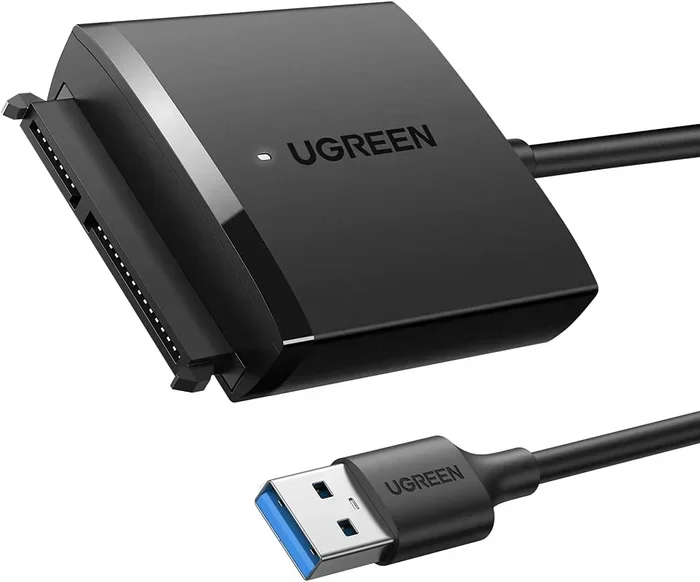
Yes, USB to SATA adapters work well for most users. They let you connect SATA hard drives and SSDs to any computer using a simple USB cable. Whether you need to recover data, clone a drive, or add extra storage, a USB to SATA adapter is a quick and affordable solution.
Have you ever pulled an old hard drive out of a desktop and wondered if you could use it with a laptop? Maybe you need to recover files from a dead computer, or you want to turn an internal drive into portable storage. The question is simple: do USB to SATA work?
The short answer is yes. USB to SATA adapters are one of the most useful and affordable tools in the tech world. They let you connect a SATA hard drive or SSD directly to any computer through a USB port. No tools, no technical skills, and no need to open up your machine. In this guide, we will walk through everything you need to know about using a USB to SATA adapter in 2024.
We will cover how they work, what speeds you can expect, common problems, and which adapter to buy. By the end, you will know exactly whether a USB to SATA cable or adapter is right for your needs.
Key Takeaways
- USB to SATA adapters are reliable: They provide a simple way to connect SATA drives to computers without opening the case.
- USB 3.0 and USB 3.1 offer fast speeds: These versions handle most storage tasks with ease, making data transfer smooth and quick.
- Not all adapters are equal: Quality matters. Cheap adapters may cause disconnects or slow performance.
- NVMe SSDs need special adapters: Standard USB to SATA adapters work for 2.5-inch SATA drives, but M.2 NVMe SSDs require a different adapter or enclosure like the M.2 NVMe SSD to USB 3.1 Adapter.
- Plug and play is real: Most modern adapters work instantly without installing extra software.
- Power can be an issue: Some larger drives need dual USB ports or a power adapter to work properly.
📑 Table of Contents
What Is a USB to SATA Adapter?
A USB to SATA adapter is a small device that bridges the gap between a SATA storage drive and a USB port on your computer. SATA stands for Serial Advanced Technology Attachment. It is the standard connection used inside most desktop computers and laptops for hard drives and solid-state drives.
On the other side, the adapter plugs into your computer using a USB cable. This creates an external connection for an internal drive. You can then access the drive just like you would a USB flash drive or external hard drive.
There are two main types you will see online:
- USB to SATA cables: These are simple cables with a SATA connector on one end and a USB plug on the other. They are cheap and easy to use.
- USB to SATA adapter enclosures: These are full enclosures that house the drive and connect via USB. They offer more protection and often better cooling.
For most users, a simple USB to SATA cable works perfectly. If you want something more permanent, an external enclosure is a great choice.
How Do USB to SATA Adapters Work?
Understanding how these adapters work helps you troubleshoot issues and choose the right one. The process is straightforward.
The SATA Side
On the drive side, the adapter connects to the SATA data port on your hard drive or SSD. SATA drives come in two common sizes:
- 2.5-inch drives: These are used in most laptops and smaller desktops.
- 3.5-inch drives: These are standard desktop hard drives. They require external power in most cases.
The adapter communicates with the drive using the SATA protocol. It reads the data on the drive and sends it through the USB connection to your computer.
The USB Side
On the computer side, the adapter uses a USB connection. The version of USB matters a lot for speed:
- USB 2.0: Very slow for large drives. Max speed around 480 Mbps. Fine for small files, not great for big transfers.
- USB 3.0: Much better. Max speed around 5 Gbps. This is the sweet spot for most drive cloning and backup tasks.
- USB 3.1 and USB 3.2: Even faster. Up to 10 or 20 Gbps. Great if you are working with large files or NVMe SSDs in compatible enclosures.
Most modern adapters use USB 3.0 or USB 3.1. These provide more than enough speed for everyday use. If you want to learn more about connecting NVMe drives via USB, check out this NVMe SSD to USB Adapter guide for detailed options.
Do USB to SATA Adapters Really Work?
Yes, they absolutely work. Thousands of people use them every day for data recovery, drive cloning, and extra storage. But the experience depends on several factors.
What They Work Great For
- Data recovery: Pulling files from an old or failing drive.
- Drive cloning: Copying everything from one drive to another.
- Portable storage: Turning an internal drive into an external one you can carry around.
- Testing drives: Checking if a drive is still working before installing it.
What to Watch Out For
- Power issues: 3.5-inch desktop drives often need more power than a single USB port provides. Look for adapters with a dual USB connector or a separate power cable.
- Slow speeds: If you use a USB 2.0 adapter, transfers will be painfully slow. Always go with USB 3.0 or better.
- Drive recognition problems: Some older drives may not be recognized immediately. Try a different USB port or reboot your computer.
For most people, a quality USB 3.0 to SATA adapter solves all of these issues. The key is to buy from a reputable brand and avoid the cheapest no-name options on the market.
USB to SATA vs. NVMe Adapters
Not all storage drives are the same. This is an important distinction that many people miss when shopping for adapters.
Standard SATA Drives
Traditional SATA hard drives and 2.5-inch SATA SSDs use the SATA interface. A standard USB to SATA adapter works perfectly with these drives. They are the most common type of internal drive and the easiest to connect externally.
NVMe M.2 SSDs
NVMe SSDs use a different interface called PCIe. They are faster than SATA drives but require a different adapter. If you have an M.2 NVMe SSD, you cannot plug it directly into a USB to SATA adapter. You need a special adapter designed for NVMe drives.
For example, the M.2 NVMe to USB-C SSD Enclosure is an excellent option for turning an NVMe drive into a portable external drive. Similarly, if you need a budget-friendly option, the NVMe M.2 SSD to SATA Adapter can help you bridge the gap between NVMe and SATA connections.
Quick Comparison
- USB to SATA adapter: Works with 2.5-inch SATA SSDs and 3.5-inch SATA HDDs. Affordable and widely available.
- USB to NVMe adapter: Works with M.2 NVMe SSDs. Slightly more expensive but supports the fastest drives.
- USB to SATA adapter for NVMe: Does not work directly. You need an NVMe-specific adapter or enclosure.
Before buying an adapter, check what type of drive you have. This one step saves a lot of frustration and wasted money.
Common Problems and How to Fix Them
Even though USB to SATA adapters work well, you may run into some issues. Here are the most common ones and how to solve them.
Drive Not Showing Up
If you plug in the adapter and nothing happens, do not panic. Try these steps:
- Unplug the adapter and plug it into a different USB port.
- Restart your computer with the adapter connected.
- Check if the drive shows up in Disk Management (Windows) or Disk Utility (Mac).
- Try a different USB cable if the adapter came with a removable cable.
Slow Transfer Speeds
If your transfers are slower than expected, the USB port is usually the culprit. USB 2.0 ports are much slower than USB 3.0. Make sure you are plugged into a blue USB 3.0 port (or a USB-C port labeled as USB 3.1 or 3.2).
Also, check the drive itself. An old mechanical hard drive will never be fast, no matter what adapter you use.
Drive Keeps Disconnecting
This usually means a power problem. If you are using a 3.5-inch drive, make sure it has its own power supply or that you are using both USB ports for power. Some adapters come with a Y-cable that draws power from two USB ports at once.
If the problem persists, try a powered USB hub. This gives the drive a stable power source and often fixes disconnection issues.
How to Choose the Right USB to SATA Adapter
Not all adapters are created equal. Here is what to look for when buying one.
Check the USB Version
Always go with USB 3.0 or higher. USB 3.0 gives you speeds up to 5 Gbps, which is more than enough for most SATA drives. If your computer supports USB 3.1 or USB-C, even better.
Consider Drive Size
Will you be connecting 2.5-inch laptop drives or 3.5-inch desktop drives? If you need to handle both, make sure the adapter supports 3.5-inch drives with a power supply. Some adapters are designed only for 2.5-inch drives and will not work with larger desktop HDDs.
Build Quality
Look for adapters with good build quality and solid connectors. Cheap plastic adapters with loose connections can cause data corruption over time. Spending a little more on a reputable brand pays off in reliability.
Do You Need an Enclosure?
If you plan to use the drive regularly, an external enclosure is a better long-term option. It protects the drive from drops and dust. You can find enclosures that support both SATA and NVMe drives depending on your needs.
Final Thoughts
Do USB to SATA work? Absolutely. They are one of the handiest tools you can have in your tech toolkit. Whether you need to rescue files from an old computer, clone a failing drive, or add extra storage, a USB to SATA adapter gets the job done quickly and affordably.
The key is to buy a quality adapter, match it to the right type of drive, and use the right USB port. Avoid the cheapest options, and you will have a reliable connection every time. For NVMe drives, make sure you grab the right adapter or enclosure like the M.2 NVMe SSD to USB 3.1 Adapter to get the best results.
Now that you know how these adapters work and what to look for, you are ready to connect any SATA drive to your computer with confidence.
Frequently Asked Questions
Can I use a USB to SATA adapter with a 3.5-inch hard drive?
Yes, but you need an adapter that supports 3.5-inch drives. These larger drives require more power, so look for adapters that come with a power adapter or dual USB connectors for extra power delivery.
Do USB to SATA adapters need drivers?
Most modern adapters are plug and play and do not need any drivers. Windows 10 and 11, as well as macOS, recognize them automatically. If your drive does not show up, try a different USB port before looking for drivers.
What is the difference between USB to SATA and USB to NVMe adapters?
A USB to SATA adapter works with traditional SATA hard drives and SSDs. A USB to NVMe adapter works with M.2 NVMe SSDs, which use a different and faster interface. You cannot use a SATA adapter for an NVMe drive directly.
Can I clone my operating system using a USB to SATA adapter?
Yes, you can. Connect your source and target drives using two adapters, then use cloning software like Macrium Reflect or Clonezilla. This is a great way to migrate your system to a new SSD without reinstalling everything.
Are cheap USB to SATA adapters worth buying?
It is best to avoid the cheapest options. Poorly made adapters can cause disconnects, slow speeds, or even data loss. Spending a little more on a well-reviewed adapter saves you from headaches down the road.
Can I leave a drive connected to a USB to SATA adapter permanently?
You can, but it is not ideal for long-term use. An external hard drive enclosure is a better option for permanent setups because it provides better protection and cooling for the drive.