Do Usb Speakers Need Power
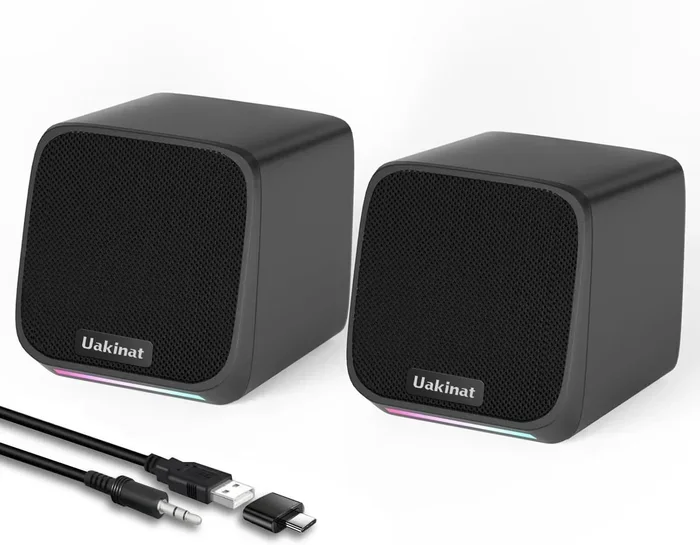
USB speakers are convenient and easy to use, but the question of whether they need power depends on their design and type. Some USB speakers draw power directly from the USB port and work right out of the box, while others may need an external power source for better performance. This guide covers everything you need to know about USB speaker power requirements, including bus-powered vs. self-powered options, how much power your USB port can deliver, and tips to improve your audio setup.
This is a comprehensive guide about Do Usb Speakers Need Power.
Key Takeaways
- Bus-powered USB speakers get all their power from the USB port and need no extra cables.
- Self-powered USB speakers require an external power adapter for louder volume and richer sound.
- USB 2.0 ports typically deliver 500mA while USB 3.0 ports can provide up to 900mA of power.
- A powered USB hub can solve low-power issues and improve audio performance.
- Speaker wattage and driver size directly affect how much power your USB speakers need.
- Plug-and-play USB speakers are simple to set up but may lack the power of traditional amplified setups.
- Matching your speaker power needs with the right USB port or hub ensures the best sound quality.
[FEATURED_IMAGE_PLACEHOLDER]
Do USB Speakers Need Power?
Here is the short answer: yes, USB speakers need power. But the real question is where that power comes from. Some USB speakers pull all the energy they need straight from the USB port on your computer. Others need a separate power adapter to run properly. Understanding this difference is the key to getting great sound without any headaches.
When you plug in a pair of USB speakers, you are connecting them to a power source and an audio signal at the same time. That is one of the biggest advantages of USB speakers. They simplify your setup. No extra cables, no separate wall plug (in most cases), and no complicated configuration. But does that mean every USB speaker works the same way? Not exactly.
Let us break down how USB speaker power works, what types exist, and how to choose the right pair for your needs. Whether you are setting up a desktop workstation or looking for portable audio, this guide has you covered.
How Do USB Speakers Get Their Power?
USB speakers receive power through the USB connection. The amount of power they get depends on the USB standard and the device they are plugged into. Here is a closer look at how this works.
Bus-Powered USB Speakers
Bus-powered USB speakers draw all their power from the USB port. These are the most common type of USB speakers on the market. They are small, lightweight, and perfect for everyday use. You plug them in, and they work. No extra power cable needed.
Most bus-powered speakers work fine for casual listening. They handle music, videos, and video calls with ease. However, they have limits. If you push the volume too high, you may notice distortion. That is because the USB port cannot supply unlimited power.
Self-Powered USB Speakers
Self-powered USB speakers come with their own power supply. These speakers usually have a wall adapter or a power brick that plugs into an outlet. The USB connection handles the audio signal, while the power adapter handles the electricity.
Self-powered models deliver louder volume and cleaner sound. They are ideal for larger rooms or for people who like to listen at higher volumes. If you have ever wondered why some USB speakers sound better than others, the power source is often the answer.
How Much Power Does a USB Port Provide?
The power output of a USB port varies by standard. Here is a quick comparison:
- USB 2.0: Delivers up to 500mA at 5 volts. This is enough for small, low-power speakers.
- USB 3.0: Provides up to 900mA at 5 volts. Better for slightly larger speakers.
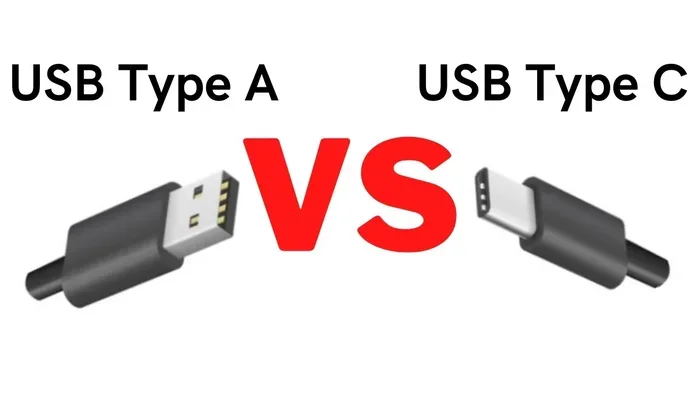
- USB-C (standard): Can deliver up to 5 volts at 3 amps (15 watts) with basic USB-C power delivery.
- USB-C (Power Delivery): Supports higher voltages and can provide significantly more power for demanding setups.
Most desktop USB speakers fall into the bus-powered category and work perfectly fine with standard USB 2.0 or 3.0 ports. But if you want louder volume or better sound quality, a self-powered option is the way to go.
Types of USB Speakers and Their Power Needs
Not all USB speakers are created equal. The type you choose directly affects how much power they need and how they perform. Here are the most common types.
Mini USB Desktop Speakers
These are the small, compact speakers you see on many office desks. They are usually bus-powered and draw just enough electricity from the USB port to produce moderate sound. They work great for background music and casual listening.
Mini speakers typically have small drivers (around 2 to 3 inches). Because of their size, they do not need much speaker wattage to produce acceptable sound. A standard USB 2.0 port provides more than enough power for these models.
USB-Powered Multimedia Speaker Systems
These are larger setups that include multiple speakers and a subwoofer. Many multimedia systems use a USB connection for audio while relying on an external power adapter for the amplification. This gives you the best of both worlds: simple connectivity and powerful sound.
If you want rich bass and clear highs, look for systems that include a dedicated power supply. These setups often outperform purely bus-powered options, especially at higher volumes.
Portable USB Speakers
Portable USB speakers are designed for on-the-go use. Some are truly bus-powered and run entirely off the USB connection. Others have built-in rechargeable batteries that you charge via USB. These battery-powered models store energy and do not need a constant power source.
For travel or outdoor use, battery-powered USB speakers are a great choice. They give you portable audio without needing an outlet. Just keep in mind that battery life affects how long you can listen at full volume.
USB-Powered Active vs. Passive Speakers
Active speakers have a built-in amplifier. They need power to work, and USB speakers are almost always active. Passive speakers, on the other hand, have no built-in amplifier. They need an external amp to produce sound.
USB speakers are almost always active. The USB connection provides both the signal and the power needed for the internal amplifier. If you ever see a passive speaker with a USB cable, the USB is only carrying audio data, not power. You would still need an external amplifier for that setup.
Common Power Issues with USB Speakers
Even though USB speakers are simple to use, power problems can still happen. Here are the most common issues and how to fix them.
Low Volume or Distorted Sound
If your USB speakers sound quiet or distorted at higher volumes, the USB port may not be providing enough power. This is especially common with older computers or when you use a USB extension cable. Extension cables can reduce the power reaching the speakers.
Quick fix: Plug your speakers directly into a USB port on the back of your computer. Back-panel ports usually provide more stable power than front-panel ports. If that does not help, try a powered USB hub to boost the power supply.
Speakers Not Recognized by the Computer
Sometimes a USB speaker simply does not get recognized. This can happen if the USB port does not provide enough power or if there is a driver issue. Try plugging the speaker into a different USB port first. If that fails, check for driver updates or try the speakers on another computer.
Interference and Static Noise
USB speakers can pick up electrical interference, especially when the USB port is shared with other devices. This is a power-related issue in many cases. The USB port struggles to deliver clean, stable power when multiple devices are connected.
To reduce interference, avoid using the same USB hub for your speakers and other high-power devices like external hard drives. A powered USB hub can also help by providing cleaner, more stable power to each connected device.
Tips to Get the Best Performance from USB Speakers
Want your USB speakers to sound their best? Follow these practical tips to improve your audio experience.
Use a Powered USB Hub
A powered USB hub connects to your computer and provides its own power supply to connected devices. This means your speakers get consistent, reliable power without tapping into your computer’s USB port. The result is often louder volume, cleaner sound, and fewer dropouts.
If you plan to connect multiple USB devices, a powered hub is a smart investment. It keeps everything running smoothly and prevents power conflicts between devices.
Plug Directly Into the Computer
Avoid USB extension cables or daisy-chaining multiple devices. The further the speaker is from the computer, the weaker the power signal can become. Plugging directly into the computer ensures the strongest power delivery and the best audio quality.
Check Speaker Wattage and Match It to Your Needs
Every pair of speakers has a wattage rating. This tells you how much power they can handle. For casual listening at a desk, 5 to 10 watts is usually plenty. For louder volumes or larger rooms, look for speakers rated at 15 watts or higher.
If you are unsure about recommended amplifier power for speakers, check the manufacturer’s specifications. Matching the wattage to your listening habits ensures you get the best performance without straining the speakers.
Keep Your Drivers and Software Updated
Some USB speakers rely on software drivers to function properly. Outdated drivers can cause audio glitches, low volume, or even prevent the speakers from being recognized. Check the manufacturer’s website periodically for driver updates.
Many modern USB speakers are truly plug and play and do not need special drivers. But it never hurts to keep your system updated for the best compatibility.
Consider Your Listening Environment
The room you use your speakers in affects how they sound. Small desks and bedrooms work well with compact bus-powered speakers. Larger rooms or open spaces benefit from self-powered or higher-wattage models.
Placing speakers on a stable surface away from walls reduces echo and improves clarity. Even a simple change in placement can make a noticeable difference in audio quality.
How Do USB Speakers Compare to Traditional Powered Speakers?
It is helpful to compare USB speakers with traditional powered speakers that use a standard wall outlet or a separate amplifier. Here is a side-by-side look at the differences.
USB speakers offer simplicity and portability. You need one cable for both power and audio. They are perfect for laptops, desktops, and small workspaces. However, they are limited by the power output of the USB port.
Traditional powered speakers use a wall outlet and can deliver much more power. They tend to sound better at higher volumes and handle complex audio with more clarity. If you want to know more about whether you need an amplifier for your setup, check out our guide on Do You Need An Amplifier For Speakers for detailed advice.
For most everyday users, USB speakers are more than enough. But if you are an audiophile or need high-volume sound for a large space, traditional powered speakers or a dedicated amplifier setup may be a better fit. You can also learn more about whether you need an amp for car speakers to understand amplifier basics across different setups.
Here is a quick comparison table:
- Power Source: USB port vs. wall outlet or external amp
- Setup Complexity: Plug and play vs. may require additional cables and configuration
- Volume Output: Moderate vs. high, depending on the model
- Sound Quality: Good for casual use vs. typically better for demanding listening
- Portability: Highly portable vs. usually less portable
- Price Range: Budget-friendly vs. varies widely
Do USB Speakers Need Power? Final Thoughts
So, do USB speakers need power? The answer is a clear yes. Every speaker needs power to produce sound, and USB speakers get that power from the USB connection or an external adapter. The type of power they need depends on the design, size, and intended use.
For most people, bus-powered USB speakers are the perfect solution. They are simple, affordable, and easy to use. Just plug them in and enjoy your audio. If you need more volume or better sound quality, self-powered or externally amplified options will serve you better.
Understanding how much power your USB port provides and how your speakers use it helps you make the right choice. Whether you are shopping for USB speakers for your desk or looking to upgrade your current setup, knowing the basics of speaker power will save you time and money.
Take a moment to assess your listening needs. Consider the room size, the volume levels you prefer, and how you plan to use the speakers. With the right pair of USB speakers and a proper power setup, you can enjoy great sound every single day. For more insights on speaker longevity and care, check out our article on how long speakers last to keep your audio gear performing at its best.
FAQs
Can I plug USB speakers into a laptop?
Yes, most USB speakers work with laptops right out of the box. They are plug and play and do not require any special setup. Just make sure your laptop’s USB port provides enough power. If the sound is weak or distorted, try a powered USB hub to boost the power supply.
Do USB speakers need drivers?
Many USB speakers are plug and play and do not need drivers. However, some advanced models may require a driver or software for full functionality. Check the manufacturer’s website if your speakers are not recognized by your computer.
Can I use a USB hub to power my speakers?
Yes, but only if the hub is powered. A passive USB hub draws power from your computer and may not provide enough electricity for your speakers. A powered USB hub has its own power supply and can deliver consistent power to multiple devices.
Why do my USB speakers sound quiet?
Quiet sound often means the USB port is not providing enough power. Try plugging the speakers directly into the computer instead of through an extension cable. You can also check the volume settings on your computer and within the speaker’s own controls.
Are USB speakers as good as regular powered speakers?
USB speakers are great for everyday use and convenience. However, they usually cannot match the volume and sound quality of traditional powered speakers that use a wall outlet. If you need high-performance audio, a regular powered speaker or an external amplifier may be a better choice.
Can I charge a portable USB speaker while using it?
Yes, many portable USB speakers allow you to charge them while they are in use. This is convenient for long listening sessions. Just make sure the USB port or charger you are using can supply enough power for both charging and playback at the same time.
Frequently Asked Questions
What is Do Usb Speakers Need Power?
Do Usb Speakers Need Power is an important topic with many practical applications.