Does Mini Dp to Hdmi Support 4k
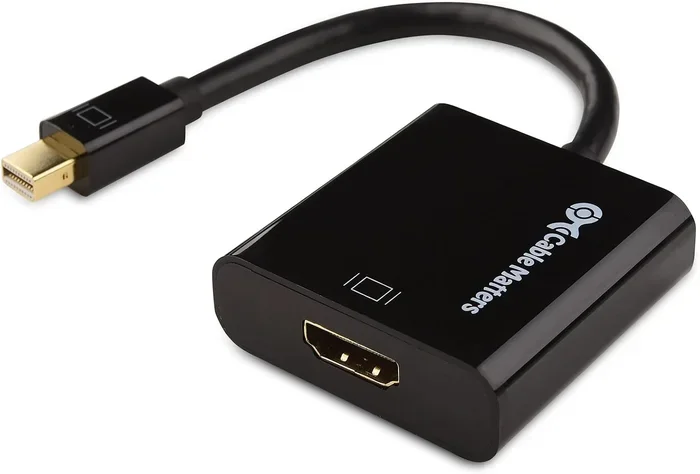
Does Mini DP to HDMI support 4K? Yes, but it depends on the adapter version and your hardware. A Mini DisplayPort to HDMI adapter can deliver 4K resolution, but you need to match the right DisplayPort version with your HDMI port and cable. Using an outdated or passive adapter may limit you to 4K at 30Hz or even lower.
This is a comprehensive guide about Does Mini Dp To Hdmi Support 4k.
Key Takeaways
- Mini DP to HDMI can support 4K: But only with the right adapter version and compatible hardware on both ends.
- DisplayPort 1.2 is the minimum: You need at least DP 1.2 to get 4K at 60Hz over HDMI.
- Active adapters matter: Active adapters handle signal conversion better than passive ones for 4K output.
- HDMI version counts too: Your HDMI port and cable must support the bandwidth needed for 4K.
- Check your GPU and motherboard: Both the source and display device need to support 4K over Mini DP.
- 4K at 60Hz vs 30Hz makes a difference: Smoother visuals require higher bandwidth and the right adapter.
[FEATURED_IMAGE_PLACEHOLDER]
You just bought a new monitor or TV. It supports 4K resolution. You have a laptop or desktop with a Mini DisplayPort. So you grab a Mini DP to HDMI adapter and plug it in. Then you wait. The screen flickers. The resolution drops. Or nothing happens at all.
This is a frustrating experience. But it is also very common. The real question is not just “does Mini DP to HDMI support 4K.” It is about which adapter, which version, and what your setup can handle. Many people buy the wrong adapter and wonder why 4K does not work.
The good news is that this guide breaks it all down. You will learn exactly what it takes to get 4K output from a Mini DisplayPort to an HDMI display. We will cover versions, bandwidth, active vs passive adapters, and common mistakes. By the end, you will know exactly what to buy and why.
Whether you are connecting a laptop to a 4K monitor, setting up a home theater, or building a display workstation, this article has you covered. Let us get into it.
What Is a Mini DP to HDMI Adapter?
A Mini DisplayPort to HDMI adapter is a small device that converts a video signal from a Mini DP output to an HDMI input. This lets you connect devices like laptops, desktops, or tablets to monitors, TVs, or projectors that use HDMI cables.
Mini DisplayPort is a compact version of the standard DisplayPort connector. Apple popularized it in their MacBook lineup. Many modern desktops and GPUs also include it. The adapter takes that signal and translates it into HDMI so your display can understand it.
But here is the key part. Not all adapters are created equal. Some can handle 4K video. Some cannot. The difference comes down to the adapter’s internal chip, the DisplayPort version it supports, and the HDMI version on your TV or monitor.
How Does the Signal Conversion Work?
When you send a video signal from a Mini DP port, the adapter converts it from the DisplayPort signaling protocol to the HDMI protocol. This process is called signal conversion. A good adapter does this without losing quality or dropping the frame rate.
A cheap or outdated adapter might not have enough video bandwidth to pass through a 4K signal. This is why you might see a lower resolution or experience stuttering. The adapter acts as a bridge between two different display technologies.
Does Mini DP to HDMI Actually Support 4K?
The short answer is yes. But the full answer depends on several factors. Let us break them down so you understand exactly what is happening.
DisplayPort Version Matters
The version of DisplayPort your device supports is the biggest factor. DisplayPort 1.2 can handle 4K at 60Hz. This is the standard most people want. DisplayPort 1.4 goes even further, supporting 4K at 120Hz or even 8K in some cases.
If your laptop or GPU only has DisplayPort 1.1, it may only support 4K at 30Hz. That looks fine for movies but feels laggy for gaming or editing. Always check what DisplayPort version your device supports before buying an adapter.
HDMI Version on the Display Side
It is not just about the adapter. Your HDMI port and cable matter too. An HDMI 2.0 port supports 4K at 60Hz. An HDMI 1.4 port maxes out at 4K at 30Hz. If you are using an older TV or monitor, it might bottleneck your setup no matter how good the adapter is.
Newer devices with HDMI 2.1 can handle even higher refresh rates. But for most 4K setups, HDMI 2.0 is the sweet spot. Make sure your entire chain supports the bandwidth you need.
Active vs Passive Adapters
This is where many people get confused. A passive adapter simply changes the connector shape. It does not boost or convert the signal. It works when both the source and display use the same signaling standard.
An active adapter has built-in electronics that actually convert the signal. This is often necessary for 4K output because the conversion requires more processing power. Active adapters are usually more expensive but much more reliable for high-resolution setups.
If you want to know more about how different adapters handle signal conversion, you might also find it helpful to read about how adapters work across different connection types. The principle is similar — not all adapters handle every scenario equally well.
What You Need for 4K Over Mini DP to HDMI
Getting 4K to work over a Mini DP to HDMI connection is not hard. But you need the right combination of hardware. Here is what matters most.
Checklist for 4K Support
- Your source device must support DisplayPort 1.2 or higher.
- The adapter must be rated for 4K resolution.
- Your HDMI display must have an HDMI 2.0 port or better.
- The HDMI cable must be high-speed and rated for 4K.
- Your GPU or laptop graphics chip must be capable of outputting 4K.
Skip any one of these and your 4K experience will suffer. It is like trying to pour water through a funnel that is too small. The bottleneck will be the weakest link in the chain.
Recommended Adapter Specifications
When shopping for a Mini DP to HDMI adapter, look for these specifications on the box or product listing:
- Resolution: 4K @ 60Hz (or higher if your display supports it)
- Bandwidth: At least 10.2 Gbps for 4K at 60Hz
- Adapter type: Active preferred for reliable 4K
- HDCP support: Needed for protected content like Netflix 4K
- Compatibility: Works with DisplayPort 1.2 and HDMI 2.0
Brands like Satechi, Cable Matters, and StarTech make reliable options. Avoid the cheapest no-name adapters on Amazon. They often fail to deliver 4K even if the listing claims they do.
Common Problems and How to Fix Them
Even with the right adapter, things can go wrong. Here are the most common issues people face when trying to get 4K through a Mini DP to HDMI connection.
4K Shows But Only at 30Hz
This is the number one complaint. Your screen works but everything feels choppy. The most likely cause is a bandwidth limitation. Your adapter or HDMI cable might only support 4K at 30Hz instead of 60Hz.
Try these fixes:
- Replace the HDMI cable with a high-speed 4K rated cable.
- Check your display settings and manually set the refresh rate to 60Hz.
- Upgrade to an active adapter that supports DisplayPort 1.2 or higher.
- Make sure your GPU drivers are up to date.
No Signal at All
If your screen stays black, the adapter might not be compatible with your device. Some adapters do not work well with certain GPUs or laptops. Try unplugging and replugging the adapter. If that does not work, test with a different adapter or a different display.
Sometimes the issue is as simple as a loose connection. But if it persists, your adapter might just be defective or incompatible. This is why buying from a reputable brand matters so much.
Flickering or Intermittent Signal
Flickering usually means the adapter cannot handle the bandwidth. This happens when someone tries to push 4K through an adapter rated only for 1080p or 1440p. The signal drops in and out because the adapter is overwhelmed.
The fix is straightforward. Get an adapter rated for 4K. Check the product description carefully. If it does not explicitly mention 4K support, assume it does not have it.
Mini DP to HDMI vs Other Connection Options
Mini DP to HDMI is not the only way to connect a device to a 4K display. Let us compare it with some popular alternatives so you can make an informed choice.
| Connection Type | Max 4K Support | Best For |
|---|---|---|
| Mini DP to HDMI | 4K @ 60Hz (with DP 1.2+) | Laptops with Mini DP, older setups |
| USB-C to HDMI | 4K @ 60Hz (with Thunderbolt 3+) | Modern laptops, docking stations |
| Full-size DP to HDMI | 4K @ 60Hz or higher | Desktops, workstations |
| HDMI Direct | 4K @ 60Hz or 120Hz (HDMI 2.1) | TVs, monitors with HDMI input |
Each connection type has its strengths. USB-C to HDMI is more versatile for modern laptops. Full-size DP to HDMI offers better bandwidth for desktop setups. But if your device only has a Mini DP port, the right adapter gets the job done.
For more on how different connection types compare, check out this guide on how adapters bridge compatibility gaps between different standards. The same principles of matching versions and bandwidth apply across all adapter types.
Expert Tips for the Best 4K Experience
Getting 4K working over Mini DP to HDMI is one thing. Getting it to look and feel its best is another. Here are some expert tips that make a real difference.
Always Update Your Graphics Drivers
Your GPU manufacturer releases driver updates that improve display compatibility. Before setting up a new adapter, update your drivers. This alone can fix many 4K issues, especially refresh rate problems.
Use a Docking Station When Possible
If you use a laptop, a docking station with a dedicated DisplayPort output often provides better 4K performance than a standalone adapter. Docking stations have better chips and more stable power delivery.
Some docking stations also support Thunderbolt, which adds even more bandwidth and reliability. If you do a lot of 4K work, this is worth the investment.
Test Your Setup Before Committing
Do not buy an adapter and assume it will work. Test it with your specific devices before committing. Return policies are your friend here. Buy from a retailer that offers easy returns in case the adapter does not meet your needs.
Watch Out for HDCP Issues
If you want to watch 4K content from streaming services like Netflix or Disney+, your adapter must support HDCP 2.2 (High-bandwidth Digital Content Protection). Without it, you will get a blank screen or degraded quality when playing protected content.
Final Thoughts
So, does Mini DP to HDMI support 4K? Yes, it absolutely does. But success depends on using the right adapter, the right cable, and compatible hardware on both ends. A Mini DisplayPort to HDMI adapter that supports DisplayPort 1.2 or higher and pairs with an HDMI 2.0 display will deliver smooth 4K at 60Hz.
Do not fall for cheap adapters that claim 4K support but do not deliver. Check the specifications carefully. Look for active adapters when possible. And always make sure your entire setup — from your GPU to your cable — can handle the bandwidth 4K demands.
With the right gear and a little patience, you will enjoy stunning 4K visuals on any HDMI display. It is not magic. It is just matching the right technology together. Now you know exactly how to do it.
FAQs
Can any Mini DP to HDMI adapter handle 4K?
No, not every adapter supports 4K. You need an adapter rated for at least DisplayPort 1.2 and HDMI 2.0. Cheap or older adapters may only support 1080p or 4K at 30Hz. Always check the product specifications before buying.
Why is my 4K Mini DP to HDMI connection only showing 30Hz?
This usually means your adapter, cable, or HDMI port does not support enough bandwidth for 4K at 60Hz. Upgrade to an active adapter with DisplayPort 1.2 support and use an HDMI 2.0 high-speed cable to fix this.
Is an active or passive adapter better for 4K?
An active adapter is generally better for 4K because it has built-in electronics that handle signal conversion. Passive adapters simply change the connector shape and may not have enough bandwidth for reliable 4K output.
Does the HDMI cable affect 4K performance over Mini DP?
Yes, absolutely. A standard HDMI cable may not have enough bandwidth for 4K at 60Hz. Use a high-speed HDMI cable rated for 4K to ensure you get the full resolution and refresh rate your adapter supports.
Can I use a Mini DP to HDMI adapter with a Mac?
Yes, many MacBooks have Mini DisplayPort or Thunderbolt 3 ports that support 4K over adapters. Just make sure the adapter is compatible with macOS and supports the resolution and refresh rate you need.
Will a Mini DP to HDMI adapter work with HDR content?
Only if both the adapter and your display support HDR and the adapter has the right bandwidth. Look for adapters that explicitly mention HDR support and ensure your HDMI display is HDR-capable for the best results.
Frequently Asked Questions
What is Does Mini Dp To Hdmi Support 4k?
Does Mini Dp To Hdmi Support 4k is an important topic with many practical applications.