Fastest Gaming Keyboards
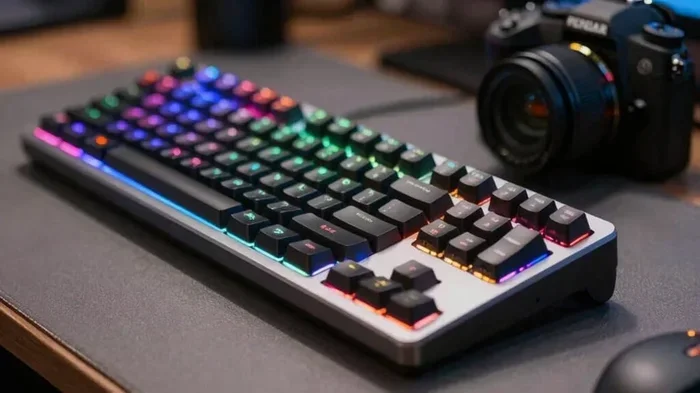
Finding the fastest gaming keyboard can transform your gameplay and give you the edge in competitive matches. We’ve tested and reviewed the top speed keyboards to help you choose the right one for your setup. From mechanical switches to polling rates, we cover everything you need to know about gaming keyboards that deliver lightning-fast response times.
You know that moment in a intense gaming session where you swear your character moved a split second too late? That tiny delay can mean the difference between winning and losing. The fastest gaming keyboards eliminate that frustration with lightning-fast response times and precise inputs.
Whether you’re a casual player or a competitive esports athlete, your keyboard matters more than you think. The right gaming keyboard speed can improve your reaction time and give you a real edge over opponents. In this guide, we break down everything you need to know about choosing the speediest keyboard for your setup.
We’ve tested dozens of models and compared features like switch types, polling rates, and build quality. By the end, you’ll know exactly what to look for and which keyboards deliver the best performance. Let’s dive in and find your perfect match.
Key Takeaways
- Speed matters: The fastest gaming keyboards offer sub-1ms response times and rapid actuation switches that give you a real competitive advantage.
- Switch types are crucial: Linear switches like Cherry MX Red and optical switches provide the quickest keypresses for gaming.
- Polling rate makes a difference: Keyboards with 1000Hz or higher polling rates send data to your PC faster, reducing input lag.
- Build quality affects performance: Sturdy construction and quality materials ensure your keyboard lasts and performs consistently.
- Extra features help: Programmable keys, anti-ghosting, and key rollover features enhance your gaming experience significantly.
📑 Table of Contents
Why Keyboard Speed Matters for Gaming
Every millisecond counts in competitive gaming. A standard keyboard might have a response time of 8-10ms, while the fastest gaming keyboards drop that to under 1ms. That difference might sound tiny, but it adds up fast during intense gaming sessions.
Your gaming peripherals work together as a system. A great mouse means nothing if your keyboard lags behind. The gaming response time of your keyboard directly impacts how quickly your PC registers your inputs and translates them into on-screen action.
Understanding Actuation Speed
Actuation speed refers to how quickly a key registers a press. Most standard keyboards require you to push a key all the way down before it registers. Fast gaming keyboards activate halfway or even sooner.
For example, Cherry MX Red switches actuate at just 2mm of travel compared to 4mm for Cherry MX Blue. This means your fingers do less work to trigger commands. In fast-paced games like FPS titles, this advantage adds up quickly.
The Role of Polling Rate
Polling rate measures how often your keyboard sends data to your computer per second. A 1000Hz polling rate means your keyboard reports its status 1000 times per second. Higher polling rates mean smoother, more responsive input.
Many esports keyboard models now offer 4000Hz or even 8000Hz polling rates. This might sound extreme, but if you’re serious about competitive play, every bit of speed helps. Think of it like the difference between a slow internet connection and fiber optic speed.
Types of Keyboard Switches for Speed
Not all keyboard switches are created equal. The type of switch your keyboard uses has a huge impact on speed and feel. Let’s explore the main options available.
Linear Switches
Linear switches are the go-to choice for speed. They offer a smooth, consistent keystroke with no tactile bump or audible click. This makes them ideal for rapid key presses and combos.
Popular linear switches include:
- Cherry MX Red: Light actuation force (45g) and 2mm travel distance
- Cherry MX Speed Silver: Even shorter 1.2mm travel for maximum speed
- Optical switches: Use light sensors for near-instantaneous actuation
Linear switches require less finger fatigue during long gaming sessions. You can mash keys rapidly without the resistance you’d feel with tactile switches. Many pro gamers prefer these for their consistency and speed.
Tactile and Clicky Switches
While not as fast as linear switches, tactile switches offer a middle ground. They provide a noticeable bump when the key activates, giving you feedback without the loud click of clicky switches.
Some gamers prefer tactile switches because the feedback helps them know a key has registered without bottoming out. However, for pure speed, linear switches still win the race. If you’re building a gaming setup focused on performance, linear is the way to go.
Optical vs Mechanical Switches
Optical switches represent the cutting edge of keyboard technology. Instead of physical contact points, they use light sensors to detect key presses. This eliminates the mechanical wear and tear of traditional switches.
The benefits are clear:
- Near-zero latency: Light triggers activate faster than physical contacts
- Longer lifespan: No mechanical parts to wear out
- Consistent performance: No degradation over time
Brands like Razer and SteelSeries now offer keyboards with optical switches that rival the speed of dedicated racing peripherals. These are perfect for players who want the absolute fastest input possible.
Key Features to Look For in Fast Keyboards
Speed isn’t the only factor that matters. The best fast gaming keyboards combine quick response times with features that enhance your overall experience. Here’s what to prioritize.
Anti-Ghosting and Key Rollover
Anti-ghosting ensures that every key press registers, even when you’re pressing multiple keys simultaneously. Without it, certain key combinations might get ignored during intense gaming moments.
Look for keyboards with at least N-key rollover (NKRO). This means every single key can be pressed and registered independently at the same time. For competitive gaming, this is non-negotiable. You don’t want to lose a crucial input because your keyboard couldn’t keep up.
Programmable Keys and Macros
Many fast gaming keyboards come with programmable keys or macro capabilities. These let you assign complex commands to a single key press. In games with lots of abilities or shortcuts, this can save precious milliseconds.
Some keyboards offer onboard memory so your profiles stay with the keyboard even on different PCs. This is handy if you game at LAN events or use multiple setups. Check our guide on best accessories for gaming PC for more peripheral tips.
Build Quality and Durability
A fast keyboard means nothing if it falls apart after a few months. Look for keyboards with aluminum frames or high-quality plastic construction. The switches themselves should be rated for millions of keystrokes.
Consider features like:
- USB-C connectivity: More reliable and faster than USB-A
- Detachable cables: Easier transport and replacement
- RGB lighting: Not just for looks, but also key identification in dark rooms
Premium build quality also reduces flex and creaking during intense gaming. You want a keyboard that stays stable even when you’re mashing keys furiously.
Top Fastest Gaming Keyboards Reviewed
Let’s look at some of the fastest gaming keyboards currently available. These models represent the best in speed, features, and overall performance.
Razer Huntsman V3 Pro
The Razer Huntsman V3 Pro features optical-mechanical switches with an incredible 0.2ms actuation time. It offers wireless connectivity with a 2.4GHz dongle for minimal latency. The 8000Hz polling rate makes it one of the fastest wireless keyboards on the market.
Key highlights include:
- Optical switch technology for instant actuation
- 8000Hz polling rate for ultra-responsive input
- Wireless and wired connectivity options
- Per-key RGB lighting with Razer Chroma
This keyboard is perfect for competitive gamers who demand the absolute fastest response times without sacrificing wireless freedom.
SteelSeries Apex Pro TKL
The SteelSeries Apex Pro TKL uses OmniPoint adjustable switches that let you customize actuation point from 0.2mm to 4mm. This means you can set each key to trigger at exactly the point that suits your playstyle.
Notable features include:
- Adjustable per-key actuation points
- OLED Smart Display for in-game info
- Premium aluminum frame construction
- 200M keystroke switch lifespan
This keyboard offers unparalleled customization for serious gamers who want to fine-tune every aspect of their input.
Corsair K100 RGB
The Corsair K100 RGB features Cherry MX Speed switches with 1.2mm actuation distance. It includes a dedicated macro pad and iCUE software for extensive customization. The aircraft-grade aluminum frame ensures durability and stability.
Standout features include:
- Cherry MX Speed Silver switches for rapid input
- Dedicated macro pad with OLED display
- 8000Hz polling rate with Corsair Slipstream wireless
- AirScape wireless technology for lag-free connection
This keyboard strikes an excellent balance between speed, features, and price. It’s a great choice for gamers who want top-tier performance without breaking the bank.
Wired vs Wireless: Does It Affect Speed?
One common question is whether wired or wireless keyboards are faster. The short answer is: wired has a slight edge, but modern wireless technology has largely closed the gap.
The Wired Advantage
Wired keyboards connect directly via USB, which means zero wireless latency. The signal travels immediately from the keyboard to your PC. For the most demanding competitive scenarios, this direct connection provides the most reliable input.
However, the difference is often measured in fractions of milliseconds. Most players won’t notice the difference in real-world gaming. Many professional esports players still use wired keyboards, but this is often due to tradition and tournament rules rather than actual performance needs.
Modern Wireless Performance
Modern wireless gaming keyboards use dedicated 2.4GHz dongles that offer latency comparable to wired connections. Brands like Razer, SteelSeries, and Corsair have developed proprietary wireless technologies specifically designed for gaming.
The benefits of wireless include:
- Cleaner desk setup: No cable clutter
- Flexibility: Position your keyboard anywhere
- Battery life: Many last 20+ hours on a single charge
If you’re building a clean, minimalist gaming setup, a high-quality wireless keyboard is an excellent choice. Just make sure it offers a high polling rate and low-latency wireless technology.
Tips to Maximize Your Keyboard’s Speed
Having a fast keyboard is only half the battle. You can optimize your setup to squeeze out every bit of performance.
Update Your Keyboard Firmware
Manufacturers regularly release firmware updates that improve performance and fix bugs. Check the manufacturer’s website or software for updates regularly. These updates can sometimes improve polling rates or reduce latency.
Use the Right Surface
The surface under your keyboard affects how quickly you can type and press keys. A hard, flat surface works best for gaming. Avoid soft or uneven surfaces that cause your keyboard to flex.
Consider using a keyboard desk mat or hard desk pad. This provides a stable, consistent surface that lets your fingers move freely without resistance.
Optimize Your Windows Settings
Windows has settings that can affect keyboard responsiveness. Go to Settings > Devices > Typing and adjust the filter keys settings. Disabling unnecessary filters ensures your keypresses register immediately.
You can also check your keyboard settings in the Control Panel to ensure repeat delay and repeat rate are set to your preference. Faster repeat rates help with held-down keys in games.
Check for Interference
If you’re using a wireless keyboard, keep it away from other wireless devices that might cause interference. USB 3.0 devices can also interfere with wireless signals. Try using a USB extension cable to distance your keyboard’s receiver from other USB devices.
For wired keyboards, make sure you’re using a direct USB port rather than a hub. USB hubs can introduce slight delays in signal transmission.
Common Mistakes to Avoid
Even with the fastest keyboard, some common mistakes can hurt your performance. Here’s what to watch out for.
Ignoring Switch Maintenance
Dust and debris can slow down your switches over time. Regular cleaning keeps your keyboard performing at its best. Use compressed air to blow out debris and occasionally clean your switches with switch lubricant.
Bottoming Out Too Hard
Pressing keys all the way down every time wastes time and energy. With fast switches, you don’t need to bottom out for the key to register. Learn to press lightly and let the switch do the work. This technique is called “floating” and it can significantly improve your speed.
Overlooking Software Settings
Many keyboards come with software that lets you adjust polling rates, key mappings, and other settings. Taking the time to configure these properly can make a noticeable difference. Don’t just plug and play without exploring the software options.
Choosing Style Over Substance
It’s easy to get drawn in by flashy RGB lighting and fancy designs. But for competitive gaming, focus on performance features first. A beautiful keyboard that’s slow won’t help you win matches. Prioritize switch type, polling rate, and build quality over aesthetics.
Final Thoughts
The fastest gaming keyboards can genuinely transform your gameplay. Whether you’re climbing ranked ladders or just enjoying casual sessions, the right keyboard makes a real difference. Focus on switches, polling rates, and features that match your gaming style.
Remember that the best keyboard is the one that feels right for your hands and playstyle. Speed matters, but comfort and consistency matter just as much. Take your time to test different options and find the perfect fit.
Don’t forget to pair your keyboard with other quality peripherals. A great keyboard works best with responsive gaming peripherals that complement its speed. Check out our guide on best PC headphones for gaming to complete your setup.
Invest in a fast keyboard, optimize your settings, and practice your technique. You’ll be amazed at how much smoother and faster your gaming becomes. Happy gaming!
Frequently Asked Questions
What makes a gaming keyboard fast?
A fast gaming keyboard combines quick actuation switches, high polling rates, and responsive wireless or wired connections. Optical switches and linear mechanical switches offer the fastest input speeds. The polling rate, measured in Hz, determines how often the keyboard reports its status to your PC each second.
Are wireless gaming keyboards as fast as wired ones?
Modern high-end wireless keyboards offer latency comparable to wired models. Technologies like 2.4GHz dongles and Bluetooth LE provide fast, reliable connections. For most gamers, the difference is negligible and won’t impact gameplay in any noticeable way.
How important is polling rate for gaming?
Polling rate is very important for competitive gaming. A higher polling rate means your keyboard sends data to your PC more frequently, reducing input lag. 1000Hz is standard, but many gaming keyboards now offer 4000Hz or 8000Hz for ultra-responsive performance.
What switch type is best for fast gaming?
Linear switches are generally the best for fast gaming because they offer smooth, uninterrupted keystrokes with no tactile bump. Optical switches take this a step further with near-instantaneous actuation using light sensors instead of physical contacts.
Can I use a gaming keyboard for typing and work?
Absolutely! Many fast gaming keyboards are excellent for everyday use too. The quick actuation means less finger fatigue during long typing sessions. Just be mindful of loud clicky switches if you work in quiet environments.
How long do fast gaming keyboards last?
Quality gaming keyboards typically last 5-10 years with regular use. Switch lifespan varies by brand and type, but most are rated for 50-100 million keystrokes. Proper maintenance like regular cleaning can extend your keyboard’s life significantly.