Is Universal Usb Installer Open Source
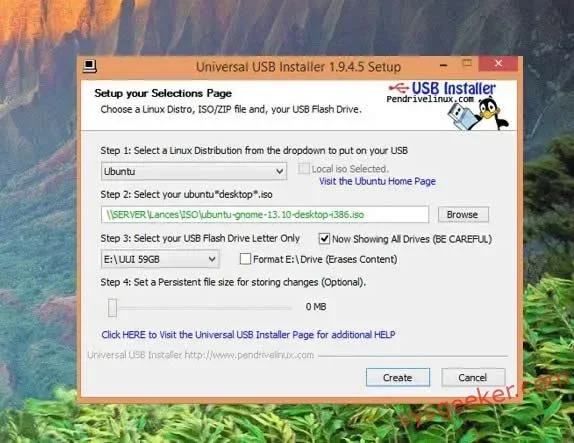
Universal USB Installer is a popular free tool for creating bootable USB drives, but it is not open source software. The application was developed by Pendrivelinux and remains proprietary freeware, meaning its source code is not publicly available for review or modification. In this article, we explore what this means for users and compare it with truly open-source alternatives.
If you have ever needed to install a Linux distribution or create a bootable USB drive, you have probably heard of the Universal USB Installer. This free tool has been a favorite among tech enthusiasts, students, and professionals for many years. But a common question keeps popping up in forums and search queries: Is Universal USB Installer open source?
The short answer is no. The Universal USB Installer is freeware, but it is not open source. This means you can use it at no cost, but you cannot access, view, or modify its source code. In this article, we dig deep into what this means for everyday users, why it matters, and what alternatives exist if open-source software is important to you.
Whether you are a student setting up a dual-boot system, a developer testing different operating systems, or someone who just wants to try a new operating system, understanding the tools you use is essential. Let us break down everything you need to know about the Universal USB Installer and its open-source status.
Key Takeaways
- Not Open Source: Universal USB Installer is freeware but does not have publicly available source code.
- Free to Use: Despite not being open source, the tool is completely free for creating bootable USB drives.
- Wide Compatibility: It supports numerous Linux distributions and Windows ISO files for creating a live USB.
- Open-Source Alternatives Exist: Tools like Rufus and BalenaEtcher offer transparent, community-reviewed options.
- Portable and Easy: No installation is required, making it convenient for use on any Windows computer.
- Trusted by the Community: It has been widely used and relied upon by Linux enthusiasts for years.
📑 Table of Contents
What Is Universal USB Installer?
The Universal USB Installer is a lightweight Windows application created by Pendrivelinux. It allows you to flash Linux distributions and Windows ISO files onto a USB flash drive. Once the process is complete, you have a bootable drive that can start a computer directly from the USB stick, bypassing the need to install anything on the hard drive first.
This tool supports a remarkably wide range of operating systems. You can create a live USB for Ubuntu, Fedora, Linux Mint, Debian, Arch Linux, and many other popular distributions. It also works with Windows installation images, making it a versatile USB creator for various needs. Whether you want to try a new operating system without committing to an installation or you need rescue media for a broken system, this tool delivers.
One of the main reasons the Universal USB Installer remains so popular is its simplicity. You do not need advanced technical skills to use it. The interface is clean and straightforward. The process typically involves just a few clicks. You select your preferred Linux distribution from a dropdown menu, choose the ISO file you want to flash, pick your target USB drive, and click the create button. The tool handles everything else automatically.
Who Created the Universal USB Installer?
The tool was developed by Pendrivelinux, a community-driven project focused on providing free Linux resources and guides. Pendrivelinux has been active for many years and has built a solid reputation within the Linux community. Their primary goal was to make it easy for anyone to try Linux without dealing with complicated setup processes or confusing documentation.
Because Pendrivelinux operates as a community project, the Universal USB Installer receives updates and support from volunteers. However, the source code behind the application has never been made publicly available on platforms like GitHub or similar repositories. This is the key distinction between freeware and true open-source software. Freeware means free to use, but it does not guarantee transparency or community access to the code.
For many users, this distinction does not matter much. They simply want a reliable tool that works. But for security researchers, developers, and privacy advocates, the lack of open-source code can be a significant concern. These users often prefer tools where they can verify exactly what the software is doing at a deeper level.
Is Universal USB Installer Open Source?
The answer is definitively no. The Universal USB Installer is classified as freeware, not open-source software. Freeware means you can download and use the program at zero cost. Open-source software, on the other hand, gives users the freedom to inspect, modify, and redistribute the source code. These are two very different things, and understanding the difference is important when choosing the tools you rely on.
This distinction matters for several practical reasons. When software is open source, a global community of developers can review the code for security vulnerabilities. They can also contribute improvements, bug fixes, and new features. With the Universal USB Installer, users must trust the developer without being able to independently verify what the software does behind the scenes. This is not necessarily a bad thing, but it is an important consideration.
For most everyday users, the lack of open-source code is not a dealbreaker. The Universal USB Installer has been downloaded millions of times and is widely trusted across the tech community. It has been around long enough to build a strong track record. However, if you work in a corporate environment or handle sensitive data, you may want to stick with tools that offer fully transparent and auditable code.
It is also worth noting that USB connectivity issues can sometimes affect how any bootable USB tool performs. If you have ever experienced problems where a USB device is not recognized by your laptop, you know how frustrating that can be. These issues are often related to drivers or port compatibility rather than the software itself. You can find helpful troubleshooting advice in this guide on why your USB mouse might not be working on your laptop, which covers common USB recognition problems.
Why Does Open Source Matter for USB Tools?
Open-source software offers transparency that proprietary tools simply cannot match. Anyone can look at the code to understand exactly what the program does. This is especially important for tools that interact with your hardware and operating system at a deep level, like a USB creator application.
When you create a bootable drive, the software writes directly to your USB stick and modifies its file system. Having open-source code means independent security researchers can verify that no malicious code is present. For the Universal USB Installer, the lack of open-source code does not mean it is unsafe. It simply means users cannot independently verify its safety. This is a subtle but meaningful difference that matters to certain user groups.
How Universal USB Installer Works
Understanding how the Universal USB Installer works can help you appreciate its functionality and limitations. The process is designed to be simple and user-friendly, even for beginners who have never created a bootable USB drive before.
First, you download the application from the official Pendrivelinux website. The file is a small portable executable, so you do not need to install it on your computer. You can run it directly from your USB stick or any folder on your hard drive. This portability is one of the tool’s strongest features and makes it convenient for technicians who need to carry it from machine to machine.
Once you launch the application, you are greeted with a clean and intuitive interface. Here is a quick look at the steps involved in creating a bootable drive:
- Step 1: Select your desired Linux distribution from the dropdown menu.
- Step 2: Browse and select the ISO file you want to flash onto the drive.
- Step 3: Choose your target USB drive from the list of available devices.
- Step 4: Click the “Create” button and wait for the process to finish.
The tool uses disk imaging techniques to copy the ISO contents onto the USB drive. This creates a live USB that boots into the selected operating system. The entire process typically takes between 5 and 15 minutes, depending on the size of the ISO file and the speed of your USB drive. One important thing to remember is that the process will format your USB drive completely. Make sure you back up any important files before proceeding.
The Universal USB Installer handles the USB formatting automatically, so you do not need to manually prepare the drive beforehand. However, if you are using USB adapters or hubs to connect your drive, compatibility can sometimes be an issue. For example, if you are using an M.2 NVMe SSD to USB 3.1 adapter, you want to make sure the adapter is compatible and provides a stable connection during the flashing process.
Supported Operating Systems
The Universal USB Installer supports a large number of operating systems, which is one of its biggest strengths. Here are some of the most popular ones you can use with the tool:
- Ubuntu and its variants like Linux Mint and Lubuntu
- Fedora and CentOS
- Debian
- Arch Linux
- openSUSE
- Windows 10 and Windows 11 installation ISOs
- Various system rescue and recovery tools
This extensive compatibility list is one of the main reasons the Universal USB Installer has remained a go-to tool for so many users over the years. Whether you need a system rescue drive to recover data from a failing hard drive or a full Linux installation media to try a new operating system, this tool can handle it with ease.
Open-Source Alternatives to Universal USB Installer
If the fact that the Universal USB Installer is not open source is a dealbreaker for you, there are several excellent alternatives available. These tools offer the same core functionality for creating bootable USB drives, but with the added benefit of transparent, community-reviewed code. Let us look at the best options.
Rufus
Rufus is arguably the most popular USB creator tool available today. It is open source, lightweight, and incredibly fast. Rufus supports a wide range of ISO files, including Linux distributions and Windows installation images. Many users prefer Rufus over the Universal USB Installer because of its speed, active development community, and frequent updates.
Rufus is a portable application, meaning you do not need to install it on your computer. You can carry it on a USB stick and use it on any Windows machine. It also offers extensive USB formatting options that give you more control over how your bootable drive is created. If you are looking for a reliable open-source alternative, Rufus should be at the top of your list.
BalenaEtcher
BalenaEtcher, developed by Balena, is another fantastic open-source option. It is known for its simplicity and cross-platform support. Unlike the Universal USB Installer, which is Windows-only, Etcher works on Windows, macOS, and Linux. This makes it a great choice if you work across multiple operating systems.
The interface is extremely minimal. You select your ISO file, choose your USB drive, and flash. That is it. BalenaEtcher also includes validation features that verify the written data after the flashing process. This ensures your bootable USB is error-free and ready to use. This validation feature is something the Universal USB Installer does not offer natively, and it can save you from a lot of headaches.
When working with external storage devices and adapters, you want to make sure your setup is reliable. For instance, if you are using a NVMe SSD to USB adapter to create a bootable drive from an NVMe disk, you want to ensure the adapter provides a stable and fast connection during the imaging process.
dd Command (Linux and macOS)
For advanced users on Linux and macOS, the built-in dd command is a powerful open-source option for creating bootable USB drives. It is a command-line tool that performs low-level disk imaging. While it has a steeper learning curve than graphical tools, it gives you complete control over the process and is fully transparent. Every step of the operation is visible and documented in the code.
Pros and Cons of Universal USB Installer
Like any tool, the Universal USB Installer has its strengths and weaknesses. Let us take a balanced look at what makes it great and where it falls short. Understanding both sides helps you make an informed decision about whether this tool is right for your needs.
| Pros | Cons |
|---|---|
| Free to use with no hidden costs | Not open source; source code is not publicly available |
| Supports a wide range of Linux distributions | Windows only; no macOS or Linux version available |
| Simple and intuitive interface for beginners | No built-in data validation after the flashing process |
| Portable application; no installation needed | Less active development compared to alternatives like Rufus |
| Works with Windows ISO files as well | Limited customization options for advanced users |
The Universal USB Installer remains a solid choice for users who want a quick and easy way to create bootable USB drives. It has stood the test of time and continues to be a trusted tool in the Linux community. However, if you value open-source transparency and cross-platform compatibility, you should seriously consider exploring the alternatives mentioned above.
When using any USB tool, it is important to ensure your hardware is working properly. Sometimes issues with USB connectivity can cause problems during the flashing process. If you have ever encountered a situation where your USB devices are not being recognized properly, you are not alone. These issues can stem from driver problems, port compatibility, or hardware limitations. Understanding your USB setup is just as important as choosing the right software.
Final Thoughts
So, is Universal USB Installer open source? No, it is not. It is freeware created by Pendrivelinux that has served the community well for many years. The tool is safe, reliable, and easy to use, but it does not provide access to its source code. This does not make it a bad tool by any means. It simply means it is not the right choice for users who require full transparency in their software.
If you are comfortable using proprietary freeware and simply need a dependable way to create bootable USB drives, the Universal USB Installer is a great choice. It has a proven track record and continues to be a trusted name in the Linux community. The tool has helped countless users try new operating systems, set up dual-boot systems, and create rescue media without any hassle.
On the other hand, if open-source software is important to you, tools like Rufus and BalenaEtcher offer excellent alternatives. These tools provide the same core functionality for creating bootable drives with the added benefits of transparency and community-driven development. You can inspect the code, report issues, and even contribute to the project if you are inclined.
Ultimately, the best tool is the one that meets your specific needs and values. Whether you choose the Universal USB Installer or an open-source alternative, what matters most is that you can confidently create your bootable drive and get your operating system up and running. Take some time to explore your options, read user reviews, and pick the tool that aligns with your requirements and principles.
The world of USB creators has never been more accessible, and you are sure to find the right fit for your needs. What matters most is that you feel confident and informed about the tools you use to manage your USB flash drive and create reliable bootable media.
Frequently Asked Questions
What is the Universal USB Installer used for?
The Universal USB Installer is a free Windows tool used to create bootable USB drives from ISO files. It supports a wide range of Linux distributions and Windows installation images. You can use it to create a live USB for testing or installing an operating system.
Is Universal USB Installer safe to use?
Yes, the Universal USB Installer has been downloaded millions of times and is widely trusted in the Linux community. While it is not open source, it is freeware developed by Pendrivelinux, a well-known community project. Always download it from the official website to ensure you get the genuine version.
Can I use Universal USB Installer on Mac or Linux?
No, the Universal USB Installer is Windows-only. If you need a cross-platform alternative, tools like BalenaEtcher support Windows, macOS, and Linux. Rufus is another great option, though it is also Windows-only.
What are the best open-source alternatives to Universal USB Installer?
The best open-source alternatives include Rufus, BalenaEtcher, and the dd command-line tool. Rufus is fast and feature-rich. BalenaEtcher offers cross-platform support and data validation. The dd command provides full transparency for advanced Linux and macOS users.
Does Universal USB Installer support Windows ISO files?
Yes, the Universal USB Installer can create bootable USB drives from Windows ISO files, including Windows 10 and Windows 11. This makes it a versatile tool not just for Linux users but also for anyone who needs Windows installation media on a USB drive.
Do I need an internet connection to use Universal USB Installer?
No, you do not need an internet connection to use the Universal USB Installer itself. However, you will need to download the ISO file for your chosen operating system beforehand if you do not already have it saved on your computer. The tool works entirely offline once you have your ISO file ready.