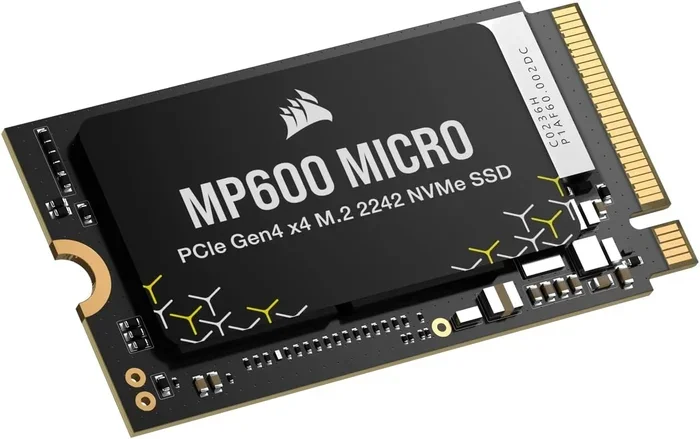
Nvme M.2 Ssd 1tb
The nvme m.2 ssd 1tb is one of the best storage upgrades you can make for your PC or laptop. It delivers blazing fast speeds, ample storage space, and a compact design that fits easily into modern systems. Whether you are a gamer, a creator, or a everyday user, this drive transforms your experience with quick boot times and smooth performance. In this guide, we cover everything you need to know before buying one.
The nvme m.2 ssd 1tb has become the go-to storage choice for anyone looking to boost their computer’s performance. If you are still using an old hard drive or a slower SATA SSD, you are missing out on incredible speed gains. This guide breaks down everything you need to know about these drives, from how they work to which ones you should buy.
We will walk you through the key features, performance benchmarks, pricing, and common mistakes to avoid. By the end, you will feel confident choosing the right 1TB NVMe M.2 SSD for your needs. Let us dive in.
Key Takeaways
- Blazing Speed: NVMe M.2 SSDs offer speeds up to 7000 MB/s, far faster than traditional hard drives.
- Compact Form Factor: The M.2 2280 size fits directly onto your motherboard with no cables needed.
- Great Value: A 1TB capacity strikes the perfect balance between price and storage for most users.
- Easy Installation: Most setups require just one screw and a slot on your board.
- Gen3 vs Gen4 Matters: PCIe Gen4 drives are faster, but Gen3 options are more affordable.
- Check Compatibility: Not all motherboards support NVMe, so verify your slot type first.
📑 Table of Contents
What Is an NVMe M.2 SSD 1TB?
An nvme m.2 ssd 1tb is a type of solid state drive that uses the NVMe protocol over a PCIe connection. The M.2 form factor means it is a small, rectangular stick that plugs directly into your motherboard. The 1TB capacity gives you plenty of room for your operating system, games, apps, and files.
Unlike traditional hard drives with spinning disks, these drives use flash memory. This means no moving parts, no noise, and much faster read and write speeds. Most NVMe M.2 SSDs use the 2280 size, which is 22mm wide and 80mm long. This is the standard size found in almost all modern desktops and laptops.
The NVMe protocol was designed specifically for flash storage. It communicates directly with the CPU through the PCIe lanes, bypassing the older AHCI protocol used by SATA drives. This is why nvme m.2 ssd 1tb drives are so much faster than traditional options.
How NVMe Differs from SATA
SATA SSDs max out around 550 MB/s. NVMe drives can reach speeds of 3500 MB/s to 7000 MB/s depending on the generation. The difference is night and day. If you have ever waited minutes for a game to load or a video to render, an NVMe drive eliminates that wait.
Here is a quick comparison of the two technologies:
- SATA SSD: Up to 550 MB/s speeds, 2.5-inch form factor, uses SATA cables.
- NVMe M.2 SSD: Up to 7000 MB/s speeds, compact M.2 2280 size, plugs directly into the motherboard.
For most users, the nvme m.2 ssd 1tb option is the clear winner. You get dramatically better performance in a smaller package.
Why Choose a 1TB NVMe M.2 SSD?
The 1TB capacity has become the sweet spot for storage upgrades. It gives you enough space without breaking the bank. Let us look at the main reasons why this drive size works so well for most people.
Speed That Changes Everything
Once you experience NVMe speeds, going back to a hard drive feels unbearable. Your operating system boots in seconds. Games load almost instantly. Large files transfer in a flash. The nvme m.2 ssd 1tb delivers a level of responsiveness that makes everyday computing feel brand new.
Here are some real-world benefits you will notice:
- Boot times drop to under 10 seconds.
- Game load times are cut by half or more.
- Video editing and rendering become much smoother.
- Opening large applications feels instant.
- File transfers happen at incredible speeds.
Perfect Storage Capacity
One terabyte gives you room for your operating system, dozens of games, creative projects, and everyday files. If 1TB feels like it might not be enough, you can always pair it with a larger storage drive later. But for most users, 1TB is the ideal starting point.
Compared to a 512GB drive, the 1TB option gives you double the space for only a small price increase. And compared to a 2TB drive, the 1TB version costs significantly less while still covering most needs.
Compact and Clean Build
The M.2 form factor is tiny. It is about the size of a stick of gum. This means no cables, no bulky drive bays, and a cleaner build inside your PC case. For laptop users, the compact size is a huge advantage since it saves precious internal space.
Top Brands and Models to Consider
The market for nvme m.2 ssd 1tb drives is competitive, with several excellent brands offering great options. Here are some of the most popular choices you will encounter.
Kingston NV2
The Kingston 1TB M.2 NVMe SSD is a budget-friendly option that still delivers strong performance. It uses PCIe Gen3 and offers speeds up to 2000 MB/s. For everyday use and gaming, it is more than capable. The price point makes it attractive for users who want reliable performance without spending too much.
Crucial P310
The Crucial P310 1TB PCIe Gen4 NVMe M.2 SSD is a solid mid-range choice. It supports PCIe Gen4, which means faster speeds than Gen3 drives. The P310 offers sequential read speeds of up to 5000 MB/s. It is a great option for users who want Gen4 performance at a reasonable price.
Other Notable Options
Brands like Samsung, WD, and Corsair also offer excellent 1TB NVMe M.2 drives. Each brand has its strengths in terms of endurance, warranty, and software support. When comparing options, look at sequential read/write speeds, random read/write performance (IOPS), and the warranty period.
How to Choose the Right NVMe M.2 SSD 1TB
Not all NVMe M.2 SSDs are created equal. Before you buy, there are a few key factors to consider. Making the right choice ensures you get the best performance for your money.
PCIe Generation
PCIe Gen3 and Gen4 are the two most common generations you will find. Gen4 drives are faster but also more expensive. Gen3 drives are still very fast and offer better value for budget-conscious buyers. For most users, a Gen3 nvme m.2 ssd 1tb drive is more than sufficient.
Here is a simple breakdown:
- PCIe Gen3: Speeds up to 3500 MB/s read. Great value. Widely compatible.
- PCIe Gen4: Speeds up to 7000 MB/s read. Faster but pricier. Requires a Gen4 motherboard.
- PCIe Gen5: Speeds up to 14000 MB/s read. Cutting edge but expensive and limited compatibility.
Motherboard Compatibility
This is a crucial step many people skip. Not all motherboards have NVMe M.2 slots, and not all slots support NVMe. Some M.2 slots only support SATA SSDs. Check your motherboard manual to confirm it has an NVMe-compatible M.2 slot.
Also check how many M.2 slots your board has. If you already have a drive in one slot, you may need to use a different slot or a PCIe adapter.
DRAM Cache
Drives with a DRAM cache tend to perform better, especially during sustained write operations. For most casual users, the difference is minimal. But if you do heavy workloads like video editing or large file transfers, a DRAM-equipped drive will serve you better.
Endurance and Warranty
Look at the TBW (Terabytes Written) rating. This tells you how much data you can write to the drive over its lifetime. Higher TBW means longer durability. Most quality 1TB NVMe M.2 SSDs come with a 3 to 5 year warranty, which gives you peace of mind.
Installation Guide
Installing an nvme m.2 ssd 1tb is surprisingly simple. You do not need to be a tech expert. Here is a step-by-step overview of the process.
- Turn off your PC and unplug it from the power outlet.
- Open your PC case or laptop access panel.
- Locate the M.2 slot on your motherboard. It looks like a small slot with a single screw hole.
- Remove the screw from the slot.
- Align the notch on the M.2 SSD with the key in the slot.
- Gently insert the drive at a 30-degree angle.
- Press it down flat and secure it with the screw.
- Close your case and boot up your PC.
That is it. Your new drive should be recognized automatically. You may need to go into your BIOS or UEFI settings to ensure the M.2 slot is enabled. After that, you can format and install your operating system or use it as a secondary storage drive.
Quick Tips for a Smooth Installation
- Ground yourself before touching components to avoid static damage.
- Do not force the drive into the slot. It should slide in smoothly.
- Keep the screw safe. Losing it means you cannot secure the drive.
- If your PC does not recognize the drive, check the BIOS settings first.
Pricing and Value Analysis
The NVMe M.2 SSD 1TB price has dropped significantly over the past few years. What used to cost a fortune is now very affordable. You can find solid 1TB NVMe drives for under $60, and premium Gen4 options for around $80 to $100.
When evaluating value, do not just look at the price per gigabyte. Consider the speed, warranty, endurance, and brand reputation. A slightly more expensive drive with better durability and faster speeds is often the smarter long-term investment.
For budget builds, the Kingston NV2 and similar Gen3 drives offer excellent value. For performance-focused builds, a Gen4 drive like the Crucial P310 or similar options delivers a noticeable speed boost.
Common Mistakes to Avoid
Even though installing an NVMe M.2 SSD is straightforward, there are a few common pitfalls to watch out for.
- Buying the wrong key type: M.2 slots come in different keys (B-key, M-key, B+M key). Make sure your drive matches your slot.
- Ignoring motherboard compatibility: Some older motherboards do not support NVMe at all. Always check first.
- Overlooking cooling: High-performance NVMe drives can get hot. Some come with heatsinks, but others may need one separately.
- Skipping firmware updates: Keeping your drive firmware updated can improve performance and fix bugs.
- Assuming all M.2 slots are NVMe: Some M.2 slots only support SATA. Double-check your motherboard specifications.
Avoiding these mistakes saves you time, money, and frustration. A little research before buying goes a long way.
Final Thoughts
The nvme m.2 ssd 1tb is one of the most impactful upgrades you can make to any modern computer. It brings incredible speed, a compact design, and generous storage capacity to your system. Whether you are building a new PC or upgrading an existing one, this drive delivers outstanding value.
With prices at an all-time low and performance at an all-time high, there has never been a better time to make the switch. Pick a reputable brand, confirm your motherboard compatibility, and enjoy the difference that NVMe speed makes in your daily computing.
Do not let your old slow storage hold you back any longer. Upgrade to an nvme m.2 ssd 1tb today and experience computing the way it was meant to be.
Frequently Asked Questions
Is an NVMe M.2 SSD 1TB worth it?
Absolutely. A 1TB NVMe M.2 SSD offers a massive speed boost over traditional hard drives and even SATA SSDs. The 1TB capacity is perfect for most users, giving you enough room for your operating system, games, and files without costing a fortune.
Can I install an NVMe M.2 SSD in any computer?
Not all computers support NVMe M.2 SSDs. Your motherboard needs to have an NVMe-compatible M.2 slot. Check your motherboard manual or specifications to confirm before purchasing. Older systems may require an adapter.
What is the difference between PCIe Gen3 and Gen4 NVMe SSDs?
PCIe Gen4 NVMe SSDs are roughly twice as fast as Gen3 drives. Gen3 drives top out around 3500 MB/s read speeds, while Gen4 drives can reach up to 7000 MB/s. However, Gen4 drives also require a compatible Gen4 motherboard to reach their full speed potential.
How hard is it to install an NVMe M.2 SSD?
It is very easy. Most installations require just one screw and a single slot on your motherboard. The entire process takes about five minutes. If you can swap out a USB drive, you can install an M.2 SSD.
Do NVMe M.2 SSDs need a heatsink?
Some high-performance NVMe drives run hot under heavy workloads. Many motherboards come with a heatsink built into the M.2 slot. For most users, the default cooling is sufficient. But if you are doing intensive tasks like video rendering, a separate heatsink can help maintain peak performance.
How long does a 1TB NVMe M.2 SSD last?
Quality NVMe M.2 SSDs are built to last many years. Most come with a 3 to 5 year warranty and have TBW ratings in the hundreds of terabytes. For typical home and office use, a 1TB NVMe drive will easily last 5 to 7 years or more.