Nvme M 2 Ssd Enclosure
An NVMe M 2 SSD enclosure lets you turn any M 2 NVMe solid-state drive into a fast, portable external drive. These enclosures support blazing speeds up to 10 Gbps or even 20 Gbps via USB 3.1 or USB 4 connections. Whether you need extra storage for editing video, backing up files, or expanding your laptop, the right enclosure makes a huge difference. We will walk you through everything from choosing the best model to setting it up like a pro.
An NVMe M 2 SSD enclosure is one of the smartest upgrades you can make for your storage setup. If you already own an M 2 NVMe solid-state drive, an enclosure transforms it into a fast external drive you can carry anywhere. No need for bulky external hard drives or slow USB sticks. You simply slide the SSD into the enclosure, plug it into your computer, and get instant high-speed storage.
These little devices have become hugely popular in 2024. Content creators, gamers, and professionals all use them to move large files quickly. A NVMe SSD enclosure with USB 3.1 or USB 4 support delivers speeds that traditional external drives simply cannot match. In this guide, we will break down everything you need to know. We will cover how they work, what to look for, and which options deliver the best value.
Whether you are a beginner or a tech-savvy user, this article will help you make a confident choice. We kept the language simple and the advice practical. Let us dive right in.
Key Takeaways
- Plug and play simplicity: Most NVMe M 2 SSD enclosures work instantly without installing extra software or drivers.
- Blazing fast speeds: USB 3.1 Gen 2 and USB 4 enclosures deliver up to 10 Gbps or 20 Gbps transfer rates.
- Wide compatibility: These enclosures fit most M 2 NVMe SSDs from brands like Samsung, Crucial, Kingston, and WD.
- Portable and compact: NVMe M 2 SSD enclosures are small enough to fit in your pocket or bag.
- Affordable upgrade: A quality enclosure costs far less than buying a new external hard drive with the same speed.
- Cooling matters: Look for enclosures with heat dissipation to keep your NVMe SSD running at top performance.
📑 Table of Contents
What Is an NVMe M 2 SSD Enclosure?
An M 2 NVMe SSD enclosure is a small shell or case that houses an M 2 format NVMe solid-state drive. It connects to your computer through a USB cable. The enclosure acts as a bridge between the NVMe drive and your system. It translates the NVMe protocol into a USB connection your computer understands.
Inside the enclosure, you will find a controller chip. This chip handles the communication between the NVMe SSD and the USB port. Good controllers make a big difference in speed and stability. A NVMe M 2 SSD enclosure with a high-quality controller will give you much better performance than a cheap one.
The M 2 form factor is tiny. It looks like a small stick of gum. This makes it perfect for portable storage. You can slip an enclosure with an NVMe drive into your pocket and carry terabytes of data wherever you go.
How NVMe Differs from SATA
It helps to understand the difference between NVMe and SATA. NVMe stands for Non-Volatile Memory Express. It is a protocol designed specifically for flash storage. SATA is an older interface that was built for spinning hard drives. NVMe drives connected through a M 2 NVMe SSD enclosure are significantly faster than SATA SSDs.
Here is a quick comparison:
- NVMe protocol: Uses the PCIe bus for ultra-fast data transfer.
- SATA protocol: Limited by the SATA III interface at 6 Gbps.
- NVMe enclosure speed: Can reach 10 Gbps or 20 Gbps with USB 3.1 or USB 4.
- SATA enclosure speed: Capped at around 5 Gbps max.
So if you want the fastest portable storage possible, an NVMe enclosure is the way to go. The NVMe M 2 SSD enclosure unlocks the full potential of your NVMe drive.
Why You Need an NVMe M 2 SSD Enclosure
There are many reasons to invest in an M 2 NVMe SSD enclosure. Let us look at the biggest benefits that make these devices worth every penny.
Blazing Fast Transfer Speeds
The most obvious reason is speed. A good NVMe SSD enclosure can push data at 1,000 MB/s or more. That is about 15 times faster than a standard external hard drive. You can move a 50 GB video file in under a minute. For video editors and photographers, this speed change is a game changer.
Portability Meets Performance
External hard drives are slow. Flash drives hold very little data. An NVMe enclosure gives you the best of both worlds. It is small and light but delivers enterprise-level speed. You can carry a M 2 SSD NVMe enclosure in your laptop bag without adding any noticeable weight.
Cost-Effective Storage Expansion
Buying a high-capacity external NVMe drive costs a lot of money. But you can buy a cheap NVMe SSD and an enclosure separately for much less. This gives you the flexibility to upgrade your drive anytime. Just swap out the old SSD and drop in a new one. A NVMe M 2 SSD enclosure pays for itself quickly.
Universal Compatibility
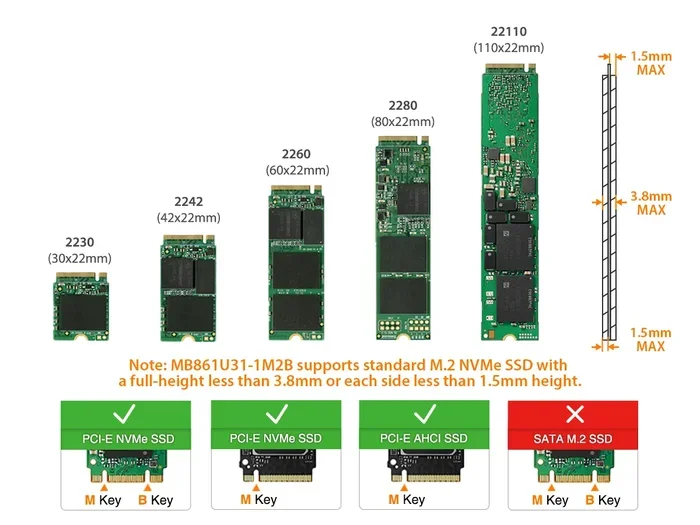
Most NVMe M 2 SSD enclosures work with all major brands. Samsung, Crucial, Kingston, WD, and Intel NVMe drives all fit standard M 2 slots. Before buying, check that your SSD length matches the enclosure. The most common sizes are 2280 and 2242.
How to Choose the Right NVMe M 2 SSD Enclosure
Not all enclosures are created equal. Choosing the right one depends on a few key factors. Here is what you should look for before you buy.
Interface and Speed
The interface determines the maximum speed you can get. USB 3.1 Gen 2 offers up to 10 Gbps. USB 4 can reach 20 Gbps or even 40 Gbps. If your NVMe SSD supports fast speeds, make sure the enclosure matches. A slow USB 3.0 enclosure will bottleneck a fast NVMe drive. Always match the interface to your needs.
Chipset and Controller
The chipset inside the enclosure is the brain of the operation. Popular chipsets include the ASMedia and JMicron controllers. The Ugreen M 2 NVMe SATA SSD enclosure uses a reliable chipset that delivers stable speeds. The Acasis 40Gbps M 2 NVMe SSD enclosure uses a newer chipset for even faster performance. Research the controller before buying.
Build Quality and Cooling
NVMe drives can get hot under heavy load. A good enclosure will have an aluminum body that acts as a heat sink. Some models include built-in fans. Others use passive cooling with metal shells. If you plan to transfer large files for hours, cooling is essential. A M 2 NVMe SSD enclosure with proper heat management will keep your drive running fast and safe.
Size and Form Factor
Enclosures come in different sizes. The most common is the pocket-sized design that fits in your hand. Some are ultra-slim and flat. Others are slightly thicker but offer better cooling. Think about where you will carry it. If it lives in a backpack every day, go for a compact and durable model.
Price Range
You can find an M 2 NVMe SSD enclosure for as little as $20. Premium models with USB 4 and advanced cooling cost $60 or more. The sweet spot for most users is between $25 and $40. At this price range, you get solid performance and good build quality. The Orico M 2 NVMe SSD enclosure is a great option in this mid-range bracket.
Top NVMe M 2 SSD Enclosures Reviewed
Not sure which enclosure to pick? Here are some popular options that our community loves. Each one brings something unique to the table.
Ugreen M 2 NVMe SATA SSD Enclosure
The Ugreen M 2 NVMe SATA SSD enclosure is a solid choice for everyday users. It supports both NVMe and SATA M 2 SSDs. This makes it very versatile. The aluminum body keeps temperatures low. It connects via USB 3.1 for speeds up to 10 Gbps. At an affordable price, it is one of the best value options on the market.
Acasis 40Gbps M 2 NVMe SSD Enclosure
If you want the fastest speeds available, look at the Acasis 40Gbps M 2 NVMe SSD enclosure. It uses a USB 4 connection for transfer rates up to 40 Gbps. This enclosure is perfect for professionals who work with massive video files. It is more expensive but delivers unmatched performance for a portable solution.
Orico M 2 NVMe SSD Enclosure
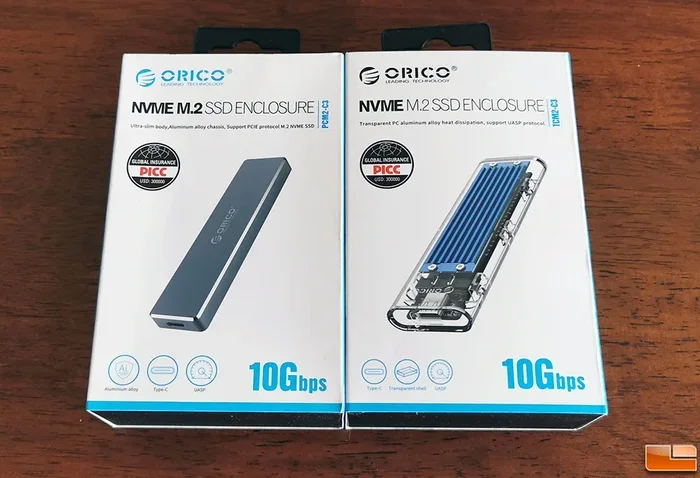
The Orico M 2 NVMe SSD enclosure offers a great balance of speed and price. It supports NVMe M 2 drives and features a sleek aluminum design. The USB 3.1 Gen 2 interface provides reliable 10 Gbps speeds. It is a dependable choice for users who want quality without breaking the bank.
How to Set Up Your NVMe M 2 SSD Enclosure
Setting up an NVMe M 2 SSD enclosure is incredibly easy. You do not need to be a tech expert. Follow these simple steps and you will be ready in minutes.
- Check compatibility: Make sure your NVMe SSD is the M 2 form factor. Confirm the length (2280, 2260, 2242) matches the enclosure.
- Open the enclosure: Most enclosures have a screw or snap-on cover. Carefully open it to reveal the empty slot.
- Insert the SSD: Align the NVMe SSD with the connector at an angle. Gently press it down until it sits flat. Secure it with the screw if needed.
- Close the enclosure: Snap or screw the cover back on. Make sure it is snug but not forced.
- Connect to your computer: Plug the USB cable into the enclosure and your computer or laptop.
- Wait for recognition: Most operating systems will recognize the drive instantly. You may need to format it if it is brand new.
That is it! Your NVMe SSD M 2 enclosure is now ready to use. You can now drag and drop files at incredible speeds. No software installation is required for most operating systems including Windows, macOS, and Linux.
Quick Tips for Best Performance
- Always use the USB cable that comes with the enclosure for best results.
- Avoid running the enclosure in direct sunlight or hot environments.
- Use a USB port that supports the full speed of the enclosure (USB 3.1 or USB 4).
- Eject the drive safely before unplugging it to prevent data loss.
Common Mistakes to Avoid with NVMe M 2 SSD Enclosures
Even though these devices are simple, some common mistakes can cause problems. Here is what to watch out for.
Buying the Wrong SSD Length
M 2 NVMe SSDs come in different lengths. A 2280 drive will not fit in a 2242 slot. Always check your SSD length before purchasing an enclosure. This is the most common mistake buyers make.
Ignoring Heat Management
NVMe drives generate heat during heavy transfers. A plastic enclosure with no ventilation will cause thermal throttling. Your drive will slow down to protect itself. Choose a metal enclosure with good heat dissipation. The M 2 NVMe SSD enclosure you pick should prioritize cooling.
Using a Slow USB Port
Plugging a USB 4 enclosure into a USB 2.0 port will give you terrible speeds. Always match your USB port to the enclosure’s capability. Use USB 3.1 or USB 4 ports for the best NVMe M 2 SSD enclosure performance.
Forgetting to Format
A new SSD in an enclosure may need formatting before use. This is normal and quick. Just make sure you back up any existing data first. Formatting erases all data on the drive.
Skipping the Eject Process
Never just pull the USB cable out. Always eject the drive through your operating system. This prevents data corruption and keeps your files safe.
Final Thoughts on NVMe M 2 SSD Enclosures
An NVMe M 2 SSD enclosure is one of the best investments you can make for your digital life. It turns any NVMe SSD into a blazing fast portable drive. The setup takes minutes and the speed difference is night and day compared to traditional external storage.
Whether you choose a budget-friendly M 2 NVMe SSD enclosure or a premium USB 4 model, you will enjoy faster file transfers and more flexibility. The key is to match the enclosure to your SSD and your needs. Check compatibility, prioritize cooling, and pick a chipset that supports the speeds you want.
For most users, the sweet spot is a USB 3.1 Gen 2 enclosure in the $25 to $40 range. Brands like Ugreen, Acasis, and Orico offer excellent options that deliver real-world performance. If you need extreme speed, a USB 4 enclosure like the Acasis 40Gbps model will not let you down.
Start with a reliable NVMe M 2 SSD enclosure today and experience the difference portable high-speed storage can make. Your files will thank you.
Frequently Asked Questions
Can I use a SATA M 2 SSD in an NVMe M 2 SSD enclosure?
It depends on the enclosure. Some NVMe M 2 SSD enclosures support both NVMe and SATA M 2 drives. Check the product specifications before buying. If the enclosure only supports NVMe, a SATA SSD will not work with it.
What is the best speed I can get from an NVMe M 2 SSD enclosure?
With a USB 4 enclosure, you can reach speeds up to 20 Gbps or even 40 Gbps. A USB 3.1 Gen 2 enclosure typically delivers up to 10 Gbps. Your actual speed depends on both the enclosure and the NVMe SSD inside it.
Do I need to install drivers for an NVMe M 2 SSD enclosure?
No. Most modern NVMe M 2 SSD enclosures are plug and play. Windows, macOS, and Linux recognize them automatically. You do not need to download any extra software or drivers in most cases.
Will my NVMe M 2 SSD enclosure work with a gaming console?
Some consoles like the PS5 support external NVMe drives through USB. Check your console specifications first. A M 2 NVMe SSD enclosure can expand your game library if the console supports external SSD storage.
How do I know which M 2 SSD length my enclosure supports?
Most enclosures support the 2280 length, which is the most common. Some also support 2260 or 2242 sizes. Check both your SSD and the enclosure specifications to confirm they match before purchasing.
Can I leave my NVMe SSD in the enclosure permanently?
Yes. An M 2 NVMe SSD enclosure is designed for permanent use. Just make sure the enclosure has good ventilation and you do not expose it to extreme temperatures. Treat it like any other piece of computer hardware.