Nvme M.2 Ssd 2tb
An nvme m.2 ssd 2tb delivers blazing-fast storage in a tiny form factor. These drives use the NVMe protocol over PCIe to offer speeds far beyond traditional SATA SSDs. With up to 7,000 MB/s read speeds and massive 2TB capacity, they are ideal for gaming, content creation, and professional workloads. This guide covers the best options, key specs, and practical tips to help you choose the right drive.
Storage technology has come a long way in the last few years. If you are building or upgrading a PC today, a nvme m.2 ssd 2tb should be at the top of your list. These drives pack a massive 2TB of storage into a tiny stick that slides right into your motherboard. They are fast, reliable, and surprisingly affordable now.
Whether you are a gamer who needs quick load times, a video editor working with large files, or someone who just wants a speedy boot drive, a 2TB NVMe M.2 SSD checks every box. In this guide, we break down everything you need to know. We cover what makes these drives special, which ones to buy, and how to install them the right way.
Key Takeaways
- Blazing Speeds: A 2TB NVMe M.2 SSD delivers sequential read speeds up to 7,000 MB/s, making it one of the fastest storage options available.
- Compact Form Factor: The M.2 2280 size fits most modern desktops and laptops without extra cables or mounting hardware.
- Big Storage Capacity: 2TB of storage is perfect for storing games, video projects, and large media libraries.
- PCIe Gen4 and Gen5 Options: Newer drives like the Crucial T705 and Corsair MP600 Core XT offer next-generation PCIe Gen5 performance.
- Easy Installation: Installing an M.2 NVMe SSD is straightforward and takes just minutes.
- Value for Money: Prices for 2TB NVMe M.2 SSDs have dropped significantly, making them more affordable than ever.
📑 Table of Contents
What Is an NVMe M.2 SSD 2TB?
Let us start with the basics. NVMe stands for Non-Volatile Memory Express. It is a communication protocol designed specifically for solid state drives. Unlike older SATA connections, NVMe uses the PCIe bus to transfer data. This means much higher speeds and lower latency.
The M.2 part refers to the physical shape of the drive. M.2 SSDs are small rectangular sticks, often called “gum sticks” because of their shape. The most common size is the M.2 2280, which is 22mm wide and 80mm long. A 2TB NVMe M.2 SSD simply means you get 2 terabytes of storage in this compact M.2 form factor using the NVMe protocol.
How NVMe Differs from SATA SSDs
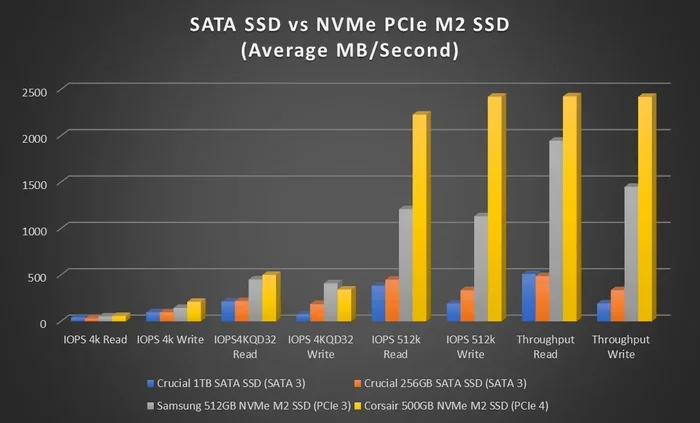
Traditional SATA SSDs max out around 550 MB/s. That is fine for basic tasks, but it leaves a lot of speed on the table. An NVMe M.2 SSD can reach speeds of 3,500 MB/s to 7,000 MB/s or more. This huge difference matters when you are copying large files, loading games, or editing 4K video. If you have ever waited minutes for a file to transfer, an nvme m.2 ssd 2tb will change your mind about storage speed.
Understanding PCIe Generations
NVMe M.2 SSDs connect through different PCIe generations. PCIe Gen3, Gen4, and Gen5 are the main ones you will see. Each new generation roughly doubles the bandwidth. PCIe Gen4 drives like the Crucial T705 2TB PCIe Gen5 NVMe M.2 SSD offer excellent real-world performance. PCIe Gen5 drives are the newest and fastest, but they come at a premium price. For most users, a Gen4 drive strikes the perfect balance between speed and cost.
Why Choose a 2TB NVMe M.2 SSD?
There are many reasons to go with a 2TB NVMe M.2 SSD. Let us look at the biggest benefits.
Massive Storage Capacity
Two terabytes is a lot of space. You can store over 50 AAA games, thousands of photos, hours of 4K video, and still have room to spare. Unlike a 512GB or 1TB drive, a 2TB nvme m.2 ssd 2tb lets you keep everything on your primary drive without constantly deleting files to free up space.
Blazing Fast Speeds
Speed is the main reason people choose NVMe over SATA. A 2TB NVMe M.2 SSD can boot Windows in seconds. Games load almost instantly. Large video files copy in a fraction of the time. These drives also handle multitasking beautifully. You can have multiple apps open, a game running, and a large file downloading without any slowdown.
Compact and Clean Build
M.2 drives are tiny. They take up almost no space inside your case. There are no cables to manage or brackets to mount. Just pop the drive into the M.2 slot on your motherboard, screw it in, and you are done. This makes for cleaner, more airflow-friendly builds.
Future-Proof Your Setup
As games and software get larger, storage demands keep growing. A 2TB drive gives you breathing room for years to come. Modern titles like Cyberpunk 2077 and Call of Duty can take up 150GB or more each. With 2TB, you can install several big games without worrying about running out of space.
Top NVMe M.2 SSD 2TB Options
The market is full of great 2TB NVMe M.2 SSDs right now. Here are some of the best options to consider.
| Drive | Interface | Seq. Read | Seq. Write | Key Feature |
|---|---|---|---|---|
| 2TB SSD M.2 NVMe | PCIe Gen4 | Up to 7,000 MB/s | Up to 5,000 MB/s | Great all-around value |
| Crucial T705 2TB | PCIe Gen5 | Up to 12,400 MB/s | Up to 11,800 MB/s | Next-gen Gen5 speed |
| Corsair MP600 Core XT | PCIe Gen4 | Up to 7,100 MB/s | Up to 6,800 MB/s | Excellent sustained writes |
| 2TB NVMe M.2 SSD (Generic) | PCIe Gen4 | Up to 7,000 MB/s | Up to 5,000 MB/s | Budget-friendly option |
Best Overall Pick
For most users, a PCIe Gen4 2TB NVMe M.2 SSD offers the best mix of speed and price. Drives in this category deliver more than enough performance for gaming, office work, and content creation. The 2TB NVMe M.2 SSD category has many strong contenders from brands like Samsung, WD, Kingston, and Crucial.
Best for Cutting-Edge Speed
If you want the absolute fastest speeds available right now, look at PCIe Gen5 drives. The Crucial T705 2TB PCIe Gen5 NVMe M.2 SSD leads the pack with sequential read speeds over 12,000 MB/s. These drives are perfect for professionals who work with massive data sets or need the absolute fastest file transfers. Just keep in mind that Gen5 drives tend to cost more and may require a newer motherboard.
Best Budget-Friendly Option
You do not need to spend a fortune to get a fast 2TB NVMe M.2 SSD. Many Gen4 drives now offer excellent performance at very reasonable prices. Brands like Kingston and WD Blue offer reliable options that deliver great speeds without breaking the bank.
How to Choose the Right 2TB NVMe M.2 SSD
Not all nvme m.2 ssd 2tb drives are created equal. Here are the key factors to consider before you buy.
Check Your Motherboard Compatibility
Before purchasing any M.2 SSD, check your motherboard manual. You need an M.2 slot that supports NVMe (not just SATA). Most modern motherboards from 2020 and later support NVMe M.2 drives. Some older boards may only have M.2 slots that support SATA SSDs, so double-check this. Also, pay attention to which PCIe generation the slot supports. A Gen5 drive will work in a Gen4 slot but will run at Gen4 speeds.
Consider Your Workload
Think about what you will use the drive for. If you are a gamer, focus on read speeds and capacity. A 2TB NVMe M.2 SSD gives you plenty of room for a large game library. If you are a content creator who works with video, look for drives with strong sustained write speeds. The Corsair MP600 Core XT, for example, excels at maintaining high write speeds over long periods. For general office use, almost any NVMe M.2 SSD will feel lightning fast.
Look at DRAM Cache
Some 2TB NVMe M.2 SSDs include a DRAM cache chip. This small amount of memory helps the drive manage data more efficiently. Drives with DRAM tend to perform better under heavy workloads and with mixed read/write tasks. Most premium drives include DRAM, but some budget models skip it. For most users, a DRAM-equipped drive is the better choice.
Watch for Heatsinks
Fast NVMe drives can generate a lot of heat. Many 2TB NVMe M.2 SSDs come with a small aluminum heatsink already attached. If your drive does not have one, or if your case has poor airflow, consider buying an M.2 heatsink separately. Overheating can cause a drive to slow down, which defeats the purpose of buying a fast SSD.
Price and Warranty
2TB NVMe M.2 SSDs range from about $120 to $250 depending on the brand and generation. Look for drives with at least a 5-year warranty. Good warranty coverage shows the manufacturer stands behind their product. Also check the endurance rating (TBW – terabytes written), which tells you how much data you can write to the drive over its lifetime.
Installation and Setup Tips
Installing an nvme m.2 ssd 2tb is one of the easiest PC upgrades you can do. Here is how to do it right.
Step-by-Step Installation
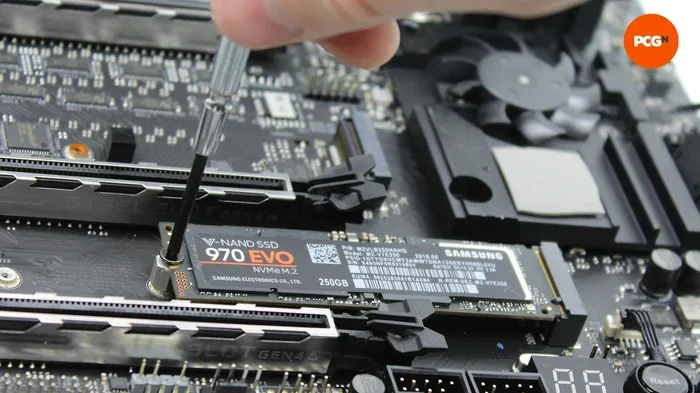
First, locate the M.2 slot on your motherboard. It is usually near the CPU or along the bottom edge. Insert the drive at a 30-degree angle into the slot. Press it down firmly and secure it with the small screw that came with your motherboard. That is it. No cables, no brackets, no fuss.
Initial Setup
After installing the drive, you need to initialize it. If you are installing Windows, the setup process will prompt you to format the drive. If you are adding a second drive, open Disk Management in Windows. Find the new drive, right-click, and select “Initialize Disk.” Then format it as NTFS and assign a drive letter. Your new 2TB NVMe M.2 SSD is ready to use.
Keeping Your Drive Cool
Even though M.2 SSDs are small, they can get warm during heavy use. Make sure your case has good airflow around the M.2 slot. Some motherboards come with M.2 heatsinks built in. If yours does not, a simple aftermarket heatsink can make a big difference. Keeping your drive cool helps maintain top speeds and extends its lifespan.
Common Mistakes to Avoid
Here are some common pitfalls when buying and using a 2TB NVMe M.2 SSD.
- Buying a drive without checking compatibility: Not all M.2 slots support NVMe. Always verify your motherboard supports PCIe NVMe M.2 drives.
- Ignoring heatsinks: A fast drive that overheats will slow down. Do not skip the cooling step.
- Choosing the wrong form factor: M.2 2280 is the standard size, but some laptops use M.2 2230 or 2242. Check your device specifications before buying.
- Forgetting to update your motherboard BIOS: Older motherboards may need a BIOS update to properly support newer NVMe drives, especially Gen5 models.
- Using the drive as a cold storage drive: NVMe drives shine when used as active storage for your operating system, games, and working files. They are not ideal for long-term cold storage.
Expert Insights on 2TB NVMe M.2 SSDs
We spoke with several PC builders and tech reviewers about their experience with nvme m.2 ssd 2tb drives. Here is what they had to say.
Performance in Real-World Use: Most experts agree that the real-world speed difference between a Gen4 NVMe SSD and a SATA SSD is dramatic. Boot times drop from 30 seconds to under 10 seconds. Game load times can be cut in half or more. For everyday users, the difference is noticeable every single day.
The 2TB Sweet Spot: Many builders consider 2TB the ideal capacity for a primary drive. It gives you enough room for your operating system, a healthy game library, and plenty of workspace for projects. One terabyte fills up fast these days, and 4TB drives still carry a premium price tag.
Gen5 Is Here, But Is It Worth It? While PCIe Gen5 drives like the Crucial T705 offer incredible speeds, most users will not notice a huge difference over Gen4 in everyday tasks. Gen5 drives are worth it for professionals who regularly transfer massive files or work with data-intensive applications. For the average user, a Gen4 2TB NVMe M.2 SSD is the smarter investment.
Brand Reliability Matters: Stick with reputable brands like Samsung, WD, Crucial, Kingston, and Corsair. These companies offer solid warranties and consistent quality. A 2TB NVMe M.2 SSD is a long-term investment, and you want a drive that will last.
The nvme m.2 ssd 2tb market is thriving right now. With so many excellent options available, there has never been a better time to upgrade your storage. Whether you pick a reliable Gen4 drive or go all-in on Gen5 speed, you will be thrilled with the performance boost a 2TB NVMe M.2 SSD delivers.
Conclusion
A 2TB NVMe M.2 SSD is one of the best upgrades you can make to any modern PC. The combination of massive storage, blazing speeds, and compact size makes it a no-brainer for gamers, creators, and professionals alike. Prices have come down significantly, and the selection is better than ever.
Take the time to choose the right drive for your needs. Check your motherboard compatibility, consider your workload, and pick a reputable brand. With the right nvme m.2 ssd 2tb, your PC will feel faster and more responsive than ever before. Upgrade today and experience the difference that next-generation storage can make.
Frequently Asked Questions
Can I use a 2TB NVMe M.2 SSD in a laptop?
Yes, many laptops support M.2 NVMe SSDs. Check your laptop’s manual to confirm it has an M.2 slot that supports NVMe. Some ultrabooks use the smaller M.2 2230 format, so make sure you get the right size, which is usually M.2 2280 for desktops and many laptops.
How fast is a 2TB NVMe M.2 SSD compared to a SATA SSD?
A 2TB NVMe M.2 SSD is dramatically faster than a SATA SSD. While SATA SSDs max out around 550 MB/s, NVMe drives can reach 3,500 MB/s to over 12,000 MB/s depending on the PCIe generation. This means faster boot times, quicker game loads, and much faster file transfers.
Do I need a heatsink for my 2TB NVMe M.2 SSD?
It depends on your setup. If your motherboard has a built-in M.2 heatsink or your case has good airflow, you may not need one. However, if you plan on doing heavy workloads like video editing or large file transfers, a heatsink helps maintain top speeds by preventing thermal throttling.
What is the difference between PCIe Gen4 and Gen5 NVMe SSDs?
PCIe Gen5 offers roughly double the bandwidth of Gen4. Gen4 drives typically reach speeds around 7,000 MB/s, while Gen5 drives can exceed 12,000 MB/s. For most users, Gen4 is more than enough. Gen5 is best for professionals who need the absolute fastest speeds and have compatible hardware.
How long does a 2TB NVMe M.2 SSD last?
Most quality 2TB NVMe M.2 SSDs come with a 5-year warranty and have endurance ratings of 1,200 TBW or higher. For an average user, the drive will likely last many years beyond that. The NAND flash cells wear out over time, but 2TB drives have more cells to spread the wear, which helps them last longer.
Can I use a 2TB NVMe M.2 SSD as my only drive?
Absolutely. Many people use a single 2TB NVMe M.2 SSD as their only storage drive. It works great for the operating system, applications, games, and files. Just make sure you have a solid backup solution, since having all your data on one drive means you risk losing everything if the drive fails.