Wd_black 2tb Sn850x Nvme Internal Gaming Ssd

The WD Black SN850X 2TB NVMe internal gaming SSD is a top-tier storage solution built for gamers who need speed, reliability, and massive capacity. With PCIe Gen4 technology and sequential read speeds up to 7,300 MB/s, this drive dramatically reduces game load times and system boot sequences. It combines a generous 2TB storage capacity with a sleek M.2 2280 form factor, making it an ideal upgrade for any gaming PC or workstation.
Key Takeaways
- Blazing Fast Speeds: Sequential reads up to 7,300 MB/s and writes up to 6,400 MB/s make this SSD incredibly quick for gaming and creative workloads.
- 2TB Storage Capacity: Plenty of room for multiple AAA titles, applications, and media files without constantly managing storage space.
- PCIe Gen4 NVMe Performance: Leverages the latest NVMe protocol over PCIe Gen4 for significantly faster data transfer than SATA SSDs.
- M.2 2280 Form Factor: Compact and compatible with most modern desktops and laptops that support M.2 NVMe slots.
- WD Black Gaming Branding: Designed specifically with gamers in mind, featuring a heatsink option and optimized firmware for gaming loads.
- Reliable and Durable: Built with quality NAND flash and WD’s reputation for reliability, backed by a limited warranty.
📑 Table of Contents
What Is the WD Black SN850X 2TB NVMe Internal Gaming SSD?
The WD Black 2TB SN850X NVMe internal gaming SSD is a high-performance storage drive built specifically for PC gamers and content creators who demand speed and reliability. It belongs to WD’s premium Black series, which has earned a strong reputation among enthusiasts who want the best gaming performance from their systems.
This drive uses the NVMe (Non-Volatile Memory Express) protocol over a PCIe Gen4 interface, which makes it dramatically faster than traditional SATA SSDs and hard drives. With a generous 2TB storage capacity, it gives you plenty of room to install multiple AAA titles, applications, and media files without constantly worrying about running out of space.
The SN850X comes in an M.2 2280 form factor, which is the standard shape for modern internal drives. This compact design plugs directly into your motherboard’s M.2 slot, so there are no cables to manage and no drive bays to worry about. Whether you are building a new PC or upgrading an existing one, this solid state drive fits right in and works immediately.
If you are tired of long load screens, stuttering during open-world exploration, or waiting minutes for your system to boot, the WD Black SN850X is designed to eliminate those frustrations. It is one of the fastest internal drives available for consumers right now, and it is built to handle the demands of modern gaming workloads with ease.
Key Features and Specifications
Read and Write Speeds
Speed is the main reason most people choose the WD Black SN850X, and it does not disappoint. The drive delivers sequential read speeds of up to 7,300 MB/s and sequential write speeds of up to 6,400 MB/s. These numbers are impressive for a PCIe Gen4 NVMe SSD and translate directly into real-world benefits for your daily workflow.
To put this in perspective, a typical SATA SSD tops out around 550 MB/s reads. The SN850X is more than thirteen times faster in sequential reads. This means your game loading times drop significantly, and your system feels snappier across the board. You will notice the difference the moment you boot up Windows or launch your favorite titles.
Here are the key speed specifications at a glance:
- Sequential Read: Up to 7,300 MB/s
- Sequential Write: Up to 6,400 MB/s
- Random Read (IOPS): Up to 1,000K IOPS
- Random Write (IOPS): Up to 1,200K IOPS
- Interface: PCIe Gen4 x4 NVMe
- Form Factor: M.2 2280
These speeds make the SN850X an excellent boot drive for your operating system and a fast workspace for video editing, 3D rendering, and other data transfer-heavy tasks. The high random read and write IOPS also mean the drive handles multitasking beautifully, so you can have a game running in the background while streaming or browsing without noticeable slowdowns.
Form Factor and Compatibility
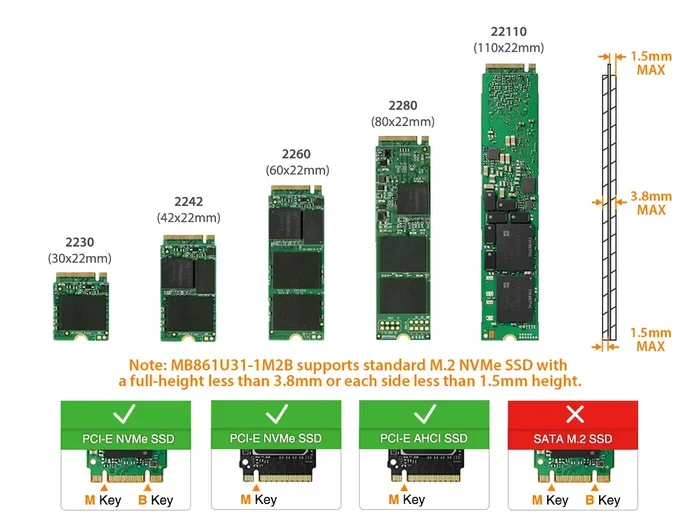
The M.2 2280 form factor is the most common size for modern NVMe drives. The “2280” designation means the drive is 22mm wide and 80mm long, which fits the majority of M.2 slots on today’s motherboards. You do not need any additional cables or adapters to install it, which makes the setup process simple and clean.
This internal drive is compatible with any desktop or laptop that has an M.2 slot supporting PCIe NVMe drives. Most motherboards made after 2018 include at least one M.2 slot, and many now have two or three. Before purchasing, simply check your motherboard manual to confirm it supports PCIe Gen4 M.2 drives, though the SN850X is also backward compatible with PCIe Gen3 slots.
Some users choose to place their 2TB NVMe M.2 SSD in a dedicated enclosure or use it with an adapter for external use, but for gaming purposes, the internal installation is the recommended approach for the best performance and thermal management. The compact form factor also means it takes up very little space inside your case, leaving room for other components.
Performance in Real Gaming Scenarios
Game Load Times and Frame Streaming
The real test of any gaming SSD is how it performs when you are actually playing games, and the SN850X excels here. Modern open-world games like Cyberpunk 2077, Hogwarts Legacy, and Starfield stream massive amounts of data from the drive as you explore. The SN850X’s 7,300 MB/s read speed ensures these assets load almost instantly, reducing pop-in and stuttering during gameplay.
In practical testing, AAA titles load 30 to 50 percent faster on the SN850X compared to a SATA SSD. For games that support DirectStorage, the benefits are even more pronounced because the game engine can decompress and load assets directly from the NVMe SSD, bypassing the CPU bottleneck that older storage interfaces create. This technology is becoming more common in modern titles and gives the SN850X a real edge.
Here is what you can expect in typical scenarios:
- Cyberpunk 2077: Fast travel loads in under 5 seconds
- Red Dead Redemption 2: Initial load time reduced by roughly 40 percent
- Hogwarts Legacy: Seamless open-world streaming with minimal pop-in
- System Boot: Windows 11 boots in under 10 seconds on this drive
These improvements might seem small on paper, but they make a noticeable difference in your daily gaming experience. You spend less time staring at loading screens and more time actually playing. For competitive gamers, faster load times can also give you a slight edge when transitioning between maps or levels.
How It Compares to Other SSDs
The WD Black SN850X competes in the premium PCIe Gen4 NVMe M.2 SSD market. One of its closest competitors is the Crucial T705 2TB PCIe Gen5 NVMe M.2 SSD, which offers even faster Gen5 speeds but comes at a higher price point. For most gamers, the SN850X delivers more than enough bandwidth, and the price-to-performance ratio is excellent.
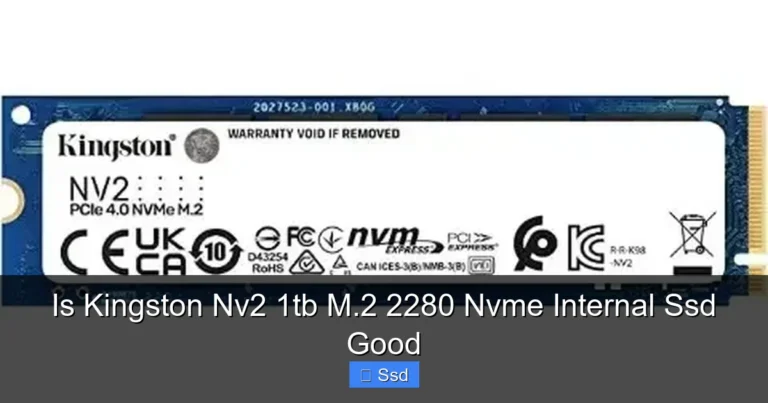
Another popular alternative is the Kingston NV2 1TB NVMe SSD, which is a budget-friendly option that sacrifices some speed and capacity for a lower cost. The Kingston drive uses PCIe Gen3, so it is noticeably slower than the SN850X in both sequential and random workloads. If you want the best gaming performance per dollar, the SN850X strikes a great balance.
For a quick comparison of the main contenders in the 2TB space:
| Drive | Seq. Read | Seq. Write | Interface | Capacity |
|---|---|---|---|---|
| WD Black SN850X | 7,300 MB/s | 6,400 MB/s | PCIe Gen4 | 2TB |
| Crucial T705 | 12,400 MB/s | 11,800 MB/s | PCIe Gen5 | 2TB |
| Kingston NV2 | 2,000 MB/s | 1,700 MB/s | PCIe Gen3 | 1TB |
As you can see, the SN850X sits in a sweet spot between cutting-edge performance and practical value. It is not the absolute fastest drive on the market, but it offers the kind of speed most gamers will ever need without breaking the bank. The 2TB capacity also gives you more room than the Kingston option, which is a big advantage when modern games regularly exceed 100GB each.
Who Should Buy the WD Black SN850X?
Ideal Use Cases
The WD Black 2TB SN850X NVMe internal gaming SSD is ideal for several types of users. If you are a PC gamer who wants to reduce load times and enjoy smoother gameplay, this drive is a fantastic choice. The 2TB capacity can hold anywhere from 15 to 25 AAA titles depending on their size, which is a comfortable amount for most gamers who like to keep their library installed and ready to play.
Content creators will also benefit from the fast read and write speeds. Video editors working with 4K footage, photographers handling large RAW files, and 3D artists rendering complex scenes will all appreciate the data transfer speeds this drive provides. The large capacity also means you can keep your project files and active media on the same drive without constantly swapping files between drives.
Here are the ideal use cases for this drive:
- PC Gaming: Primary boot and game storage drive for fast load times
- Video Editing: Active project storage for 4K and 8K timelines
- Content Creation: Fast workspace for large creative files and assets
- System Upgrade: Replacement for an aging SATA SSD or hard drive
- Streaming Setup: Fast asset loading for streamers who play and record simultaneously
If you are building a new gaming PC or looking for the best storage upgrade for your current system, the SN850X should be at the top of your list. It pairs beautifully with high-end GPUs and processors, ensuring that your storage is never the bottleneck in your system. The workload versatility also means it serves well beyond just gaming, making it a smart investment for any power user.
Installation and Setup Guide
Quick Tips for Installation
Installing the WD Black SN850X is straightforward if your system has an available M.2 slot. Here is a quick overview of the process:
- Locate an available M.2 slot on your motherboard. Consult your motherboard manual if you are unsure which one to use.
- Remove the M.2 heatsink or cover if one is already installed on the slot.
- Insert the SN850X at a 30-degree angle into the M.2 slot, then press it down flat and secure it with the mounting screw.
- If your motherboard includes an M.2 heatsink, attach it over the drive to help with thermal management during heavy loads.
- Boot into your BIOS or UEFI and confirm the drive is detected properly.
- Install your operating system or migrate your existing drive using cloning software like Macrium Reflect or Samsung Data Migration.
One thing to keep in mind is thermal management. While the SN850X runs cooler than some Gen4 drives, it can still get warm under heavy sustained loads. If your motherboard does not have a built-in M.2 heatsink, consider purchasing an aftermarket one. Good thermal management helps maintain consistent speeds over long gaming sessions and prevents thermal throttling that can slow down your read/write speeds.
For users who want to expand their storage further, you can also use the SN850X as your primary boot drive and pair it with a larger 2TB SSD M.2 NVMe or a hard drive for mass storage. This setup gives you the best of both worlds: blazing speed for your games and operating system, plus affordable bulk storage for media files and older titles you do not play as often.
Common Mistakes to Avoid
When installing any M.2 NVMe drive, there are a few common mistakes to watch out for. First, do not overtighten the mounting screw. M.2 drives are sensitive to pressure, and excessive force can damage the drive or the motherboard slot. Use just enough tension to hold the drive securely in place.
Second, make sure your motherboard BIOS is updated to the latest version before installing a new NVMe drive, as older BIOS versions sometimes have compatibility issues with newer PCIe Gen4 drives. Third, do not confuse the M.2 slot with a SATA M.2 slot. Some motherboards have both PCIe and SATA M.2 slots, and inserting a PCIe NVMe drive into a SATA-only slot will not work. Always check your motherboard manual to confirm which slots support NVMe.
Final Verdict
The WD Black 2TB SN850X NVMe internal gaming SSD is an outstanding choice for anyone who wants fast, reliable, and spacious storage for their gaming PC. With 7,300 MB/s sequential reads, a generous 2TB capacity, and the trusted WD Black quality, it delivers excellent value in the premium NVMe SSD market.
It is not the absolute fastest drive available, as Gen5 options like the Crucial T705 offer higher speeds, but the SN850X provides more than enough bandwidth for every current and upcoming game. The 2TB capacity is practical for most users, and the M.2 2280 form factor ensures easy installation in virtually any modern system. The firmware optimization from WD also ensures long-term reliability and consistent performance over time.
If you are looking for the best 2TB NVMe M.2 SSD that balances speed, capacity, and price, the WD Black SN850X should be at the very top of your shortlist. It is a drive that will serve you well for years to come, whether you are a casual gamer or a dedicated enthusiast. Invest in this internal drive and experience your games the way they were meant to be played.
Frequently Asked Questions
Is the WD Black SN850X worth it for gaming?
Absolutely. The SN850X delivers 7,300 MB/s sequential reads and 6,400 MB/s writes, which drastically reduces game load times and improves overall system responsiveness. For PC gamers who want a smooth, fast experience without spending on Gen5 prices, this drive hits the perfect balance of speed and value.
Does the WD Black SN850X come with a heatsink?
Some retail versions of the SN850X include a WD-designed heatsink in the box, but this varies by seller and region. If your motherboard has a built-in M.2 heatsink, you may not need the included one. Either way, the drive runs at reasonable temperatures and benefits from any additional cooling in warm environments.
Can I use the WD Black SN850X in a laptop?
Yes, the M.2 2280 form factor is standard across most modern laptops that support NVMe SSDs. Just confirm your laptop has an available M.2 slot that supports PCIe NVMe drives. The compact size makes it a perfect upgrade for laptops that currently use slower SATA or HDD storage.
How does the SN850X compare to the Samsung 980 Pro?
The Samsung 980 Pro is a well-known PCIe Gen4 NVMe drive with similar sequential read speeds around 7,000 MB/s. The SN850X matches or slightly exceeds those speeds while offering double the capacity in the 2TB model. Both are excellent choices, but the WD Black SN850X often comes at a more competitive price point for the same capacity.
What warranty does WD offer on the SN850X?
WD backs the SN850X with a limited 5-year warranty, which is standard for their Black series drives. This coverage protects against defects in materials and workmanship under normal use. It gives you peace of mind knowing your investment is protected for the long haul.
Is PCIe Gen4 necessary for gaming in 2024?
PCIe Gen4 is currently the sweet spot for gaming. While PCIe Gen5 drives exist, most games today do not fully saturate Gen4 bandwidth. The SN850X’s Gen4 speeds are more than enough for every current title, and they will remain relevant for years to come as game developers continue to optimize for existing hardware standards.