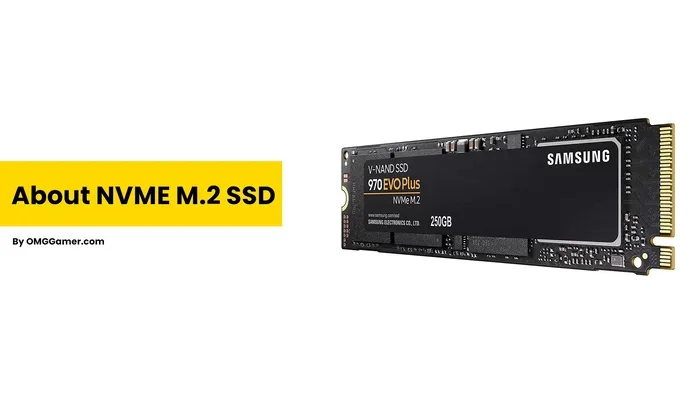
M 2 Nvme Ngff Ssd

M 2 NVMe NGFF SSD is a small, fast solid state drive that fits directly onto your motherboard. It uses the NVMe protocol over PCIe lanes to deliver blazing read and write speeds. This form factor replaced the older mSATA standard and has become the go-to choice for modern laptops and desktops. If you want faster boot times, quicker file transfers, and better gaming performance, understanding M 2 NVMe NGFF SSD technology is essential.
If you have been shopping for a new solid state drive, you have probably seen the term M 2 NVMe NGFF SSD thrown around. It sounds technical, but the concept is actually simple. This small drive packs a huge performance punch and has become the standard storage choice for modern computers.
NGFF stands for Next Generation Form Factor. It was the original name for what we now call M.2. The M.2 specification replaced the older mSATA standard because it offered a better design and faster data transfer options. Today, when people say M 2 NVMe NGFF SSD, they are talking about a compact, ultra-fast storage device that connects directly to your motherboard.
The beauty of this drive lies in its size and speed. It is roughly the size of a stick of gum, yet it can read and write data at thousands of megabytes per second. Whether you are a gamer, a content creator, or someone who just wants a faster computer, this storage format delivers real results.
Key Takeaways
- Compact Design: M 2 NVMe NGFF SSD drives are tiny, measuring just 22mm wide and 80mm long in the common 2280 size.
- Blazing Speeds: NVMe protocol over PCIe lanes delivers speeds far faster than traditional SATA SSDs and hard drives.
- Direct Motherboard Connection: These drives slot directly into M.2 sockets on your motherboard without cables.
- Wide Compatibility: Most modern PCs and laptops from the last few years support M.2 NVMe drives.
- Multiple Generations: PCIe Gen3, Gen4, and Gen5 offer increasing speed tiers for different budgets and needs.
- Perfect for Gaming and Workloads: Fast load times and smooth multitasking make these drives ideal for gamers and professionals.
📑 Table of Contents
- What Exactly Is an M 2 NVMe NGFF SSD?
- How M.2 NVMe SSDs Work
- Benefits of Using an M 2 NVMe NGFF SSD
- M 2 NVMe NGFF SSD vs SATA SSD
- How to Choose the Right M 2 NVMe NGFF SSD
- Installation Tips for M 2 NVMe NGFF SSD
- Common Mistakes to Avoid
- Expert Insights on M 2 NVMe NGFF SSD Technology
- Key Takeaways
- Conclusion
What Exactly Is an M 2 NVMe NGFF SSD?
Let us break this down piece by piece. M.2 refers to the physical shape and connector of the drive. NGFF was the original name for the standard before it was renamed to M.2 by the PCI-SIG group. NVMe stands for Non-Volatile Memory Express, which is the communication protocol the drive uses to talk to your computer.
Think of it this way. The M.2 part is the physical shape. The NGFF part is the history of how it came to be. NVMe is the language it uses to send data. And SSD is the fact that it has no moving parts. Together, they describe one of the best storage solutions available today.
Most M.2 drives use the 2280 form factor. That means they are 22 millimeters wide and 80 millimeters long. Some laptops use shorter drives like 2242 or 2230, but 2280 is the most common size for desktops and full-size laptops.
M.2 vs mSATA: What Changed?
Before M.2 existed, there was mSATA. It served a similar purpose but had limitations. mSATA drives used the SATA III interface, which caps out at around 550 MB/s. M.2 NVMe drives can reach speeds of 7,000 MB/s or more on PCIe Gen4, and even faster on Gen5.
The M.2 connector also supports both SATA and NVMe protocols. However, when people refer to an M 2 NVMe NGFF SSD, they specifically mean a drive that uses the NVMe protocol for maximum speed. SATA-based M.2 drives exist too, but they are much slower.
How M.2 NVMe SSDs Work
Understanding the inner workings of a M 2 NVMe NGFF SSD helps you appreciate why it is so fast. Unlike traditional hard drives that spin metal platters, NVMe SSDs use flash memory chips. Data is stored electronically, which means there is no mechanical delay.
The NVMe protocol was designed specifically for flash storage. It uses a streamlined command queue that reduces overhead. Traditional SATA SSDs use AHCI, which was built for spinning drives decades ago. NVMe bypasses that outdated architecture entirely.
M.2 NVMe drives connect directly to the CPU through PCIe lanes. This direct connection eliminates bottlenecks. The more PCIe lanes a drive uses, the faster it can transfer data. Gen3 uses 4 lanes, Gen4 doubles the bandwidth, and Gen5 doubles it again.
PCIe Generations Explained
Each PCIe generation roughly doubles the available bandwidth. Here is a simple breakdown of what that means for real-world performance.
- PCIe Gen3: The most common and affordable option. Speeds up to 3,500 MB/s read and 3,000 MB/s write. Great for everyday use and budget builds.
- PCIe Gen4: Found on modern AMD and Intel platforms. Speeds up to 7,000 MB/s read and 6,500 MB/s write. Excellent for gaming and content creation.
- PCIe Gen5: The newest standard. Speeds up to 14,000 MB/s read and 12,000 MB/s write. Overkill for most users but future-proof and impressive.
If you are looking for a reliable M 2 NVMe NGFF SSD for your next build, the Crucial T705 PCIe Gen5 NVMe M.2 SSD is one of the top choices on the market right now. It pushes the boundaries of what consumer storage can do.
Benefits of Using an M 2 NVMe NGFF SSD
Switching to an M 2 NVMe NGFF SSD brings several tangible benefits. Let us look at why so many people are making the switch from older storage drives.
1. Lightning Fast Boot Times
Your operating system will load in seconds, not minutes. A Windows boot from an NVMe drive typically takes under 10 seconds. This alone makes the upgrade worthwhile for anyone who waits around for their computer to start.
2. Faster Game Load Times
Games installed on an NVMe drive load significantly faster. Open-world games benefit the most because they stream assets continuously. You will notice fewer stutters and shorter loading screens.
3. Better Multitasking Performance
Because NVMe drives handle multiple data requests simultaneously, you can run several demanding applications at once. Video editing, streaming, and gaming all at the same time becomes much smoother.
4. No Cables Needed
M.2 drives plug directly into the motherboard. There are no SATA cables or power connectors to manage. This makes installation a breeze and keeps your build clean and organized.
5. Compact Size
In laptops especially, space is precious. The tiny M.2 form factor saves room for other components. It also generates less heat than a bulky 2.5-inch drive.
M 2 NVMe NGFF SSD vs SATA SSD
The difference between NVMe and SATA is the single biggest factor to consider when choosing a drive. While both connect via the M.2 slot, their performance gap is enormous.
SATA SSDs max out at 550 MB/s. NVMe drives start at around 3,500 MB/s on Gen3 and go way beyond that. The speed difference is like comparing a highway to a dirt road. Both get you there, but one gets you there a lot faster.
For most users, the choice comes down to budget and compatibility. If your older motherboard only has M.2 slots that support SATA, you will be limited to SATA M.2 drives. But if your system supports NVMe, there is no reason to choose SATA.
Many people also ask whether a M 2 NVMe NGFF SSD works as a boot drive. The answer is absolutely yes. In fact, that is what most people use them for. Install your operating system and frequently used programs on the NVMe drive, and use a larger SATA or HDD for mass storage.
How to Choose the Right M 2 NVMe NGFF SSD
Not all NVMe drives are created equal. Before you buy, consider a few key factors that will help you pick the right one for your needs.
Capacity Options
M.2 NVMe drives come in many sizes. The most popular options are 500GB, 1TB, and 2TB. A 500GB drive is enough for an operating system and a few games. A 1TB drive is the sweet spot for most users. If you store large video files or many games, consider a 2TB model.
For a great 512GB option that balances price and performance, check out the 512GB NVMe M.2 SSD options available on the market today.
PCIe Generation
Gen3 is perfectly fine for most tasks and costs less. Gen4 is the current mainstream sweet spot and offers excellent value. Gen5 is cutting-edge and best for enthusiasts who want the absolute fastest speeds available.
Brand Reliability
Stick with well-known brands like Samsung, Crucial, Kingston, and WD. These companies offer solid warranties and consistent performance. Cheaper no-name drives may save money upfront but often lack reliability and proper firmware support.
Heat Management
NVMe drives can run hot, especially Gen4 and Gen5 models. Many drives come with a heatsink included. If yours does not, you can buy a separate M.2 heatsink for a few dollars. Good thermal management keeps your drive performing at its best over time.
Installation Tips for M 2 NVMe NGFF SSD
Installing an M.2 NVMe SSD is one of the easiest PC upgrades you can do. Here is a quick walkthrough to get you started.
- Check your motherboard for an available M.2 slot. Look for the slot labeled M2_1 or similar in your manual.
- Make sure your motherboard supports NVMe drives. Some older boards only support SATA M.2 drives.
- Insert the drive at a 30-degree angle into the M.2 slot.
- Press the drive down gently and secure it with the small screw that came with your motherboard.
- Enter your BIOS or UEFI and confirm the drive is detected.
- Install your operating system or clone your existing drive to the new NVMe SSD.
One common mistake people make is buying the wrong key type. M.2 drives come in Key M and Key B configurations. Most NVMe SSDs use Key M, which fits the longer slot on most modern motherboards. Always double-check before purchasing.
If you run into driver issues after installation, you may need to update your NVMe M.2 SSD drivers. Windows 10 and 11 usually include native NVMe support, but a driver update from the manufacturer can improve stability and performance.
Common Mistakes to Avoid
- Buying a Gen4 drive for a Gen3 motherboard: The drive will work but run at Gen3 speeds. You pay more for speed you cannot use.
- Ignoring thermals: Without proper cooling, high-performance NVMe drives can throttle and slow down.
- Mixing up M.2 SATA and NVMe: Not all M.2 slots support NVMe. Check your motherboard manual carefully.
- Skipping firmware updates: Manufacturers release firmware that improves performance and fixes bugs. Always check for updates.
- Overfilling the drive: NVMe SSDs perform best when they have at least 10-20% free space. Keep some breathing room.
Expert Insights on M 2 NVMe NGFF SSD Technology
The storage industry has evolved rapidly, and NVMe M.2 drives sit at the forefront of that evolution. Experts agree that NVMe is the future of consumer storage. SATA SSDs are slowly being phased out in favor of faster NVMe alternatives.
According to industry analysts, PCIe Gen4 NVMe drives offer the best price-to-performance ratio right now. They are fast enough for almost every use case and cost significantly less than Gen5 drives. For most everyday users, a Gen4 drive is all you will ever need.
For those who want to explore the latest in NVMe technology, the Samsung 970 EVO Plus NVMe M.2 SSD remains a popular and reliable choice that continues to deliver excellent performance.
One thing that surprises many new users is how much the operating system benefits from NVMe speeds. Windows updates, file transfers, and application launches all feel noticeably snappier. The difference is most apparent when you go back to a slower drive after using an NVMe SSD for a while.
For users who need external access to their NVMe drives, an M.2 NVMe enclosure is a great accessory. These enclosures convert internal NVMe drives into portable USB storage. They are handy for backing up large files or transferring data between computers.
Key Takeaways
- M 2 NVMe NGFF SSD refers to a compact, ultra-fast solid state drive using the NVMe protocol over PCIe lanes.
- NGFF is the older name for the M.2 form factor standard.
- NVMe protocol eliminates the bottlenecks of older SATA and AHCI interfaces.
- PCIe Gen3, Gen4, and Gen5 offer progressively faster speeds for different needs and budgets.
- Installation is simple and requires no cables, making it one of the easiest PC upgrades.
- Choose the right capacity, generation, and brand to get the best value and performance for your specific use case.
Conclusion
The M 2 NVMe NGFF SSD has transformed how we think about computer storage. It combines a tiny form factor with incredible speed, making it the ideal choice for anyone building or upgrading a modern PC. Whether you are a gamer chasing faster load times, a professional handling large files, or simply someone who wants a snappier computer, this storage format delivers.
The technology continues to evolve with each PCIe generation. Prices for Gen4 drives have dropped significantly, making them accessible to a wider audience. Gen5 drives are emerging too, but for most users, Gen4 provides more than enough performance for years to come.
If you have not yet made the switch to NVMe storage, now is the perfect time. The speed difference is immediately noticeable, and the installation process is straightforward. Your computer will feel faster, more responsive, and ready for whatever tasks you throw at it.
Start by checking your motherboard compatibility, pick the right capacity for your needs, and enjoy the benefits of modern NVMe storage. A M 2 NVMe NGFF SSD upgrade is one of the best investments you can make for your computer.
Frequently Asked Questions
What does M 2 NVMe NGFF SSD stand for?
M.2 refers to the physical form factor of the drive. NGFF stands for Next Generation Form Factor, which was the original name before it was renamed to M.2. NVMe is the communication protocol that allows the drive to transfer data at high speeds over PCIe lanes. SSD means Solid State Drive, indicating there are no moving parts.
Is an M 2 NVMe NGFF SSD the same as a regular M.2 SSD?
Not exactly. M.2 is the physical shape and connector. An M.2 SSD can use either the SATA or NVMe protocol. When people say M 2 NVMe NGFF SSD, they specifically mean an M.2 drive that uses the faster NVMe protocol rather than the older SATA protocol.
Do I need a special motherboard for an M 2 NVMe NGFF SSD?
Your motherboard needs an M.2 slot that supports NVMe. Most motherboards made after 2016 include at least one M.2 slot with NVMe support. Check your motherboard manual or look for the M.2 slot specifications online to confirm. Some older boards only support SATA M.2 drives.
How much faster is an NVMe M.2 SSD compared to a SATA SSD?
NVMe drives are typically 4 to 7 times faster than SATA SSDs in real-world use. A SATA SSD tops out around 550 MB/s, while a Gen3 NVMe drive reaches about 3,500 MB/s. Gen4 and Gen5 drives go even faster, reaching 7,000 MB/s and 14,000 MB/s respectively.
Can I use an M 2 NVMe NGFF SSD as my primary boot drive?
Absolutely. In fact, that is the most common use for these drives. Installing your operating system and frequently used applications on an NVMe drive dramatically improves boot times and application loading speeds. It is one of the simplest upgrades you can make to breathe new life into an older computer.
Do M 2 NVMe NGFF SSDs need a heatsink?
It depends on the drive and your usage. Gen3 drives rarely need additional cooling. Gen4 drives can get warm under heavy workloads, so a heatsink is recommended. Gen5 drives generate the most heat and almost always benefit from a heatsink. Many modern motherboards include M.2 heatsinks built right into the board.