What Causes Damage to a Flat Screen Tv
Flat screen TVs are a significant investment, and understanding what causes damage to a flat screen TV helps you protect it for years. From power surges and overheating to physical impacts and burn-in, several common threats can shorten your TV’s lifespan. This guide covers every major cause of damage and gives you simple, actionable steps to keep your screen working perfectly.
Flat screen TVs have changed the way we watch movies, play games, and binge our favorite shows. They look stunning, deliver incredible picture quality, and can turn any room into a home theater. But here is the thing most people do not think about until it is too late. These sleek, impressive screens are surprisingly vulnerable. A single power surge, a careless cleaning habit, or even something as simple as leaving a static image on the screen for too long can cause serious, sometimes permanent, damage.
Understanding what causes damage to a flat screen TV is the first step toward protecting your investment. Whether you own a cutting-edge OLED or a reliable LED set, the threats are real and more common than you might think. This article breaks down every major cause of flat screen TV damage in plain language. You will learn what to avoid, what to watch for, and exactly how to keep your TV safe for years to come.
Key Takeaways
- Power Surges: Electrical spikes are the #1 silent killer of flat screen TVs and can fry internal circuits instantly.
- Burn-In and Image Retention: Static images left on screen too long cause permanent discoloration on OLED and plasma panels.
- Physical Damage: Cracks, dents, and pressure marks from mishandling are among the most common forms of TV damage.
- Heat and Humidity: Overheating and moisture exposure degrade internal components and warp delicate screens.
- Improper Cleaning: Using harsh chemicals or abrasive materials scratches and damages TV coatings permanently.
- Static Electricity: Built-up static can destroy sensitive electronic components inside your TV.
- Prevention Is Key: Simple habits like using surge protectors and proper cleaning routines extend TV life significantly.
📑 Table of Contents
- Power Surges and Electrical Damage
- Burn-In and Image Retention
- Physical Damage and Impact
- Heat, Humidity, and Environmental Factors
- Improper Cleaning and Maintenance
- Static Electricity and Internal Component Failure
- Comparing Common Causes of Flat Screen TV Damage
- How to Extend the Life of Your Flat Screen TV
- When to Seek Professional Help
- Conclusion
Power Surges and Electrical Damage
Power surges are one of the biggest enemies of any electronic device, and flat screen TVs are no exception. A power surge is a sudden spike in voltage that flows through your electrical system. It happens in milliseconds, but the damage it causes can be devastating.
How Power Surges Damage Your TV
When a surge hits, it sends more electricity through your TV’s circuits than they are designed to handle. This can fry the power supply board, damage the main processor, or even destroy the display panel itself. The worst part is that you may not notice any warning signs. The TV might work fine one moment and then simply stop working the next.
Common causes of power surges include lightning strikes, downed power lines, and even turning on high-power appliances like air conditioners or microwaves on the same circuit.
How to Protect Your TV from Surges
- Use a surge protector: A quality surge protector absorbs excess voltage and keeps it from reaching your TV.
- Unplug during storms: If a thunderstorm is rolling in, unplug your TV to be safe.
- Avoid daisy-chaining: Do not plug multiple high-wattage devices into the same surge protector.
- Install a whole-house surge protector: Talk to an electrician about adding surge protection to your home’s electrical panel.
These small steps go a long way in preventing electrical damage to your flat screen TV.
Burn-In and Image Retention
If you own an OLED or plasma TV, burn-in is a real concern. Burn-in happens when a static image is displayed on the screen for an extended period. The pixels in that area degrade at a faster rate than the rest of the screen, leaving a permanent ghost image.
What Causes Burn-In?
Burn-in is caused by uneven pixel wear. When the same bright image sits on screen for hours, certain pixels work harder and eventually lose their ability to emit light properly. Common culprits include:
- Leaving a news channel logo on the screen all day
- Gaming with a persistent heads-up display (HUD)
- Watching widescreen letterbox bars for extended periods
- Using your TV as a computer monitor with a static taskbar
Image Retention vs. Burn-In
It is important to know the difference. Image retention is temporary and usually fades after you turn off the TV. Burn-in, on the other hand, is permanent. If you notice a faint outline of a previous image that does not go away after turning the TV off for a while, that is likely burn-in.
Preventing Burn-In
- Enable your TV’s pixel shift or screen protection feature if it has one.
- Take breaks during long gaming or viewing sessions.
- Adjust your screen brightness to a comfortable level rather than keeping it at maximum.
- Avoid pausing the same image on screen for more than two hours at a time.
These habits will help keep your screen looking vibrant and evenly lit for a much longer time.
Physical Damage and Impact
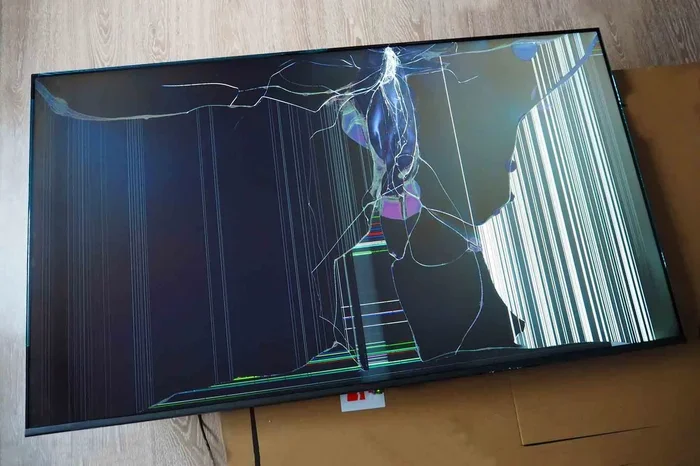
Flat screen TVs are thin and relatively fragile compared to the old tube TVs of the past. Physical damage is one of the most common causes of TV screen problems, and it often happens in ways people do not expect.
Common Causes of Physical Damage
- Impact from objects: A remote control, toy, or decorative item hitting the screen can leave cracks or dents.
- Pressure marks: Placing objects on or pressing against the screen can damage the internal panel layers.
- Improper mounting: A poorly secured wall mount can cause the TV to fall or shift, leading to cracks.
- Moving and transport: Jostling the TV during relocation can crack the panel or damage internal connections.
Why Screen Cracks Happen
Modern flat screen TVs use delicate layers of glass, liquid crystals, and organic materials. Even a small crack can spread across the panel and ruin the entire display. Unlike a cracked phone screen, a cracked TV screen usually cannot be repaired easily or affordably. In many cases, the cost of a replacement panel equals or exceeds the price of a new TV.
Tips to Prevent Physical Damage
- Place your TV in a safe, low-traffic area where it is less likely to be bumped.
- Use a sturdy, properly rated wall mount and have it installed by a professional.
- Keep objects away from the TV that could fall or be thrown.
- When moving your TV, always use the original packaging or a specialized TV moving box.
Heat, Humidity, and Environmental Factors
Your TV works hard to produce bright, colorful images, and that work generates heat. When heat builds up without proper ventilation, it slowly damages internal components. Humidity is another sneaky threat that many people overlook.
How Heat Damages Your TV
Flat screen TVs have fans and ventilation vents designed to keep internal components cool. When these vents are blocked by curtains, furniture, or dust buildup, heat gets trapped inside the TV. Over time, this causes:
- Premature aging of the display panel
- Warping of internal circuit boards
- Failure of the backlight system
- Reduced overall lifespan
How Humidity Damages Your TV
Excess moisture in the air can cause condensation to form on and inside your TV. This leads to corrosion of internal components, short circuits, and mold growth on the screen. Bathrooms and basements are common problem areas because of their high humidity levels.
Keeping Your TV in a Safe Environment
- Ensure at least 4 to 6 inches of clearance around the TV for proper airflow.
- Do not place your TV in direct sunlight for extended periods.
- Use a dehumidifier in rooms with high humidity.
- Keep your TV away from heat sources like radiators and space heaters.
A cool, dry, well-ventilated environment is your TV’s best friend.
Improper Cleaning and Maintenance
Keeping your TV screen clean is important for a great viewing experience, but cleaning it the wrong way can cause serious damage. Many people do not realize that TV screens have special coatings that are easily damaged by common household cleaners.
What NOT to Use on Your TV Screen
- Window cleaners: Products like Windex contain ammonia and alcohol that strip away anti-glare and anti-fingerprint coatings.
- Paper towels and tissues: These are too abrasive and can create fine scratches on the screen surface.
- Bleach or abrasive cleaners: These chemicals can permanently damage the screen’s finish and clarity.
- Excess water: Liquid can seep into the edges of the TV and reach internal components.
The Right Way to Clean Your TV
For safe cleaning, use a soft microfiber cloth slightly dampened with distilled water. If you need a bit more cleaning power, a 50/50 mix of distilled water and isopropyl alcohol can work well for non-screen parts of the TV, but always avoid spraying liquid directly onto the screen.
When it comes to cleaning around your TV, remember that proper care of your display area matters. If you also use external speakers or audio equipment, keeping those clean and well-maintained contributes to a better overall viewing setup. For example, if your speakers start to crackle or sound distorted, that could be a sign of an electrical issue that might also affect nearby electronics like your TV.
Quick Cleaning Tips
- Always turn off and unplug the TV before cleaning.
- Use a dry microfiber cloth to remove dust first.
- Dampen the cloth lightly with distilled water or a safe cleaning solution.
- Wipe gently in circular motions without applying pressure.
- Let the screen dry completely before turning the TV back on.
Static Electricity and Internal Component Failure
Static electricity is an often-overlooked threat to flat screen TVs. While a small static shock from a doorknob might just surprise you, static buildup inside or around your TV can cause real harm to sensitive electronic components.
How Static Electricity Damages TVs
Static discharge can fry small but critical components on the TV’s circuit boards. This is especially true in dry environments where static builds up more easily. In some cases, a static discharge can damage the TV’s main board, causing complete failure with no warning.
How to Reduce Static Risk
- Use a humidifier in dry rooms to reduce static buildup in the air.
- Ground yourself before touching the TV’s internal components if you are opening the back panel.
- Keep your TV’s vents and filters clean to prevent dust accumulation, which can hold static charge.
- Use anti-static mats or wrist straps when handling internal parts.
Comparing Common Causes of Flat Screen TV Damage
Not all causes of TV damage are equally common or equally severe. Here is a quick comparison of the most frequent threats and how they rank in terms of damage potential and likelihood.
| Cause of Damage | Likelihood | Severity | Preventable? |
|---|---|---|---|
| Power Surges | High | Very High | Yes, with a surge protector |
| Burn-In | Medium | High | Yes, with proper usage habits |
| Physical Impact | Medium | Very High | Yes, with careful placement |
| Heat Buildup | Medium | Medium | Yes, with proper ventilation |
| Humidity | Low to Medium | Medium | Yes, with dehumidifier |
| Improper Cleaning | High | Low to Medium | Yes, with correct methods |
| Static Electricity | Low | Medium | Yes, with humidity control |
As you can see, most causes of flat screen TV damage are entirely preventable with the right knowledge and habits. Taking a few simple precautions can save you hundreds or even thousands of dollars in repair or replacement costs.
How to Extend the Life of Your Flat Screen TV
Now that you know what causes damage, here are some proactive steps to keep your TV running strong for as long as possible.
Daily Habits That Help
- Turn off your TV when you are not watching it.
- Use the TV’s built-in energy-saving or eco mode to reduce heat and power strain.
- Adjust the brightness and contrast to comfortable levels rather than maximum settings.
- Give your TV regular breaks during extended use, especially for gaming.
Regular Maintenance Checklist
- Dust the TV and vents weekly with a dry microfiber cloth.
- Check all cable connections every few months for looseness or corrosion.
- Inspect the wall mount or stand for stability once a month.
- Update your TV’s firmware when new versions are available.
- Run a pixel refresh or screen cleanup cycle if your TV supports it.
If you are in the market for a new display setup, understanding the differences between TV types can help you make a better purchasing decision. For instance, when comparing displays for a secondary setup, the considerations are similar to what to look for when buying a secondary monitor in terms of panel type, refresh rate, and burn-in prevention.
When to Seek Professional Help
Not all TV problems are caused by damage you can prevent. Sometimes, internal components fail due to manufacturing defects or normal wear and tear. If you notice any of the following signs, it is time to consult a professional technician:
- Flickering or dimming that does not go away with settings adjustments
- Color distortion or unusual tinting across the screen
- Unusual buzzing or crackling sounds coming from the TV
- A visible line or section of the screen that is always dark or discolored
- The TV won’t turn on even after checking the power source
Attempting DIY repairs on a flat screen TV can void your warranty and sometimes cause even more damage. Always check your warranty coverage first and contact the manufacturer or a certified technician for repairs.
Conclusion
Your flat screen TV is a centerpiece of your home entertainment setup, and protecting it should be a priority. From power surges and burn-in to physical impacts and humidity, the causes of flat screen TV damage are varied but mostly preventable. The key is awareness and consistent care. Use a surge protector, ventilate your TV properly, clean it the right way, and adopt smart viewing habits. These simple actions add up to a significantly longer lifespan for your TV.
Understanding what causes damage to a flat screen TV empowers you to take control. You do not need to be a tech expert to keep your TV safe. Just stay informed, stay proactive, and enjoy your screen for many years to come.
Frequently Asked Questions
Can a power surge completely destroy a flat screen TV?
Yes, a severe power surge can fry the internal circuits of a flat screen TV and render it completely inoperable. Using a quality surge protector is the easiest and most effective way to prevent this type of damage.
Is burn-in covered under TV warranty?
Many manufacturers now offer burn-in protection for OLED and plasma TVs, but coverage varies by brand and model. Check your warranty terms carefully, as some manufacturers exclude burn-in damage from coverage while others include it for a limited time.
How long does a flat screen TV typically last?
Most flat screen TVs last between 7 and 10 years with normal use. However, proper care and maintenance, including avoiding burn-in and keeping the TV well-ventilated, can extend that lifespan significantly.
Can I use a regular household cleaner on my TV screen?
No, most household cleaners contain harsh chemicals like ammonia and alcohol that can damage the special coatings on flat screen TVs. Always use a microfiber cloth with distilled water or a TV-specific cleaning solution.
What should I do if my TV screen gets cracked?
If your TV screen is cracked, turn it off immediately and contact the manufacturer or a certified repair technician. In most cases, a cracked screen requires panel replacement, which can be expensive, so checking your warranty coverage first is always a good idea.
Does leaving a TV on 24/7 cause damage?
Yes, running a flat screen TV continuously for 24 hours a day accelerates pixel wear, increases heat buildup, and shortens the overall lifespan. It is best to turn the TV off when it is not in use and enable energy-saving features when possible.