What Is 127001 Ip Address
The 127001 IP address is a shorthand for 127.0.0.1, known as the localhost or loopback address. It lets your laptop communicate with itself for testing, development, and troubleshooting without sending data over the internet. Understanding this address helps you fix network issues and run local servers smoothly.
If you have ever seen the numbers 127001 IP address or 127.0.0.1 pop up on your laptop screen, you might have wondered what it means. It looks like a strange code, but it is actually one of the most important addresses in computer networking. This special IP address is called the localhost or loopback address, and it plays a huge role in how your device communicates with itself.
Whether you are a developer, a student learning about networks, or just someone trying to fix a connectivity issue, understanding the 127001 IP address can save you a lot of time and frustration. In this guide, we will break down everything you need to know in simple, easy-to-understand terms. Let us dive right in.
Key Takeaways
- What It Is: The 127001 IP address is the loopback address that routes traffic back to your own device.
- Why It Matters: It is essential for software testing, web development, and local server setups on any laptop.
- How It Works: Your operating system redirects 127.0.0.1 traffic internally, never sending it to an external network.
- Common Uses: Developers use it for testing websites, APIs, and applications before going live.
- Troubleshooting: If localhost stops working, simple steps can restore it quickly.
- Security: The loopback address is private and safe — it never exposes your laptop to the outside world.
📑 Table of Contents
- What Is the 127001 IP Address?
- How Does the 127001 IP Address Work?
- Why Is the 127001 IP Address Important?
- Common Uses of the 127001 IP Address on Laptops
- How to Check and Use the 127001 IP Address
- Troubleshooting Common 127001 IP Address Issues
- How the 127001 IP Address Relates to Networking
- Security Considerations for the 127001 IP Address
- 127001 IP Address vs. Other Common IP Addresses
- Final Thoughts
What Is the 127001 IP Address?
The 127001 IP address is really just a shortened way of writing 127.0.0.1. This is a special IP address reserved by the Internet Assigned Numbers Authority (IANA) for loopback purposes. When your laptop sends data to this address, it does not travel anywhere. Instead, the data loops right back to your own machine.
Think of it like a mirror. You say something, and the mirror reflects it right back. Your laptop talks to itself through the loopback interface. This is not a physical connection — it is built into every operating system, whether you use Windows, macOS, or Linux.
Why Is It Called “127.0.0.1”?
The number 127 is a reserved block in the IP address system. Any address starting with 127 is designated for loopback. The full address 127.0.0.1 is the most commonly used one, but the entire range from 127.0.0.0 to 127.255.255.255 is reserved for this purpose. Your device uses this range to test its own network stack without needing an external network connection.
How Does the 127001 IP Address Work?
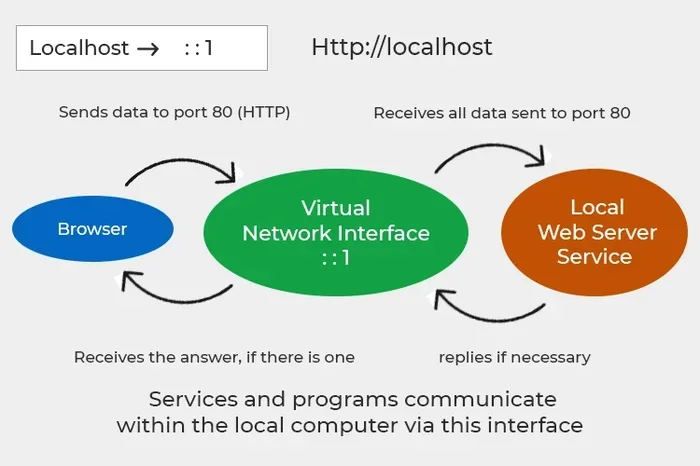
Every device connected to a network needs an IP address. Your laptop gets one from your router when you connect to Wi-Fi or Ethernet. But the 127001 IP address is different. It is not assigned by your router. It exists entirely within your device.
Here is how it works step by step:
- Your laptop sends a data packet to 127.0.0.1.
- The operating system recognizes this as a loopback address.
- The data is redirected back to your own network interface immediately.
- Your laptop receives its own data, completing the loop.
This entire process happens in milliseconds. You never need an internet connection, a router, or any external hardware. The loopback interface handles everything internally. This is why you can run a local server on your laptop even when you are completely offline.
The Role of the Loopback Adapter
Behind the scenes, your operating system uses a virtual network adapter called the loopback adapter. This is not a physical piece of hardware. It is a software-based interface that enables your laptop to send and receive data to and from itself. When you ping 127.0.0.1, you are essentially testing whether this virtual adapter is working correctly.
Why Is the 127001 IP Address Important?
The 127001 IP address serves several critical purposes, especially for anyone working with laptops. Let us explore the most common reasons why this address matters.
1. Web Development and Testing
If you build websites or web applications, you need a way to test them before publishing them online. The localhost address gives you a private testing environment. You can run a local server on 127.0.0.1 and view your project in your browser without exposing it to the internet. This keeps your work safe and private during development.
2. Network Troubleshooting
When something goes wrong with your laptop’s network connection, the first thing IT professionals do is ping 127.0.0.1. If the loopback address responds correctly, it means your laptop’s network software is functioning. If it does not respond, there is a problem with the network configuration itself. This makes the 127001 IP address a vital diagnostic tool.
3. Software Development and APIs
Programmers use the loopback address to test APIs, databases, and backend services locally. Instead of deploying code to a remote server every time they make a change, they can test everything on 127.0.0.1. This speeds up development and keeps sensitive data off external networks.
4. Security and Privacy
Because the 127001 IP address never leaves your laptop, it is completely secure from external threats. No one on the internet can access your loopback address. This makes it a safe space for running sensitive applications and testing vulnerable code without risk.
Common Uses of the 127001 IP Address on Laptops
You might be surprised how often the 127001 IP address comes into play during everyday laptop use. Here are some of the most common scenarios:
- Running a local web server: Tools like XAMPP, WAMP, or MAMP use 127.0.0.1 to host websites locally.
- Testing email clients: Developers send test emails to the loopback address to verify email functionality.
- Database testing: Local databases like MySQL or PostgreSQL often bind to 127.0.0.1 for secure access.
- Gaming servers: Some multiplayer games let you host a local server using the loopback address for practice.
- Network configuration testing: System administrators verify network settings by checking loopback responses.
Even if you are not a developer, your laptop uses the 127001 IP address more often than you might think. Many background services and applications rely on loopback communication to function properly.
How to Check and Use the 127001 IP Address
Using the 127001 IP address is straightforward. Here are some simple ways to interact with it on your laptop.
Pinging the Loopback Address
Open your command prompt or terminal and type the following command:
ping 127.0.0.1
If everything is working correctly, you will see replies coming back from your own machine. This confirms that your network stack is active and healthy. If you get errors, it could indicate a problem with your network configuration or firewall settings.
Accessing Localhost in Your Browser
You can type http://127.0.0.1 or http://localhost into your web browser. If you have a local server running, it will display your project. If nothing is running, you will see a “This site can’t be reached” message, which is perfectly normal.
Configuring Local Services
Many applications let you specify the 127001 IP address as the host address. For example, when setting up a development environment, you would configure your server to listen on 127.0.0.1 rather than a public IP. This ensures your service is only accessible from your own laptop.
Quick Tips for Using the Loopback Address
- Always use 127.0.0.1 or localhost — they are interchangeable.
- If localhost is not working, try clearing your browser cache or restarting your network services.
- You can assign other addresses in the 127.x.x.x range for multiple loopback interfaces, though 127.0.0.1 is the standard.
- Use the loopback address to test whether your network software is working before diagnosing external connection problems.
Troubleshooting Common 127001 IP Address Issues
Even though the loopback address is simple, you can occasionally run into problems. Here are some common issues and how to fix them.
localhost Not Responding
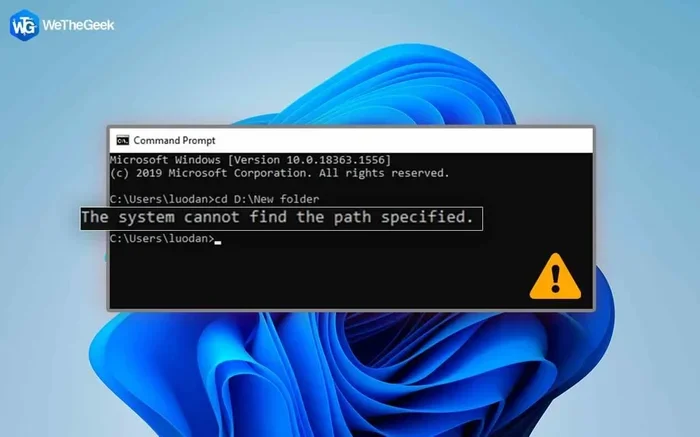
If you type localhost or 127.0.0.1 in your browser and get an error, the most common cause is that no service is running on that address. Make sure your local server is started before trying to access it. Also check that your firewall is not blocking loopback traffic.
Loopback Address Not Pinging
If the ping command fails, your network adapter settings might be misconfigured. On Windows, you can reset your network settings through the Settings app. On macOS or Linux, you can use terminal commands to restart your network services. The 127001 IP address should always work unless something is fundamentally wrong with your operating system’s network stack.
Confusion with Public IP Addresses
Sometimes people confuse the loopback address with their laptop’s actual network IP. Your public IP address (the one you get from your router) is completely different from 127.0.0.1. The loopback address is always private and local. If you need to find your real network IP, tools that help you find IP address can be useful.
How the 127001 IP Address Relates to Networking
The 127001 IP address is part of a larger networking system. To understand it fully, it helps to know a few basic networking concepts. Every device on a network has an IP address that allows other devices to find and communicate with it. The loopback address is a special exception — it is reserved exclusively for your device to talk to itself.
When you connect your laptop to a Wi-Fi network, your router assigns you a local IP address, such as 192.168.1.x. This is your address on the local network. But the 127001 IP address exists independently of your router and your network. It is always available, always the same, and always points to your own machine.
This distinction is important for network troubleshooting. If your internet connection is down but you can still ping 127.0.0.1, you know your laptop’s networking software is fine. The problem lies elsewhere, such as with your router, modem, or internet service provider. For more on network devices, you might want to learn about what is a gully camera, which uses IP-based networking for surveillance purposes.
Security Considerations for the 127001 IP Address
One of the best things about the 127001 IP address is that it is inherently secure. Because it never leaves your laptop, there is no risk of external attacks through the loopback interface. However, you should still be mindful of a few security practices.
First, never expose your loopback services to the public internet unless you intend to. Binding a server to 127.0.0.1 is safe, but binding it to 0.0.0.0 makes it accessible to anyone on your network. Second, keep your local services updated. Even though they are on the loopback, vulnerabilities in local applications can still be exploited if malware gains access to your laptop.
For those interested in IP-based security devices, understanding how default IP addresses work is valuable. You can explore resources about default IP address for Bosch cameras to see how network devices use IP addresses for communication and access control.
127001 IP Address vs. Other Common IP Addresses
To really understand the 127001 IP address, it helps to compare it with other types of IP addresses you might encounter on your laptop.
| Address Type | Example | Purpose |
|---|---|---|
| Loopback | 127.0.0.1 | Device communicates with itself |
| Private Local | 192.168.1.x | Device on your home network |
| Public | 8.8.8.8 | Device on the global internet |
| APIPA | 169.254.x.x | Auto-assigned when no DHCP server is available |
As you can see, the 127001 IP address is unique because it is the only one that never leaves your device. All other addresses involve communication between multiple devices or across networks.
Final Thoughts
The 127001 IP address is a small but powerful part of how your laptop handles networking. It gives you a safe, private, and reliable way to test applications, troubleshoot network issues, and run local services. Whether you are a developer, a student, or just someone curious about how your laptop works, understanding this address is a valuable skill.
Next time you see 127.0.0.1 or localhost on your screen, you will know exactly what it means and why it is there. Keep this knowledge in your toolkit — it will come in handy more often than you might expect.
For more tips on keeping your laptop running smoothly, check out our guide on what is the best investment for lifespan of PC to learn how to protect and extend the life of your device.
Frequently Asked Questions
What is the 127001 IP address used for?
The 127001 IP address (127.0.0.1) is used for loopback communication, meaning your laptop sends and receives data to and from itself. It is commonly used for testing websites, running local servers, and troubleshooting network issues without needing an internet connection.
Is the 127001 IP address the same as localhost?
Yes, 127.0.0.1 and localhost are essentially the same thing. Both refer to the loopback address on your device. When you type either one into your browser or command line, you are telling your laptop to communicate with itself.
Can someone else access my 127001 IP address?
No, the 127001 IP address is completely private and internal. It never leaves your laptop, so no one else on the internet or your local network can access it. This makes it a safe environment for testing and development.
Why is my 127001 IP address not working?
If the loopback address is not responding, it could be due to a misconfigured network setting, a firewall blocking loopback traffic, or a problem with your operating system’s network stack. Try restarting your network services or checking your firewall rules to resolve the issue.
Do I need an internet connection to use the 127001 IP address?
No, the 127001 IP address works entirely offline. Since it loops back to your own device, you do not need Wi-Fi, Ethernet, or any external network to use it. This is one of the reasons it is so valuable for testing and development.
How is the 127001 IP address different from my laptop’s regular IP address?
Your laptop’s regular IP address (like 192.168.1.x) identifies it on your local network, allowing other devices to find it. The 127001 IP address is reserved exclusively for your device to talk to itself. It is not visible to any other device on the network and never changes.