What Is Google Earth Level of Detail
Google Earth Level of Detail (LOD) is the system that controls how much detail you see at different zoom levels. It helps Google Earth load the right amount of imagery and terrain data based on how close or far you are from the surface. Understanding LOD helps you get the best performance and visual quality whether you are exploring the planet on a powerful desktop or a laptop with limited RAM.
Google Earth is one of the most impressive tools ever built for exploring our planet. You can zoom from a view of the entire globe all the way down to street-level detail in seconds. But have you ever wondered how Google Earth manages to show you so much detail without crashing your browser or slowing down your computer? The answer lies in a clever technology called Level of Detail, or LOD for short.
Google Earth Level of Detail is the system that decides how much visual information to show you at any given moment. When you are zoomed out looking at a whole continent, Google Earth does not waste resources loading tiny details you cannot even see. When you zoom in on your neighborhood, it suddenly loads high-resolution images and detailed 3D terrain. This smart balancing act is what makes the experience so smooth and enjoyable.
In this article, we will break down exactly what Level of Detail means in Google Earth. We will look at how it works behind the scenes, why it matters for performance, and how it affects the quality of the images you see. Whether you are a casual explorer or someone using Google Earth for professional work, understanding LOD will help you get the most out of the tool.
Key Takeaways
- LOD stands for Level of Detail: It is the technology Google Earth uses to adjust image and terrain quality based on your zoom level.
- It balances performance and quality: LOD ensures smooth navigation by loading more detail only when you need it.
- Higher LOD means sharper imagery: When you zoom in closely, Google Earth loads high-resolution satellite photos and detailed terrain meshes.
- Your hardware matters: Having enough RAM, like the amount discussed in what is good RAM for a laptop, directly impacts how well Google Earth renders detailed layers.
- LOD uses streaming tiles: Google Earth loads image tiles dynamically as you move and zoom, rather than downloading everything at once.
- Camera altitude drives LOD switching: The system automatically adjusts detail levels based on how high or low your virtual camera is above the surface.
📑 Table of Contents
- What Is Level of Detail in Google Earth?
- Why Google Earth Uses Level of Detail
- The Different Levels of Detail in Google Earth
- How LOD Affects Your Google Earth Experience
- Tips for Getting the Best Google Earth Experience
- Common Problems Related to LOD in Google Earth
- Frequently Asked Questions
- Conclusion
What Is Level of Detail in Google Earth?
Level of Detail, commonly shortened to LOD, is a rendering technique used in 3D mapping software. In Google Earth, LOD controls the amount of geographic data, imagery, and terrain detail that loads at any given zoom level. Think of it like a camera adjusting its focus. When you are far away, the system shows a broad overview. When you move closer, it sharpens the image and adds finer details.
Google Earth does not load one giant image of the entire planet. That would be impossible and would crash any device. Instead, it breaks the Earth into thousands of small tiles. Each tile has multiple versions with different amounts of detail. LOD is the system that picks the right version of each tile based on where your virtual camera is pointing and how high up it is.
How LOD Works Behind the Scenes
The LOD system in Google Earth operates on a simple principle. Show less detail when the user is far away. Show more detail when the user is close. This might sound obvious, but the technology behind it is quite sophisticated. Here is how it works step by step.
First, Google Earth tracks the altitude of your virtual camera above the Earth’s surface. This altitude is measured in meters or feet. The higher the camera, the lower the LOD setting. The lower the camera, the higher the LOD setting.
Second, Google Earth divides the globe into a grid of tiles. Each tile covers a specific geographic area. At high altitudes, fewer tiles load because each tile covers a larger area with less detail. As you zoom in, more tiles load, and each tile contains higher-resolution imagery and more detailed terrain data.
Third, Google Earth uses a process called streaming. It does not download all tiles at once. Instead, it fetches tiles on demand as you move and zoom. This saves bandwidth and keeps the application responsive. The LOD system tells the server which tile versions to send based on your current view.
Finally, Google Earth smoothly transitions between LOD levels. You will notice that as you zoom in, blurry images gradually sharpen into crisp satellite photos. This transition is the LOD system swapping lower-detail tiles for higher-detail ones in real time.
Why Google Earth Uses Level of Detail
There are several important reasons why Google Earth relies on LOD technology. Without it, the application would be slow, bloated, and frustrating to use. Let us explore the key reasons in detail.
Performance Optimization
The biggest reason Google Earth uses LOD is performance. Rendering high-resolution imagery and complex 3D terrain for the entire planet at once would require enormous computing power. Most devices, especially laptops, simply cannot handle that kind of load.
By using LOD, Google Earth only renders the detail that is currently visible to the user. This dramatically reduces the amount of processing power needed. Even on a laptop with 16 GB of RAM, loading every detail of the Earth at once would cause serious slowdowns. LOD keeps things running smoothly by being smart about what it loads.
Bandwidth Efficiency
Google Earth streams data from servers around the world. If it loaded full-resolution tiles for everything you could see, it would use a massive amount of internet data. LOD helps conserve bandwidth by only downloading high-resolution tiles for the areas you are actively looking at.
This is especially important for users on mobile data or slow internet connections. The LOD system ensures that you get a usable experience even when your connection is not blazing fast. It prioritizes the tiles you need right now and defers the rest.
Memory Management
Every tile that Google Earth loads takes up space in your device’s memory. If the application kept every tile in memory at all times, it would quickly run out of RAM. LOD helps manage memory by unloading tiles that are no longer in view and loading new tiles as you navigate.
This is why having sufficient RAM matters when using Google Earth. If your system does not have enough memory, the constant loading and unloading of tiles can cause stuttering and delays. You can learn more about how much RAM you actually need for smooth performance in our guide on what is good RAM on a laptop.
The Different Levels of Detail in Google Earth
Google Earth does not use just one or two detail levels. It uses many. The exact number can vary depending on the version of Google Earth you are using and the type of data being displayed. However, the general concept remains the same across all versions.
Global View (Low LOD)
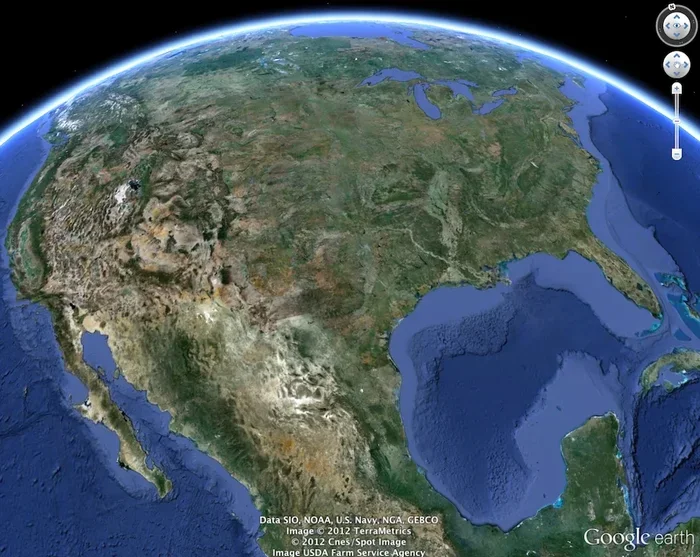
When you first open Google Earth and see the entire planet, you are looking at the lowest LOD setting. At this level, the imagery is coarse and generalized. You can see continents, major oceans, and large mountain ranges, but individual buildings and roads are not visible.
The global view uses very small tile files. This means the application loads quickly and uses minimal memory. It is perfect for getting an overview of a region before zooming in to explore further.
Regional View (Medium LOD)
As you zoom in to a country or a large city, the LOD increases. Google Earth starts loading medium-resolution tiles that show more geographic features. You can see major highways, rivers, parks, and the outlines of large buildings.
At this level, the terrain starts to look more realistic. Google Earth applies shading and elevation data to create a sense of three-dimensional landscape. The tiles are larger in file size but still manageable for most devices.
Street-Level View (High LOD)
When you zoom in very close to a specific location, Google Earth reaches its highest LOD setting. At this level, you can see individual buildings, trees, roads, and even small pathways. The satellite imagery becomes extremely sharp and detailed.
High LOD tiles are the largest in file size and require the most processing power to render. This is where your device’s hardware really matters. A powerful graphics card and plenty of RAM make a big difference at this zoom level.
How LOD Affects Your Google Earth Experience
The Level of Detail system has a direct impact on how you experience Google Earth every day. Understanding this impact can help you troubleshoot issues and optimize your setup for the best results.
Visual Quality
The most obvious effect of LOD is visual quality. When the LOD is high, images look crisp and detailed. When the LOD is low, images look blurry or pixelated. This is completely normal and expected. The LOD system is designed to show you the best possible quality for your current view.
If you notice that images stay blurry even when you are zoomed in, it could be a sign that your device is struggling to load high-LOD tiles. This might happen if your internet connection is slow or if your hardware is not powerful enough.
Navigation Smoothness
LOD also affects how smoothly you can navigate Google Earth. When you pan and zoom quickly, the application needs to load new tiles fast. If your device cannot keep up, you will see delays and stuttering.
One common issue is that when you zoom in rapidly, Google Earth temporarily shows lower-detail tiles while it fetches higher-detail ones. This is the LOD system doing its job. It prioritizes a smooth experience over perfect detail in that moment. Once the high-detail tiles arrive, the image sharpens.
3D Buildings and Terrain
Google Earth’s 3D buildings and terrain models also use LOD. Close up, you can see individual buildings with realistic textures and shapes. From far away, these buildings are simplified into basic shapes to save processing power.
The 3D city models in Google Earth are some of the most impressive uses of LOD technology. Cities like New York, London, and Tokyo have thousands of detailed 3D buildings, each with its own LOD settings. This allows Google Earth to render entire skylines without overwhelming your device.
Tips for Getting the Best Google Earth Experience
Now that you understand how Level of Detail works, here are some practical tips to help you get the most out of Google Earth.
- Use a stable internet connection: Since Google Earth streams tiles dynamically, a fast and stable connection ensures that high-LOD tiles load quickly.
- Close other applications: Running Google Earth alongside heavy applications can strain your system memory. Close unnecessary programs to free up resources for smooth tile rendering.
- Check your RAM: Google Earth benefits from having enough memory. If you are unsure whether your current setup is sufficient, check out our article on is 8 GB of RAM good for a laptop for guidance.
- Use the latest version: Google regularly updates Google Earth with performance improvements and better LOD algorithms. Always keep your app updated for the smoothest experience.
- Adjust graphics settings: If you experience lag, try reducing the graphics quality in Google Earth settings. This lowers the LOD demand and can significantly improve frame rates.
- Explore offline: Google Earth Pro allows you to save areas for offline use. Pre-loading tiles for a specific region means you can explore high-detail imagery without relying on an internet connection.
Common Problems Related to LOD in Google Earth
Even with LOD technology, you may occasionally run into issues. Here are some common problems and what causes them.
Blurry images at high zoom: This usually happens when your internet connection is too slow to fetch high-resolution tiles. The LOD system keeps showing lower-detail tiles until the better ones arrive.
Stuttering or lag when zooming: This is often a hardware issue. If your device does not have enough RAM or a capable graphics card, it struggles to render high-LOD tiles quickly enough.
Tiles not loading at all: Sometimes, specific tile servers may be temporarily unavailable. The LOD system will try to load alternative tiles or show gray areas until the correct tiles become available.
Inconsistent detail across regions: Not all areas of the Earth have the same level of satellite coverage. Some regions have high-resolution imagery with multiple LOD levels, while others only have low-detail coverage. This is a data availability issue, not an LOD technology issue.
Frequently Asked Questions
What does Level of Detail mean in Google Earth?
Level of Detail, or LOD, is the system Google Earth uses to adjust the amount of visual detail based on your zoom level. When you are far away, it shows less detail for better performance. When you zoom in, it loads more detailed imagery and terrain data. This ensures a smooth and responsive experience at every zoom level.
Does Level of Detail affect how fast Google Earth runs?
Yes, LOD has a direct impact on performance. By only loading the detail you can currently see, LOD reduces the amount of data your device needs to process. This keeps Google Earth running smoothly, especially on devices with limited hardware resources.
Can I manually control the Level of Detail in Google Earth?
Google Earth does not offer a manual LOD control. The system automatically adjusts detail levels based on your zoom and camera position. However, you can indirectly influence LOD by adjusting graphics settings, closing background apps, and ensuring you have enough RAM and a good internet connection.
Why do some areas in Google Earth look less detailed than others?
Google Earth has different levels of satellite imagery coverage around the world. Some regions have high-resolution photos with many LOD levels, while others have older or lower-quality imagery. The LOD system works the same everywhere, but the maximum detail available depends on the data Google has for that area.
Do I need a powerful computer to use Google Earth at high LOD?
You do not need a top-of-the-line computer, but having decent hardware helps. A laptop with at least 8 GB of RAM and a dedicated graphics card will handle high LOD levels much better than a basic system. The LOD system is designed to scale down gracefully on less powerful devices, so you can still use Google Earth even on modest hardware.
Is Google Earth Level of Detail the same as image resolution?
Not exactly. Image resolution refers to the sharpness and clarity of a single image. LOD is a broader concept that includes resolution but also covers terrain meshes, 3D models, and how all these elements are managed at different zoom levels. LOD is the system that decides which resolution and level of detail to show at any given moment.
Conclusion
Google Earth Level of Detail is a brilliant piece of technology that makes exploring our planet feel seamless and magical. It handles the complex job of deciding what detail to show and when to show it, so you can focus on discovery rather than technical issues. From the broad global view all the way down to individual buildings, LOD ensures that Google Earth delivers the right amount of detail at the right time.
Understanding how LOD works gives you a new appreciation for the tool. It also helps you troubleshoot issues and optimize your setup for the best possible experience. Whether you are a student, a researcher, or simply someone who loves exploring the world from their desk, knowing about Level of Detail makes you a smarter Google Earth user.
Next time you zoom into a satellite image and watch it sharpen into crystal-clear detail, remember the LOD system working behind the scenes. It is the invisible engine that powers one of the most amazing mapping tools ever created. And with the right hardware and a good internet connection, you can enjoy every level of detail Google Earth has to offer.