What Is a Bezel on a Laptop
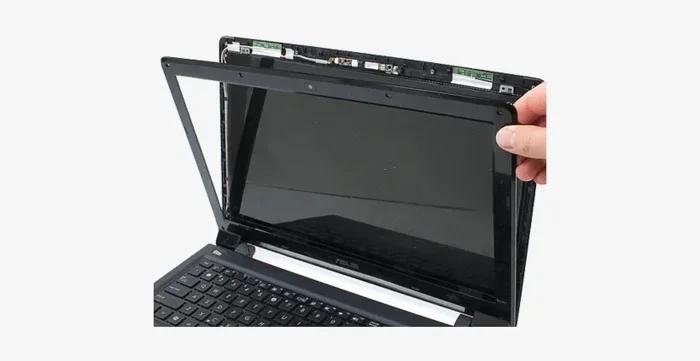
A bezel is the thin frame or border surrounding your laptop screen. It holds the display panel in place and affects how your laptop looks and feels. Thin bezels give you a bigger view and a modern look, while thick bezels can make a laptop feel bulky. Understanding bezels helps you choose a better laptop for work, gaming, or everyday use.
Have you ever looked closely at the edges of your laptop screen? That frame around the display has a name. It is called a bezel. The bezel on a laptop is the border that surrounds the screen panel. It connects the display to the laptop body and holds everything together. You might not think about it much, but the bezel plays a big role in how your laptop looks, feels, and works.
When you shop for a new laptop, you often hear words like “thin bezels” or “narrow border.” These terms describe how much frame space surrounds the screen. A laptop with thin bezels gives you more screen space in a smaller body. This is why modern laptops look so sleek and borderless compared to older models. In this guide, we will break down everything you need to know about bezels. You will learn what they do, why they matter, and how to pick the right one for your needs.
Key Takeaways
- Bezel Definition: The bezel is the border or frame around your laptop display panel.
- Thin Bezels Matter: They increase your screen-to-body ratio and make laptops look sleeker.
- Types of Bezels: You will find thin, ultra-thin, and bezel-less designs on modern laptops.
- Function Goes Beyond Looks: Bezels protect the screen, house webcams, and affect laptop build quality.
- Trade-Offs Exist: Very thin bezels can affect durability and may cause accidental touches.
- Check Specs When Buying: Always look at bezel size alongside screen size and laptop design before purchasing.
📑 Table of Contents
- What Exactly Is a Bezel on a Laptop?
- Why Bezels Matter for Your Laptop Experience
- Types of Bezel Designs You Will See
- How Bezels Affect Laptop Specs and Components
- How to Choose the Right Bezel for Your Needs
- Common Mistakes People Make When Choosing a Laptop Based on Bezels
- Expert Insights on Laptop Bezels
- Conclusion
What Exactly Is a Bezel on a Laptop?
The bezel is the solid frame that sits between the edge of your display and the outer shell of the laptop. Think of it like a picture frame around a painting. The screen is the painting, and the bezel is the frame that keeps it in place. On most laptops, the bezel covers the front, sides, and sometimes the top and bottom edges of the panel.
Bezels serve several important purposes. They physically hold the display panel inside the laptop chassis. They also protect the screen from damage if you bump or drop the device. Many laptops place the front-facing camera inside the top bezel. Some laptops also put microphones or indicator lights in the bezel area. So even though bezels might seem like just a design choice, they are actually functional parts of your laptop.
How Bezels Are Measured
Bezel size is usually measured in millimeters. A thinner bezel means less frame space around the screen. A thicker bezel means more frame space. When you see a laptop listed with “narrow bezels” or “slim bezels,” it means the frame is small. This gives you a higher screen-to-body ratio, which is a fancy way of saying more screen in less space.
If you compare two laptops with the same screen size, the one with thinner bezels will have a smaller overall footprint. This is a big deal if you carry your laptop around every day. A compact laptop with thin bezels fits more easily into bags and takes up less desk space. That is a huge advantage for students and professionals alike.
Why Bezels Matter for Your Laptop Experience
You might wonder why bezels deserve so much attention. The answer is simple. Bezels directly affect how you use your laptop every day. They influence your visual experience, the laptop’s weight, and even its durability. Let us look at the main reasons bezels matter.
Visual Impact and Immersion
Thin bezels give you a more immersive viewing experience. When the frame around the screen is small, your eyes focus more on the content. This is especially important if you use your laptop for movies, video editing, or gaming. A laptop with narrow bezels makes the display feel larger without actually increasing the screen size.
For example, a 15-inch laptop with thick bezels might feel smaller than a 14-inch laptop with thin bezels. The difference in screen-to-body ratio can be dramatic. This is why many laptop brands now compete to offer the thinnest possible bezels. It is a key selling point in laptop reviews and product comparisons.
Portability and Design
Thin bezels also make laptops lighter and more portable. When you reduce the frame size around the screen, you shrink the overall dimensions of the laptop. A sleek laptop design with slim bezels is easier to carry in a backpack or briefcase. It also looks more modern and professional on your desk.
Many business laptops and ultrabooks prioritize thin bezels because portability is their main goal. If you travel often or work from cafes, a compact laptop with minimal bezels is a smart choice. The design not only looks good but also makes your daily routine more convenient.
Durability and Protection
Thicker bezels can actually offer better protection. A wider frame absorbs more impact if you drop the laptop. It also provides more structural support for the screen panel. So there is a trade-off between aesthetics and durability. Very thin bezels look stunning, but they may be more vulnerable to damage.
If you are hard on your devices, a laptop with slightly thicker bezels might be a better fit. You get a bit more cushion and protection without sacrificing too much screen space. It is all about finding the right balance for your lifestyle.
Types of Bezel Designs You Will See
Laptop manufacturers use different bezel designs to stand out from the competition. Each style has its own strengths. Here are the most common types you will encounter when shopping.
Standard Bezel
A standard bezel is the traditional frame you see on most laptops. It is about 3 to 5 millimeters thick on each side. This design has been around for years and still appears on budget and business laptops. Standard bezels are functional and reliable, but they do not give you the most modern look.
Thin Bezel
A thin bezel is narrower than a standard one, usually around 1 to 3 millimeters. This design became popular as laptops started focusing on screen-to-body ratio. Thin bezels make the laptop look more polished and give you a slightly larger viewing area. Most mid-range and premium laptops use this design today.
Ultra-Thin Bezel
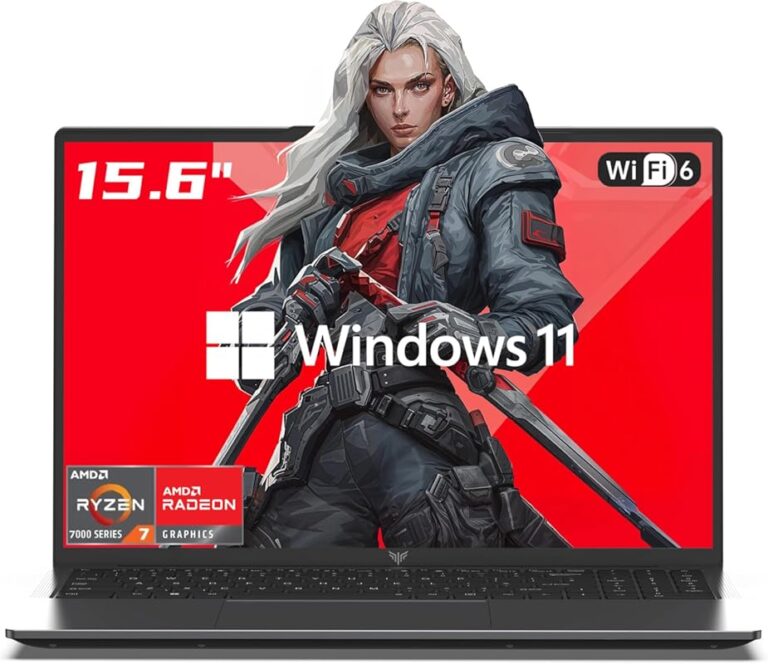
Ultra-thin bezels are the thinnest frames available, often under 1 millimeter. These create a nearly borderless look that is very eye-catching. Laptops with ultra-thin bezels maximize every inch of the display. They are common in premium ultrabooks and high-end gaming laptops.
Bezel-Less or Borderless Display
A bezel-less design takes the concept even further. The screen edge goes almost all the way to the laptop body with no visible frame. This gives the most immersive experience possible. However, true bezel-less designs are still rare and often come with a higher price tag. They can also be more fragile due to the lack of protective frame.
How Bezels Affect Laptop Specs and Components
Bezels do not just impact the look of your laptop. They also influence where other components are placed. Let us explore how bezels connect to the rest of your laptop.
Webcam Placement
Most laptops place the front-facing webcam inside the top bezel. This is the strip of frame right above the screen. When bezels get thinner, webcam placement becomes a design challenge. Some laptops now put the camera under the screen or on the keyboard deck instead. This is an interesting trend that shows how bezels shape the entire laptop layout.
Screen Size vs. Laptop Size
Thin bezels let manufacturers fit larger screens into smaller laptop bodies. This is why you can get a 16-inch display in a 14-inch laptop chassis. The reduced frame size around the display creates the illusion of a bigger screen. When you compare laptop specs, always check both the screen size and the bezel size to understand the true viewing experience.
Other Components in the Bezel
Beyond the webcam, bezels can house microphones, status lights, and fingerprint readers. Some laptops put the power button in the top bezel. Others include volume controls or function keys along the bezel edges. The bezel area is essentially a useful workspace for extra features, even if you do not always notice them.
How to Choose the Right Bezel for Your Needs
Not all bezels are created equal, and the right choice depends on what you use your laptop for. Here are some tips to help you decide.
For Work and Productivity
If you use your laptop for office tasks, a thin or ultra-thin bezel is a great choice. More screen space means you can fit more windows side by side. This boosts your productivity and makes multitasking easier. Look for a laptop with a high screen-to-body ratio for the best work experience.
For Gaming and Media
Gamers and media lovers should prioritize thin bezels too. A narrow frame reduces distractions and lets you focus on the action. When combined with a fast display technology like IPS or OLED, thin bezels create a truly immersive setup. Just make sure the laptop also has strong performance and a good GPU.
For Durability and Everyday Use
If you are rough on your gear, consider a laptop with slightly thicker bezels. The extra frame provides better protection for the screen. You do not have to sacrifice everything for a slim look. A balanced design with a moderate bezel gives you both durability and a clean appearance.
Quick Tips for Evaluating Bezels
- Check the screen-to-body ratio in the laptop specs.
- Look at the laptop from the side to see the bezel thickness.
- Read laptop reviews that mention bezel quality and design.
- Consider where the webcam and microphone are placed on the bezel.
- Compare the overall laptop weight and thickness with the bezel size.
- Visit a store to see the bezel in person before buying online.
Common Mistakes People Make When Choosing a Laptop Based on Bezels
It is easy to get caught up in bezel trends and overlook other important factors. Here are some mistakes to avoid.
Focusing only on thin bezels. A thin bezel looks great, but it does not tell the whole story. You also need to consider screen quality, laptop build, and overall performance. A thin bezel on a low-quality panel will not give you a good experience.
Ignoring the webcam placement. With thinner bezels, some laptops move the camera to unusual spots. This can affect video call quality if the camera is at an awkward angle. Check where the webcam sits before you buy.
Overlooking durability. Ultra-thin bezels may look amazing, but they can be more prone to damage. If you travel a lot or work in demanding environments, a slightly thicker bezel might save you from costly repairs.
Forgetting about the laptop’s overall weight. A thin bezel does not always mean a lighter laptop. The materials, battery size, and internal components also matter. Always check the full laptop specs before making a decision.
Expert Insights on Laptop Bezels
Industry experts agree that bezels are one of the most important design elements in modern laptops. The trend toward thinner bezels has transformed how laptops look and function. According to many laptop reviews, consumers now expect thin bezels as a standard feature, not a luxury.
Manufacturers continue to push the limits of bezel design. Some brands now offer laptops with bezels so thin they are almost invisible. As display technology improves, we can expect even more innovative approaches to the laptop frame. The future might bring truly bezel-less laptops that blend the screen seamlessly into the body.
When evaluating a laptop, always look at the bezel in context with the rest of the device. A great bezel design paired with a high-quality display and solid performance is the winning combination. Do not let a thin bezel alone sell you on a laptop. Consider the full picture to make the best choice.
Conclusion
The bezel on a laptop is more than just a frame. It shapes your viewing experience, affects portability, and influences the laptop’s durability. Whether you prefer thin bezels for a modern look or thicker bezels for extra protection, understanding bezels helps you make a smarter purchase. Next time you shop for a laptop, pay attention to the bezel size and design. It is a small detail that makes a big difference.
Remember to balance bezel style with other factors like screen quality, laptop design, and overall performance. The best laptop is the one that fits your needs and feels right in your hands. With the knowledge you have gained here, you are now ready to choose a laptop with confidence.
Frequently Asked Questions
What is the purpose of a bezel on a laptop?
The bezel holds the display panel in place and protects the screen from damage. It also houses components like the webcam and microphones. Beyond function, the bezel affects the laptop’s look and overall screen-to-body ratio.
Are thin bezels better than thick bezels?
Thin bezels give you more screen space and a modern look. However, thick bezels can offer better durability and protection. The best choice depends on your needs and how you use your laptop.
Can the bezel affect my laptop’s screen size?
Yes, indirectly. Thinner bezels allow manufacturers to fit larger screens into smaller laptop bodies. This means you can get a bigger display without increasing the overall laptop size.
Where is the webcam usually located on a laptop bezel?
The webcam is typically placed in the top bezel, right above the screen. Some laptops with very thin bezels move the camera to the keyboard deck or under the screen instead.
Do all laptops have bezels?
Most laptops have some form of bezel, but modern designs make them very thin. True bezel-less laptops are rare and usually found in premium or specialty models.
Does bezel size affect laptop weight?
Bezel size alone does not determine weight, but thinner bezels can contribute to a more compact and lighter design. The overall weight also depends on the materials and internal components used in the laptop build.
=== INTERNAL LINKS ===
If you are curious about other laptop parts, check out what the mouse on a laptop is called to learn more about laptop components.
When choosing a laptop, make sure your RAM is good enough for the tasks you plan to run.
Not sure how much memory you need? Here is a guide on how much RAM you need on a laptop to get the right setup.