What Is Intel Me
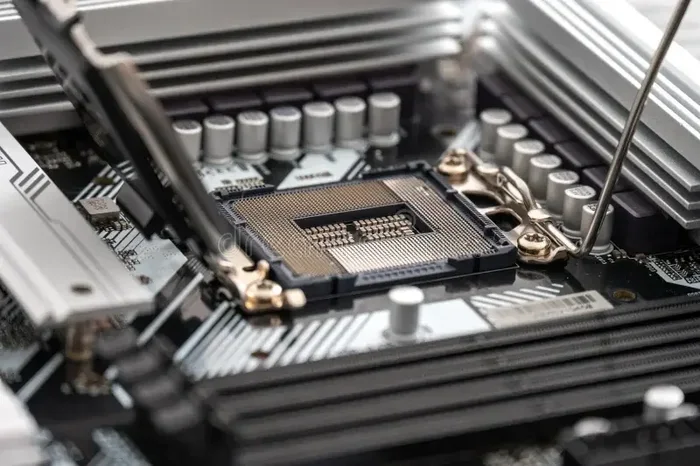
Intel ME (Intel Management Engine) is a hidden subsystem built into Intel processors that handles low-level system tasks like security, power management, and remote maintenance. It runs independently from your operating system and has been a standard feature in Intel-based laptops since the mid-2000s. Understanding what Intel ME does can help you better manage your PC’s security, performance, and troubleshooting.
You boot up your laptop every day, open apps, browse the web, and get work done. But deep inside your Intel-based system, a quiet little subsystem has been running since before your operating system even loads. This is Intel ME, and it is one of the most important yet least understood parts of modern laptop hardware.
If you have ever wondered what runs on your computer when Windows or macOS is completely shut down, or why your IT department can fix a work laptop remotely, Intel ME is the answer. In this article, we will break down exactly what Intel ME is, how it works, what it does, and why it matters for your everyday computing experience. Let us dive in.
Key Takeaways
- Intel ME is a dedicated microcontroller: It operates independently from your CPU and OS, handling critical system functions behind the scenes.
- It boosts laptop security and manageability: Features like AMT allow IT admins to remotely monitor and repair systems even when they are powered off.
- Intel ME has faced privacy concerns: Because it runs in the background with limited user control, security researchers have raised questions about its transparency.
- You can check Intel ME version through your BIOS or system tools: Keeping it updated helps patch vulnerabilities and improve compatibility.
- Intel ME is not removable: It is embedded in the chipset and cannot be fully disabled on most consumer systems without risking stability.
- It works closely with other laptop components: From RAM management to thermal monitoring via your CPU cooler, Intel ME plays a behind-the-scenes coordination role.
📑 Table of Contents
What Is Intel ME?
Intel ME stands for Intel Management Engine. It is a dedicated microcontroller that lives inside Intel chipsets. Think of it as a tiny computer within your computer. It has its own processor, memory, and firmware, and it operates completely separate from your main operating system. Even when your laptop is turned off, Intel ME can remain active as long as the system is plugged into power.
Intel first introduced the Management Engine around 2008. It became a standard component in almost all Intel-based laptops, desktops, and workstations. The purpose was to give businesses and IT departments a powerful tool for managing fleets of computers. But over time, it has become a part of nearly every Intel system, including consumer laptops you buy at a retail store.
The Intel ME firmware is stored on a separate flash chip on your motherboard. It boots up independently and initializes before your main operating system loads. This means it has a privileged position in your system architecture. It can access hardware resources that your OS normally controls, making it both powerful and, for some users, a bit unsettling.
How Intel ME Works Under the Hood
Intel ME runs on an ARC processor core, which is a type of embedded processor designed for low-level tasks. It has its own small amount of static RAM (SRAM) and flash storage. When you press the power button on your laptop, Intel ME wakes up first. It initializes the chipset, sets up secure communication channels, and then hands control over to your BIOS or UEFI firmware.
From there, Intel ME continues to run in the background. It communicates with the Platform Controller Hub (PCH), which is the Intel chipset that manages connections between your CPU, memory, storage, and peripherals. Intel ME acts as a traffic controller of sorts, coordinating low-level operations that keep your system running smoothly and securely.
One key aspect of Intel ME is that it uses Active Management Technology (AMT). AMT allows remote technicians to access and manage a computer even if the operating system is crashed or powered off. This is incredibly useful in enterprise environments where hundreds or thousands of laptops need to be maintained efficiently.
What Does Intel ME Actually Do?
Intel ME handles a surprising number of tasks that you never see directly. Here is a closer look at its core functions:
System Security
Intel ME plays a major role in protecting your laptop at the hardware level. It supports features like Intel Trusted Execution Technology (TXT), which helps ensure that your system boots using only trusted software. This prevents rootkits and other low-level malware from infecting your laptop before your operating system even starts.
Intel ME also works with your laptop’s BIOS firmware to verify the integrity of the boot process. If something has been tampered with, Intel ME can flag the issue and prevent the system from booting into an insecure state. This is a powerful layer of protection that most users never notice but benefits greatly from.
Power Management
Your laptop’s battery life depends on smart power management. Intel ME helps regulate how components use energy. It can put unused hardware into low-power states and wake them up when needed. This is why your laptop can stay in sleep mode for days while still being ready to use instantly.
Intel ME also monitors thermal sensors throughout the system. When temperatures rise, it can signal the system to reduce power to the CPU or ramp up fan speeds. This coordination is essential for keeping your laptop cool and preventing overheating, especially during demanding tasks like gaming or video editing.
Remote Management and IT Support
For businesses, Intel ME is a game-changer. IT departments can use AMT to remotely access laptops, even if they are turned off or disconnected from the corporate network. They can push software updates, run diagnostics, and troubleshoot problems without needing someone to physically sit at the machine.
This capability is particularly valuable for companies with remote or hybrid workforces. A technician in another city can essentially sit at your desk virtually and fix issues that would normally require an on-site visit. It saves time, reduces costs, and keeps employees productive.
Digital Rights Management (DRM)
Intel ME also supports digital rights management for protected content. If you have ever streamed a high-definition movie or used professional creative software that checks for license compliance, Intel ME may have been involved in verifying that your system meets the requirements. This is more common in business and creative workstations than in everyday consumer laptops.
Intel ME and Your Laptop’s Performance
One question many users ask is whether Intel ME affects laptop performance. The short answer is no, or very minimally. Intel ME is designed to be lightweight and efficient. It uses very little processing power and memory, so you should not notice any slowdown in your day-to-day tasks.
However, there are a few scenarios where Intel ME can have an impact:
- During boot-up: Intel ME adds a few seconds to the initialization process before your operating system loads.
- When updating firmware: Intel ME firmware updates can take a few minutes and may require a restart.
- In rare cases of conflict: If Intel ME firmware is outdated or corrupted, it can cause stability issues like random reboots or failure to wake from sleep.
Keeping your Intel ME firmware updated is important for both security and stability. Most laptop manufacturers push Intel ME updates through BIOS or UEFI updates. If you have an Intel-based system, checking for BIOS updates periodically is a good habit.
Privacy and Security Concerns with Intel ME
Intel ME has not been without controversy. Because it operates at such a low level with access to system memory and hardware, security researchers have raised valid concerns about its potential for misuse. Here are the key issues:
Limited Transparency
Intel ME firmware is proprietary and closed-source. This means users and security researchers cannot easily inspect what the code is actually doing. The concern is that a vulnerability or a backdoor in Intel ME could be exploited without the user ever knowing. Since Intel ME operates below the operating system, traditional security tools like antivirus software cannot detect or control it.
Potential Attack Surface
Security researchers have discovered vulnerabilities in Intel ME firmware over the years. In 2017, a major vulnerability known as CVE-2017-5689 was found that could allow remote attackers to gain full control of a system through Intel ME. Intel released patches, but the incident highlighted how a subsystem with this level of access could become a serious attack vector.
What Can You Do?
If you are concerned about Intel ME, here are some practical steps you can take:
- Keep your BIOS and firmware updated to the latest version from your laptop manufacturer.
- Disable Intel AMT if you do not need remote management features (available in BIOS settings on many systems).
- Use a reputable antivirus and keep your operating system patched.
- Consider using a laptop with AMD or ARM processors if you want to avoid Intel ME entirely.
For most everyday users, Intel ME is a net positive. The security benefits outweigh the risks, especially when you keep your firmware up to date. But it is good to be aware of what is running on your system, even if you cannot see it.
Intel ME Versions and Compatibility
Intel has released several versions of the Management Engine over the years. Each version brings improvements in security, performance, and features. Here is a quick look at the major generations:
| Intel ME Version | Release Year | Key Features |
|---|---|---|
| ME 6.x | 2008-2010 | Initial consumer rollout, basic AMT support |
| ME 7.x – 8.x | 2010-2013 | Improved security, better power management |
| ME 9.x – 10.x | 2013-2016 | Enhanced trusted execution, stronger DRM |
| ME 11.x | 2016-present | Major security overhaul, improved transparency |
| CSME (Converged Security ME) | 2019-present | Merged with Intel Security Engine, tighter integration |
Newer laptops will have the latest Intel ME versions, which include significant security improvements. If you are buying a used or older Intel-based laptop, it is worth checking what ME version it has. You can usually find this information in your BIOS settings or by using system information tools provided by your laptop manufacturer.
Intel ME vs. Other System Subsystems
Intel ME is not the only low-level subsystem in your laptop. Here is how it compares to other similar technologies:
Intel ME vs. AMD Platform Security Processor (PSP)
AMD processors have their own equivalent called the Platform Security Processor. It serves a similar purpose, handling security and management tasks at the hardware level. Both Intel ME and AMD PSP operate independently from the main OS and provide a trusted execution environment. The key difference is that Intel ME has been more widely adopted and studied, which means more vulnerabilities have been found and patched over time.
Intel ME vs. UEFI/BIOS Firmware
Your UEFI firmware is the software that initializes your hardware when you power on. Intel ME works alongside UEFI but operates at an even lower level. While UEFI handles boot order and basic hardware setup, Intel ME manages security policies, power states, and remote access features that UEFI alone cannot provide.
Intel ME vs. Embedded Controllers
Many laptops also have an embedded controller (EC) that handles keyboard input, battery charging, and thermal management. Intel ME is a more powerful and feature-rich subsystem that can take over some of the EC’s responsibilities, particularly around security and remote management.
How to Check Your Intel ME Version
Curious about what version of Intel ME your laptop is running? Here is how you can check:
- Restart your laptop and enter the BIOS or UEFI settings (usually by pressing F2, Del, or F10 during boot).
- Look for a section labeled “Intel ME,” “ME Firmware Version,” or “Management Engine.”
- The version number will be displayed there.
- Alternatively, you can check your laptop manufacturer’s support website and look up your model number for firmware details.
If your Intel ME version is outdated, check with your laptop manufacturer for a BIOS update. Updating your firmware regularly is one of the best ways to keep your system secure and stable.
The Future of Intel ME
Intel has been evolving its Management Engine technology with each new generation of processors. The latest versions focus on greater transparency, stronger security, and better integration with modern threats. Intel has also introduced Intel Hardware Shield, which builds on Intel ME capabilities to provide enhanced protection against malware and cyber attacks.
As laptops become more powerful and more connected, the role of Intel ME will only grow. It is already a critical part of how modern laptops handle security, power management, and remote IT support. Understanding Intel ME helps you appreciate the complex layers of technology that make your laptop work every single day.
Final Thoughts
Intel ME is a powerful and essential part of modern laptop computing. It works silently in the background, managing security, power, and remote access so that you can focus on getting things done. While it has faced valid scrutiny over privacy and security, keeping your firmware updated and understanding what it does puts you in a much better position as a user.
Whether you are a casual laptop user, a remote worker, or an IT professional managing a fleet of machines, Intel ME touches your experience more than you might realize. Taking a few minutes to learn about it can pay off in better security practices and a smoother-running system.
And if you are looking to upgrade other parts of your laptop, understanding components like RAM and long-term PC investments helps you build a well-rounded system that stays secure and performs well for years to come.
Frequently Asked Questions
Is Intel ME the same as Intel vPro?
No, but they are closely related. Intel vPro is a business-focused platform technology that includes Intel ME as one of its core components. Intel ME provides the underlying management and security capabilities, while vPro bundles those features with additional hardware and software tools designed for enterprise IT management.
Can I disable Intel ME on my laptop?
On most consumer laptops, Intel ME cannot be fully disabled. Some business and workstation systems allow you to disable certain features like AMT through BIOS settings, but completely turning off Intel ME can cause system instability. It is deeply integrated into Intel chipsets and is not designed to be removed by end users.
Does Intel ME use a lot of battery?
No. Intel ME is designed to be extremely power-efficient. It uses a small amount of electricity even when your laptop is in sleep mode, but the impact on battery life is negligible. The security and management benefits it provides far outweigh any tiny power draw.
Can Intel ME be hacked?
Like any software, Intel ME firmware can have vulnerabilities. Security researchers have found exploits in the past, but Intel actively patches these through firmware updates. Keeping your laptop’s BIOS and firmware up to date is the best way to protect against known Intel ME vulnerabilities.
Do non-Intel laptops have something similar?
Yes. AMD processors use the Platform Security Processor (PSP), which serves a similar purpose. ARM-based laptops, like those running on Qualcomm Snapdragon processors, also have their own security subsystems. Every major processor manufacturer includes some form of low-level management engine in their chips.
What should I do if Intel ME is not working properly?
If you suspect Intel ME is causing issues, start by updating your BIOS firmware through your laptop manufacturer’s website. You can also reset BIOS settings to default, which often resolves Intel ME-related problems. If issues persist, contact your laptop manufacturer’s support team for further assistance.