What Is Intel Arc Graphics
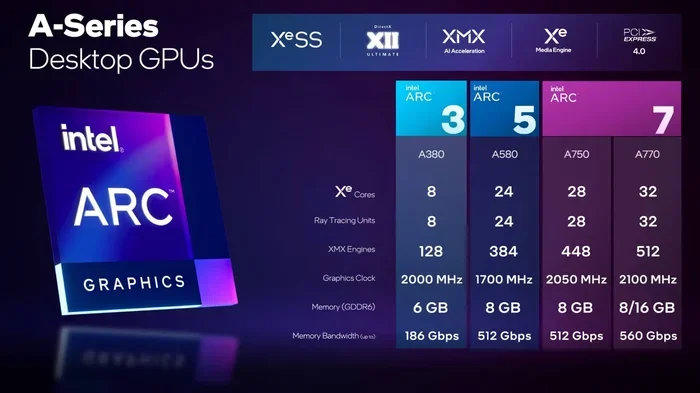
Intel Arc Graphics is Intel’s line of discrete and integrated GPUs built for laptops and desktops. These graphics cards bring modern features like XeSS upscaling and hardware-accelerated ray tracing to the Intel ecosystem. Whether you are a gamer, creator, or programmer, understanding Intel Arc can help you pick the right GPU for your needs.
Intel Arc Graphics is turning heads in the GPU world. For years, Intel focused on integrated graphics built into their processors. But with the Arc lineup, Intel entered the discrete graphics card market with serious intent. If you have been wondering what Intel Arc is all about, you are in the right place. This guide breaks down everything you need to know in simple, clear language.
The Intel Arc brand covers a wide range of graphics solutions. From powerful discrete GPUs for gaming laptops to capable integrated graphics inside everyday processors, Intel Arc aims to compete with NVIDIA and AMD. The lineup includes the B-series for budget users, the A-series for mainstream performance, and the higher-end models for enthusiasts. Each tier brings its own set of features, prices, and performance levels.
One of the biggest reasons Intel Arc has gained attention is its feature set. Hardware-accelerated ray tracing, XeSS upscaling, and AV1 video encoding give these GPUs modern capabilities that were once reserved for premium cards. Plus, Intel has been pushing hard on driver improvements and software support. The result is a graphics solution that is getting better with every update.
Whether you are building a new laptop, upgrading your PC, or just curious about GPU options, Intel Arc deserves a close look. Let us dive into the details and explore what makes these graphics cards tick.
Key Takeaways
- Intel Arc is Intel’s dedicated GPU brand: It includes both discrete graphics cards and integrated solutions for laptops.
- XeSS technology boosts frame rates: Intel’s upscaling feature works similarly to NVIDIA DLSS and AMD FSR.
- Arc graphics come in multiple tiers: From budget-friendly options to high-performance GPUs for gaming and content creation.
- Driver support has improved significantly: Early issues have been addressed with frequent updates and the new Arc Control software.
- Intel Arc competes with NVIDIA and AMD: It offers a strong alternative, especially for laptop users seeking value.
- Ray tracing and AV1 encoding are key features: These make Arc GPUs capable for both gaming and video workloads.
- Compatibility matters: Not all laptops support Arc discrete GPUs, so check your system before buying.
📑 Table of Contents
- What Exactly Is Intel Arc Graphics?
- Intel Arc GPU Lineup: B-Series, A-Series, and More
- Key Features That Make Intel Arc Stand Out
- Intel Arc Graphics for Laptops
- Intel Arc vs. NVIDIA and AMD: How Does It Compare?
- Common Mistakes to Avoid with Intel Arc GPUs
- Who Should Choose Intel Arc Graphics?
- Final Thoughts on Intel Arc Graphics
What Exactly Is Intel Arc Graphics?
Intel Arc Graphics is Intel’s brand for its graphics processing units. The name covers both integrated GPUs found in Intel Core processors and discrete graphics cards sold separately. The discrete Arc GPUs are built on Intel’s Xe architecture, which is a modern design focused on efficiency and performance.
Before Arc, Intel’s integrated graphics were known as Intel UHD or Intel Iris. These worked fine for everyday tasks like browsing, video playback, and light gaming. But they struggled with demanding games and professional workloads. Intel Arc changed that by giving the company a dedicated gaming and creative GPU line.
The Xe Architecture Behind Arc
At the heart of every Intel Arc GPU is the Xe architecture. This is Intel’s modern GPU design that uses a scalable approach. Smaller chips use fewer compute units, while larger chips pack more units for higher performance. The Xe architecture supports key features like ray tracing, XeSS, and advanced media encoding.
Intel built Xe with flexibility in mind. The same architecture scales from ultra-low-power mobile GPUs to full-size desktop cards. This means Intel can target many market segments with one core design. It also helps keep development costs down and speeds up driver optimization.
Intel Arc GPU Lineup: B-Series, A-Series, and More
Intel organizes its Arc GPUs into different series based on target use cases. Each series offers a different balance of performance, features, and price.
Arc B-Series: Budget-Friendly Gaming
The B-series is Intel’s entry-level discrete GPU lineup. Cards like the Arc B580 and Arc B570 are designed for 1080p gaming at affordable prices. They are perfect for users who want a dedicated GPU without spending a fortune. The B-series supports XeSS, ray tracing, and Intel’s Quick Sync video encoding.
For laptop buyers, the B-series offers a big upgrade over integrated graphics. You can play modern games at medium to high settings and still enjoy smooth frame rates. If you are on a tight budget, an Arc B-series GPU is a smart starting point.
Arc A-Series: Mainstream Performance
The A-series steps up the performance ladder. Cards like the Arc A770 and A750 target 1080p and even 1440p gaming. They have more compute units, higher clock speeds, and more video memory than the B-series. This makes them suitable for demanding games and content creation tasks.
The A-series also supports hardware-accelerated AV1 encoding, which is a big plus for streamers and video editors. If you want a GPU that can handle gaming and creative work, the A-series hits a sweet spot between price and performance.
Arc Pro and High-End Models
Intel also offers professional-grade Arc GPUs under the Pro brand. These are designed for workstations, AI workloads, and enterprise applications. While they are not aimed at gamers, they show how versatile the Xe architecture can be. Intel is also working on higher-end consumer models that will compete directly with NVIDIA’s RTX 40-series and AMD’s Radeon RX 7000 series.
Key Features That Make Intel Arc Stand Out
Intel Arc GPUs come loaded with features that set them apart from competitors. Let us look at the most important ones.
XeSS: Intel’s Upscaling Technology
XeSS is Intel’s answer to NVIDIA DLSS and AMD FSR. It uses AI and spatial upscaling to boost frame rates without sacrificing image quality. XeSS works on Intel Arc GPUs and, in some cases, on AMD and NVIDIA cards too. This broad compatibility is a unique advantage.
When you enable XeSS in a game, the GPU renders the game at a lower resolution and then scales it up. This gives you much smoother gameplay, especially in demanding titles. XeSS supports both quality and performance modes, so you can choose the balance that works for you.
Hardware Ray Tracing
Ray tracing simulates how light behaves in real time. It creates realistic reflections, shadows, and lighting effects in games. Intel Arc GPUs include dedicated ray tracing cores, which handle these calculations efficiently. Early Arc cards had weaker ray tracing performance, but newer drivers and architectures have closed the gap.
Ray tracing is still demanding even on high-end GPUs. But Intel Arc makes it accessible at 1080p and 1440p settings. Combined with XeSS, you can enjoy ray-traced games without needing a flagship card.
AV1 Video Encoding and Decoding
AV1 is a next-generation video codec that offers better compression than older formats. Intel Arc GPUs include hardware blocks for AV1 encoding and decoding. This means smoother video playback, faster exports in editing software, and more efficient streaming.
If you create YouTube content or stream on platforms like Twitch, AV1 support is a huge benefit. It reduces the workload on your CPU and delivers higher-quality video at lower bitrates. This feature alone makes Intel Arc attractive for content creators.
Intel Arc Control Software
Intel released the Arc Control app to give users easy access to GPU settings. Through this software, you can adjust XeSS quality, monitor temperatures, update drivers, and fine-tune game-specific profiles. The app is free and works alongside your games to optimize performance.
The software has come a long way since the early days of Arc. It now offers a clean, user-friendly interface that rivals NVIDIA’s GeForce Experience and AMD’s Adrenalin software. Regular updates add new features and improve compatibility.
Intel Arc Graphics for Laptops
One of the most exciting developments with Intel Arc is its presence in laptops. Intel has introduced mobile Arc GPUs that bring discrete graphics to thin and light laptops. This is a game-changer for users who want gaming performance without a bulky gaming notebook.
Laptop users benefit from Intel Arc in several ways. First, discrete Arc GPUs provide much better gaming performance than integrated Intel UHD or Iris graphics. Second, the power-efficient design of mobile Arc chips helps preserve battery life during light tasks. Third, features like XeSS and AV1 encoding work the same way on laptop Arc GPUs as on desktop models.
When choosing a laptop with Intel Arc graphics, check the specific model and its TDP rating. Lower TDP mobile GPUs are more power-efficient but may offer slightly lower peak performance. Higher TDP models deliver better gaming speeds but may drain the battery faster during intense sessions.
Intel Arc also pairs well with modern laptop processors. If you have a laptop with an Intel Core Ultra processor, you get a balanced system where the CPU and GPU work together efficiently. For those wondering whether a dedicated GPU is necessary for programming or other tasks, a dedicated graphics card can help with certain workloads, though it is not always essential for basic coding tasks.
Intel Arc vs. NVIDIA and AMD: How Does It Compare?
Intel Arc enters a market dominated by NVIDIA and AMD. Here is how it stacks up against the competition.
Intel Arc vs. NVIDIA GeForce
NVIDIA has long been the market leader in discrete GPUs. Their GeForce RTX lineup offers industry-leading ray tracing performance and a mature software ecosystem. Intel Arc competes on price, offering similar or better raw performance at lower price points. XeSS also works on NVIDIA cards, which is a unique selling point.
However, NVIDIA still leads in driver maturity and game optimization. Many AAA games are still better optimized for NVIDIA hardware. Intel is closing this gap with each driver update, but NVIDIA maintains an edge in overall software support.
Intel Arc vs. AMD Radeon
AMD Radeon GPUs are strong competitors, especially in the mid-range segment. Intel Arc offers competitive performance at similar price points. The key difference is that Intel Arc supports XeSS on both its own hardware and AMD hardware, while AMD’s FSR works across all brands too. This creates a friendly ecosystem where upscaling is not locked to one brand.
AMD also has a more established track record in discrete GPUs. Intel Arc is relatively new, and some users still experience occasional driver issues. That said, Intel’s rapid update cycle has improved stability significantly over the past year.
Common Mistakes to Avoid with Intel Arc GPUs
Even though Intel Arc is a great product, there are some common pitfalls users should watch out for.
- Skipping driver updates: Intel releases frequent driver updates that improve game compatibility and performance. Always keep your Arc drivers up to date through the Arc Control app or Intel’s download center.
- Ignoring XeSS settings: Many users do not enable XeSS, leaving performance on the table. Turning on XeSS can boost frame rates by 30 to 50 percent in supported games.
- Overlooking power settings: Intel Arc GPUs in laptops have different power profiles. Switching to a performance mode when gaming and a power-saver mode when working on battery can make a big difference.
- Assuming all games support ray tracing well: Ray tracing performance on Arc GPUs is still catching up. Some games handle ray tracing better than others. Check benchmarks before expecting flawless performance.
- Not checking laptop compatibility: Not every laptop can accommodate a discrete Arc GPU. Make sure your laptop model supports Arc graphics before making a purchase decision.
Who Should Choose Intel Arc Graphics?
Intel Arc is a great fit for several types of users. Budget-conscious gamers will appreciate the affordable pricing and solid 1080p performance. Content creators benefit from AV1 encoding and strong video processing capabilities. Laptop users looking for a thin design with gaming power will find mobile Arc GPUs compelling.
Programmers and developers may also find value in Intel Arc. While a powerful GPU is not always necessary for coding, having a dedicated GPU can accelerate certain tasks like machine learning training and parallel computing workloads.
Users who already have an Intel CPU may find Arc GPUs a natural fit. The shared Intel ecosystem means better integration between the processor and graphics card. This can lead to smoother multitasking and more efficient power usage.
On the other hand, if you are a hardcore competitive gamer who needs the absolute best ray tracing performance, you may still want to look at NVIDIA’s RTX lineup. Intel Arc is excellent for most use cases, but the top-tier NVIDIA cards still hold a slight edge in extreme scenarios.
Final Thoughts on Intel Arc Graphics
Intel Arc Graphics represents a bold step forward for Intel in the GPU market. With modern features like XeSS upscaling, hardware ray tracing, and AV1 encoding, these graphics cards offer strong value for the price. The lineup spans budget-friendly B-series cards to capable A-series GPUs, giving users plenty of options to choose from.
Driver improvements and the Arc Control software have addressed many of the early concerns. Intel Arc is no longer a risky experiment. It is a mature, competitive product that holds its own against NVIDIA and AMD. For laptop users especially, mobile Arc GPUs bring discrete graphics performance to thinner, lighter designs that were previously limited to integrated graphics.
If you are shopping for a new GPU or a laptop with discrete graphics, Intel Arc deserves a spot on your shortlist. Check benchmarks for your favorite games, compare prices, and consider what features matter most to you. With the right expectations and a bit of research, Intel Arc can deliver an excellent experience without breaking the bank.
Frequently Asked Questions
What does Intel Arc Graphics do?
Intel Arc Graphics handles all visual output tasks, from displaying your desktop to rendering demanding 3D games. It supports modern features like hardware ray tracing, XeSS upscaling, and AV1 video encoding, making it capable for both gaming and creative workloads.
Is Intel Arc good for gaming laptops?
Yes, Intel Arc is a strong choice for gaming laptops. The mobile Arc GPUs deliver solid 1080p gaming performance and are more power-efficient than many alternatives. They are especially good for budget and mid-range gaming laptops that need dedicated graphics without the bulky design.
How does Intel Arc compare to NVIDIA?
Intel Arc competes closely with NVIDIA in the mid-range segment. Arc GPUs often match or exceed NVIDIA’s equivalent models in raw performance at similar prices. However, NVIDIA still leads in ray tracing optimization and software maturity. Intel Arc is a compelling alternative, especially for value-focused buyers.
Do I need a special laptop for Intel Arc?
Yes, your laptop must support discrete Arc GPUs. Not all laptops are compatible with Intel Arc graphics cards. Check your laptop’s specifications or manufacturer website to confirm Arc support before purchasing a system with an Arc GPU.
What is XeSS in Intel Arc?
XeSS is Intel’s upscaling technology, similar to NVIDIA DLSS. It uses AI to render games at a lower resolution and then scales the image up, boosting frame rates while maintaining visual quality. XeSS is available on Intel Arc GPUs and works in many modern games.
Are Intel Arc drivers reliable now?
Intel has made significant progress with Arc drivers. The early release had some stability issues, but frequent updates have greatly improved reliability. The Arc Control software makes it easy to keep drivers current and fine-tune performance settings for your games.