How Much Is a 8gb Ram for Laptop
How much is 8gb ram for laptop? The price typically ranges from $20 to $60 for a single 8GB DDR4 module, while DDR5 modules cost slightly more. Several factors like brand, speed, and type affect the final cost. In this guide, we break down everything you need to know about 8GB RAM pricing for laptops.
Key Takeaways
- Price Range: An 8GB RAM module for a laptop usually costs between $20 and $60 depending on the type and brand.
- DDR4 vs DDR5: DDR4 modules are more affordable, while DDR5 modules are newer and slightly pricier.
- Factors That Affect Price: Brand reputation, RAM speed, latency, and whether you buy a single or kit change the cost.
- Is 8GB Enough? For basic tasks like browsing and office work, 8GB works well. For gaming or heavy software, you may need 16GB.
- Where to Buy: You can find affordable 8GB RAM from online retailers like Amazon, Newegg, and official brand stores.
- Upgrade Option: If your laptop supports it, upgrading from 4GB to 8GB can significantly boost performance.
📑 Table of Contents
- How Much Is 8GB RAM for Laptop: A Complete Price Guide
- What Is 8GB RAM and Why Does It Matter?
- How Much Does 8GB RAM Cost for a Laptop?
- Factors That Affect the Price of 8GB RAM
- Is 8GB RAM Enough for Your Laptop?
- Where to Buy 8GB RAM for Laptop
- Common Mistakes When Buying 8GB RAM
- Expert Insights on Getting the Best Value
- How to Install 8GB RAM in Your Laptop
- Conclusion: Is 8GB RAM Worth It?
- Frequently Asked Questions
How Much Is 8GB RAM for Laptop: A Complete Price Guide
If you are shopping for a laptop or thinking about upgrading, you have probably wondered about how much is 8gb ram for laptop. The short answer is that an 8GB RAM module typically costs between $20 and $60. But the actual price depends on several important factors that we will break down in this guide.
RAM, or Random Access Memory, is one of the most important parts of any laptop. It affects how fast your device runs, how many apps you can open at once, and how smoothly you multitask. Understanding the 8GB RAM cost helps you make a smart buying decision. Whether you are building a budget laptop or upgrading an existing one, this guide has you covered.
What Is 8GB RAM and Why Does It Matter?
8GB RAM means your laptop has 8 gigabytes of computer memory available for running programs. Think of it as a workspace. The bigger the workspace, the more tasks you can handle at the same time without things slowing down.
Here is why 8GB matters for your laptop performance:
- Basic multitasking: You can browse the web, use spreadsheets, and listen to music without lag.
- Better app performance: Apps load faster when there is enough memory to work with.
- Smoother experience: Your system runs more smoothly overall compared to laptops with only 4GB.
Most budget laptops come with 4GB or 8GB of memory. If you want a solid experience for everyday use, 8GB is a sweet spot. It gives you room to work without overspending. For more demanding tasks like video editing or gaming, you might want to consider 16GB instead. To understand whether 8GB meets your needs, check out our detailed guide on is 8GB RAM enough for laptop.
How Much Does 8GB RAM Cost for a Laptop?
The laptop RAM price for 8GB varies based on several factors. Below is a breakdown of typical costs you can expect in 2024.
Price by RAM Type
| RAM Type | Price Range | Best For |
|---|---|---|
| DDR4 8GB (Single Module) | $20 – $40 | Everyday use, office work |
| DDR4 8GB (High-Speed) | $35 – $50 | Light gaming, creative work |
| DDR5 8GB (Single Module) | $40 – $65 | Newer laptops, future-proofing |
| DDR5 8GB (High-Speed Kit) | $60 – $90 | Gaming, professional work |
Price by Brand
Brand reputation plays a big role in the 8GB RAM cost. Here is a quick look at popular brands and their typical pricing:
- Kingston: $22 – $45. Known for reliability and value.
- Crucial: $25 – $50. Great quality with solid performance.
- Samsung: $30 – $55. Premium build and compatibility.
- Corsair: $35 – $60. Often marketed toward gamers.
- SK Hynix: $20 – $45. A solid budget-friendly option.
As you can see, the RAM upgrade cost for an 8GB module is quite reasonable. You do not need to break the bank to get good performance.
Factors That Affect the Price of 8GB RAM
Not all 8GB RAM modules are priced the same. Several key factors influence the final cost. Understanding these helps you choose the right product without overpaying.
DDR4 vs DDR5
This is the biggest factor in how much is 8gb ram for laptop. DDR4 is the older standard and costs less. DDR5 is the newer generation that offers better speed and efficiency but comes at a higher price. If your laptop supports DDR4, you can save money by sticking with that type.
RAM Speed (MHz)
RAM speed measures how fast data moves through the module. Common speeds include:
- DDR4-2666 MHz: The most common and affordable option.
- DDR4-3200 MHz: Faster and slightly more expensive.
- DDR5-4800 MHz: Standard speed for DDR5 modules.
- DDR5-5600 MHz: Premium speed with a higher price tag.
Higher speeds sound great, but they only make a real difference in specific tasks. For everyday use, a standard speed module works perfectly fine.
Single Channel vs Dual Channel
A single module gives you single channel performance. Buying two 4GB modules (a kit) gives you dual channel, which improves performance. However, two modules cost more than one, so this affects the total 8GB RAM price.
Latency and Timings
Lower latency means faster response times. Modules with tighter timings usually cost a bit more. But the difference in real-world use is often small. Most users will not notice a big change in daily tasks.
Warranty and Quality
Branded modules with lifetime warranties tend to cost more. But they also offer better reliability. Cheap, no-name modules might save you money upfront but could cause stability issues over time.
Is 8GB RAM Enough for Your Laptop?
This is one of the most common questions people ask when looking at how much is 8gb ram for laptop. The answer depends on what you plan to do with your device.
8GB Is Great For:
- Web browsing with multiple tabs
- Office applications like Word and Excel
- Streaming videos and music
- Light photo editing
- Running basic programming environments
- Casual gaming at lower settings
8GB May Not Be Enough For:
- Heavy video editing or 3D rendering
- Running virtual machines
- Intensive gaming at high settings
- Professional music production
- Working with very large datasets
If you fall into the second category, consider going for 16GB. But for most users, 8GB of memory handles daily tasks with ease. To learn more about what 8GB can handle, read our full breakdown on how much RAM for laptop.
Where to Buy 8GB RAM for Laptop
Finding the right place to buy your RAM upgrade matters. You want a reliable source with good prices and warranty support. Here are the best options:
Online Retailers
- Amazon: Wide selection, competitive pricing, and fast shipping. You can often find deals on DDR4 RAM modules.
- Newegg: A great tech-focused store with detailed product specs.
- Best Buy: Good for walk-in purchases and easy returns.
- B&H Photo: Reliable with excellent customer service.
Direct from Manufacturers
Buying directly from brands like Kingston, Crucial, or Samsung ensures you get genuine products. Their websites sometimes offer exclusive bundles or discounts on laptop RAM price.
Quick Tips for Buying
- Always check your laptop’s RAM compatibility before purchasing.
- Look for DDR4 or DDR5 depending on what your laptop supports.
- Compare prices across at least three retailers.
- Check for warranty coverage before finalizing your purchase.
- Read customer reviews to gauge real-world performance.
For a detailed look at how to install your new RAM, take a look at our guide on how to upgrade RAM on a laptop. It walks you through the process step by step.
Common Mistakes When Buying 8GB RAM
Buying RAM seems simple, but many people make avoidable mistakes. Here are some common errors to watch out for:
Buying the Wrong Type
The most common mistake is purchasing DDR4 RAM for a laptop that needs DDR5. Always check your laptop’s specifications first. Using the wrong type means the module will not work at all.
Ignoring Speed Requirements
Some people buy the cheapest module without checking the supported speed. If your laptop supports DDR4-3200, buying a DDR4-2666 module wastes potential. Your system will run at the slower speed, limiting your laptop specs performance.
Not Checking Physical Space
Some slim laptops have limited space for memory modules. Not all 8GB modules fit in every laptop. Check your laptop model’s specifications for the correct size and form factor.
Skipping the Warranty
Cheap modules without warranty coverage can be risky. If the module fails, you may lose your money. Always choose products with at least a limited warranty.
Overpaying for Features You Do Not Need
RGB lighting and extreme overclocking sound cool, but most users do not need them. These features raise the 8GB RAM cost significantly. Stick to straightforward modules for the best value.
Expert Insights on Getting the Best Value
We spoke with PC building experts to get their take on choosing the right 8GB module. Here is what they recommend:
Focus on Your Use Case
“Do not overspend on RAM you will not use,” says one hardware specialist. “If you only browse the web and use office apps, a standard DDR4-2666 8GB module is perfect. Save your money for other upgrades like a better SSD.”
Consider Future Needs
If you plan to keep your laptop for three or more years, spending a little extra on a faster module can help. DDR5 is becoming more mainstream, and investing now can extend your laptop’s useful life. However, DDR4 still has plenty of life left and remains the go-to for most users.
Check for Upgrade Slots
Before buying, check if your laptop has an empty RAM slot. If it does, adding an 8GB module is a simple and affordable upgrade. If not, you may need to replace the existing module entirely, which costs more.
How to Install 8GB RAM in Your Laptop
Installing a new 8GB memory capacity module is easier than you might think. Here is a quick overview of the process:
- Back up your data: Always protect your files before making hardware changes.
- Power off and unplug: Shut down your laptop completely and disconnect the charger.
- Find the RAM compartment: Check your laptop manual for the exact location. Most laptops have a small panel on the bottom.
- Remove the panel: Use the correct screwdriver to open the compartment.
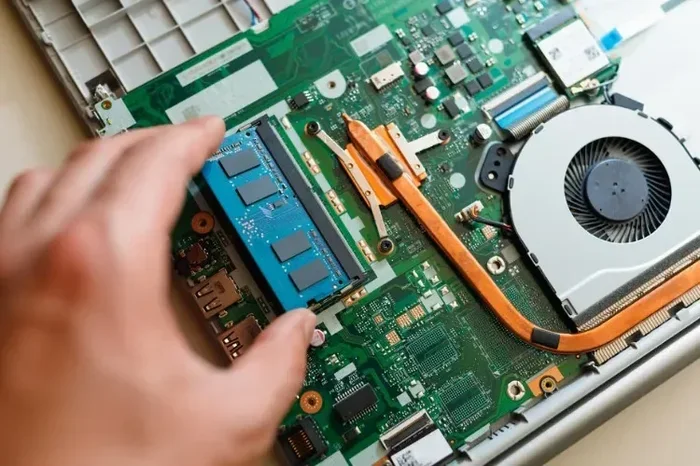
- Insert the RAM: Align the notch on the module with the slot. Press it in at an angle until it clicks into place.
- Close and test: Put the panel back on, power up, and verify the new computer memory is recognized.
If you want a detailed walkthrough, our article on how to install more RAM to a laptop covers everything you need to know with pictures and tips.
Conclusion: Is 8GB RAM Worth It?
So, how much is 8gb ram for laptop? You can expect to pay between $20 and $60 for a quality 8GB module. The exact price depends on the type, speed, brand, and where you buy it.
8GB of RAM remains a solid choice for most laptop users. It handles everyday tasks, multitasking, and even light gaming without issues. For professionals who need more power, 16GB is the next step. But for the average person, 8GB hits the sweet spot between performance and price.
Take your time to check your laptop’s compatibility, compare prices, and choose a reputable brand. A simple RAM upgrade can breathe new life into an older laptop or boost a budget model to handle more demanding tasks. With the right 8GB module, your laptop will feel faster and more responsive for years to come.
Frequently Asked Questions
How much does it cost to add 8GB RAM to a laptop?
Adding an 8GB RAM module to a laptop typically costs between $20 and $60. The price depends on whether you choose DDR4 or DDR5, the brand, and the RAM speed. Budget-friendly DDR4 modules are on the lower end, while newer DDR5 modules cost a bit more.
Is 8GB RAM enough for a laptop in 2024?
Yes, 8GB of RAM is still sufficient for most everyday tasks in 2024. It handles web browsing, office work, streaming, and light photo editing well. However, if you do heavy video editing, 3D rendering, or intensive gaming, you may want to consider upgrading to 16GB for better performance.
Can I upgrade my laptop from 4GB to 8GB RAM?
In most cases, yes. Many laptops have an empty RAM slot or a replaceable module that allows upgrading from 4GB to 8GB. Check your laptop model’s specifications to confirm compatibility. You can also refer to our guide on how to upgrade RAM in a laptop for step-by-step instructions.
What is the difference between DDR4 and DDR5 8GB RAM?
DDR5 is the newer generation of RAM that offers faster speeds and better energy efficiency compared to DDR4. DDR4-2666 to DDR4-3200 is common and more affordable, while DDR5 typically starts at DDR5-4800. DDR5 modules cost slightly more but provide better future-proofing for newer laptops.
Which brand of 8GB RAM is best for laptops?
Some of the most reliable brands include Kingston, Crucial, Samsung, and SK Hynix. Kingston and SK Hynix offer great value at budget-friendly prices. Crucial and Samsung provide excellent performance and durability. Choose based on your budget and the specific laptop RAM price that fits your needs.
How do I know if my laptop supports 8GB RAM?
Check your laptop’s specifications on the manufacturer’s website. Look for information about the maximum supported memory and the RAM type (DDR4 or DDR5). You can also use system information tools on your laptop to see current memory details. Our guide on how much RAM do I need on a laptop can help you figure out the right amount for your usage.