What Is the Difference Between Usb and Pen Drive
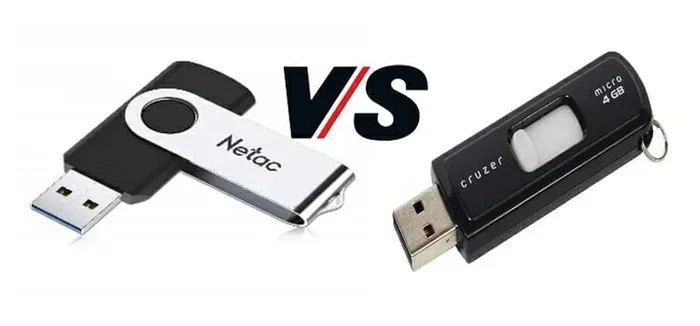
The difference between USB and pen drive is simpler than most people think. A USB is a universal connection standard used across devices, while a pen drive is a specific portable storage device that uses USB technology to transfer data. This guide breaks down everything you need to know, so you can pick the right portable device for your needs.
Key Takeaways
- USB is a connection standard: It refers to the universal protocol that lets devices communicate with computers and each other.
- A pen drive is a storage device: It uses USB technology to store and transfer files portably.
- Not all USB devices are pen drives: Keyboards, mice, printers, and cameras also use USB connections.
- Pen drives are plug and play: They need no extra software to work on most operating systems.
- Speed and capacity vary: Both USB standards and pen drives come in different versions with different performance levels.
- Choose based on your needs: Understanding the difference helps you pick the right tool for data transfer and data backup.
📑 Table of Contents
What Is a USB?
USB stands for Universal Serial Bus. It is a standard that defines how devices connect to computers and other electronics. You use a USB port every day, even if you do not realize it. Your keyboard, mouse, printer, and phone all rely on this connection type.
The USB standard was first introduced in the mid-1990s. It was designed to simplify how devices connect. Before USB, computers had many different ports and cables. USB brought order to that chaos. Today, USB is the most common way to connect external storage and accessories to a computer.
A USB connector is the physical plug that goes into the port. There are several shapes and sizes. Each one serves a specific purpose. Understanding these connectors helps you pick the right cable or device for your setup.
How Does USB Work?
A USB connection has two main parts. The first is the port on your computer or device. The second is the connector on the cable or device you are plugging in. When you insert a USB connector, it creates a digital link. This link allows data transfer between the two devices.
USB also carries power. This is why you can charge your phone through a USB cable. The same port that sends data can also supply electricity. This dual function is one reason USB became so popular. It saves space and reduces the number of cables you need.
When you connect a device via USB, the computer recognizes it automatically. This is called enumeration. The computer asks the device what it is and what it can do. Then it loads the right driver. All of this happens in seconds. You barely notice it is happening.
Types of USB Connectors
Over the years, USB connectors have changed. Here are the main types you will encounter:
- USB Type-A: The classic rectangular connector. You will find this on almost every computer and wall charger.
- USB Type-B: A square-shaped connector often used for printers and larger devices.
- USB Type-C: A small, reversible connector. It is the modern standard for laptops, phones, and tablets.
- Mini and Micro USB: Smaller connectors used in older phones and compact devices.
Each connector type serves a purpose. Type-A and Type-C are the most common today. USB Type-C is quickly becoming the go-to choice for new devices because of its small size and fast transfer speed.
USB Standards and Speed
USB has gone through several versions. Each new version improves speed and power delivery. Here is a quick look:
- USB 2.0: Max speed of 480 Mbps. Still common in older devices and basic peripherals.
- USB 3.0: Max speed of 5 Gbps. Much faster for file transfer and backing up large files.
- USB 3.1 and 3.2: Speeds up to 20 Gbps. Used in high-performance external storage devices.
- USB4: The newest standard. Offers speeds up to 40 Gbps and uses the USB Type-C connector.
The USB standard your device supports affects how fast you can move files. If you plug a fast USB 3.0 drive into a USB 2.0 port, the speed will be limited to USB 2.0 levels. Always check both sides of the connection to get the best performance.
It is also worth noting that USB is not just for storage. Many portable device types use USB. This includes webcams, audio interfaces, and even gaming controllers. The versatility of USB is a big reason it became the universal standard it is today.
What Is a Pen Drive?
A pen drive is a small, portable storage device that uses USB technology. You may also hear people call it a thumb drive, jump drive, or memory stick. No matter what you call it, the purpose is the same. It stores files and plugs directly into a USB port.
Pen drives are incredibly convenient. You can carry one in your pocket or attach it to your keychain. They do not need batteries or external power. When you plug them in, the computer provides the power they need. This plug and play design makes them simple to use for everyone.
The first pen drives appeared in the early 2000s. They replaced floppy disks and CDs as the go-to way to carry files. Since then, they have become smaller, faster, and cheaper. Today, you can buy a reliable pen drive for just a few dollars.
How Does a Pen Drive Work?
A pen drive uses flash memory to store data. Unlike a hard drive, there are no moving parts inside. The memory chips hold your files even when the device is unplugged. This is called non-volatile storage.
When you plug a pen drive into a USB port, the computer recognizes it as a removable drive. You can then drag and drop files onto it. The process works on most operating systems, including Windows, macOS, and Linux. You do not need to install any special software.
The computer’s RAM helps process the data transfer quickly when files are being moved to or from the pen drive. This is why a system with more memory can handle large file transfers more smoothly. If you want to learn more about how your laptop handles memory, check out what the RAM on a laptop does.
Pen Drive vs USB Flash Drive
People often use the terms pen drive and USB flash drive interchangeably. In everyday conversation, they mean the same thing. Both are small, portable devices that connect via USB to store and move files.
However, technically speaking, a pen drive is a type of USB flash drive. The term pen drive is more common in some regions, especially in the UK and India. USB flash drive is the more formal, technical name used globally.
Some people also confuse pen drives with external hard drives. The key difference is that a pen drive uses flash memory, while an external hard drive uses spinning disks or flash storage in a larger casing. External drives offer more capacity but are less portable.
Key Differences Between USB and Pen Drive
Now that you understand what each term means, let us look at the actual difference between USB and pen drive. The table below makes this clear:
| Feature | USB | Pen Drive |
|---|---|---|
| Definition | A universal connection standard | A portable storage device that uses USB |
| What It Is | A protocol and connector type | A physical device with flash memory |
| Scope | Used by many device types | Used only for storage |
| Examples | Keyboards, mice, printers, cameras | Thumb drives, jump drives, memory sticks |
| Requires Power? | Provides power to connected devices | Draws power from the USB port |
| Storage Capacity | N/A (it is a connection, not storage) | Typically 8 GB to 256 GB or more |
The biggest takeaway is that USB is the connection method. A pen drive is a device that uses that method. Think of USB as the road and the pen drive as the car. The car drives on the road, but the road is not the car.
Many people mix up these terms because pen drives are the most common USB storage device. When someone says “USB,” they often mean the little flash drive in their pocket. But the correct use of the term is broader. It covers every device that connects through the USB standard.
USB Devices That Are Not Pen Drives
To really understand the difference, consider all the devices that use USB but are not pen drives:
- Keyboards and mice: These input devices connect via USB and send data to your computer.
- Printers and scanners: They use USB to receive print jobs and scan documents.
- Webcams and microphones: These audio and video devices rely on USB for data and power.
- Phone chargers: The cable uses USB to deliver power to your phone.
- External DVD drives: They connect via USB to read and write discs.
All of these devices use USB. None of them are pen drives. This shows how broad the term USB really is. The difference between USB and pen drive becomes obvious when you see all the other things that use USB.
How to Choose Between USB Devices and Pen Drives
When you need to pick a portable storage solution, understanding your options helps. Here are some factors to consider before you buy:
Consider Your Storage Needs
Think about how much data you need to carry. A basic pen drive with 16 GB or 32 GB works well for documents and photos. If you need to move large video files, look for drives with 64 GB or more. For comparison, the biggest NVMe SSD can hold several terabytes, but those are internal drives, not portable USB devices.
Your storage capacity needs depend on what you plan to carry. If you only need documents, a small drive is fine. If you work with media files, go for a larger one. Keep in mind that prices go up as capacity increases.
Think About Speed
Your transfer speed matters if you move large files often. USB 3.0 pen drives are much faster than USB 2.0 models. Look for drives that match your USB port standard. A USB 3.0 drive in a USB 3.0 port gives you the best performance.
Speed also depends on the flash memory quality inside the pen drive. Cheap drives often use slower memory chips. They may be fine for documents but struggle with large video files. Stick with trusted brands for reliable speed.
Check Compatibility
Make sure the pen drive works with your devices. Most modern drives work with any computer. But if you want to use one with a smart TV or car stereo, check the device specs first. Some older devices only support USB 2.0 speeds.
Also consider the connector type. USB Type-C is becoming standard on newer laptops and phones. If your devices only have USB Type-A ports, you may need an adapter. A USB hub can also help you connect multiple devices at once.
Durability and Build Quality
Pen drives are small and easy to lose. Choose one with a sturdy build if you carry it daily. Some models come with keychain loops or retractable connectors. Metal-bodied drives tend to last longer than plastic ones.
Water resistance is another factor to consider. Not all pen drives are waterproof. If you work outdoors or travel often, a durable model can save you from data loss. Look for drives rated for shock and water resistance.
Security Features
If you carry sensitive files, consider a pen drive with built-in encryption. Some models include password protection or fingerprint scanners. This adds a layer of data backup security that regular drives do not offer.
Encrypted drives cost more, but they are worth it for sensitive work. They protect your files even if the drive is lost or stolen. This is especially important for professionals who handle confidential data.
Remember, a pen drive is just one type of USB device. Your needs will determine which type of USB device is right for you. If you just need to carry files around, a simple pen drive is perfect. If you need to connect peripherals, USB is the standard that makes it all work.
Common Uses for Pen Drives and USB Devices
Both pen drives and other USB devices serve important roles in daily life. Here are the most common ways people use them:
Using Pen Drives for Data Transfer
Pen drives shine when you need to move files between computers. Maybe you work at the office and home. You can save a file on your pen drive and carry it with you. No email attachment needed. No cloud upload required.
Students use pen drives to submit assignments. Professionals use them to share presentations. Creators use them to transfer photos and video projects. The simplicity of a pen drive has not changed, even as cloud storage has grown. Sometimes the simplest solution is still the best one.
Using USB for Peripherals and Accessories
USB connections power the accessories you use every day. Your wireless mouse receiver plugs into a USB port. Your external webcam connects the same way. Even your USB hub expands the number of ports available on your laptop.
Many modern accessories are designed specifically for USB Type-C. These include docking stations, external GPUs, and fast chargers. The versatility of the USB standard means it can do far more than just store files. It is the backbone of modern device connectivity.
Using Pen Drives for Data Backup
One of the oldest uses for a pen drive is data backup. You can copy important documents and keep the drive in a safe place. It is a simple form of backup that does not require internet access.
However, pen drives are not a replacement for proper backup systems. They can be lost, damaged, or stolen. For important files, always keep multiple copies. Consider pairing your pen drive with an external hard drive or cloud service for a complete backup strategy.
Conclusion
The difference between USB and pen drive comes down to one simple idea. USB is the connection standard. A pen drive is a device that uses that standard. Once you understand this, the confusion disappears.
USB connects everything from keyboards to cameras to external drives. A pen drive is just one of many devices that use USB. It is a small, portable tool for storing and moving your files. Whether you need to transfer a single document or back up an entire project, a pen drive makes it easy.
Next time someone asks you about USB versus pen drive, you will know exactly what to say. USB is the road. The pen drive is one of the many vehicles that travel on it. Choose the right tool for your needs, and you will always have your data where you need it. With the right knowledge, you can make smart choices about your portable storage and get the most out of every USB connection.
Frequently Asked Questions
Can a pen drive work without a USB port?
No. A pen drive relies on a USB port to connect to a computer or device. Without a USB port, the pen drive cannot communicate or transfer data. Some modern devices, like smartphones, may need an adapter to accept a USB pen drive.
Is a USB cable the same as a pen drive?
No. A USB cable is just the cord that connects devices. A pen drive is a complete storage device with flash memory inside. The cable may come included with some drives, but they are separate items.
Can I use a pen drive on any computer?
Yes. Pen drives work on virtually any computer with a USB port. They are recognized automatically by Windows, macOS, and most Linux systems. This universal compatibility is one of the biggest advantages of using a pen drive for file transfer and data backup.
Does a pen drive need drivers to work?
Most modern pen drives do not need any drivers. They use the standard USB mass storage protocol built into every major operating system. However, some advanced drives with special features may require a driver or software installation. Always check the product instructions if the drive does not appear automatically.
What is the lifespan of a pen drive?
A good quality pen drive can last several years with normal use. However, flash memory has a limited number of write cycles. Over time, the cells in the memory can wear out. To extend the life of your drive, avoid deleting and rewriting files constantly. Proper data backup practices also help protect your files.
Are pen drives safe for long-term storage?
Pen drives are convenient but not ideal for long-term storage. They are small and easy to misplace. They can also be affected by magnetic fields, extreme temperatures, and physical drops. For important long-term files, use a more reliable storage solution. Consider the difference between SSD and NVMe drives for more robust internal storage options, and always keep backups in multiple locations.