What Is the Purpose of a Docking Station
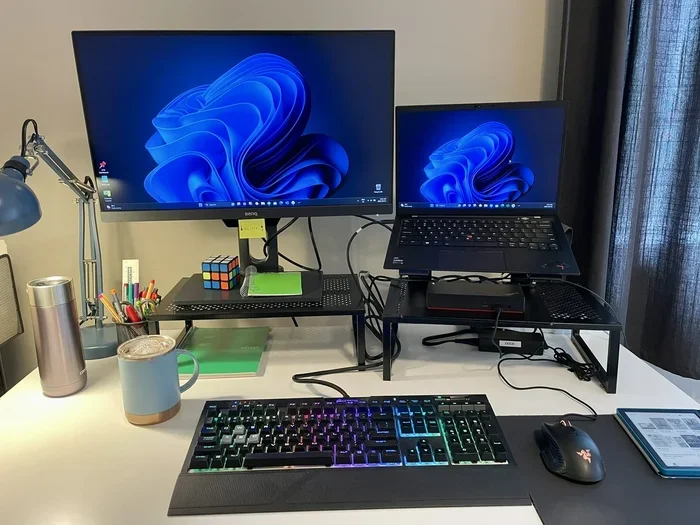
A docking station connects your laptop to multiple devices with one cable, turning it into a full workstation. It saves time, reduces cable clutter, and boosts daily productivity. This guide covers everything you need to know about why a docking station is essential for modern computing.
A docking station is one of the most useful tools you can add to your workspace. If you use a laptop every day, you know the hassle of plugging and unplugging cables. A docking station solves that problem with a single connection point.
Think of it as a hub that gives your laptop extra ports and connections. You can plug in a monitor, keyboard, mouse, and other peripheral devices all at once. Then, when you need to move around, you unplug just one cable.
This guide will walk you through everything you need to know. We will cover what a docking station does, the different types available, and who benefits the most from using one. By the end, you will know exactly whether a dock is right for your setup.
Key Takeaways
- A docking station turns your laptop into a desktop setup with one simple connection
- USB-C and Thunderbolt docks offer the fastest and most versatile options
- Cable management becomes effortless when you use a single dock
- Remote workers and multi-monitor users benefit the most from docking stations
- Choosing the right dock depends on your laptop model and work needs
- A docking station saves time every day by eliminating plug-and-unplug routines
📑 Table of Contents
- What Is a Docking Station?
- The Main Purpose of a Docking Station
- Types of Docking Stations You Can Choose
- Who Benefits Most From a Docking Station?
- Key Benefits of Using a Docking Station
- Common Mistakes to Avoid
- Quick Tips for Getting the Most From Your Docking Station
- Expert Insights
- Comparison: Docking Station vs Direct Connection
- Conclusion
What Is a Docking Station?
A docking station is a device that connects to your laptop and expands its connectivity options. It acts as a central hub where you can plug in multiple devices at the same time. Instead of dealing with a tangle of cables, you get a clean and organized desk setup.
How Does a Docking Station Work?
A dock connects to your laptop through a single port. Most modern docks use a USB-C connection or a Thunderbolt port. Once connected, the dock provides access to extra USB ports, video outputs, audio jacks, and power delivery.
The docking station essentially turns your laptop into a desktop computer. You get the portability of a laptop with the comfort of a full-size monitor, keyboard, and wired peripherals. It is a simple idea that makes a big difference in how you work.
Some people also call a dock a port replicator. While the terms are similar, a dock usually offers more features. It can charge your laptop, connect to multiple external displays, and support high-speed data transfer all at the same time.
The Main Purpose of a Docking Station
The purpose of a docking station is to make your laptop work like a desktop without the mess. It gives you one simple way to connect all your tools and devices. This is especially helpful if you switch between working at home and on the go.
Creating a Desktop-Ready Setup
A docking station lets you set up your laptop as a full desktop in seconds. You connect your monitor, keyboard, and mouse to the dock. Then, when you sit down at your desk, everything is ready to go with just one cable.
This setup is perfect for people who use the same workspace every day. You do not need to reconnect devices each time. The docking station handles all the connections for you. Your laptop RAM and processor stay the same, but the experience feels like a desktop.
For example, if your laptop has 8GB of RAM, using a dock does not change that. But it does give you the comfort of a big screen and full keyboard. If you want to learn more about laptop memory, check out What Is The Ram Of A Laptop to understand how memory affects performance.
Simplifying Cable Management
One of the biggest wins of using a docking station is cleaner cable management. Without a dock, you might have three or four cables plugged into your laptop every day. A dock reduces that to just one.
This means less clutter on your desk. It also means less wear and tear on your laptop ports. You plug in once in the morning and unplug once at night. The docking station keeps everything organized and ready for you.
When you travel, you only need to carry the dock and your laptop. All your other devices stay connected to the dock at home or in the office. This is a huge time saver and a real productivity boost for busy professionals.
Types of Docking Stations You Can Choose
Not all docks are the same. Different types serve different needs and budgets. Here is a look at the most common kinds of docking stations available today.
| Type | Best For | Speed | Price Range |
|---|---|---|---|
| USB-C Dock | Most laptop users | Fast | $50 – $150 |
| Thunderbolt Dock | Power users and creatives | Very Fast | $150 – $400 |
| USB-A Legacy Dock | Older laptops | Moderate | $30 – $100 |
| Travel Dock | Frequent travelers | Fast | $40 – $120 |
USB-C Docks
A USB-C dock is the most popular type right now. It works with most modern laptops that have a USB-C port. These docks offer fast data transfer and can often charge your laptop at the same time.
USB-C docks are versatile and affordable. They are a great connectivity hub for everyday users. If you are not sure which type to get, a USB-C dock is a safe choice.
Thunderbolt Docks
A Thunderbolt dock offers the fastest speeds and the most features. Thunderbolt technology allows you to connect multiple external displays and transfer large files quickly. These docks are ideal for video editors, designers, and power users.
Thunderbolt docks cost more than USB-C docks, but the performance difference is real. If you need top-tier speed and reliability, this is the way to go. Many professionals who work with large files swear by Thunderbolt docks for their workstation setup.
USB-A Legacy Docks
Older laptops may not have USB-C ports. A USB-A legacy dock connects through the traditional USB-A port. These docks are more basic but still very useful for adding extra ports to an older machine.
They are also more affordable. If you have an older laptop and need a simple way to connect a mouse and keyboard, a legacy dock can help. To learn more about laptop pointing devices, check out What Is The Mouse On A Laptop Called for a quick guide.
Who Benefits Most From a Docking Station?
A docking station is not just for tech experts. Many different types of users can benefit from adding a dock to their setup. Here are the groups that get the most value from a docking station.
Remote Workers and Hybrid Employees
If you work from home or split your time between home and office, a dock is a game changer. You set up your dock at your home desk and connect everything once. When it is time to go to the office, you unplug one cable and go.
This one-cable solution saves you from reconnecting everything each day. It also means your home setup is always ready when you sit down. Remote workers who use a docking station report feeling more organized and focused.
For those looking to boost their laptop’s performance for work tasks, learning about Is 8Gb Of Ram Enough For A Laptop can help you understand if your current setup is up to par.
Multi-Monitor Users
People who use two or more monitors need a reliable way to connect them. A docking station makes this easy. Most modern docks can support two or even three external displays at once.
This is a huge advantage for people who work with spreadsheets, code, or design tools. Having multiple screens means more screen space and less window switching. A dock gives you a multi-monitor setup without the cable chaos.
Key Benefits of Using a Docking Station
Using a docking station comes with several real-world benefits. Here are the top reasons people love adding a dock to their workspace.
Productivity Boost
A docking station helps you work faster and smarter. With everything connected and ready, you spend less time setting up and more time doing real work. You can jump right into your tasks every time you sit down.
Studies show that organized workspaces lead to better focus. A dock keeps your cables tidy and your devices connected. This small change can lead to a big productivity boost over time.
One-Cable Convenience
The biggest selling point of a modern docking station is the one-cable convenience. You plug in a single USB-C or Thunderbolt cable, and everything works. Your monitor, keyboard, mouse, and internet connection are all ready.
When you are done, you unplug that one cable. That is it. No need to disconnect five or six different cables. This simplicity is why so many people love using a docking station every day.
If you want to expand your laptop’s memory to get the most out of your dock setup, you can learn how to How To Upgrade The Ram Of A Laptop for a step-by-step guide.
Common Mistakes to Avoid
While docking stations are great, there are some common mistakes people make. Avoiding these pitfalls will help you get the best experience from your dock.
Mistake 1: Buying the wrong dock for your laptop. Not all docks work with all laptops. Check your laptop’s ports before buying. If your laptop only has USB-C, do not buy a dock that needs USB-A.
Mistake 2: Ignoring power delivery. Some docks can charge your laptop while you work. If you buy a dock that does not support power delivery, you will need a separate charger. Always check if the dock can power your laptop.
Mistake 3: Overloading the dock. Every dock has limits. Do not connect more devices than the dock can handle. Check the dock’s specifications to see how many devices it supports at once.
Mistake 4: Skipping driver updates. Some docks need drivers to work properly. Keep your dock’s software up to date to avoid connection issues and performance problems.
Quick Tips for Getting the Most From Your Docking Station
- Use a high-quality cable between your laptop and the dock for the best connection
- Place your dock on a flat surface to avoid overheating and connection issues
- Label your cables so you always know which one goes where
- Update dock firmware regularly to keep everything running smoothly
- Match your dock to your laptop model for the best compatibility and performance
Expert Insights
Tech experts agree that a docking station is one of the best investments for laptop users. It bridges the gap between portability and a full desktop experience. The right dock can transform how you work every single day.
When choosing a dock, focus on the ports you actually need. Do not pay for features you will not use. A simple USB-C dock works great for most users. But if you need multiple monitors or fast data transfer, a Thunderbolt dock is worth the extra cost.
Also consider your future needs. If you plan to add more devices later, choose a dock with extra ports. This way, you will not need to buy a new dock every year. Think ahead and invest in a docking station that grows with your work.
For more tips on keeping your laptop running smoothly, check out What Is Good Ram On A Laptop to learn about memory requirements for different tasks.
Comparison: Docking Station vs Direct Connection
| Feature | With Docking Station | Without Docking Station |
|---|---|---|
| Setup Time | One cable plug-in | Multiple cables each time |
| Cable Clutter | Minimal | High |
| Monitor Support | Multiple external displays | Usually one built-in screen |
| Peripheral Connections | Many ports available | Limited to laptop ports |
| Portability | Easy single-cable disconnect | Must unplug each device |
| Desk Organization | Clean and tidy | Messy cable management |
The table above shows a clear advantage for using a docking station. The one-cable connection saves time and keeps your workspace clean. Even if you only use your laptop at a desk sometimes, a dock makes the switch seamless.
Conclusion
A docking station is a simple yet powerful tool for anyone who uses a laptop regularly. It turns your portable computer into a full workstation with one easy connection. You get a bigger screen, full keyboard, and mouse without the cable mess.
Whether you work from home, in an office, or both, a dock makes your life easier. It saves time, reduces clutter, and boosts your daily productivity. The different types of docks mean there is an option for every budget and need.
If you have been thinking about getting a dock, now is a great time to start. Pick the right type for your laptop, set up your desk setup, and enjoy the difference. A docking station is a small investment that pays off every single day.
Frequently Asked Questions
Can I use a docking station with any laptop?
Most modern laptops work with docking stations. Check your laptop’s ports first. USB-C and Thunderbolt ports are the most common connections for docks today. If your laptop has one of these ports, a dock will likely work with it.
Do docking stations slow down my laptop?
No, docking stations do not slow down your laptop. They actually help by keeping your connections organized. A good dock can even improve performance by allowing your laptop to connect to faster external devices like monitors and storage drives.
Can a docking station charge my laptop?
Yes, many docking stations can charge your laptop through the same connection cable. Look for docks that support power delivery, often called PD charging. This means you only need one cable for both data and power.
How many monitors can a docking station support?
This depends on the dock you buy. USB-C docks usually support one or two external monitors. Thunderbolt docks can support two or more. Check the dock’s specifications to see how many external displays it can handle at once.
Is a docking station the same as a USB hub?
They are similar but not the same. A USB hub mainly adds extra USB ports. A docking station does more. It can connect monitors, charge your laptop, and support many types of devices all at once. Think of a dock as a more powerful version of a hub.
What should I look for when buying a docking station?
Check your laptop’s ports first. Then decide which features matter most to you. Do you need multiple monitor support? Fast data transfer? Laptop charging? Make a list of your needs and pick a dock that matches. Reading reviews can also help you find the best option for your workstation setup.
=== CONCLUSION ===
A docking station is one of the simplest ways to improve your laptop workflow. It gives you a clean, organized workspace with everything connected in one place. From remote workers to multi-monitor users, almost anyone can benefit from adding a dock to their setup.
Take the time to choose the right type of dock for your needs. Set it up once, and enjoy the convenience every day. Your future self will thank you for making this small but powerful upgrade to your workspace.