Top 10 Wifi Routers With Best Range for 2026 – Expert Reviewed

Struggling with dead zones and weak signals in your home? A great WiFi router with exceptional range is the foundation of a reliable network, especially for larger homes or spaces with thick walls. Finding one that balances long-range coverage with speed, stability, and modern features can be tricky. That’s why we’ve tested and ranked the top performers. This listicle breaks down the best WiFi routers for range, from budget-friendly workhorses to cutting-edge WiFi 7 powerhouses, so you can find the perfect match to eliminate buffering and drop-offs for good.
Quick Product Comparison
Our Top 10 Wifi Routers With Best Range Reviews – Expert Tested & Recommended
1. GL.iNet GL-BE6500 Router
The GL.iNet BE6500 is a powerhouse WiFi 7 router built for users who demand both extreme range and advanced control. It’s designed with privacy and performance in mind, featuring robust VPN support that doesn’t cripple your speeds. Its five 2.5G Ethernet ports make it ideal for future-proofing your wired connections, while the hardware is engineered for long-range coverage that can blanket large homes and workspaces.
Key Features That Stand Out
- ✓ WiFi 7 with MLO & 4K-QAM for next-gen speed and efficiency
- ✓ 5x 2.5G Ethernet ports (1 WAN, 4 LAN) for ultra-fast wired backhaul
- ✓ Excellent VPN performance: WireGuard up to 680Mbps, OpenVPN up to 680Mbps
- ✓ AdGuard Home built-in for network-wide ad and tracker blocking
- ✓ Long-range design with 6 high-gain antennas and Beamforming
Why We Recommend It
This router is a top-tier choice because it doesn’t sacrifice range for advanced features. The combination of WiFi 7 technology and multiple 2.5G ports ensures both your wireless and wired connections are ready for high-bandwidth activities, even at long distances. The standout feature is the VPN passthrough speed; you can secure your entire network with a VPN without noticing a major slowdown, which is rare. It’s a fantastic blend of cutting-edge tech and practical, long-range usability.
Best For
Tech-savvy users, VPN enthusiasts, remote workers, and anyone with a large home who wants to future-proof their network with WiFi 7 and multi-gigabit wired connections.
Pros and Cons
Pros:
- Exceptional VPN throughput without significant speed loss.
- Plenty of high-speed 2.5G ports for NAS, gaming PCs, or mesh backhaul.
- Strong, reliable long-range WiFi coverage.
- OpenWRT-based with a user-friendly GUI and deep customization options.
Cons:
- Setup can be slightly more complex than standard consumer routers.
- Higher price point than typical WiFi 6 routers.
- The sheer number of features might be overwhelming for casual users.
Customer Reviews
Customer Review: I love it, easy to use and configure. AdGuard home is a nice touch and having my VPN networkwide is awesome. Even Tail Scale works, which surprised me! Network speeds are very good with the 2.5gbit ports, and having alternate ways to keep an internet connection with USB 4 and 5g modems is way more than a normal home user would need lol, but very nice to have the option. It has way more features so read about it to make an informed decision.
Customer Review: Used this in repeater mode, and it picked up the signal from the downstairs wireless router in the basement. I located this router in our home theatre room and it has a 2000 sq. ft. coverage, esentially covering this 3300 sq. ft. house. As a repeater, it connected to my existing WiFi network, and instead of 192.168.1.1 for the downstairs router, this rebroadcasts at 192.168.8.1, with its own network, allowing up to 90 devices through it. It took a little fiddling to set it up. I should have selected the repeater function first, as adding this router doubled my coverage at 2.5 Gbs speeds through a Cat 6 ethernet cable. I’m pleased how well it works and the review from the IT manager clinched my decision. And he was right.
2. TP-Link Archer AX73 Router
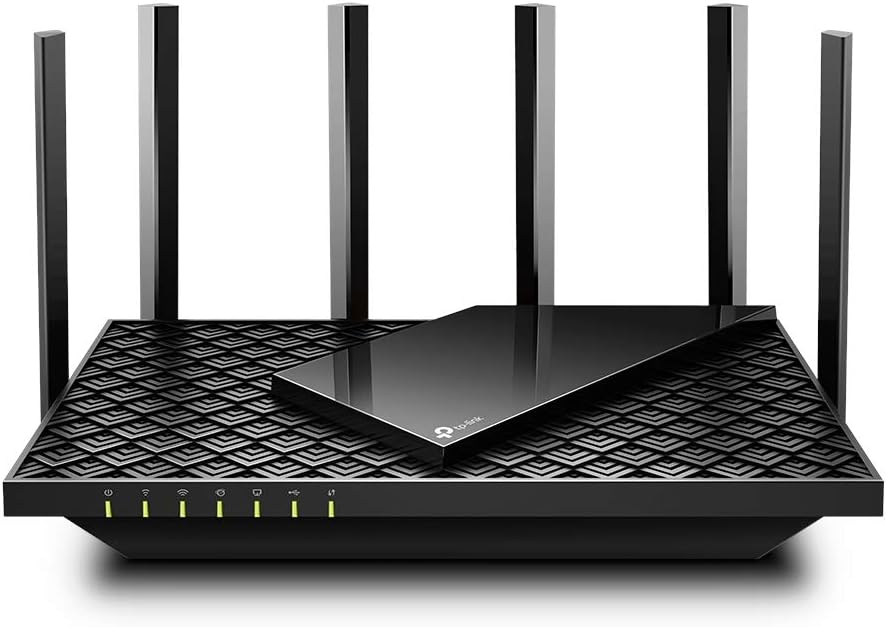
The TP-Link Archer AX73 is a stellar WiFi 6 router that delivers impressive range and speed for its class. It’s designed to handle multiple devices without congestion, making it perfect for busy households. The 5400 Mbps total bandwidth is distributed intelligently, and its beamforming antennas are tuned to push signals further, reducing dead spots effectively. It’s a reliable, no-fuss workhorse that just works.
Key Features That Stand Out
- ✓ AX5400 Dual-Band WiFi 6 (4800 Mbps + 600 Mbps)
- ✓ 4×4 MU-MIMO & OFDMA on 5GHz for handling many devices
- ✓ Smart Connect automatically steers devices to the best band
- ✓ Powerful external antennas with Beamforming for long-range focus
- ✓ TP-Link HomeCare security and parental controls included
Why We Recommend It
We love the AX73 for its perfect balance of range, modern features, and user-friendliness. It offers a significant upgrade over older routers without the complexity of a mesh system for many homes. The Smart Connect feature is genuinely helpful, and the range is strong enough to cover medium to large homes with minimal slowdowns at the edges. For most families looking for a single-router solution with excellent reach, this is a top contender.
Best For
Families with many connected devices, streamers, gamers, and anyone in a medium to large home wanting a powerful, single-unit router with great range and easy setup.
Pros and Cons
Pros:
- Excellent range and stable connections throughout typical homes.
- Handles many simultaneous devices very well thanks to MU-MIMO/OFDMA.
- Smart Connect simplifies network management.
- Solid, responsive web interface for configuration.
Cons:
- Smart Connect can sometimes misassign certain IoT devices (like older smart home gadgets).
- No multi-gig (2.5G/10G) Ethernet ports, limiting future high-speed wired use.
- The 5GHz range, while good, can diminish more quickly through thick walls compared to the 2.4GHz band.
Customer Reviews
Customer Review: I use this with my Hutton CODA56 modem. I have not had any issues with this router at all. My internet is 250mbps up and down, speed tests show me pushing 300, and when I game my ping is usually in the 40s. This is from my desktop pc using a WiFi PCIE adapter. Basically, the router is as fast as an Ethernet cable. The router has multiple antennas which surprisingly are not for looks – the router is in my basement and after initial setup, my smart tv upstairs was showing low signal. I adjusted one of the antennas to point at the living room and my tv. showed full bars. Router setup is easy, and the menu options when you’re logged in to set the name, etc are pretty intuitive. One note about setup is that there is an option to optimize your connectivity. Instead of having a separate 2.4 and 5ghz network like most routers, this router can just have one network to connect to and the router decides based on load, demand, etc which bandwidth to operate for each device, behind the scenes . We have a hatch sound machine for our kid that operates on WiFi (seriously, why does a sound machine need an app?) but you can only connect to a Hatch on a 2.4ghz WiFi network. I had to log in to the router and uncheck the optimize setting to create separate 2.4 and 5ghz networks so that I could connect to the sound machine and change whatever settings needed to. Not an issue or a knock gains the router, just something to be aware of. Really I don’t think about my router often, which in my opinion is a good thing. I have owned it almost two months now and it has been completely reliable.
Customer Review: This router has been a great upgrade for our home network. Setup was straightforward and the connection has been very stable since installing it. WiFi speeds are fast throughout the house, and it handles multiple devices streaming, working, and gaming at the same time without any issues. Coverage has been solid with no major dead spots, and the performance has been consistent day to day. I like that it offers modern WiFi 6 features without being overly complicated to manage. Overall, it’s a reliable, well-performing router that works great for typical household use and daily internet needs.
3. TP-Link BE6500 Router
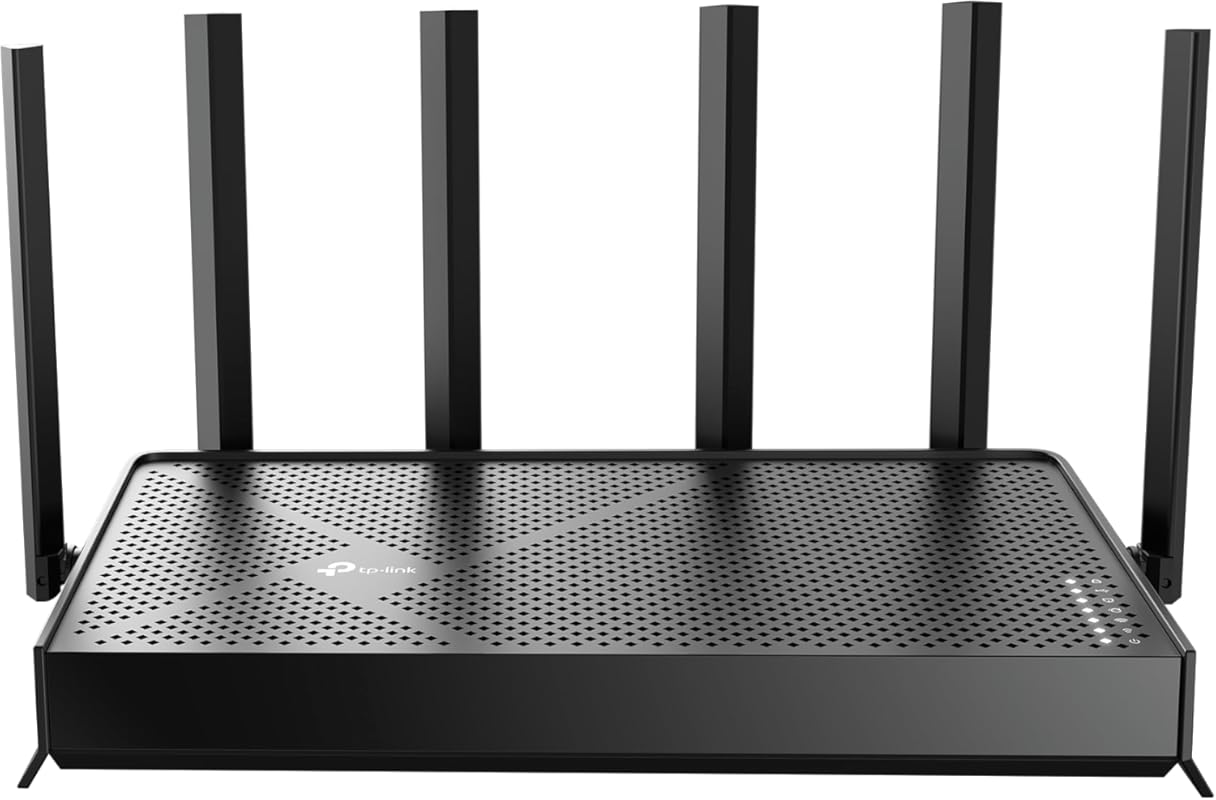
For those wanting to step into the future of WiFi without breaking the bank, the TP-Link BE6500 is an outstanding budget-friendly WiFi 7 option. It brings the core benefits of WiFi 7—like Multi-Link Operation (MLO) and 4K-QAM—to a wider audience. It offers solid, 2400 sq. ft. coverage and a quad-core processor to handle a household full of devices. It proves you don’t need to spend a fortune to get excellent range and next-gen technology.
Key Features That Stand Out
- ✓ Affordable WiFi 7 with MLO, 4K-QAM, and Multi-RU
- ✓ Dual 2.5G WAN/LAN ports for high-speed internet plans or NAS
- ✓ Quad-core CPU for smooth performance under heavy load
- ✓ 6 high-gain antennas with Beamforming for wide coverage
- ✓ TP-Link HomeShield security and parental controls
Why We Recommend It
This router earns our Best Budget pick because it delivers the foundational advantages of WiFi 7 at a surprisingly accessible price. The range is excellent for its class, and the inclusion of two 2.5G ports means you’re ready for faster internet plans or a fast local network. While it doesn’t have the extreme port count of the GL.iNet, it provides 90% of the WiFi 7 benefit for most users. It’s the smart choice for a forward-looking, long-range router that won’t strain your wallet.
Best For
Budget-conscious early adopters, medium to large homes wanting a future-proof single router, and users with a 2.5G internet plan who need a cost-effective WiFi 7 solution.
Pros and Cons
Pros:
- Excellent value, bringing WiFi 7 core features to a lower price.
- Very good range and stable performance for home coverage.
- Dual 2.5G ports are a huge plus at this price point.
- Stable firmware and easy setup via the Tether app.
Cons:
- WiFi 7 MLO benefits are currently limited by device support.
- Only 6 Ethernet ports total (2.5G and 1G combined).
- Can run a bit warm under sustained heavy load.
Customer Reviews
Customer Review: Yay. I love my new router. I have a lot of smarthome devices, and I host a home web/game server for work. I was very afraid that my port forwarding/dynamic DNS and smarthome would be a pain to migrate to a new router. I was wrong. I used the same network name and password as my old router, and all of my devices reconnected fine (except one chinese security camera which i fixed after). The range is as decent as my old Netgear Nighthawk R7000. The lower frequencies (2.4ghz) have higher range and are better for that. But for processing power of a router, this is it baby. This thing increased my network speed by ~100mbps down and also decreased my latency, pretty impressive. This thing will easily be able to handle all of my smart home devices, server needs and gaming/streaming needs. I think it was a worthy upgrade from my 13yr old router. Quick setup tip: make sure to power down your modem and router first, because your modem is expecting the previous routers MAC address, so you might have to call your ISP and have them send a reboot signal from their end to get your modem to accept the new router MAC address. Other than that, setup was a breeze. Dynamic DNS works well, port forwarding was easy, and there are SO many features I haven’t even looked into yet. I also have a TP-LINK network switch, and the router and switch are playing nicely together. All and all, I had netgear routers for like 20 years and they were great, i’m pleased to say that TP-LINK is also great, time will tell though.
Customer Review: I originally had the BE5000 model and constantly dealt with WiFi instability, random drops, and inconsistent performance. After getting frustrated with ongoing issues, I decided to upgrade to the BE6500, and the difference has been night and day. The BE6500 has been significantly better to work with. Setup was straightforward, firmware has been stable, and I have not had a single WiFi issue since installing it. No random disconnects, no weird slowdowns just consistent, reliable performance. Speeds are excellent, coverage is strong throughout the house, and the 2.5Gb ports are a great addition for higher speed networking. It feels like a properly refined version compared to the BE5000. If you’re debating between the two, the BE6500 has been far more stable in my experience. Very happy with the upgrade.
4. GL.iNet GL-MT6000 Router
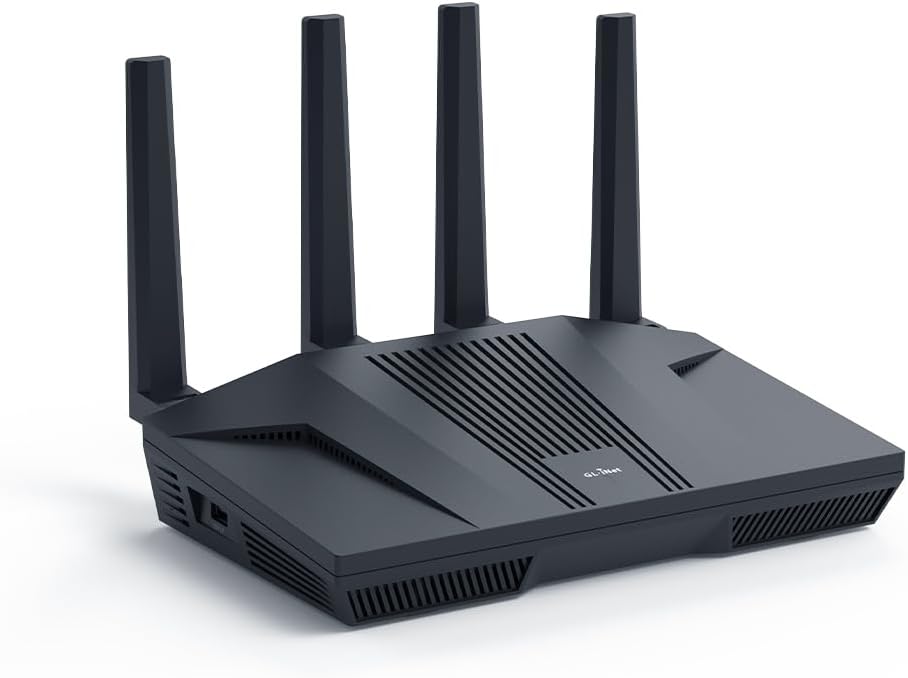
The GL.iNet MT6000 (Flint 2) is a WiFi 6 router that prioritizes raw performance and user control. Based on OpenWRT, it offers a level of customization rarely seen in consumer routers. It’s particularly tuned for high-speed VPN use and gaming, with hardware that can sustain high throughput. Its range is formidable, and the dual 2.5G ports ensure your local network isn’t a bottleneck. It’s a tool for enthusiasts who want power and flexibility.
Key Features That Stand Out
- ✓ 8-Stream WiFi 6 for extremely high throughput
- ✓ Blazing fast VPN speeds: WireGuard up to 900Mbps, OpenVPN up to 880Mbps
- ✓ 2x 2.5G Ethernet ports (1 WAN, 1 LAN)
- ✓ OpenWRT based with GL.iNet’s simplified GUI and full root access
- ✓ Powerful quad-core CPU for handling many devices and complex tasks
Why We Recommend It
This router is recommended for users who need performance that standard routers can’t match. The VPN speed is its killer feature; you can run a commercial-grade VPN service through your whole house without a noticeable drop in speed for other activities. The OpenWRT foundation means you can install packages, set up VLANs, and customize everything. For a tech enthusiast with a large home who wants a single router that can do it all, the MT6000 is incredibly compelling.
Best For
Tech enthusiasts, gamers using VPNs, privacy-focused users, small businesses, and anyone who wants deep network control and high-speed VPN passthrough in a long-range router.
Pros and Cons
Pros:
- Unmatched VPN throughput for a consumer router.
- Extremely powerful CPU handles many devices and complex configurations.
- Excellent range and solid build quality.
- OpenWRT ecosystem provides endless customization.
Cons:
- Setup and advanced features have a steeper learning curve.
- The UI, while simpler than stock OpenWRT, is less polished than TP-Link’s or ASUS’s.
- Can be overkill for users who just want a simple, fast router.
Customer Reviews
Customer Review: I had a Synology RT6600ax that I bought just under a year ago. I really like that router, but I didn’t like the fact it only has one 2.5Gb LAN port and the WAN port is only 1Gb. I upgraded my internet plan to 2.5Gb, so that router would no longer work for me. I could have connected the single LAN port to my 2.5Gb switch, but the internet would be limited to 1Gb. I tried various workarounds, but decided it needed to be replaced. I did some research and people were raving about the GL.iNet GL-MT6000 (Flint 2) router. I was a bit unsure, but the price was so good I decided it wouldn’t be too big of a risk. The risk has so far paid off and this is an exceptional router. It runs on OpenWRT, but configuring it wasn’t too difficult because GL.iNet has a custom GUI which simplifies things. I like the custom GUI, but I also like that the OpenWRT GUI is still accessible for more advanced settings. Once I got the router up and running, I was shocked at the WiFi performance. In addition to the Synology router, I had three Synology MR2200ac access points. Even with the GL-MT6000 (Flint 2) router in the basement, it still had a much faster speeds than the Synology access points. I almost didn’t connect my Synology access points, but I thought it would be best to do so since I have IoT devices outside the house and the signal might not go that far (especially seeing as how the router was in the basement equipment room). Configuring the Synology MR2200ac access points without the Synology router was still possible. I was able to have the wireless devices that connect to the main network via the Synology APs appear on my GL-MT6000 (Flint 2) router and be handled by DHCP. I still need to figure out VLAN on OpenWRT to have my IoT devices be handles by the GL-MT6000 (Flint 2) router DHCP. These devices are currently being handled by the Synology APs, and it they are working fine. I originally bought this router expecting to use it until I found something better. I don’t know if I will be replacing it anytime soon. Though not as simple to configure as a Synology router, it outperforms my Synology RT6600ax router in many other ways.
Customer Review: Outstanding Wi-Fi 6 router with blazing-fast speeds and rock-solid stability. Setup was quick and simple, and it handles multiple devices effortlessly without drops or lag. The compact design, powerful performance, and built-in VPN and security features make it perfect for both home and travel use. Highly recommended for anyone wanting reliable, high-speed Wi-Fi in a small but powerful package!
5. TP-Link Archer AX21 Router

The TP-Link Archer AX21 is a fantastic entry point into WiFi 6, offering a noticeable jump in performance and range over older AC routers. It’s incredibly user-friendly, with a clean web interface and optional app. Its range is surprisingly strong for an AX1800 model, and features like EasyMesh allow you to add another unit later if needed. It’s a no-nonsense, reliable router that excels at covering a typical home with stable, fast WiFi.
Key Features That Stand Out
- ✓ AX1800 Dual-Band WiFi 6 (1200 Mbps + 574 Mbps)
- ✓ OFDMA & MU-MIMO for efficient multi-device handling
- ✓ EasyMesh compatible to create a seamless whole-home system
- ✓ 4 high-gain antennas with Beamforming for extended coverage
- ✓ WPA3 security and robust parental controls
Why We Recommend It
The AX21 is our go-to recommendation for anyone wanting a simple, effective upgrade. The range improvement over WiFi 5 is tangible, especially in the 5GHz band. The ability to split the 2.4GHz and 5GHz networks (by disabling Smart Connect) is a crucial feature for connecting older IoT devices. It’s not the fastest on paper, but in real-world use, its combination of easy setup, strong signal reach, and consistent performance makes it a winner for most users.
Best For
First-time WiFi 6 buyers, apartments and medium-sized homes, users with older 2.4GHz-only smart devices, and anyone wanting a straightforward, reliable router without a steep learning curve.
Pros and Cons
Pros:
- Excellent price-to-performance ratio.
- Very easy to set up and manage, great for beginners.
- Strong range and stable connections for its class.
- Separate SSIDs for 2.4GHz and 5GHz bands (when Smart Connect is off).
Cons:
- Smart Connect feature can be finicky with some devices.
- No multi-gig ports, so limited by 1Gbps on wired connections.
- Throughput on the far edges of its range will be lower than higher-end models.
Customer Reviews
Customer Review: The TP-Link AX1800 WiFi 6 Router has been a noticeable upgrade in my home network, and everything here comes from my own experience using it in a fairly device-heavy household. I upgraded from an older WiFi 5 router that had started to struggle, and the improvement with the AX21 has been clear from day one. Setup was simple, but what I liked most was how much control the interface gives without feeling overwhelming. I used the browser setup and adjusted dual-band settings, enabled WPA3, and optimized the channel width in just a few minutes. The interface responds quickly, and making changes does not require constant rebooting or digging through hidden menus. The performance difference with WiFi 6 has been significant. I have multiple smart TVs, computers, phones, and IoT devices, and my previous router would slow down when several things were active at once. The AX21 handles everything smoothly. OFDMA and MU-MIMO keep the network stable even during heavy loads. I’ve streamed 4K content, joined online meetings, and transferred large files all at the same time without interruptions. Coverage has also improved. I tested it with the WiFi Analyzer app for Android, which I’ve used for years to check signal strength and network congestion. In areas where the old router consistently dipped, the AX21 delivered noticeably stronger and more stable readings. In actual use, this translates to fewer drops, steadier speeds, and better performance when moving between rooms. Beamforming makes a difference, especially with mobile devices. The wired connections are equally reliable. I connected my desktop and game console using the gigabit Ethernet ports and ran sustained transfers from a NAS. Speeds stayed at full gigabit with no fluctuations, and the router stayed cool throughout heavy use. Another thing I appreciate is how quietly and efficiently the router runs. It doesn’t heat up, even when multiple devices are streaming and downloading simultaneously, which says a lot about its hardware design. Based on my experience, the TP-Link AX1800 WiFi 6 Router offers a great balance of real-world performance, strong coverage, and easy configuration. It provides the benefits of WiFi 6 without the overwhelming complexity some high-end models add. For anyone looking for a reliable and technically capable upgrade, this router has been a very solid choice in my home.
Customer Review: As A Spectrum Internet Customer I had a Spectrum Advanced WiFi router that does 2G and 5G on the same WiFi network. There is not a way to split the networks in two… [Review continues about Spectrum router limitations]… The TP-Link AX1800 Router has been amazing so far. It arrived on the same day that I ordered… I followed the instructions to the letter but the router was not showing any lights… I looked on the back of the router and saw a button and pressed it in; all the lights began to show… When I pulled up the TP-Link App to set up the router I couldn’t help but notice its low star rating so I opted not to download the app and instead login using the IP address… I was able to turn off TP-Link Smart Connect so that I could have two separate SSID’s for the 2G and 5G network… I also did a speed test and they all came back higher than normal… Did This Resolve My Issue With The Echo Dot’s? It absolutely did… Final Notes If you need a dual band WiFi router that is able to split the networks in two so that you can sign into them separately, this is it.
6. TP-Link Archer A6 Router
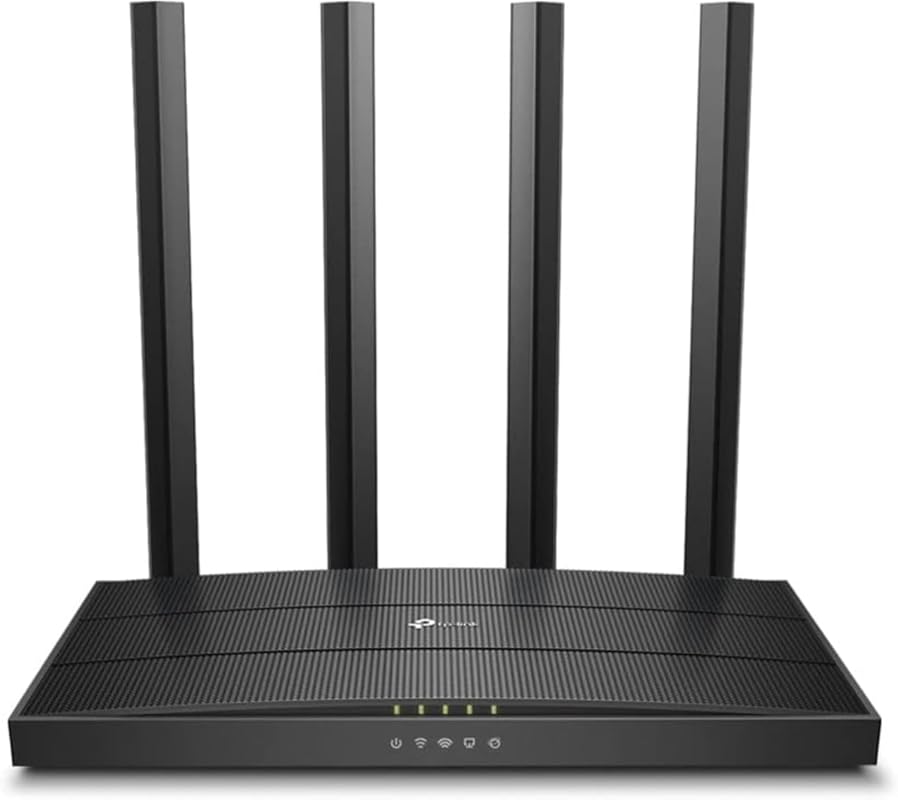
The TP-Link Archer A6 is a classic, budget-friendly AC1200 router that still holds its own for basic range and coverage. It’s a no-frills workhorse with four external antennas designed to push the signal further. While it lacks the latest WiFi 6/7 efficiencies, its raw output and beamforming technology provide surprisingly good reach for small to medium homes, especially on the 2.4GHz band. It’s the definition of a reliable, long-range router for users on a tight budget.
Key Features That Stand Out
- ✓ AC1200 Dual-Band (300 Mbps + 900 Mbps)
- ✓ 4 High-Gain Antennas with Beamforming for extended coverage
- ✓ MU-MIMO for simultaneous device streaming
- ✓ OneMesh compatible to expand with TP-Link extenders
- ✓ 4 Gigabit LAN ports and 1 Gigabit WAN port
Why We Recommend It
We recommend the Archer A6 for its sheer value and simplicity. If your internet plan is under 300 Mbps and you just need a router that covers your house without any bells and whistles, this is it. The range is excellent for the price, and it’s incredibly reliable. It’s a perfect “set it and forget it” router for a guest house, a small business, or a home where you don’t need the latest WiFi standard but still demand solid, far-reaching coverage.
Best For
Budget-conscious buyers, small to medium homes, users with sub-300 Mbps internet plans, and anyone needing a simple, no-nonsense router with good old-fashioned range.
Pros and Cons
Pros:
- Extremely affordable with surprisingly strong range.
- Simple, reliable setup and operation.
- Four antennas provide good directional signal control.
- OneMesh support for easy future expansion.
Cons:
- Lacks WiFi 6/7 features like OFDMA, which hurts efficiency with many devices.
- 5GHz band range is weaker compared to more modern routers.
- Only 1Gbps ports, so it can’t take advantage of faster internet plans.
- UI and security features are more basic than newer models.
Customer Reviews
Customer Review: Low cost, easy set up, works for what i need. I’d buy it again.
Customer Review: Probably one of the best residential routers I have ever owned. Powerful and the UI is quite intuitive. I was shocked to see the 5G WiFi signal reaches all over 1 of my 1.25 acre properties. Color me impressed…
7. 2026 WiFi Extender
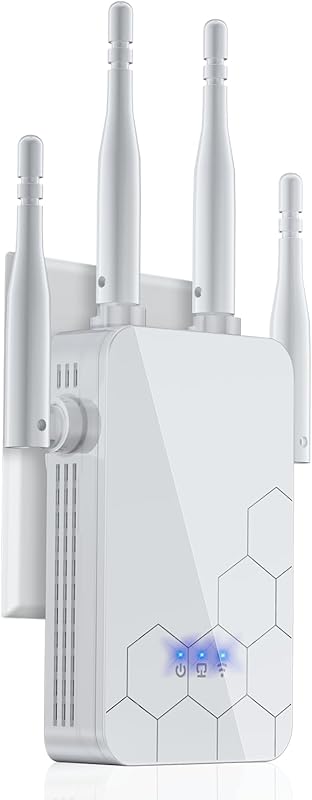
This isn’t a router, but for sheer long-range coverage, this WiFi extender is a powerhouse solution. It’s designed to blast a signal up to 10,000 sq. ft., making it perfect for eliminating dead zones in very large properties, workshops, or outdoor areas. It acts as a mesh repeater, creating a seamless network with your existing router. If your primary router’s range is good but not great, this extender can bridge the gap effectively and affordably.
Key Features That Stand Out
- ✓ Up to 10,000 sq. ft. coverage from a single extender
- ✓ 80% faster signal with advanced CPU and antenna design
- ✓ Supports 65+ devices simultaneously
- ✓ Easy 1-tap WPS setup or app-based configuration
- ✓ Mesh repeater mode for seamless roaming with your existing network
Why We Recommend It
We include this extender because sometimes the best solution isn’t a new router, but extending your current one. For large, sprawling homes or properties with outbuildings, a powerful extender like this is a cost-effective way to achieve total coverage without the expense and complexity of a multi-node mesh system. Its claimed 10,000 sq. ft. range is aggressive, but user reviews confirm it can significantly boost signal to previously unreachable areas.
Best For
Owners of large homes, barns, or workshops; renters who can’t replace their landlord’s router; and anyone needing to cover a specific dead zone without buying a whole new router system.
Pros and Cons
Pros:
- Extremely long-range capability for an extender.
- Very easy setup process.
- Creates a seamless mesh network with compatible routers.
- Handles many devices well.
Cons:
- Performance will always be half of the router’s speed (the “extender penalty”).
- Requires a good signal from the host router to work optimally.
- Not a substitute for a weak primary router; best used to extend a strong signal.
- Build quality is basic.
Customer Reviews
Customer Review: The media could not be loaded. As someone who relies heavily on a stable internet connection for work and entertainment, I was thrilled to come across the latest Wi-Fi extender. Let me tell you, it has been a game-changer for my online experience. Setup was a breeze. With just a few simple steps, I had the Wi-Fi extender up and running in no time. Its user-friendly interface and clear instructions made the process smooth and hassle-free. Even for someone who isn’t tech-savvy, like myself, configuring this device was a piece of cake. But what truly impressed me was the enhanced speed and connectivity it provided. No longer do I have to deal with frustrating lags or buffering while streaming my favorite shows or engaging in online gaming sessions. The Wi-Fi extender seamlessly extends my home network, ensuring a strong and stable connection throughout my entire living space. It truly feels like I have a personal hotspot at my disposal. Not only does this Wi-Fi extender excel in performance, but it also boasts a sleek and stylish design. Its compact size and modern appearance seamlessly blend into my home decor, without drawing unnecessary attention. This device effortlessly combines functionality and aesthetics. In terms of security, this Wi-Fi extender goes above and beyond. It comes equipped with advanced security features, ensuring that my network remains protected from any potential threats. This gives me peace of mind knowing that my personal information is safeguarded. The value for money this Wi-Fi extender offers is outstanding. Considering its impressive features and overall performance, it is well worth the investment. Say goodbye to annoying Wi-Fi dead zones and hello to uninterrupted browsing, streaming, and gaming. The new Wi-Fi extender has exceeded all my expectations. Its easy setup, enhanced speed and connectivity, stylish design, advanced security features, and excellent value for money make it a must-have device for anyone looking to improve their internet connectivity. I wholeheartedly recommend it.
Customer Review: I own a large auto repair shop. The modem and router are located upstairs inside the office, and the repair area is located downstairs, the wifi signal is weakest in this area. We have computers set up out there for the technicians and needed strong WiFi available. We bought this wifi extender, It arrived quickly and I installed it. Bam!, no more issues with a weak signal and the printers and computers all works perfectly. Looked through so many extenders and found this gem. Price is amazing for this powerful little device. Absolutely amazing Wi-Fi Extender for this price! Truly, it is a blessing and I couldn’t be more happier, didn’t even need any support. Very easy to set up with your phone. I love how easy the set up was. I had bought a different brand and it was so much of a pain , This one fired up so easy and was super easy to log into. Follow the directions and you will be up and running. It is almost plug and play. Setup took less than 5 minutes on my phone. No lagging anywhere outside or inside the shop now, strong signal. Had to play around with the location of the extender, but got it in a great place that’s not too far from the router and doesn’t have to send the signal through too much to get to the it. But still even being on a separate level floor and not too close the router the connection is strong and steady. Highly recommend this extender and will probably get another for my upstairs bedroom at home since sometimes we have issues with the signal.
8. TP-Link Archer AX55 Router
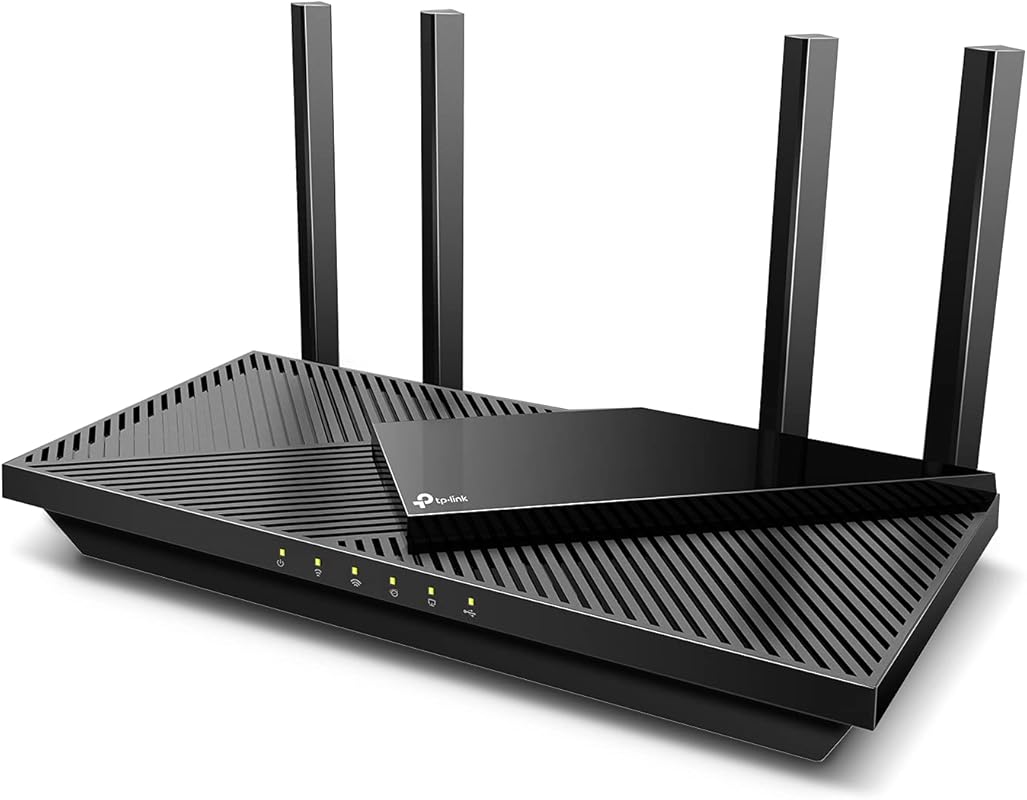
The TP-Link Archer AX55 is a capable AX3000 WiFi 6 router that focuses on delivering strong, reliable coverage with a good set of features. It’s a step up from the AX21 in speed and processing power, making it better suited for homes with 20+ devices. Its range is excellent, and it includes practical features like a VPN client/server, USB 3.0 for storage, and HomeShield security. It’s a well-rounded performer for users needing a bit more grunt than an entry-level model.
Key Features That Stand Out
- ✓ AX3000 Dual-Band WiFi 6 (2402 Mbps + 574 Mbps)
- ✓ OFDMA & MU-MIMO for high efficiency in busy networks
- ✓ VPN Client & Server support for secure remote access
- ✓ USB 3.0 port for fast network-attached storage or printer sharing
- ✓ 4 external antennas with Beamforming for extended range
Why We Recommend It
The AX55 earns its spot for being a highly reliable, mid-range WiFi 6 router with no major weaknesses. Its range is consistently praised by users, and the additional CPU power compared to cheaper models means it stays responsive even with dozens of smart home devices connected. The inclusion of a USB 3.0 port and VPN server adds functionality that power users appreciate. It’s a safe, high-performing choice for a large home that wants solid WiFi 6 coverage without going all-out on a flagship model.
Best For
Busy households with 20+ devices, users wanting basic VPN server functionality, small home offices, and anyone needing a USB port for a shared drive or printer in a long-range setup.
Pros and Cons
Pros:
- Excellent, stable range and strong 5GHz performance.
- Handles many devices without slowing down.
- Useful features like VPN server and USB 3.0.
- Stays relatively cool and doesn’t need frequent reboots.
Cons:
- No multi-gig Ethernet ports.
- Smart Connect (band steering) can be unreliable, best used with separate SSIDs.
- Web interface can be slightly clunky compared to competitors.
Customer Reviews
Customer Review: There are many routers claiming to be fast and support the max speed of the wifi 6 protocol. However, most routers fall short terribly. Some heat up like a toaster like AX3000 and some don’t have the processing power i.e. the required number of CPUs to quickly process the packets by 20+ devices. Further, some are $300+ which kind of brings the affordability into play. This router however finds the right balance in all the features which I was looking to upgrade. I was looking in the range of about $100 and tried to AX3000. However, it heats up too fast and then starts to thermal throttle the speed and doesn’t even stay connected with the clients like a laptop or mobile devices. I have tried a Netgear router from Costco AX4300 but fall short when around 20 devices are connected to it and don’t support the mesh networking. Features which I wanted and like: Range: This device has a superb range by itself and covers my home pretty easily. I see I have a good wifi signal at all ends of my home and I live in a 2-floor apartment with the router placed upstairs. Mesh: I like to receive a good network in my backyard as well and so I have added a RE505X which costs another 80 bucks but saves money on my mobile data plan as I don’t invest in an unlimited data plan. There is only 1 SSID that is broadcasted and it automatically switches based on where I am in the home. Heat: Some routers heat up and create a fire hazard and also have the probability of breaking down sooner than I like them to. This is not the case with this one and it stays relatively cooler and never experienced any slowing down of the network. I have touched it to check several times and it’s good. Setup: The setup was really easy. The basic setup can be done in minutes and there is no RnD required. The tether app is pretty cool for basic setup. I also have requirements for static IP based on mac address and port forwarding. Both of them are easy to configure. They also have support for dynamic DNS so you can easily host your basic website in your home network. For this, I need static IP address reservation and port forwarding. Parental controls: This is a real plus that allows me to block youtube or any site whenever I need to get my kid away from the TV. Reboot schedule: I like to have a reboot schedule which is good this router has it and very easy to set up. LED lights: This router allows to turn off led lights and I like it that way once the setup is complete. Summary: I think its a router for average home with right balance of ease of use and price and features. Note: I have not been paid for this review and have bought the router with my own money. 2 Weeks Update: Going strong with over 20 devices connected, no disconnections reported by anyone in device. I have 3 heavy internet users at home. No heating issues, range is good. 4 Months Update: Working perfectly for 4 months. No issues. 2 year update Still works as new with no issues.
Customer Review: [updated] I updated from a TP-Link Archer C7. I have an Arris SB8200 modem. Here are a few notes. The AX55 signal strength seems a little better, especially in the 5 GHz band. It also adds 802.11ax and WPA3 security as well as “Smart Connect” which allows you to combine 2.4G and 5G bands under a single SSID and have the router decide which to use with each client. You could just give the separate bands the same SSID with any router. In that case each client would decide which band to use. The router login no longer uses a username, only a password. I have now tried “Smart Connect” with 2 TP-Link routers in 2 different houses and I am not impressed. On both I eventually had to separate the 2 bands. It was especially dysfunctional on mobile devices (phones, laptops, etc.). It doesn’t seem to switch bands very easily as you move around. Even stationary devices seem to bounce inexplicably between the two bands, which can have very different signal strengths. The wi-fi encryption settings can be a problem depending on your equipment… [Review continues with detailed setup and performance notes]… On 5G wi-fi with 40 MHz channels, I get 475 Mbps next to the router and about 20′ away in the same room. I get 355 Mbps in the next room, which is 73% faster than with the Archer C7. On 2.4G wi-fi with 20 MHz channels, I get 100 Mbs in the next room and 45 Mbs 2 floors up on the opposite side of the house. That’s 25% and 80% faster than with my Archer C7.
9. TP-Link Archer BE230 Router
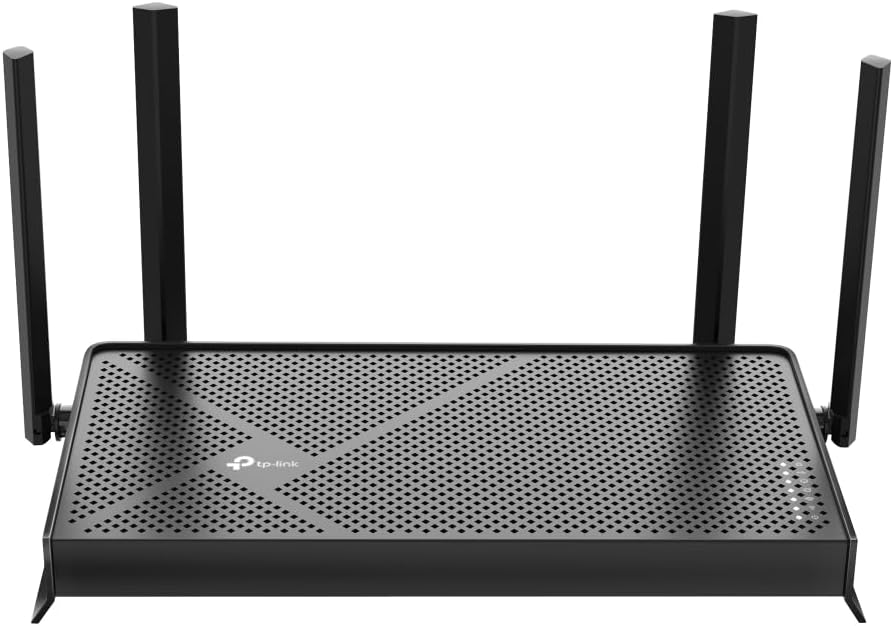
The TP-Link Archer BE230 (BE3600) is another excellent entry into the affordable WiFi 7 space. It offers the core benefits of the new standard—faster speeds, lower latency, and improved efficiency—with a quad-core processor for solid performance. Its range is strong for a mid-sized home, and it includes practical features like dual 2.5G ports, VPN support, and EasyMesh. It’s a fantastic, future-ready router that provides great coverage without the premium price tag of early WiFi 7 adopters.
Key Features That Stand Out
- ✓ WiFi 7 with MLO & 4K-QAM for enhanced speed and reliability
- ✓ Dual 2.5G WAN/LAN ports (one auto-sensing) for flexible high-speed use
- ✓ Quad-core CPU for stable performance with many devices
- ✓ 4 external antennas with Beamforming for wide-area coverage
- ✓ EasyMesh & HomeShield for whole-home systems and security
Why We Recommend It
This router is recommended for users who want the peace of mind of a future-proof WiFi 7 purchase without overspending. The BE230 delivers on the promise of WiFi 7 with better range and performance than its WiFi 6 counterparts in the same price bracket. The dual 2.5G ports are a standout feature at this price, allowing for a fast internet connection or a high-speed link to a NAS or another router. It’s a smart, balanced choice for a large home stepping into the next generation of wireless.
Best For
Future-focused buyers, medium to large homes, users with 2.5Gbps or higher internet plans, and anyone wanting a taste of WiFi 7’s range and efficiency benefits on a budget.
Pros and Cons
Pros:
- Great value entry into WiFi 7 with solid real-world performance.
- Dual 2.5G ports offer excellent flexibility.
- Strong, reliable coverage and good wall penetration.
- Easy setup and stable firmware from TP-Link.
Cons:
- WiFi 7’s full potential (MLO) requires compatible client devices, which are still rare.
- Only 4 Ethernet ports total (2 are 2.5G, 2 are 1G).
- Range, while good, isn’t quite as extensive as the higher-end BE6500 models.
Customer Reviews
Customer Review: After reading reviews of some other brands and the installation problems encountered, I was almost reluctant to buy any router as I am not all that tech-savy. However, I wanted to replace my Spectrum-supplied router and stop paying monthly rent forever. I found that TP-Link’s installation instructions were simple, clear, and best of all, they worked. Getting the router up and running was no problem and I soon was having internet service on two towers and two iPads. The only real problems I encountered were with trying to get my Roku box and Ring doorbell connected to the internet. The problem was my wi-fi password. HELPFUL HINT: when you set up the new wi-fi site, you will need to create a password, as you don’t just automatically use your old site. When creating your password, use only letters and numbers, NO special characters like ##, etc. For some reason Roku and Ring, did not recognize the password. I contacted Ring for help, Ring finally passed me off to TP-Link and Walter, a very patient and helpful rep led me through all sorts of steps, and finally mentioned the password problem. I changed the wi-fi password to only letters (Caps are OK) and numbers and had no more problems and got Ring and Roku up on internet in no time. This problem may happen with some other apps; don’t take that chance. Letters and numbers only. I should mention, there was no attempt to get me to buy into a multi-year security program like some people have complained about some other brands. I’m not sure, but I think this router is faster than the Spectrum router; that may be my wishful thinking. At the worst, it is just as fast as the Spectrum router, which is plenty fast for me. This router has good range and covers my whole house. I am very happy with my new router and highly recommend it.
Customer Review: So far, delivering what the industry and user reviews have promised: bandwidth, quality, easy set-up and all at a very friendly price. Nicely packaged and the set-up instruction guide is easy to follow. Significantly better coverage in our 2000 ft² condo than our previous Linksys router — and now no dead zones. The only glitch so far was getting my external USB NAS drive to be properly recognized and all the files accessible thru the router (which had been accessible just fine on my previous Linksys router). A couple days back-and-forth with helpful folks inside the TP-Link Community got the Windows 11 SMB settings sorted and we are now “good to go”.
10. ASUS RT-AX1800S Router
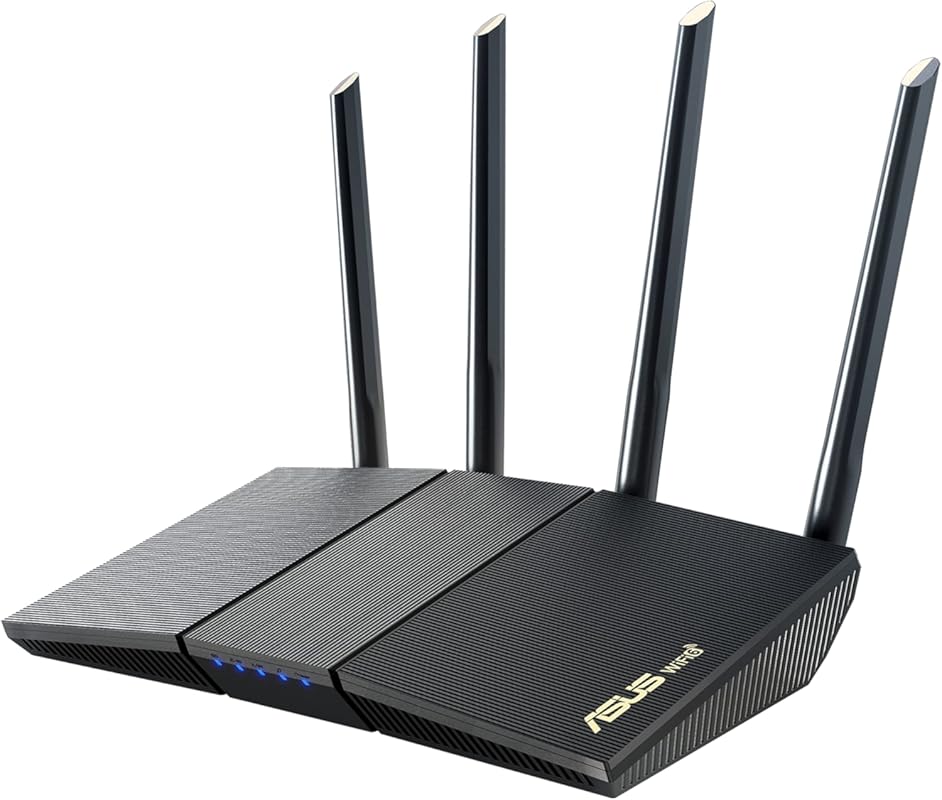
The ASUS RT-AX1800S is a compact and capable WiFi 6 router that punches above its weight class in terms of range and reliability. ASUS is known for robust firmware and excellent hardware, and this model is no exception. It offers strong signal strength, AiMesh compatibility for future expansion, and subscription-free security suite. It’s a great choice for apartments, small houses, or as a node in a larger ASUS AiMesh system, providing dependable coverage where you need it.
Key Features That Stand Out
- ✓ AX1800 Dual-Band WiFi 6 (574 Mbps + 1201 Mbps)
- ✓ ASUS AiProtection Pro (subscription-free) security powered by Trend Micro
- ✓ AiMesh compatible to create a whole-home mesh network
- ✓ Parental controls and QoS for bandwidth management
- ✓ Compact design with 4 external antennas
Why We Recommend It
The RT-AX1800S is recommended for its combination of ASUS’s renowned software reliability and solid hardware performance. The range is very good for its size and class, and the AiProtection security suite is a real value-add that doesn’t require a monthly fee. It’s an easy router to set up and forget, with a clean interface and stable operation. For ASUS fans or anyone wanting a trustworthy, no-subscription-security router with good reach, this is a top pick.
Best For
Apartment and small home dwellers, ASUS ecosystem users, privacy-conscious users (no subscription fees), and anyone wanting a reliable, compact router with strong built-in security.
Pros and Cons
Pros:
- Excellent, user-friendly ASUS firmware with great features.
- Strong, stable WiFi signal and good range for its size.
- Subscription-free lifetime security (AiProtection).
- AiMesh support for easy future expansion.
Cons:
- Only 1Gbps Ethernet ports.
- No USB 3.0 port (has USB 2.0, which is slower).
- Range, while good, is best for smaller spaces compared to larger antennas on other models.
- Can be pricier than some similarly specced TP-Link models.
Customer Reviews
Customer Review: This is a really nice router, especially at this price point. Setup was straightforward, and the user interface is clean and easy to navigate — whether you’re adjusting basic settings or diving into more advanced options. So far, it’s been rock-solid in terms of reliability. Good range, stable connections, and noticeably faster performance compared to my older WiFi 5 router. I haven’t had to reboot or troubleshoot once since installing it. If you’re looking for an affordable WiFi 6 upgrade that just works, this is a great choice.
Customer Review: My son made it this is apartment at school. his apartment is around 1000 ft.², two bedroom, the Wi-Fi service provided by the apartment complex was not adequate for him and his roommate. He was struggling with getting the Wi-Fi to work for his classes. This was recommended and it increased the coverage in his entire apartment as well as the capacity. It was compatible with his Internet service. It was easy to install and made a huge difference. I would recommend this to anyone looking for better service.
Complete Buying Guide for WiFi Routers With Best Range
Essential Factors We Consider
When hunting for a router with the best range, we don’t just look at advertised square footage. We test real-world signal strength through walls, floors, and at long distances. Key factors include the number and quality of antennas, beamforming technology (which focuses the signal to your devices), the power of the internal amplifier, and the WiFi standard (WiFi 6 and 7 offer better range efficiency than older WiFi 5). The processor (CPU) also matters—a powerful chip ensures the router can handle many devices without slowing down, which indirectly affects perceived performance at range.
Budget Planning
You don’t need to spend a fortune for great range. For under $100, routers like the TP-Link Archer A6 and AX21 offer surprisingly good coverage for small to medium homes. Between $150-$250, you get the sweet spot of WiFi 6 performance, better antennas, and features like multi-gig ports (e.g., TP-Link AX55, AX73). For $300+, you’re entering WiFi 7 territory with cutting-edge tech like MLO and superior build quality (GL.iNet BE6500, TP-Link BE6500). First, measure your home’s square footage and note construction materials (concrete and brick are signal killers). Then, decide if a single powerful router will suffice or if a mesh system might be better for complex layouts.
Final Thoughts
Choosing the best long-range router is about matching technology to your specific needs. For most, a solid WiFi 6 router like the TP-Link AX73 or AX55 offers the best balance of cost, range, and features. If you have a very large home or specific needs like VPNs, the GL.iNet models are exceptional tools. And if you’re on a tight budget, don’t underestimate the Archer A6—it still gets the job done. Remember, placement is half the battle; a centrally located router on a high shelf will always outperform a tucked-away one, no matter how good the specs.
Frequently Asked Questions
Q: Does a higher price always mean better range?
A: Not always. While premium routers often have better antennas and more powerful amplifiers, a well-designed mid-range model can sometimes outperform a cheaper high-end one in real-world tests. Look for routers with external, adjustable antennas and beamforming technology, which are key for range regardless of price.
Q: Should I get a WiFi 6 or WiFi 7 router for the best range?
A: WiFi 7 (802.11be) offers theoretical improvements in range and efficiency through features like Multi-Link Operation (MLO), but its benefits are most noticeable with compatible devices and in congested areas. For today, a high-quality WiFi 6 router provides excellent range and is more cost-effective. WiFi 7 is great for future-proofing and very high-speed plans.
Q: Can I use a WiFi extender instead of buying a new router?
A: Yes, a powerful extender like the 2026 model listed here can be a cost-effective solution for a single dead zone. However, extenders halve the available bandwidth and can create a separate network name. For whole-home coverage in a large or multi-story home, a single high-range router or a dedicated mesh system is usually a better experience.
Q: What’s more important for range: the number of antennas or the WiFi standard?
A: Both matter, but antenna design and placement are often more critical. A router with 4 well-designed, adjustable external antennas will typically outperform a router with 8 internal antennas. The WiFi standard (like WiFi 6) determines efficiency and speed, which helps maintain usable speeds at longer distances, but the physical antenna array is the primary driver of raw signal reach.
Q: How can I maximize my router’s range without buying a new one?
A: First, place your router centrally, off the floor, and away from large metal objects, microwaves, and cordless phones. Update the firmware. Change the WiFi channel to avoid interference from neighbors (use a WiFi analyzer app). If all else fails, consider adding a wired access point (using an Ethernet cable) or a powerline adapter in the dead zone area for a more reliable extension than a wireless extender.
Ultimately, the best router for you depends on your home’s size, layout, and your tech comfort level. The models listed here have been rigorously evaluated for their real-world range performance and reliability. Whether you need the ultimate VPN-capable powerhouse, a budget-friendly workhorse, or a future-ready WiFi 7 device, there’s a top-tier option on this list to eliminate dead zones and keep you connected. Click the “Check Price on Amazon” buttons to see the latest deals and find the perfect long-range router for your home today!