Why Do External Hard Drives Have 2 Usb Plugs
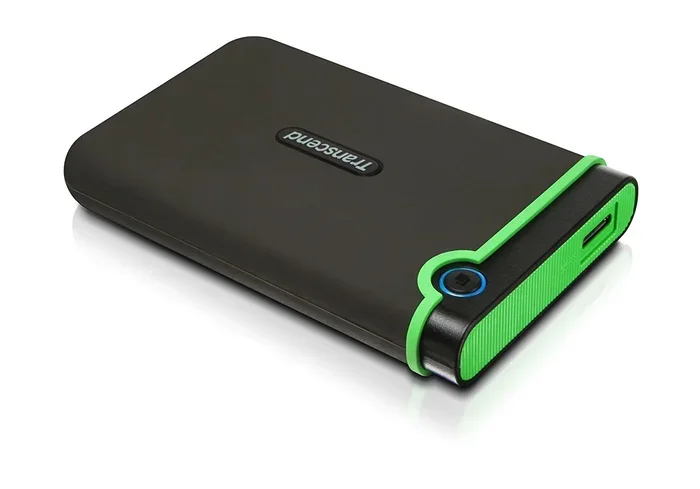
External hard drives use two USB plugs to get both power and data through a single connection. The second plug ensures your drive gets enough electricity to run smoothly, especially for larger drives. Understanding this helps you pick the right external hard drive and avoid frustrating slowdowns.
Have you ever plugged in an external hard drive and noticed it has two USB connectors? Maybe you thought it was a design mistake. Or maybe you wondered if one of them was just extra. The truth is, both plugs serve a real purpose. They work together to keep your external hard drive running the way it should.
If you have ever experienced a drive that disconnects randomly or runs slowly, the answer might be right there on the cable. Dual USB plugs are not a gimmick. They solve a very real problem with power delivery and data transfer. In this article, we will break down exactly why this design exists and what it means for you.
Whether you use a portable hard drive for backups or a bigger desktop unit for storing files, understanding dual USB plugs helps you get the most out of your storage device. Let us dive in.
Key Takeaways
- Dual USB plugs provide both power and data for stable performance
- Larger drives need more power than a single USB port can deliver
- USB 3.0 and USB-C connections benefit most from dual-plug designs
- Bus-powered drives rely on two plugs to draw enough current
- Smaller portable drives may only need one USB plug
- Using the wrong cable or port can cause speed issues or disconnections
📑 Table of Contents
- What Makes External Hard Drives Need Two USB Plugs
- How Dual USB Plugs Improve Data Transfer Speeds
- Types of External Hard Drives With Dual USB
- When You Only Need One USB Plug
- Tips for Getting the Best Performance From Your Dual-USB Drive
- Common Mistakes People Make With Dual-USB Drives
- How Dual-USB Designs Compare to Other Connection Methods
- The Future of External Drive Power Delivery
- Final Thoughts
What Makes External Hard Drives Need Two USB Plugs
The main reason comes down to power. USB ports do more than just move data. They also supply electricity. Smaller drives with less storage need very little power. A single USB plug can handle that easily. But bigger drives with spinning disks or fast SSD drives need more juice than one port can provide.
When a drive has two USB plugs, it splits the power load between them. One plug handles data transfer. The other plug helps supply extra power. This keeps the drive stable and prevents it from dropping offline. Think of it like plugging a space heater into two outlets instead of one. It spreads the demand and keeps things running smoothly.
Not all dual-USB drives are the same, though. Some use both plugs for power only. Others split the work between data and power. It depends on the drive size, the type of hard drive enclosure, and how much performance the manufacturer wants to deliver.
The Role of USB Power Delivery
A standard USB 2.0 port gives you about 500 milliamps of power. A USB 3.0 port bumps that up to 900 milliamps. For a small 1-terabyte drive, that might be enough. But for a 4-terabyte or 8-terabyte drive, you need more. The second USB plug bridges that gap.
This is especially true for desktop external hard drives. These units have spinning platters and moving parts. They draw more current than a slim portable drive. Without the second plug, the drive might not spin up properly. Or it could disconnect during heavy use.
Some people try to solve this problem with a USB hub. A hub can split one port into multiple connections. But not all hubs deliver enough power on their own. That is why the dual-plug design is built right into the drive itself. It guarantees you get the power you need without extra equipment.
How Dual USB Plugs Improve Data Transfer Speeds
Speed matters when you are moving large files. If you back up photos, videos, or game libraries, you know how long transfers can take. Dual USB plugs help keep the connection fast and steady.
When a drive gets enough power, it can maintain its top data transfer speeds. Without proper power, the drive slows down to protect itself. This is called throttling. It is a safety feature, but it is annoying when you are trying to get work done.
Many of the fastest external SSDs on the market use dual-connector designs. For example, the Sandisk Extreme Portable SSD uses advanced connectors to push high speeds while staying powered. The same idea applies to traditional dual-USB hard drives.
Here is a quick look at how USB versions compare when it comes to power and speed:
- USB 2.0: Up to 480 Mbps data speed. 500 mA power. Single plug usually enough for small drives.
- USB 3.0: Up to 5 Gbps data speed. 900 mA power. Dual plugs help larger drives stay stable.
- USB 3.1: Up to 10 Gbps data speed. 900 mA to 1.5 A power. Dual plugs become more important.
- USB-C: Up to 20 Gbps data speed. Up to 100 W power. Some drives use USB-C with dual pins for power.
The faster the USB standard, the more power the drive may need. Dual plugs help meet that demand.
Why Speed Drops Without Enough Power
When an external drive does not get enough power, it drops its performance. Files copy slower. The drive gets hot. In some cases, it stops working altogether. This is not a defect. It is the drive protecting itself from damage.
Dual USB plugs prevent this by delivering consistent power throughout the transfer. Your hard drive speed stays high, and the connection stays solid. This is especially noticeable when you are transferring files larger than 50 gigabytes.
Types of External Hard Drives With Dual USB
Not all external drives use the same dual-USB setup. There are a few common designs. Understanding them helps you choose the right one for your needs.
Desktop External Hard Drives
These are the big drives that sit on your desk. They usually have 3.5-inch spinning disks inside. They need wall power or dual USB plugs to run. The dual-plug design is very common in this category because these drives pull a lot of power.
Brands like Western Digital and Seagate make many desktop drives with this setup. They are great for storing large libraries of files, games, or backups. If you have ever owned a desktop external drive, you have probably seen the two plugs.
Portable External Hard Drives
Portable drives are smaller and lighter. Many use 2.5-inch disks or flash storage. Some portable drives need dual USB plugs too, especially if they have high storage capacity. A 4-terabyte portable drive, for example, may need two plugs to stay powered through a single computer port.
Smaller portable drives under 2 terabytes usually work fine with one plug. But as storage grows, so does the power demand. Always check the drive specifications before buying.
NVMe and SSD Enclosures With Dual Connectors
Some external SSD enclosures use dual connectors for different reasons. They may combine a USB data plug with a power plug for faster performance. The M.2 NVMe SSD enclosure adapter with USB 3.1 is a great example of this approach. It uses a dedicated power connection to keep the SSD running at full speed.
These enclosures are popular with people who want the speed of an NVMe drive in an external format. The dual connector setup ensures the drive never throttles during heavy workloads.
When You Only Need One USB Plug
Here is the good news. Not every external drive needs two plugs. If you have a small, solid-state drive with 1 terabyte or less, one USB plug is usually enough. The drive draws minimal power and transfers data without issues.
Ultra-portable drives like the ones you carry in your pocket are designed to work from a single USB port. They are perfect for students, travelers, and anyone who wants simple external storage without extra cables.
If your drive came with only one plug and works fine, do not worry. You do not need to buy a dual-connector cable or adapter. The drive was designed to run on the power a single port provides.
How to Tell If Your Drive Needs Two Plugs
Check the product label or manual. Most drives will list their power requirements. If the drive needs more than 900 milliamps, it likely needs two USB plugs. You can also watch for warning signs:
- The drive disconnects during transfers
- The drive gets unusually hot
- Copy speeds drop after a few minutes
- The drive does not show up without both plugs connected
If you see any of these, your drive probably needs the second plug for stable power.
Tips for Getting the Best Performance From Your Dual-USB Drive
Having two USB plugs is only half the battle. How you use them matters too. Here are some practical tips to get the most out of your external drive.
Always Plug Both Connectors Into the Same Computer
Some people plug one connector into the computer and the other into a different device. This does not work reliably. Both plugs should go into the same machine. Ideally, use two USB ports on the same motherboard or hub that can deliver enough power.
Use the Cables That Come With the Drive
Every drive is different. The cables included in the box are matched to the drive’s power needs. Using a random cable you have lying around might not deliver enough current. It might also not fit the second connector properly.
Avoid Cheap USB Hubs
A USB hub can be helpful, but cheap hubs often fail to deliver enough power. If your drive needs two plugs, a hub is not a substitute for the built-in dual-connector design. Spend a little extra on a quality hub if you need one.
Keep Your Cables in Good Condition
Frayed or damaged cables cause all kinds of problems. They reduce power delivery and slow down data transfer. Check your cables regularly. Replace them if you see any wear. A good cable lasts a long time and keeps your drive running smoothly.
Consider an External Power Supply for Desktop Drives
Some desktop drives come with a power adapter instead of dual USB plugs. This is another way manufacturers solve the power problem. The adapter plugs into the wall and gives the drive all the power it needs. You only need one USB cable for data.
If you are choosing between a dual-USB drive and a power-adapter drive, consider where you will use it. Dual-USB drives are more flexible. Power-adapter drives are more stable for long-term desktop use.
Common Mistakes People Make With Dual-USB Drives
Even with the best intentions, people make mistakes that hurt their drive performance. Here are a few to avoid.
Mistake 1: Plugging only one connector and hoping for the best. This works sometimes, but it can cause data corruption over time. Always use both plugs if the drive requires them.
Mistake 2: Using a front-panel USB port on your desktop. Front ports often provide less power than back ports. Plug dual-USB drives into the rear ports directly on your motherboard for the best results.
Mistake 3: Ignoring the drive’s recommended USB version. A USB 3.0 drive plugged into a USB 2.0 port will work, but it will be slow. Match your ports to the drive specifications for optimal drive performance.
Mistake 4: Assuming all dual-plug drives are the same. Some drives use both plugs for power. Others split data and power. Read the manual to understand your specific drive.
How Dual-USB Designs Compare to Other Connection Methods
Dual USB plugs are not the only way to power an external drive. Let us look at how they compare to other methods.
| Connection Method | Power Source | Best For | Portability |
|---|---|---|---|
| Dual USB Plugs | Two USB ports on computer | Medium to large drives | High |
| USB + Wall Adapter | Wall outlet | Desktop drives | Low |
| Single USB (bus powered) | One USB port | Small portable drives | Very High |
| USB-C with Power Delivery | Single USB-C port | High-speed SSDs | High |
Each method has its place. Dual USB plugs offer a nice balance of portability and power. They do not need a wall outlet, but they still deliver enough juice for most drives.
If you are shopping for a new drive, consider the most reliable hard drives available. Look for models that match your power needs and usage habits. A well-matched drive will last longer and perform better.
The Future of External Drive Power Delivery
USB technology keeps evolving. USB4 and USB-C Power Delivery are changing how external drives get their power. Some newer drives can draw up to 100 watts through a single USB-C cable. This might make dual-USB designs less common in the future.
For now, dual USB plugs remain the standard for many external hard drives. They are reliable, simple, and effective. As long as spinning disk drives and high-capacity SSDs exist, the need for extra power will continue.
If you are interested in how modern M.2 NVMe SSD USB enclosures handle power delivery, the technology is shifting toward USB-C with single-cable power and data. Still, dual-USB designs hold strong in the budget and mid-range market.
Final Thoughts
The next time you see an external hard drive with two USB plugs, you will know exactly why they are there. It is not a design flaw or unnecessary complexity. It is a smart solution to a real power problem.
Dual USB plugs keep your drive powered, stable, and fast. They prevent disconnections, reduce throttling, and help your external hard drive last longer. Whether you are backing up family photos or storing work projects, understanding this simple design choice makes you a smarter user.
Take a moment to check your current drive. Does it use dual plugs? Are you getting the best performance from it? Small changes, like using the right ports and cables, can make a big difference. Your storage device will thank you.
Invest in the right drive, use it the right way, and your data stays safe and accessible. That is a win worth understanding.
Frequently Asked Questions
Why does my external hard drive have two USB plugs?
Your drive has two USB plugs because it needs more power than a single USB port can provide. The second plug supplies extra electricity to keep the drive running smoothly, especially during large file transfers or when the drive has a high storage capacity.
Can I use an external hard drive with only one USB plug?
It depends on the drive size and type. Smaller portable drives under 2 terabytes usually work fine with one plug. Larger drives or desktop drives with spinning disks often need both plugs for stable power. Check your drive manual to be sure.
Do all external SSDs have two USB plugs?
No. Many external SSDs use a single USB-C connection because they need less power than traditional hard drives. High-performance SSDs may use dual connectors, but it depends on the model and capacity. Portable SSDs like the Sandisk Extreme Portable SSD often use a single USB-C plug.
Will a dual-USB external hard drive work on a laptop?
Yes, most dual-USB drives work on laptops. You may need to plug both connectors into separate USB ports on your laptop. Some laptops have ports close enough together to accommodate both plugs. If not, you can use a short USB extension cable for the second plug.
Can I use a USB hub with a dual-plug external hard drive?
You can, but it is not always reliable. A USB hub may not deliver enough power for both connections. For best results, plug both USB connectors directly into your computer’s ports. This ensures the drive gets the full power it needs.
Are dual-USB external hard drives more expensive?
Not necessarily. The dual-plug design adds minimal cost to manufacturing. The price of an external drive depends more on storage capacity, speed, and brand. You can find affordable dual-USB drives in the 1 to 4 terabyte range from most major brands.