Why Is Usb So Popular
USB has revolutionized how we connect devices, transfer data, and power our tech. Its universal compatibility, plug-and-play simplicity, and continuous evolution have made it the go-to standard for millions of users. Understanding why USB is so popular helps you make better choices for your devices and accessories.
USB has become the invisible backbone of our digital lives. From charging your phone to transferring files between computers, USB is everywhere. But have you ever stopped to wonder why USB is so popular? The answer lies in its simplicity, versatility, and constant innovation.
Universal Serial Bus, or USB, started as a simple way to connect peripherals to computers. Today, it powers everything from external hard drives to gaming controllers. Let us dive deep into the reasons behind USB’s massive popularity and why it shows no signs of slowing down.
Key Takeaways
- Universal Compatibility: USB works across nearly all devices and platforms, making it the most accessible connection standard.
- Plug and Play Convenience: USB devices connect instantly without needing complex setup or drivers.
- Continuous Evolution: USB standards keep improving with faster speeds and more power delivery.
- Versatile Use Cases: USB supports data transfer, charging, video output, and more in a single cable.
- Cost Effective: USB cables and devices are affordable and widely available everywhere.
- Cross-Platform Support: USB works equally well on Windows, Mac, Linux, and mobile devices.
📑 Table of Contents
- The History of USB and Its Rise to Dominance
- Universal Compatibility Across Devices
- Plug and Play Simplicity
- Speed and Performance Evolution
- Power Delivery and Charging Capabilities
- Affordability and Widespread Availability
- Why USB Continues to Evolve and Stay Relevant
- Common USB Mistakes and How to Avoid Them
- Final Thoughts
The History of USB and Its Rise to Dominance
USB was introduced in the mid-1990s as a solution to the messy tangle of ports and cables on computers. Before USB, connecting a mouse, keyboard, or printer meant dealing with different ports and drivers. USB connection standards changed all of that by offering one universal interface.
The first USB 1.0 standard offered speeds of just 12 Mbps. That sounds slow today, but back then it was a huge leap forward. Over the years, USB has evolved through several generations:
- USB 1.0 and 1.1: Introduced plug-and-play functionality for basic peripherals.
- USB 2.0: Boosted speeds to 480 Mbps and became the standard for over a decade.
- USB 3.0 and 3.1: Brought superfast speeds up to 10 Gbps for modern data needs.
- USB4: The latest standard offering speeds up to 40 Gbps and full integration with Thunderbolt technology.
Each new version kept backward compatibility intact. This means an older USB cable still works with newer ports. That kind of continuity built trust and loyalty among users worldwide.
Universal Compatibility Across Devices
One of the biggest reasons USB became so popular is its universal compatibility. Unlike proprietary connectors from the past, USB works on virtually every device you can think of. Whether you use Windows, Mac, Linux, or ChromeOS, USB ports are standard equipment.
A Single Cable for Everything
Think about how many devices you own that use USB. Your phone charges with a USB cable. Your mouse connects via USB. Your external storage drive uses USB. Even your keyboard and webcam rely on this standard wired connection. Having one cable type for so many devices is incredibly convenient.
This cross-platform support is a game changer. You do not need different cables for different devices. A single USB cable can handle charging, data transfer, and even video output. That kind of versatility is rare in the tech world.
Peripheral Devices Rely on USB
Most peripheral devices connect through USB. Keyboards, mice, printers, scanners, webcams, and external sound cards all use USB. Even some monitors now connect via USB-C. The sheer range of supported devices makes USB the default choice for manufacturers and consumers alike.
For example, if your mouse is not working on your laptop, the issue often relates to the USB port or cable. The widespread use of USB means troubleshooting is also straightforward because the standard is so well understood.
Plug and Play Simplicity
Nobody wants to spend hours setting up a new device. USB solved this problem with its legendary plug-and-play functionality. You plug in a USB device, and your operating system recognizes it instantly. No restarting, no installing drivers manually, no fuss.
Instant Device Recognition
When you connect a USB device, the operating system detects it within seconds. Windows, macOS, and most Linux distributions handle USB devices automatically. This plug and play experience made USB incredibly user-friendly from day one.
Compare this to older connection standards that required manual configuration. USB removed all that friction. Even non-technical users could connect devices without reading a manual. That accessibility played a huge role in USB becoming the most popular connection type.
Hot Swapping Made Easy
Another great feature of USB is hot swapping. You can plug in or unplug a USB device while your computer is running. There is no need to shut down first. This convenience is something users take for granted now, but it was a major innovation when USB launched.
Hot swapping works safely because USB handles power management intelligently. The port detects when a device connects or disconnects and adjusts accordingly. This makes USB ideal for external storage devices like flash drives and portable hard drives.
Speed and Performance Evolution
USB has consistently delivered faster speeds with each new version. This performance growth is a key reason why USB remains so popular after decades of use. Let us look at how USB speeds have improved over time.
| USB Version | Max Speed | Year Released |
|---|---|---|
| USB 1.0 | 12 Mbps | 1996 |
| USB 2.0 | 480 Mbps | 2000 |
| USB 3.0 | 5 Gbps | 2008 |
| USB 3.1 Gen 2 | 10 Gbps | 2013 |
| USB4 | 40 Gbps | 2019 |
These speed improvements mean USB can handle demanding tasks today. Transferring a large video file takes seconds instead of minutes. External SSDs like the SanDisk Extreme Portable 2TB External USB C NVMe SSD take full advantage of these fast speeds for lightning quick data transfers.
USB Type C: The Connector of the Future
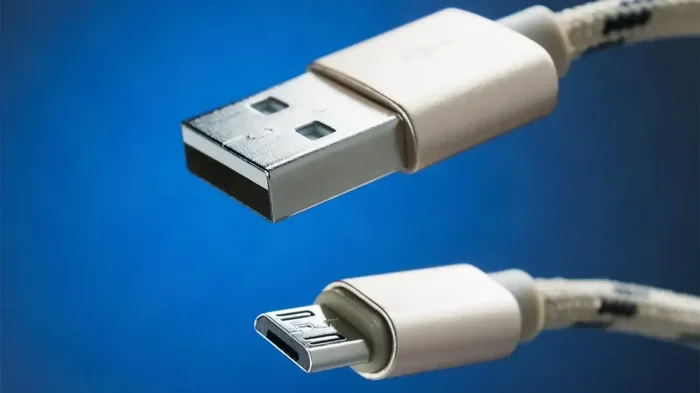
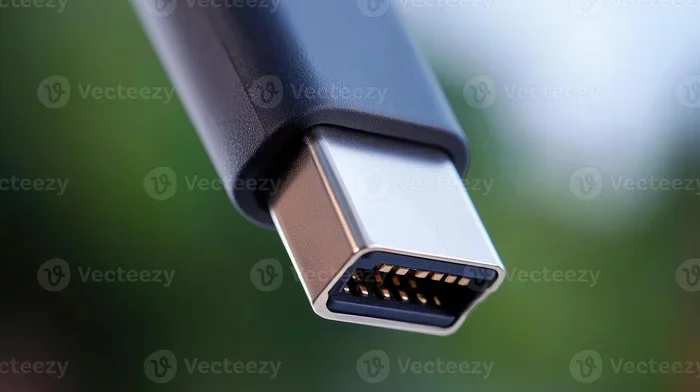
USB Type-C deserves special mention. This small, reversible connector has become the modern standard. It works for data transfer, charging, and video output all in one port. The reversible design means you never flip the cable trying to find the right orientation. That tiny detail alone has made USB-C hugely popular.
More and more laptops, phones, and tablets now use USB-C exclusively. The M.2 NVMe SSD to USB 3.1 adapter is another example of how USB adapts to new technology. These adapters let you connect ultrafast NVMe drives through a simple USB connection, bridging the gap between internal and external storage.
Power Delivery and Charging Capabilities
USB does more than transfer data. It also delivers power, and it does so remarkably well. The USB Power Delivery standard has transformed how we charge our devices.
Charging Everything from Phones to Laptops
USB can now deliver up to 240 watts of power with USB PD 3.1. That is enough to charge laptops, monitors, and even some desktop computers. Your phone, tablet, earbuds, and smartwatch can all charge from the same type of port.
This universal charging capability reduces cable clutter. You need fewer different chargers and cables. A single USB cable can power your entire tech lineup. That convenience is a huge reason why USB remains so popular.
USB Hubs Expand Your Options
USB hubs multiply the number of available ports on your device. They are especially useful for laptops with limited ports. A single USB port can become four, seven, or even ten ports with a good hub. This expandability keeps USB relevant even as devices become thinner and more compact.
USB hubs also support multiple device types at once. You can connect your mouse, keyboard, external drive, and phone charger all through one hub. The versatility of USB power and data delivery makes hubs a natural companion to the standard.
Affordability and Widespread Availability
USB cables, adapters, and devices are incredibly affordable. You can buy a quality USB cable for just a few dollars. This low cost makes USB accessible to everyone, regardless of budget.
USB products are available everywhere. Grocery stores, gas stations, electronics shops, and online marketplaces all stock USB accessories. That widespread availability means you can always find what you need when you need it.
The sheer volume of USB products also drives prices down through competition. Manufacturers produce millions of USB cables and devices every year. This scale makes USB the most cost effective connection standard in the world.
Why USB Continues to Evolve and Stay Relevant
USB is not resting on its laurels. The USB Implementers Forum (USB-IF) continuously develops new standards. USB4 represents the latest leap forward, bringing even faster speeds and better efficiency.
One exciting development is the integration of USB with Thunderbolt technology. This means the best of both worlds, blazing fast speeds combined with universal compatibility. Devices like the M.2 NVMe SSD in USB enclosure showcase this fusion perfectly, giving users portable high speed storage that works on any computer.
The future of USB looks bright. As devices become more connected and data hungry, USB will keep pace. Its open standard nature means anyone can build compatible devices. This openness has fueled innovation and kept USB at the forefront of connectivity for nearly three decades.
Even as wireless technologies advance, USB remains essential. Wireless cannot match the reliability and speed of a wired connection for many tasks. Large file transfers, stable gaming connections, and consistent charging all benefit from the wired USB standard.
Common USB Mistakes and How to Avoid Them
Even though USB is simple, some common mistakes can cause problems. Here are a few tips to get the most out of your USB devices:
- Use the right USB version: A USB 3.0 device will work in a USB 2.0 port, but at slower speeds. Check your port versions for best performance.
- Avoid cheap cables: Poor quality cables can cause slow transfers, connection drops, or even damage your devices. Invest in reputable brands.
- Do not force connectors: USB Type-C is reversible, but USB-A has a specific orientation. If it does not fit, flip it gently rather than forcing it.
- Keep ports clean: Dust and lint in USB ports can cause connection issues. Use compressed air to clean them regularly.
- Use certified adapters: When using adapters like an NVMe SSD to USB adapter, make sure they are certified for the speed standard you need.
Final Thoughts
The popularity of USB is no accident. Its combination of universal compatibility, plug-and-play simplicity, speed, power delivery, and affordability makes it the best connection standard available. Whether you are connecting a simple mouse or transferring files with an external NVMe drive, USB delivers reliably every time.
USB has adapted and evolved for nearly three decades. From USB 1.0 to USB4, each generation has improved while maintaining backward compatibility. This commitment to progress ensures USB will remain the go-to standard for years to come. So the next time you plug in a USB cable, remember that you are using a technology that has transformed how we connect and interact with our devices.
Understanding why USB is so popular helps you appreciate the engineering behind this everyday technology. It also helps you make smarter choices when buying cables, adapters, and accessories. Look for USB standards that match your needs, invest in quality products, and enjoy the seamless connectivity that USB delivers.
Frequently Asked Questions
What does USB stand for?
USB stands for Universal Serial Bus. It is a standard connection protocol used to link devices, transfer data, and deliver power across a wide range of electronics.
Why is USB better than other connection types?
USB offers universal compatibility across all major platforms and devices. Its plug-and-play functionality, continuous speed improvements, and affordable pricing make it superior to most proprietary connection standards.
Can I use any USB cable for any device?
Most USB cables are interchangeable for basic functions like charging. However, for maximum data transfer speeds, make sure your cable supports the USB standard your device uses, such as USB 3.0 or USB-C.
Is USB Type-C the same as USB 3.0?
No, USB Type-C refers to the connector shape, while USB 3.0 refers to the speed standard. USB Type-C ports can support USB 3.0, USB 3.1, USB4, or even older standards depending on the device.
How fast is USB4 compared to USB 3.0?
USB4 offers speeds up to 40 Gbps, which is four times faster than USB 3.0’s maximum of 10 Gbps. This makes USB4 ideal for demanding tasks like large file transfers and external GPU connections.
Do I need a special cable for NVMe SSD external enclosures?
Most NVMe SSD external enclosures use USB-C cables for the fastest speeds. Make sure your cable supports USB 3.1 or USB4 to take full advantage of the drive’s performance capabilities.
=== CONCLUSION ===
USB has earned its place as the most popular connection standard through decades of innovation and user focused design. Its universal compatibility, ease of use, speed, and affordability make it indispensable in our daily tech lives. Whether you are a student, professional, or casual user, understanding USB helps you get the most from your devices and accessories.