Why Hdmi Is More Popular Than Displayport
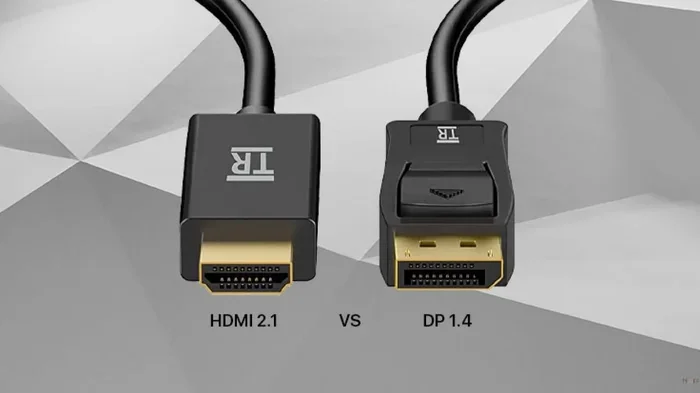
HDMI is more popular than DisplayPort because it works with almost every device, from TVs to laptops, and it carries both audio and video in one cable. Most people already own HDMI cables, making it the go-to choice for everyday use. While DisplayPort has advantages for professionals and gamers, HDMI wins on convenience and universal support.
HDMI has become the most common way to connect devices to screens. Whether you are hooking up a laptop to a TV or plugging in a game console, HDMI is almost always the default choice. But why exactly is HDMI more popular than DisplayPort? The answer comes down to compatibility, simplicity, and how far the standard has come.
DisplayPort has its strengths, especially for PC gamers and professionals who need multiple monitors. However, for the average user, HDMI just works. It fits everywhere, connects easily, and handles both sound and picture without any extra setup. In this article, we will break down the real reasons behind HDMI’s dominance and help you understand which connection actually fits your needs best.
You might wonder if DisplayPort is technically better in some ways. The truth is, both standards have their place. But when it comes to everyday use, HDMI has won the hearts of consumers and manufacturers alike. Let us explore why that is and what it means for your next setup.
Key Takeaways
- Universal Compatibility: HDMI works with TVs, monitors, laptops, consoles, and projectors, making it the most widely supported display standard.
- Easy Plug-and-Play: HDMI carries both audio and video in a single cable, which simplifies setup for everyday users.
- Consumer Device Dominance: Nearly every TV, streaming box, and game console uses HDMI as its primary output.
- Adoption and Availability: HDMI cables and ports are cheaper and easier to find than DisplayPort alternatives.
- Gaming and Professional Use: DisplayPort still leads in high-refresh-rate gaming and multi-monitor setups, but HDMI has caught up significantly.
- Future-Proofing: HDMI 2.1 supports 4K at 120Hz and 8K resolutions, closing the gap with DisplayPort.
📑 Table of Contents
What Makes HDMI the Go-To Connection
The biggest reason HDMI is more popular comes down to one word: compatibility. HDMI ports appear on nearly every modern display device you can think of. From budget TVs to high-end monitors, from soundbars to projectors, HDMI is the common language these devices speak.
Universal Device Support
Almost every device with a screen includes at least one HDMI port. This includes:
- Smart TVs and LED TVs
- Laptops and desktop computers
- Gaming consoles like PlayStation and Xbox
- Streaming devices such as Roku and Apple TV
- Blu-ray players and soundbars
- Projectors for home theaters
Because HDMI is everywhere, manufacturers build their products around it. When you buy a new device, the first cable that comes in the box is almost always HDMI. This creates a cycle where people keep using what they already have. You do not need to buy special adapters or new cables just to make things work.
Audio and Video in One Cable
One of the simplest and most powerful advantages of HDMI is that it transmits both audio and video through a single cable. With DisplayPort, you sometimes need a separate audio connection depending on your setup. For most people, this is a dealbreaker. Imagine setting up a home theater system and having to plug in three or four cables just to get sound and picture.
HDMI eliminates that hassle entirely. You plug in one cable, and everything works. Your TV gets the video signal, and your sound system gets the audio. This simplicity is a huge reason why HDMI is the standard for living rooms and offices around the world.
The Rise of HDMI in Consumer Electronics
HDMI was introduced in 2003, and it grew fast. By the mid-2000s, it had become the standard connection for home entertainment. The reason was simple: it solved a real problem. Before HDMI, people had to use multiple cables for audio and video. HDMI combined them into one neat connection.
Consumer Electronics Adoption
The consumer electronics industry embraced HDMI quickly. TV manufacturers saw the benefit and started including multiple HDMI ports on every TV they made. Game console makers adopted it as the default output. Streaming device companies built their products around the HDMI standard.
Today, HDMI is so deeply embedded in the market that it is hard to imagine a world without it. Even devices that primarily use other connections often include an HDMI port as a backup or secondary option. This widespread adoption means that HDMI cables are cheap, easy to find, and available everywhere from grocery stores to online retailers.
The HDMI Ecosystem
There is also a huge ecosystem built around HDMI. You can find HDMI splitters, switches, extenders, and adapters for virtually any situation. Need to connect five devices to a TV with only three ports? There is an HDMI switch for that. Need to run a cable through the wall? There is an HDMI extender for that. This ecosystem makes HDMI incredibly flexible and practical for real-world use.
DisplayPort has some adapters too, but the selection is much smaller. And because DisplayPort is less common on TVs and consumer devices, the demand for these accessories is lower. This creates a gap that keeps HDMI firmly on top.
HDMI vs DisplayPort: Key Differences
While HDMI dominates in popularity, DisplayPort does have some technical advantages. Understanding these differences helps you make the right choice for your specific needs. Let us look at where each standard shines.
Bandwidth and Resolution
DisplayPort was designed with PC monitors in mind. It offers higher bandwidth in its latest versions, which means it can handle very high resolutions and refresh rates more easily. HDMI has also improved significantly over the years. HDMI 2.1 now supports 4K at 120Hz and even 8K at 60Hz, which is more than enough for most users.
Here is a simple comparison of the two standards:
Quick Comparison Table
Feature | HDMI 2.1 | DisplayPort 2.1
Max Resolution | 8K at 60Hz or 4K at 120Hz | 16K at 60Hz (theoretical)
Max Bandwidth | 48 Gbps | 80 Gbps
Audio Support | Built-in | Built-in
Common Devices | TVs, consoles, PCs | PC monitors, GPUs
Cable Length | Up to 15 feet (standard) | Up to 6 feet (high speed)
Consumer Friendliness | Very High | Moderate
As you can see, DisplayPort has higher raw bandwidth, but for most people, HDMI 2.1 is more than sufficient. The real-world difference matters mostly for professional video editors and hardcore competitive gamers who need every edge they can get.
Connector Design
HDMI connectors are smaller and more durable than older versions. The standard HDMI plug fits snugly into most devices and does not fall out easily. DisplayPort connectors have a locking mechanism that prevents them from pulling loose, which is great for desktop setups but unnecessary for most TV and console connections.
For everyday use, the HDMI connector design works perfectly. It is simple, reliable, and familiar to everyone. You do not need any special tools or techniques to plug it in. This ease of use is a big part of why HDMI remains the top choice for display connections.
Why HDMI Wins for Everyday Use
Let us be honest. Most people are not building multi-monitor workstations or pushing 8K video. Most people just want to watch their favorite show, play a casual game, or connect a laptop to a projector for a meeting. For these everyday tasks, HDMI is the clear winner.
Plug and Play Simplicity
HDMI was built for the average consumer. You do not need to check which version of DisplayPort your device supports. You do not need to worry about whether your cable can handle the resolution you want. With HDMI, you just plug it in and it works. This zero-hassle experience is why millions of people choose HDMI every day without even thinking about it.
When you buy a new laptop, the first thing you look for is an HDMI port. When you set up a new TV, you grab the HDMI cable that came in the box. This instinctive behavior shows how deeply HDMI is embedded in our daily tech habits.
Cost and Availability
HDMI cables are incredibly affordable. You can buy a high-speed HDMI 2.1 cable for under ten dollars at almost any store. DisplayPort cables, especially the newer high-bandwidth versions, tend to cost more and are harder to find in physical stores.
This price difference matters to budget-conscious consumers. When you are setting up a home theater or a classroom full of computers, the cost of cables adds up quickly. HDMI keeps costs low and availability high, which is a huge advantage in real-world situations.
Gaming Console Compatibility
Every major gaming console uses HDMI as its primary display output. PlayStation, Xbox, and Nintendo Switch all rely on HDMI. If you are a console gamer, you are already using HDMI, whether you realize it or not. This means the entire gaming console market supports HDMI by default.
While PC gamers sometimes prefer DisplayPort for its higher refresh rates and multi-monitor support, console players have no choice but to use HDMI. This massive user base is one of the biggest reasons HDMI remains the most popular display connection in the world.
When DisplayPort Makes More Sense
HDMI is more popular overall, but DisplayPort is not without its strengths. There are specific situations where DisplayPort is actually the better choice. Understanding these scenarios helps you make an informed decision.
Multi-Monitor Setups
If you use multiple monitors for work or content creation, DisplayPort has an advantage. Many high-end monitors are designed with DisplayPort connections, and daisy-chaining multiple displays is easier with DisplayPort. This makes it a favorite among professionals who need screen real estate.
High-Refresh-Rate Gaming
For competitive gamers who want the highest refresh rates at high resolutions, DisplayPort often provides better support. Many gaming monitors with 144Hz, 240Hz, or higher refresh rates use DisplayPort as their primary input. If you are a serious gamer chasing every frame, DisplayPort might be worth considering.
You can also check out our guide on whether overclocking your monitor is worth it to learn more about pushing your display beyond its stock settings. This is another area where DisplayPort can shine.
Professional and Creative Work
Video editors, 3D designers, and other creative professionals often prefer DisplayPort. The higher bandwidth allows for smoother playback of high-resolution video and faster data transfer to professional displays. If your work depends on accurate color reproduction and fast performance, DisplayPort might be the better option.
However, even in these professional settings, HDMI is catching up. HDMI 2.1 now supports features that were once exclusive to DisplayPort. The gap between the two standards is getting smaller every year, which is good news for consumers.
HDMI 2.1 and the Future of Display Connections
HDMI has not stood still. The latest version, HDMI 2.1, brings features that were once only available on DisplayPort. This includes support for 4K at 120Hz, Variable Refresh Rate (VRR), and Auto Low Latency Mode (ALLM). These are all features that gamers and content creators care about deeply.
With HDMI 2.1, the average consumer can enjoy a premium viewing experience without needing to understand the technical differences between connection standards. The technology just works in the background, delivering smooth, high-quality visuals and audio through a single cable. This is the kind of invisible simplicity that keeps HDMI at the top.
As more devices adopt HDMI 2.1, the popularity gap between HDMI and DisplayPort will likely grow even wider. TV manufacturers, console makers, and streaming device companies all continue to invest in HDMI technology. This industry-wide support ensures that HDMI will remain the most popular display connection for years to come.
You might also be interested in learning about GPU temperatures and performance, since your graphics card plays a big role in how your display performs. Check out what a good idle GPU temperature is to keep your system running smoothly.
Final Thoughts
The reason HDMI is more popular than DisplayPort comes down to one simple truth: it works for everyone. It is compatible with almost every device, it carries audio and video in one cable, and it is affordable and easy to find. While DisplayPort has its place for professionals and hardcore gamers, HDMI is the connection that fits the needs of the vast majority of users.
When you are choosing a cable or planning a new setup, HDMI should be your first thought. It is the safe, reliable, and universally supported choice that will work with your TV, your laptop, your console, and your projector. You can always explore DisplayPort if you have specific needs that require it, but for everyday use, HDMI is the clear winner.
Technology evolves, and DisplayPort continues to improve too. But HDMI has built an enormous lead through decades of consumer adoption and industry support. That lead is not going away anytime soon. So the next time you plug in a cable and everything just works, you will know that is the power of HDMI at work.
Frequently Asked Questions
Is HDMI or DisplayPort better for gaming?
For most casual and mid-range gaming, HDMI is perfectly fine and often the easier choice. However, if you are a competitive gamer who needs very high refresh rates above 144Hz, DisplayPort may offer better performance on PC monitors. Both standards support modern gaming features like VRR and 4K resolution.
Can I use a DisplayPort to HDMI adapter?
Yes, you can use an adapter to connect a DisplayPort output to an HDMI monitor or TV. These adapters are widely available and affordable. However, always check that the adapter supports the resolution and refresh rate you need, as some cheap adapters may limit performance.
Why do TVs only have HDMI and not DisplayPort?
TV manufacturers chose HDMI as the standard because it is simpler for consumers, carries audio natively, and has broad industry support. DisplayPort is designed more for PC monitors and professional displays, so it makes less sense for the TV market where ease of use is the top priority.
Does HDMI support 4K and 8K resolution?
Yes, HDMI 2.1 supports 4K at 120Hz and 8K at 60Hz. Earlier versions of HDMI also support 4K but at lower refresh rates. Make sure you use an HDMI 2.1 certified cable to get the full benefit of high-resolution and high-refresh-rate content.
Is DisplayPort better for multiple monitors?
DisplayPort does have an advantage for multi-monitor setups, especially with daisy-chaining, which lets you connect several monitors in a chain from a single port. HDMI can also support multiple monitors, but you usually need a separate port for each display, which can be limiting.
Will HDMI eventually replace DisplayPort completely?
It is unlikely that HDMI will replace DisplayPort entirely. DisplayPort still serves a strong niche in the PC and professional markets. However, HDMI will continue to grow as the dominant consumer standard, and the two will likely coexist for many years, each serving its own use case best.
=== CONCLUSION ===
HDMI is more popular than DisplayPort because it is simple, universal, and works with almost every device you own. From your living room TV to your office laptop, HDMI is the connection that just works. While DisplayPort has technical strengths for specific users, the average consumer gets far more value from HDMI’s broad compatibility and ease of use. The next time you set up a new device, reach for the HDMI cable and enjoy the hassle-free experience that millions of people rely on every day.