Why Usb Has 5 Wires
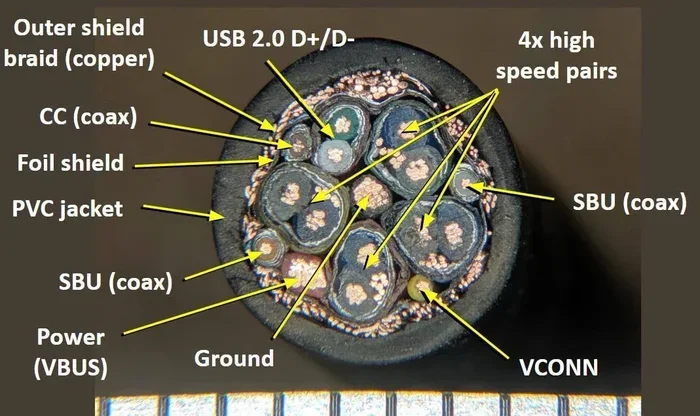
USB cables contain 5 wires to handle power delivery, data transfer, and grounding. Each wire serves a specific purpose, from carrying voltage to ensuring signal integrity. Understanding the 5-wire design helps you troubleshoot connections and choose the right cable for your needs.
Have you ever wondered what is inside a USB cable? Most people plug one end in and forget about it. But inside that small cable, there are five individual wires, each with a specific job. The why USB has 5 wires question comes up a lot among tech curious users. And honestly, the answer is simpler than you might think.
USB cables are not just random bundles of copper. Every wire plays a role in making sure your devices charge properly and transfer data without errors. Whether you are using a M.2 NVMe SSD to USB 3.1 adapter or just charging your phone, those five wires are working hard behind the scenes.
In this article, we will break down each wire, explain what it does, and show you why the 5-wire design is essential. By the end, you will never look at a USB cable the same way again.
Key Takeaways
- VBUS Wire: Delivers power from the host to the connected device
- D+ and D- Wires: Form a differential pair for reliable data transmission
- GND Wire: Provides a common ground reference for stable signals
- Shield Wire: Protects internal wires from electromagnetic interference
- 5-Wire Design Matters: Ensures safe charging and fast data speeds
- Not All USB Cables Are Equal: Different USB versions use different wire configurations
📑 Table of Contents
What Are the 5 Wires Inside a USB Cable?
A standard USB cable contains five conductors. Each one has a clear purpose. Let us go through them one by one so you can understand the full picture of USB cable wiring.
Wire 1: VBUS (Power Delivery)
The VBUS wire carries electrical power from the USB port to your device. It typically operates at 5 volts in USB 2.0 specifications. This is the wire that actually charges your phone or powers your external hard drive. Without VBUS, your device would not receive any electrical energy through the cable.
The VBUS wire is usually red in color. It is the thickest wire in most USB cables because it needs to handle the current safely. Thicker wires mean less resistance, which leads to faster and safer charging.
Wire 2: D+ (Data Positive)
The D+ wire is part of the data transmission system. It works together with the D- wire to form what is called a differential pair. This pair sends and receives data between your computer and the connected device.
In USB 2.0, the D+ wire helps negotiate the speed of the connection. When you plug in a device, the D+ and D- wires communicate to determine whether the connection will run at low speed, full speed, or high speed. It is like a handshake between two devices before any real data flows.
Wire 3: D- (Data Negative)
The D- wire is the partner of D+. Together, they form the differential signaling pair that makes USB data transfer reliable. Differential signaling means the signal is sent as two complementary voltages. The receiver looks at the difference between the two signals to determine the actual data.
This design is brilliant because it cancels out noise and interference. If external interference affects both wires equally, the difference between them stays the same. This means cleaner data and fewer connection errors.
Wire 4: GND (Ground)
The ground wire provides a common reference point for all the electrical signals in the cable. Think of it as the return path for electrical current. Every circuit needs a ground to function properly, and the USB cable is no different.
The GND wire is usually black or green. It ensures that the voltage levels remain stable and predictable. Without a solid ground connection, data transfer becomes unreliable and charging can become unsafe.
Wire 5: Shield (Electromagnetic Protection)
The fifth wire in a USB cable is the shield. It is usually a braided metal layer that wraps around the inner wires. The shield protects the other four wires from electromagnetic interference, or EMI.
EMI comes from many sources. Power supplies, motors, and even fluorescent lights can create electrical noise. The shield absorbs this noise and directs it away from the data and power wires. This is especially important for long USB cable runs where interference is more likely to be a problem.
Why Does USB Need 5 Wires? The Science Behind the Design
You might ask, why not just use fewer wires? The answer comes down to functionality and reliability. Each wire has a distinct role, and removing any one of them would break the cable.
Power and Data Must Work Together
USB cables carry both power and data simultaneously. This dual-purpose design is what makes USB so convenient. You charge your device and transfer files using the same cable. To do both jobs well, you need dedicated wires for each function.
The VBUS wire handles the power side. The D+ and D- wires handle the data side. The GND wire ties everything together electrically. And the shield keeps everything safe from outside interference. Five wires, five jobs, one efficient system.
Signal Integrity Depends on the Differential Pair
The D+ and D- wires working as a pair is critical for maintaining signal integrity. Single-wire data transmission is prone to errors because it has no way to cancel out noise. The differential pair solves this problem elegantly.
When data travels through a USB cable, it moves as electrical pulses. These pulses can degrade over distance or pick up interference. The differential pair ensures that the receiving device can reconstruct the original signal accurately, even in noisy environments.
Grounding Prevents Electrical Issues
Without a proper ground wire, USB devices can experience voltage fluctuations. These fluctuations can cause data corruption, slow charging, or even damage to connected equipment. The GND wire provides a stable baseline that all other signals reference.
This is especially important when you are using devices like an M.2 NVMe SSD USB enclosure. These devices need steady power and clean data signals to operate at their full potential.
How USB Versions Affect Cable Wiring
Not all USB cables are built the same way. The number of wires and their functions can change depending on the USB version you are using.
USB 2.0: The 4-Wire Standard
USB 2.0 cables use four wires: VBUS, D+, D-, and GND. This is the classic configuration that has been around for decades. It supports data transfer speeds up to 480 Mbps and delivers up to 500mA of current at 5 volts.
Most people refer to this as a standard USB cable. It works for keyboards, mice, flash drives, and basic charging. The USB 2.0 cable structure is the foundation that all later USB versions built upon.
USB 3.0 and Beyond: More Wires for Faster Speeds
USB 3.0 introduced additional wires to support much faster data transfer. A USB 3.0 cable has nine wires or more. The extra wires handle the increased data bandwidth that USB 3.0 offers, with speeds up to 5 Gbps.
So when you hear people talk about USB wiring differences, this is the main reason. USB 3.0 needs more wires because it moves vastly more data than USB 2.0. The 5-wire configuration we discussed is specific to USB 2.0 and earlier versions.
USB-C: A New Connector, Similar Principles
USB Type-C connectors use a different pin layout, but the underlying principles remain the same. Power delivery, data transfer, grounding, and shielding are all still essential. USB-C cables can support even more pins for higher power and faster data, but the core concept of dedicated wires for specific functions stays consistent.
If you use adapters like an M.2 NVMe to USB-C SSD enclosure, you benefit from these advanced wiring principles that ensure reliable performance at high speeds.
Common USB Cable Problems and How Wiring Causes Them
Understanding the 5 wires inside a USB cable helps you troubleshoot common issues. Many problems trace back to a specific wire failing or getting damaged.
Charging But No Data Transfer
If your cable charges a device but does not transfer data, the D+ and D- wires are likely the culprit. These wires may be broken or disconnected inside the cable. The VBUS wire is still intact, which is why charging works. But without the data wires, file transfers fail.
This is a very common issue with cheap or worn-out cables. If you experience this, try a different cable and see if data transfers resume.
Intermittent Connections
Intermittent connections often point to a failing GND wire. Without a stable ground, the signals bounce around and cause dropouts. You might see your device disconnect and reconnect randomly.
Another cause could be a damaged shield wire. If the shielding is compromised, outside interference enters the cable and disrupts the signal. This is common in cables that have been bent repeatedly or crushed.
Slow Charging
Slow charging can result from a thin VBUS wire or high resistance in the power conductor. Cheaper cables often use thinner wires that cannot carry enough current. This leads to slower charging speeds and sometimes a warning message on your device.
Always use cables that match the power requirements of your device. For high-power devices, look for cables with thicker gauge wires in the VBUS conductor.
Quick Tips for Choosing the Right USB Cable
Now that you understand the 5 wires inside a USB cable, here are some practical tips for choosing the best one for your needs.
- Check the wire gauge: Thicker wires (lower gauge number) carry more current safely.
- Look for USB-IF certification: Certified cables meet strict wiring standards.
- Match the USB version: Use USB 3.0 cables for USB 3.0 devices to get the best speeds.
- Avoid extremely long cables: Longer cables mean more resistance and potential signal loss.
- Inspect connectors regularly: Bent or damaged connectors can break internal wires over time.
- Buy from reputable brands: Quality cables use proper wire gauges and shielding.
These simple steps can save you from frustrating connection issues and help your devices perform at their best.
Expert Insights on USB Wiring
From an engineering perspective, the 5-wire USB design is a remarkable achievement of simplicity and function. Each wire does exactly what it needs to do without wasting space or materials.
Engineers who design USB cables must balance cost, performance, and durability. The 5-wire configuration for USB 2.0 hits a sweet spot. It provides reliable power delivery, dependable data transfer, and adequate protection, all within a thin, flexible cable that users can easily manage.
When you connect a device using an M.2 NVMe SSD USB setup, you are relying on these same fundamental wiring principles. The adapter or enclosure contains circuitry that translates between the USB connection and the NVMe protocol, but the underlying USB wiring remains the same.
Understanding this basics of USB wiring also helps you diagnose problems faster. Instead of guessing, you can narrow down issues to specific wire functions. Is it a power problem? Check VBUS. Is it a data problem? Check D+ and D-. This systematic approach saves time and money.
Key Takeaways
- VBUS Wire: Delivers power from the host to the connected device
- D+ and D- Wires: Form a differential pair for reliable data transmission
- GND Wire: Provides a common ground reference for stable signals
- Shield Wire: Protects internal wires from electromagnetic interference
- 5-Wire Design Matters: Ensures safe charging and fast data speeds
- Not All USB Cables Are Equal: Different USB versions use different wire configurations
Conclusion
The why USB has 5 wires question has a clear and satisfying answer. Each of the five wires inside a USB cable serves a distinct and essential purpose. VBUS delivers power. D+ and D- transfer data. GND provides a stable electrical reference. And the shield protects everything from interference.
Together, these five wires create a cable that is simple, reliable, and incredibly versatile. Whether you are charging a phone, transferring files, or connecting an external drive, the 5-wire design makes it all possible.
Next time you pick up a USB cable, remember that there is more going on inside than meets the eye. Those five conductors are working together to keep your devices powered and connected. And now you know exactly how and why they do it.
Frequently Asked Questions
Why does a USB cable have exactly 5 wires?
A standard USB 2.0 cable has five wires to handle power delivery (VBUS), data transmission (D+ and D-), grounding (GND), and electromagnetic shielding. Each wire serves a specific purpose that is essential for the cable to function properly.
Can a USB cable work with only 4 wires?
Yes, USB 2.0 cables technically have 4 active wires (VBUS, D+, D-, and GND). The shield is sometimes considered a protective layer rather than a true wire. However, the shield is still critical for preventing interference and ensuring reliable performance.
What happens if the D+ wire breaks inside a USB cable?
If the D+ wire breaks, data transfer will fail because the differential pair is incomplete. The device may still charge since VBUS is intact, but it will not be recognized for file transfers or data communication.
Are all 5-wire USB cables the same?
No, the wire gauge, material quality, and shielding effectiveness can vary greatly between cables. Premium cables use thicker wires and better shielding for faster charging and more reliable data transfer.
Does USB 3.0 still use 5 wires?
USB 3.0 cables use more than 5 wires, typically 9 or more. The additional wires handle the higher data bandwidth that USB 3.0 supports. The original 4-wire configuration (plus shield) from USB 2.0 is still present but supplemented with extra data lanes.
How can I tell if my USB cable has all 5 wires working properly?
If your cable charges devices and transfers data reliably without intermittent dropouts, all 5 wires are likely functioning correctly. Problems like charging-only behavior, slow speeds, or random disconnects often indicate a damaged or missing wire inside the cable.