Will Usb Be Phased Out
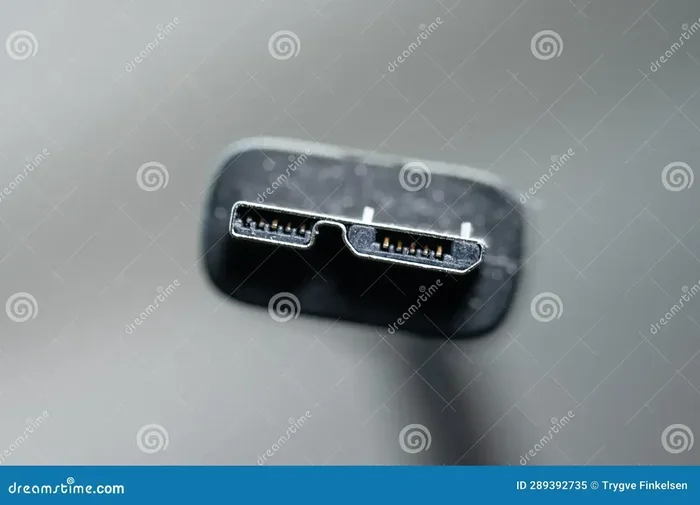
USB technology has been the backbone of data transfer and charging for decades. While wireless alternatives and new standards like Thunderbolt are emerging, USB is far from being phased out. The USB ecosystem continues to evolve, with USB-C leading the charge into the future.
Let’s talk about something that touches almost every tech device you own. USB ports are everywhere. They’re on your laptop, your phone charger, your external hard drive, and even your car. But a question keeps popping up in tech circles. Will USB be phased out?
The short answer is no. The longer answer is much more interesting. USB technology has been around since the mid-1990s. It has survived decades of change. Smartphones evolved. Laptops got thinner. Wireless tech exploded. Through all of that, USB kept going strong. Now, with new connectors and faster standards, many people wonder if the old USB-A port is finally on its way out.
Here’s the thing. USB isn’t being replaced overnight. It’s being upgraded. The USB-C connector is smaller, faster, and more versatile than anything we’ve seen before. And USB4 is pushing speeds that rival dedicated connections. So instead of asking if USB will disappear, a better question is how it will keep evolving to meet our needs.
Key Takeaways
- USB is evolving, not disappearing: Newer standards like USB4 and USB-C are keeping the technology relevant and powerful.
- Wireless alternatives exist but have limits: Technologies like Wi-Fi and Bluetooth complement USB but don’t fully replace it for speed and reliability.
- USB-C is becoming the universal standard: It works across devices, supports fast charging, and handles data transfer at impressive speeds.
- USB ports remain essential for accessories: From external drives to USB hubs, the demand for USB connectivity is growing.
- Thunderbolt and USB are merging: Thunderbolt 3 and 4 use the USB-C connector, blending technologies together.
- USB will adapt, not vanish: The industry is committed to backward compatibility and incremental improvements.
📑 Table of Contents
- The History of USB and Why It Matters
- Why People Think USB Will Be Phased Out
- USB-C: The Connector That’s Taking Over
- Thunderbolt and USB: A Powerful Combination
- What Could Replace USB in the Future?
- How to Prepare for the Future of USB
- Common Myths About USB Being Phased Out
- Expert Insights on the Future of USB
- Final Thoughts: Why USB Will Keep Evolving
The History of USB and Why It Matters
USB stands for Universal Serial Bus. The name alone tells you the goal. Make one standard that works for everything. Before USB, you had a mess of connectors. Parallel ports. Serial ports. PS/2 connectors. Every device needed its own special cable. It was a nightmare.
Then USB came along in 1996. It was simple. One connector type. One cable. One standard. It was revolutionary. Over the years, USB went through several versions. USB 1.0 was slow by today’s standards. USB 2.0 brought decent speeds. USB 3.0 was a game changer with its blue connectors and blazing fast data transfer rates.
The Connector Evolution
The original USB-A connector is what most people picture. It’s the flat, rectangular shape that goes into your computer. It’s been the standard for years. But technology kept advancing. Devices got smaller. People wanted something more compact.
That’s where USB-C enters the picture. The USB-C connector is tiny, reversible, and incredibly fast. It can carry data, video, and power all through one cable. This is a huge deal. It means fewer cables cluttering your desk. One USB-C cable can do the job of three or four older cables.
Another big step was the M.2 NVMe SSD USB adapter. These little devices let you connect super-fast internal SSDs to your computer through a USB port. They show just how versatile USB has become. You can even find an M.2 NVMe SSD to USB 3.1 adapter that delivers incredible speeds for external storage.
Why People Think USB Will Be Phased Out
It’s not hard to see why some people worry about USB‘s future. Wireless technology is advancing fast. Bluetooth 5.0 and Wi-Fi 6E offer wireless data transfer that used to require cables. Cloud storage means you don’t always need a physical connection to move files. And some laptops are starting to drop certain USB ports altogether.
The Rise of Wireless Connectivity
Wireless tech has come a long way. You can now transfer files between phones without a cable. You can mirror your screen without plugging anything in. AirDrop and similar features make sharing files feel instant. It’s easy to imagine a world where cables become optional.
But here’s the catch. Wireless data transfer is still slower and less reliable than wired connections. For large files, video editing, or backing up a drive, a cable is still the best choice. USB provides consistent, predictable speeds that wireless simply can’t match yet. Plus, wireless charging has limits. USB power delivery can charge laptops, monitors, and even some desktops. Wireless pads can’t do that.
The Shrinking Number of USB-A Ports
Look at modern laptops. Many of them have dropped USB-A ports entirely. They rely only on USB-C. This makes people think USB is dying. But that’s not what’s happening. The USB-A connector is being replaced by USB-C. The underlying USB protocol is alive and well.
In fact, USB-C is becoming more common every year. New phones use it. New tablets use it. Even some gaming consoles now use USB-C. The connector is changing, but USB itself is stronger than ever. If you need to connect older devices, you can grab an NVMe SSD to USB adapter or a USB-C hub to keep everything working.
USB-C: The Connector That’s Taking Over
USB-C is the star of the show right now. It’s small, reversible, and incredibly capable. But what makes it so special? Let’s break it down.
Speed and Performance
USB-C supports USB 3.2 and USB4 standards. These deliver speeds up to 40 Gbps. That’s fast enough to transfer a full HD movie in seconds. For creators, designers, and anyone working with large files, this is a game changer.
But speed isn’t the only advantage. USB-C supports USB power delivery up to 240 watts. That means your laptop, phone, and tablet can all charge from the same cable. One cable to rule them all. It’s the kind of simplicity people love.
Versatility Across Devices
What really sets USB-C apart is its versatility. It carries data, video, and power simultaneously. You can connect an external monitor, transfer files, and charge your laptop all with one USB-C cable. This kind of all-in-one capability is rare.
Many USB-C docks and hubs take this even further. You can connect multiple monitors, ethernet, USB drives, and peripherals through a single port. If you want to explore options, check out what’s available for M.2 NVMe SSD USB connectivity solutions.
Backward Compatibility
One of the biggest strengths of USB-C is backward compatibility. It works with older USB standards through adapters. You can plug a USB-A device into a USB-C port with a simple adapter cable. This means your old accessories aren’t suddenly useless. The ecosystem protects your investment.
Thunderbolt and USB: A Powerful Combination
Here’s something that surprises a lot of people. Thunderbolt and USB are now closely related. Thunderbolt 3 and Thunderbolt 4 use the USB-C connector. They share the same physical port. This convergence is huge.
Thunderbolt offers even faster speeds than standard USB. Thunderbolt 4 supports up to 40 Gbps, just like USB4. But Thunderbolt also supports daisy-chaining multiple devices and connecting external GPUs. It’s a powerhouse for professionals who need serious peripheral device performance.
The fact that Thunderbolt rides on USB-C tells you something important. USB isn’t just surviving. It’s becoming the foundation for even more advanced technologies. The USB standard is being adopted by industries that once used completely different connections.
What Could Replace USB in the Future?
No technology lasts forever. So what could eventually challenge USB? Let’s look at the possibilities.
Wireless Charging and Data Transfer
Wireless power delivery is improving every year. Some laptops now charge without any cable at all. And data transfer over Wi-Fi is getting faster. But wireless still has a long way to go before it matches the reliability and speed of USB.
For now, wireless connectivity works best as a complement to USB, not a replacement. You can transfer photos wirelessly from your phone, but you still need a cable for backing up your entire photo library. Both have their place.
New Connector Designs
The future might bring entirely new connector designs. But even then, they would likely be built on the USB protocol. The USB Implementers Forum (USB-IF) manages the standard. They work with hundreds of companies to ensure compatibility and progress. This kind of industry backing is hard to beat.
What’s more likely than a complete replacement is a gradual transition. Just like USB-A gave way to USB-C, USB-C might eventually evolve into something new. But the underlying USB technology will likely remain at the core.
The Role of USB in Everyday Accessories
Think about all the accessories that rely on USB. Keyboards. Mice. Webcams. Headsets. External drives. Even USB headsets for working from home depend on this technology. The ecosystem of USB accessories is massive and growing.
Manufacturers aren’t going to abandon a standard that powers millions of devices. The cost and effort of switching to something entirely new would be enormous. That’s why USB will continue to adapt rather than disappear.
How to Prepare for the Future of USB
So what should you do as USB continues to evolve? Here are some practical tips.
Invest in USB-C Gear
If you haven’t already, start moving toward USB-C accessories. Get a USB-C hub or M.2 NVMe SSD enclosure adapter USB 3.1 for your external storage needs. Look for USB-C cables that support the latest standards. This future-proofs your setup.
Keep Some Adapters on Hand
Even as USB-C becomes more common, you’ll still encounter USB-A ports. Keep a few adapters in your bag. A simple USB-C to USB-A cable can save you in a pinch. It’s a small investment that pays off.
Check Speed Ratings
Not all USB cables are the same. Some support only older speeds. Others handle the latest USB4 standards. When buying cables or adapters, check the speed rating. A fast cable makes a real difference, especially for large file transfers.
Embrace the Ecosystem
The beauty of USB is its ecosystem. One cable standard for almost everything. That simplicity is valuable. Embrace it. Build your setup around USB-C where possible, and you’ll be ready for whatever comes next.
Common Myths About USB Being Phased Out
Let’s clear up some misconceptions. There’s a lot of noise around this topic, and not all of it is accurate.
- Myth: USB-A is dead. Reality: USB-A is still widely used. Many devices, especially in offices and older setups, still rely on it. It’s declining, but far from gone.
- Myth: Wireless will replace USB soon. Reality: Wireless data transfer is convenient but still can’t match the speed and reliability of USB for heavy tasks.
- Myth: USB is too slow for modern needs. Reality: Modern USB standards like USB4 and Thunderbolt offer speeds that rival dedicated connections. USB is faster than ever.
- Myth: Only cheap devices use USB now. Reality: Premium laptops, smartphones, and tablets use USB-C. Even Apple’s latest MacBooks rely entirely on USB-C.
- Myth: USB will be completely replaced by one new technology. Reality: USB will likely evolve gradually. The protocol and connector will change, but the standard will persist.
Expert Insights on the Future of USB
Industry experts largely agree on one thing. USB isn’t going anywhere. The USB Implementers Forum continues to push the standard forward. USB4 is already making waves. And the adoption of USB-C across the industry is unprecedented.
What’s driving this? Demand. Consumers want simplicity. They want one cable that works for everything. USB delivers that. It charges devices, transfers data, and connects peripherals. No other standard comes close in terms of versatility.
Companies like Apple, Google, and Microsoft have all embraced USB-C. Regulation in the European Union even mandates USB-C for many devices. This kind of industry-wide adoption ensures that USB remains relevant for years to come.
Final Thoughts: Why USB Will Keep Evolving
So, will USB be phased out? The answer is a clear no. USB is not a static technology. It’s a living standard that adapts to the needs of the moment. From USB 1.0 to USB4, it has continuously reinvented itself without losing its core identity.
The USB-C connector is just the latest chapter in a long story. It brings speed, versatility, and simplicity that older standards couldn’t match. And the USB protocol underneath keeps getting faster and more capable with each new version.
Instead of worrying about USB being phased out, embrace the evolution. Upgrade to USB-C devices where you can. Invest in quality cables and adapters. Stay informed about new standards. The future of USB is bright, and it’s only getting brighter.
One thing is certain. As long as we need to connect devices, transfer files, and charge gadgets, USB will be there. It might look different in ten years. It might be faster and smaller. But the spirit of USB universal connectivity will live on.
So the next time someone asks you, Will USB be phased out?, you can tell them with confidence. USB isn’t ending. It’s just getting started.
Frequently Asked Questions
Is USB-A being completely discontinued?
Not yet. While many new laptops are dropping USB-A ports, the connector is still widely used across millions of devices. Adapters make it easy to connect USB-A devices to USB-C ports, so your older gear isn’t obsolete.
Can USB be replaced by wireless technology?
Wireless tech is great for convenience, but it can’t fully replace USB for speed, reliability, and power delivery. For heavy data tasks and charging larger devices, a wired USB connection is still the best choice.
What is USB4 and how does it relate to USB-C?
USB4 is the latest USB standard. It uses the USB-C connector and supports speeds up to 40 Gbps. It also shares compatibility with Thunderbolt 4, making it incredibly versatile for professionals and everyday users alike.
Should I buy USB-C accessories now?
Absolutely. USB-C is becoming the universal standard. Investing in USB-C cables, hubs, and adapters now will future-proof your setup and keep you compatible with new devices.
Are all USB-C cables the same?
No. USB-C cables vary in speed and capability. Some support only USB 2.0 speeds, while others handle USB4 or Thunderbolt. Always check the specifications before buying to make sure you get the performance you need.
How long will USB technology continue to be supported?
USB has been around since the mid-1990s and shows no signs of slowing down. With major tech companies and regulators backing the standard, USB will likely remain a core connectivity technology for at least the next decade or more.