X670e Build Guide Best Ram Ssd For Ultimate Pc Setup
This X670e build guide walks you through the best RAM and SSD choices for a powerful desktop setup. The X670e motherboard chipset unlocks PCIe 5.0 support, DDR5 memory speeds, and lightning-fast NVMe storage. Whether you are building a gaming rig or a workstation, picking the right components makes all the difference. You will learn which RAM kits and SSD drives deliver the best value and performance for your X670e platform.
If you are planning a new desktop build, the X670e platform should be at the top of your list. This AMD AM5 chipset offers cutting-edge features like PCIe 5.0 support and DDR5 memory compatibility. But with so many RAM and SSD options on the market, choosing the right ones can feel overwhelming. This X670e build guide breaks it all down for you.
You will learn exactly which RAM kits and SSD drives work best with the X670e motherboard. We cover capacity, speed, compatibility, and real-world performance. By the end, you will have a clear roadmap for building a system that delivers incredible speed and reliability.
The X670e chipset is AMD’s flagship AM5 platform for enthusiasts. It supports the latest Ryzen 7000 series processors and provides the most PCIe 5.0 lanes of any AM5 chipset. This means faster storage, better GPU bandwidth, and future-proof connectivity. Combined with DDR5 RAM and NVMe SSD storage, a X670e build delivers outstanding system performance for gaming, content creation, and multitasking.
Key Takeaways
- X670e is the top AM5 chipset: It offers the most PCIe 5.0 lanes and best overclocking support for Ryzen 7000 processors.
- DDR5 RAM is a must: The X670e platform only supports DDR5 memory, so you need compatible DDR5 kits for peak performance.
- NVMe SSDs are essential: PCIe 5.0 NVMe drives take full advantage of the X670e motherboard’s storage bandwidth.
- 32GB to 64GB RAM is ideal: For gaming and creative work, 32GB provides a sweet spot of capacity and value.
- 1TB SSD is the sweet spot: A 1TB NVMe drive gives you plenty of space for games, apps, and the operating system.
- Compatibility matters: Always check RAM and SSD compatibility with your specific X670e motherboard model before purchasing.
📑 Table of Contents
Why the X670e Platform Matters for Your Build
The X670e motherboard stands out in the AM5 lineup for good reason. It is designed for users who want the best features and maximum performance. The “e” stands for “enthusiast,” and it shows in every aspect of the board.
PCIe 5.0 Support
One of the biggest advantages of the X670e chipset is full PCIe 5.0 support. This next-generation interface doubles the bandwidth of PCIe 4.0. For your storage, this means NVMe SSDs can reach speeds over 14,000 MB/s with PCIe 5.0 drives. For your GPU, it means more headroom for future graphics cards.
When you pair a PCIe 5.0 NVMe SSD with a X670e motherboard, you get the fastest boot drive possible. Games load in seconds, and large files transfer almost instantly. This is a game-changer for anyone who works with large media files or wants the quickest possible system response.
DDR5 Memory Architecture
The X670e platform uses DDR5 RAM exclusively. DDR5 offers higher speeds, better power efficiency, and increased capacity compared to DDR4. Current DDR5 kits start at 5600 MHz and can reach 8000 MHz or higher with X3D and high-end memory controllers.
DDR5 also supports on-die ECC and dual-channel memory configurations. This means better stability and faster data transfer rates. When you build a X670e system with DDR5 RAM, you are future-proofing your investment for years to come.
Best RAM for X670e Builds
Choosing the right RAM is one of the most important decisions in any PC build. The X670e motherboard demands DDR5 memory, but not all DDR5 kits are created equal. Here is what you need to know.
RAM Capacity: How Much Do You Need?
For most users, 32GB of RAM strikes the perfect balance. It handles modern games, multitasking with dozens of browser tabs, and light content creation with ease. If you are into heavy video editing, 3D rendering, or running virtual machines, 64GB provides the headroom you need.
Here is a quick breakdown of RAM capacity options:
- 16GB (2x8GB): Entry-level for basic tasks and older games. You may find this limiting in 2024 and beyond.
- 32GB (2x16GB): The sweet spot for gaming and general productivity. Most X670e builds benefit from this amount.
- 64GB (2x32GB): Ideal for creative professionals, streamers, and power users who run memory-intensive workloads.
- 128GB (4x32GB): Overkill for most users but useful for specialized workstation tasks like 8K video editing.
RAM Speed and Timings
DDR5 RAM speed is measured in megahertz (MHz). Higher speeds generally mean better performance, but there are diminishing returns. For X670e builds, DDR5-6000 is widely considered the sweet spot. It hits the sweet point between performance and price.
Timings also matter. Lower CAS latency (CL) numbers mean faster response times. Look for kits with CL30 or lower at DDR5-6000 for the best results. If you are on a budget, DDR5-5600 CL36 kits still offer excellent value and work great with the X670e platform.
Many users ask about the 16GB RAM 1TB SSD configuration as a reference point for balanced builds. While that is a laptop setup, the same principle applies here: match your RAM capacity to your SSD size for a well-rounded system.
Dual-Channel Memory Configuration
Always install your DDR5 RAM in matched pairs to enable dual-channel mode. This doubles the memory bandwidth compared to single-channel setups. For the X670e platform, dual-channel DDR5 is essential for getting the most out of your system.
Buy a 2-stick kit rather than individual sticks. Kits are tested together by the manufacturer to ensure compatibility and optimal performance. This simple step can improve your system performance by 10 to 20 percent in memory-intensive tasks.
Best SSD Options for X670e Motherboards
Storage is where the X670e platform truly shines. With PCIe 5.0 NVMe support, you can use drives that are dramatically faster than anything from the previous generation. Here is how to choose the best SSD for your build.
NVMe SSD vs SATA SSD
For a X670e build, you should always choose an NVMe M.2 SSD over a SATA drive. NVMe drives connect directly to the CPU via PCIe lanes, bypassing the bottleneck of the SATA interface. The speed difference is enormous.
A top-tier PCIe 5.0 NVMe SSD can deliver read speeds of 14,000 MB/s or more. A SATA SSD tops out around 550 MB/s. That is a 25x speed difference. For booting Windows, loading games, and opening large files, NVMe storage is a no-brainer.
Looking at broader options, the best NVMe M.2 SSD options on the market today include models from Samsung, WD Black, and Seagate that leverage PCIe 5.0 technology for incredible speed.
SSD Capacity Recommendations
Storage needs vary by user. Here is what we recommend for different use cases on the X670e platform:
- 1TB SSD: Perfect for most gamers. It holds Windows, 10 to 15 modern games, and plenty of applications. A 1TB SSD with 16GB RAM setup offers a great balance of speed and capacity.
- 2TB SSD: Ideal for users with large game libraries or who work with video and photo editing. You get room for your operating system, apps, and a growing media collection.
- 4TB SSD: Best for professionals who need massive storage without sacrificing speed. These drives are more expensive but provide peace of mind for storage-heavy workflows.
PCIe 5.0 vs PCIe 4.0 NVMe Drives
The X670e motherboard supports both PCIe 5.0 and PCIe 4.0 NVMe drives. PCIe 5.0 is the newest standard and offers double the bandwidth of PCIe 4.0. However, PCIe 4.0 drives are still extremely fast and often more affordable.
PCIe 4.0 NVMe: Read speeds up to 7,000 MB/s. Great for most users. More budget-friendly. Widely available.
PCIe 5.0 NVMe: Read speeds up to 14,000 MB/s. Best for enthusiasts and professionals who need maximum storage bandwidth. Still emerging in the market.
For most builders, a PCIe 4.0 NVMe SSD provides excellent value. If you want to future-proof your system and have the budget, a PCIe 5.0 drive is worth the investment.
M.2 Drive Installation Tips
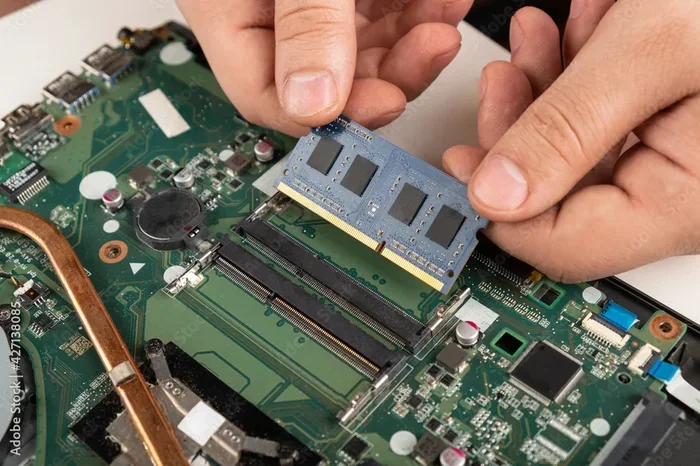
Installing an M.2 SSD on a X670e motherboard is straightforward. Locate the M.2 slot on your board, remove the mounting screw, align the drive at an angle, and press it down flat. Secure it with the screw.
Make sure your X670e motherboard has adequate heat dissipation for the M.2 drive. Many boards include M.2 heatsinks, but if yours does not, consider purchasing an aftermarket M.2 heatsink. High-speed NVMe drives can run hot under heavy loads, and thermal throttling can reduce your storage speed over time.
X670e Build Configuration Examples
Now that you understand the best RAM and SSD options, let us look at complete build configurations. These examples show how to balance performance and budget for different use cases.
Gaming Build
For a gaming-focused X670e setup, 32GB of DDR5 RAM and a 1TB NVMe SSD is the ideal configuration. This setup handles modern titles at high settings while providing fast load times and smooth multitasking.
If you want more storage, consider adding a second NVMe drive or a large SATA SSD for media files. This keeps your games on the fastest drive while storing other files separately.
Many builders look at configurations similar to the 32GB RAM 1TB SSD setup as a reference for balanced performance, though desktop X670e builds offer even faster speeds thanks to PCIe 5.0.
Content Creation Build
For video editing, 3D modeling, or music production, go with 64GB of DDR5 RAM and a 2TB NVMe SSD. These workloads demand more memory and storage space. The extra capacity prevents bottlenecks during long rendering sessions.
Consider adding a second M.2 drive for project files. Keeping active projects on a fast NVMe drive ensures smooth timeline scrubbing and quick file exports.
Budget-Friendly Build
Not everyone needs top-tier components. A solid X670e build can start with 16GB of DDR5 RAM and a 500GB NVMe SSD. This configuration handles everyday tasks, light gaming, and office work with ease.
You can always upgrade RAM or add an SSD later. The X670e motherboard provides multiple M.2 slots and DIMM slots for expansion. Start with what you need and grow your system over time.
Compatibility and Setup Tips
Building a PC is exciting, but compatibility checks are essential. The X670e platform is relatively new, and not all components work perfectly together out of the box.
BIOS Updates
Before installing your CPU, check if your X670e motherboard needs a BIOS update for your specific Ryzen 7000 processor. Some boards ship with older BIOS versions that do not support the latest CPUs. Many modern boards include BIOS Flashback, which lets you update the BIOS without a CPU installed.
RAM QVL Check
Always check the Qualified Vendor List (QVL) on your X670e motherboard manufacturer’s website. The QVL lists RAM kits that have been tested and confirmed to work with that specific board. Buying from the QVL reduces the risk of compatibility issues and saves you troubleshooting headaches.
SSD Firmware Updates
Keep your NVMe SSD firmware up to date. Manufacturers regularly release updates that improve performance, fix bugs, and enhance compatibility. Most SSD brands offer easy-to-use firmware update tools on their websites.
Common Mistakes to Avoid
Even experienced builders make mistakes. Here are common pitfalls when building a X670e system and how to avoid them.
- Buying incompatible DDR4 RAM: The X670e platform only supports DDR5. Do not accidentally purchase DDR4 memory.
- Ignoring RAM timings: Speed MHz numbers get all the attention, but timings affect real-world performance. Always check both.
- Skipping the M.2 heatsink: PCIe 5.0 NVMe drives run hot. Without proper cooling, they may throttle and lose speed.
- Underestimating storage needs: Games and applications are growing larger every year. A 500GB SSD fills up fast. When in doubt, go bigger.
- Forgetting to enable XMP/EXPO: DDR5 RAM does not run at its rated speed by default. You must enable XMP or EXPO in BIOS to activate the advertised speeds.
Expert Insights on X670e Builds
Building a X670e system is one of the best investments you can make for future-proofing your PC. The AM5 platform will support AMD processors for several more generations, so your motherboard investment lasts longer.
Focus on balancing your components. A top-tier GPU paired with slow RAM or an outdated SSD will hold back your system. The X670e platform is designed to unleash the full potential of modern components, so make sure every part of your build keeps up.
Pay attention to your power consumption and heat dissipation as well. High-speed DDR5 RAM and PCIe 5.0 NVMe SSDs can draw more power than their predecessors. Make sure your power supply has enough headroom and your case has good airflow.
Finally, do not overlook the importance of software optimization. Keeping your operating system updated, enabling firmware updates for your drives, and regularly checking for driver updates all contribute to a smoother and faster experience on your X670e build.
Conclusion
The X670e platform offers everything you need for a top-tier desktop build. With its support for DDR5 RAM, PCIe 5.0 NVMe SSDs, and the powerful Ryzen 7000 processor lineup, it delivers outstanding system performance for any use case. The best RAM and SSD choices depend on your budget and needs, but the guidelines in this X670e build guide give you a solid starting point.
Whether you choose a 32GB DDR5 setup with a 1TB NVMe SSD or go all-out with 64GB RAM and a 2TB PCIe 5.0 drive, the X670e motherboard ensures your components work together in perfect harmony. Take your time, check compatibility, and enjoy the process of building a PC that will serve you well for years to come.
Start with the right foundation, and your X670e build will deliver the speed, reliability, and future-proofing you deserve. Happy building!
Frequently Asked Questions
What is the X670e chipset and why is it important?
The X670e is AMD’s flagship AM5 motherboard chipset designed for enthusiasts. It provides the most PCIe 5.0 lanes, best overclocking support, and maximum connectivity options. It is the best choice for users who want the highest performance from their Ryzen 7000 processor.
How much RAM do I need for a X670e build?
32GB of DDR5 RAM is the recommended amount for most X670e builds. It provides excellent performance for gaming and multitasking. If you do heavy video editing or 3D rendering, consider stepping up to 64GB for smoother workflow.
Can I use PCIe 4.0 NVMe SSDs with the X670e platform?
Yes, the X670e motherboard is backward compatible with PCIe 4.0 NVMe drives. While you will not get the full PCIe 5.0 speeds, PCIe 4.0 SSDs are still extremely fast and often more affordable. They are a great value option for most builders.
Do I need an M.2 heatsink for my NVMe SSD?
It is highly recommended, especially for PCIe 5.0 NVMe drives. These drives generate more heat than previous generations. Without proper cooling, they may thermal throttle and lose speed. Many X670e motherboards include M.2 heatsinks built in, but aftermarket options work well too.
What is the best SSD capacity for a X670e gaming build?
A 1TB NVMe SSD is the sweet spot for most gaming setups. It provides enough space for your operating system, several modern games, and applications. If you have a large game library or work with media files, consider a 2TB drive for more breathing room.
Does the X670e support overclocking?
Yes, the X670e chipset offers the best overclocking support among AM5 motherboards. You can overclock both your Ryzen 7000 CPU and your DDR5 RAM for maximum performance. Make sure your CPU cooler and power supply can handle the increased demands before attempting overclocking.