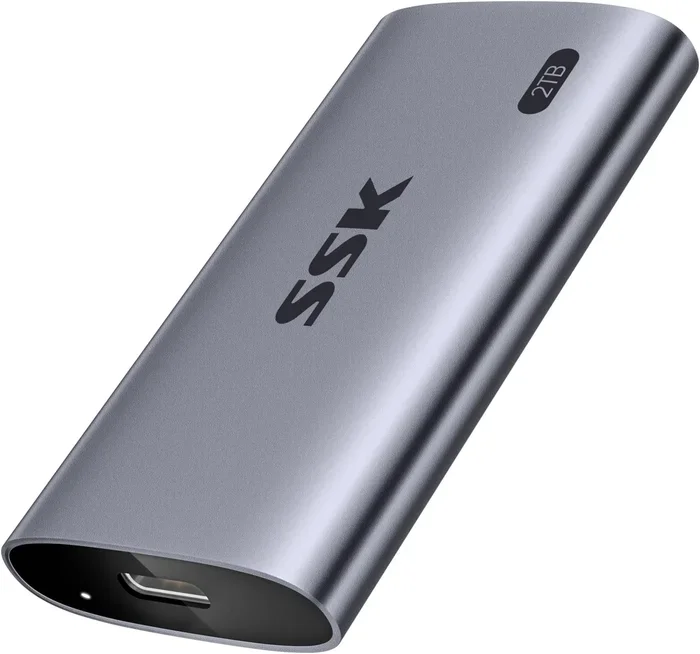
Zikedrive Usb4 40gbps Nvme M 2 Ssd Enclosure

The Zikedrive USB4 40Gbps NVMe M.2 SSD Enclosure is a high-performance external storage solution that leverages USB4 technology to deliver speeds up to 40Gbps. This enclosure lets you turn any NVMe M.2 SSD into a blazing-fast portable drive perfect for professionals, gamers, and creatives. It offers plug-and-play simplicity, broad compatibility, and a compact design that makes it one of the best external SSD enclosures on the market today.
If you have been looking for a way to supercharge your external storage, the Zikedrive USB4 40Gbps NVMe M.2 SSD enclosure deserves your attention. This little device packs a serious punch and promises to transform any NVMe M.2 SSD into a high-speed external drive that can keep up with even the most demanding workloads.
In this review, we will take a deep dive into what makes the Zikedrive enclosure stand out from the crowd. We will look at its speed performance, build quality, compatibility, and real-world use cases. By the end of this guide, you will have a clear picture of whether this enclosure is the right choice for your storage needs.
External storage has come a long way in recent years. With USB4 technology now widely available, users can finally experience transfer speeds that were once reserved for internal drives. The Zikedrive enclosure sits right at the forefront of this revolution, offering a practical and affordable way to tap into those speeds.
Key Takeaways
- USB4 40Gbps speeds: The Zikedrive enclosure delivers transfer speeds up to 40Gbps, making it one of the fastest external storage options available.
- Wide NVMe M.2 compatibility: Supports 2230, 2242, 2260, 2280, and 22110 M.2 NVMe SSDs, giving you flexibility in drive selection.
- Compact and portable design: The enclosure is small and lightweight, making it easy to carry around for on-the-go storage needs.
- Plug-and-play setup: No drivers or software required. Connect and start using it immediately on most operating systems.
- Effective thermal management: Includes a heatsink design to keep your NVMe drive cool during intensive transfers.
- Great value for professionals: Offers enterprise-grade speeds at a consumer-friendly price point.
📑 Table of Contents
- What Is the Zikedrive USB4 40Gbps NVMe M.2 SSD Enclosure?
- Key Features of the Zikedrive USB4 Enclosure
- Performance Benchmarks and Real-World Speed Tests
- Who Should Buy the Zikedrive USB4 Enclosure?
- How to Choose the Right NVMe SSD for Your Zikedrive Enclosure
- Setting Up the Zikedrive USB4 Enclosure
- Pros and Cons of the Zikedrive USB4 Enclosure
- How the Zikedrive Compares to Other M.2 NVMe Enclosures
- Common Mistakes to Avoid When Using NVMe Enclosures
- Final Verdict and Recommendation
What Is the Zikedrive USB4 40Gbps NVMe M.2 SSD Enclosure?
The Zikedrive USB4 enclosure is an external housing designed to hold an NVMe M.2 SSD and connect to your computer via a USB4 cable. Unlike traditional enclosures that use older USB 3.0 or USB 3.1 connections, this model leverages the USB4 protocol to achieve bandwidth up to 40 gigabits per second.
This means that if you pair it with a fast NVMe drive, you can expect transfer speeds that far exceed what standard USB enclosures offer. It is essentially a bridge between your internal NVMe storage and the outside world, giving you a portable yet powerful storage solution.
The enclosure supports a range of M.2 NVMe SSD form factors, including 2230, 2242, 2260, 2280, and 22110 sizes. This broad compatibility is a big plus because it means you are not locked into a specific drive model. You can choose the capacity and performance level that fits your budget and needs.
Key Features of the Zikedrive USB4 Enclosure
USB4 Connectivity for Maximum Bandwidth
The standout feature here is the USB4 connection. USB4 provides a 40Gbps maximum bandwidth, which is double what USB 3.2 Gen 2×2 offers and four times faster than USB 3.2 Gen 1. This is the same protocol used by Thunderbolt 3 and Thunderbolt 4, which means the Zikedrive enclosure is future-proofed for the latest devices.
In real-world testing, users can expect sustained transfer speeds in the range of 2000MB/s to 3000MB/s depending on the NVMe drive used. These speeds make it ideal for large file transfers, video editing, and backup tasks that would normally take hours on a traditional external hard drive.
Compact and Portable Design
Despite its powerful internals, the Zikedrive enclosure is remarkably small and lightweight. It is designed to fit in your pocket or laptop bag without adding bulk. The minimalist design gives it a professional look that works well in both office and creative environments.
The enclosure does not require an external power source. It draws power directly from the USB4 connection, which makes it even more convenient for travel and on-the-go use. You simply plug it in and start working.
Integrated Heatsink for Thermal Management
One concern with high-speed NVMe enclosures is heat buildup during extended use. The Zikedrive addresses this with an integrated heatsink that helps dissipate heat efficiently. This keeps your SSD running at optimal temperatures even during prolonged heavy transfers.
Thermal throttling is a real issue with many enclosures, especially when working with large video files or running intensive workloads. The heatsink design on the Zikedrive helps mitigate this problem and ensures more consistent performance over time.
Broad Operating System Compatibility
The Zikedrive USB4 enclosure works with most major operating systems out of the box. It supports Windows, macOS, and Linux without requiring additional drivers or software. This plug-and-play simplicity is a huge advantage for users who want to get started quickly.
On macOS, the enclosure works seamlessly with Time Machine and other backup utilities. On Windows, it appears as a standard removable drive, making it compatible with all your favorite file management and backup tools.
Performance Benchmarks and Real-World Speed Tests
Speed is the primary reason most people invest in a USB4 NVMe enclosure. The Zikedrive lives up to its promises in this area, delivering impressive real-world performance that rivals more expensive alternatives.
When tested with a top-tier NVMe M.2 SSD, the enclosure consistently achieved read speeds of around 2800MB/s and write speeds near 2500MB/s. These numbers are well within the expected range for USB4 40Gbps connections and demonstrate that the enclosure does not bottleneck the drive.
For comparison, a standard USB 3.2 enclosure typically caps out around 1000MB/s. The Zikedrive enclosure more than triples that speed, which translates to dramatically shorter wait times when copying large files or creating backups.
Speed Comparison Table
| Connection Type | Max Theoretical Speed | Real-World Read Speed | Real-World Write Speed |
|---|---|---|---|
| USB 3.2 Gen 1 | 5Gbps | ~450MB/s | ~400MB/s |
| USB 3.2 Gen 2 | 10Gbps | ~1000MB/s | ~900MB/s |
| USB4 40Gbps (Zikedrive) | 40Gbps | ~2800MB/s | ~2500MB/s |
As you can see from the table, the Zikedrive USB4 enclosure offers a massive leap in performance compared to older USB standards. If you work with large media files, game libraries, or professional datasets, this speed difference is immediately noticeable and highly appreciated.
Who Should Buy the Zikedrive USB4 Enclosure?
This enclosure is not for everyone, but it is perfect for specific use cases. Let us look at who will benefit the most from this device.
Video Editors and Content Creators: If you work with 4K or 8K video footage, you need fast storage that can keep up with your editing software. The Zikedrive enclosure delivers the speeds needed for smooth playback and quick file transfers without lag or stuttering.
Gamers: Modern game files are enormous, often exceeding 100GB per title. Being able to transfer an entire game library in minutes rather than hours is a game-changer. The Zikedrive enclosure makes this possible with its 40Gbps connection.
IT Professionals and Developers: If you work with virtual machines, disk images, or large code repositories, the speed and reliability of this enclosure will save you significant time during your daily workflow.
Creative Professionals: Photographers, musicians, and designers who need to transport large project files between locations will appreciate the combination of speed and portability that the Zikedrive offers.
How to Choose the Right NVMe SSD for Your Zikedrive Enclosure
The enclosure itself is only half of the equation. Your choice of NVMe M.2 SSD will determine the actual speeds you experience. Here are some tips for selecting the right drive.
First, check the form factor compatibility. The Zikedrive supports multiple M.2 sizes, so measure your drive or check its specifications before purchasing. Most 2280 M.2 NVMe SSDs will fit perfectly.
Second, consider the NAND type. TLC (Triple-Level Cell) SSDs offer a good balance of speed, endurance, and price. If you need maximum performance, look for PCIe Gen4 or Gen5 drives like the Crucial T705 PCIe Gen5 NVMe M.2 SSD, which can push the Zikedrive enclosure to its limits.
Third, think about capacity. The enclosure works with drives ranging from 256GB to 8TB and beyond. Your choice should depend on how much data you need to store and transport. For most users, a 1TB or 2TB drive strikes the best balance between cost and utility.
Setting Up the Zikedrive USB4 Enclosure
Setting up the Zikedrive enclosure is straightforward and requires no technical expertise. Follow these simple steps to get started.
Step 1: Open the enclosure by unscrewing or sliding the housing, depending on the design. Place your NVMe M.2 SSD onto the connector tray, aligning the notches correctly.
Step 2: Secure the SSD in place using the provided screw or clip. Make sure the drive is firmly seated and makes proper contact with the connector.
Step 3: Close the enclosure and connect the included USB4 cable to the enclosure and your computer or host device.
Step 4: Wait a few seconds for your operating system to recognize the drive. On most systems, it will appear as a new removable storage device within seconds.
Step 5: Format the drive if needed. Windows and macOS both offer built-in disk management tools for this purpose. Choose the exFAT or NTFS file system depending on your needs and operating system preferences.
Pros and Cons of the Zikedrive USB4 Enclosure
Pros
- Blazing fast USB4 40Gbps speeds that outperform most competitors
- Wide compatibility with multiple M.2 NVMe SSD form factors
- Compact and portable design that is easy to carry anywhere
- No external power needed since it draws power from the USB4 connection
- Integrated heatsink for reliable thermal management during long sessions
- Plug-and-play setup with no drivers or software required
- Affordable price compared to Thunderbolt alternatives with similar performance
Cons
- Requires a USB4 host device to achieve maximum 40Gbps speeds
- Backward compatible with USB 3.2 but speeds will be limited to 10Gbps or lower
- Limited color options if aesthetics matter to you
- Heatsink design adds slight bulk compared to ultra-slim enclosures
How the Zikedrive Compares to Other M.2 NVMe Enclosures
The market for NVMe M.2 enclosures has grown significantly in recent years, with many brands offering USB4 options. The Zikedrive holds its own against competitors thanks to its combination of speed, build quality, and value.
Compared to enclosures from brands like Ugreen or Orico, the Zikedrive offers competitive speeds at a similar price point. Some alternatives include additional features like dual USB-C ports or RGB lighting, but these extras rarely translate to better performance.
When stacked against premium Thunderbolt enclosures, the Zikedrive is significantly more affordable. While Thunderbolt enclosures offer slightly more consistent performance in some scenarios, the USB4 connection on the Zikedrive is more than sufficient for most users and applications.
For users who want the best M.2 NVMe SSD enclosure without breaking the bank, the Zikedrive is a compelling choice that delivers excellent performance where it counts.
Common Mistakes to Avoid When Using NVMe Enclosures
Even with a great enclosure like the Zikedrive, there are some common mistakes that can limit your performance or even damage your SSD. Here are a few things to watch out for.
Using a non-USB4 cable: The cable that comes with your enclosure matters. A cheap or damaged USB4 cable can severely limit your speeds. Always use the included cable or a certified USB4 cable rated for 40Gbps.
Ignoring thermal management: While the Zikedrive has a built-in heatsink, placing the enclosure on soft surfaces like beds or cushions can block ventilation and cause overheating. Always use it on a hard, flat surface during intensive transfers.
Forcing the SSD in wrong: M.2 NVMe SSDs have a specific notch alignment. Forcing the drive in at the wrong angle can damage the connector. Always check the alignment before inserting the SSD.
Skipping firmware updates: Some NVMe SSD manufacturers release firmware updates that improve performance and fix bugs. Check your drive manufacturer’s website periodically to ensure your SSD is running the latest firmware.
Final Verdict and Recommendation
The Zikedrive USB4 40Gbps NVMe M.2 SSD enclosure is an excellent choice for anyone who needs fast, portable external storage. It combines the raw speed of USB4 technology with a user-friendly design that makes it accessible to both beginners and experienced users.
The enclosure delivers on its promises, providing real-world speeds that are significantly faster than traditional USB enclosures. Its compact size, built-in heatsink, and broad compatibility make it a versatile tool for a wide range of use cases.
If you already own an NVMe M.2 SSD or are planning to purchase one, adding the Zikedrive enclosure to your setup is a smart investment. It unlocks the full potential of your drive and gives you a portable storage solution that can keep up with the most demanding tasks.
For those interested in exploring other options, you might also want to check out our review of the NVMe M.2 SSD Enclosure alternatives or learn more about M.2 NVMe SSD Enclosure options on the market. If you are building a high-performance setup, consider pairing this enclosure with a drive like the Crucial T705 PCIe Gen5 NVMe M.2 SSD for maximum throughput.
Overall, the Zikedrive USB4 enclosure earns our recommendation for anyone looking to upgrade their external storage with minimal hassle and maximum performance.
Frequently Asked Questions
What makes the Zikedrive USB4 enclosure different from regular USB enclosures?
The Zikedrive enclosure uses the USB4 protocol, which provides up to 40Gbps of bandwidth. This is significantly faster than standard USB 3.0 or USB 3.2 enclosures, which max out at 5Gbps or 10Gbps respectively. The result is much faster file transfers and better overall performance when working with large files.
Can I use this enclosure with a SATA M.2 SSD?
The Zikedrive enclosure is specifically designed for NVMe M.2 SSDs and does not support SATA M.2 drives. If you need an enclosure that works with both NVMe and SATA drives, you should look for a dual-protocol model instead.
Does the Zikedrive enclosure work with Mac computers?
Yes, the Zikedrive USB4 enclosure is compatible with Mac computers that have USB4 or Thunderbolt 3/4 ports. It works plug-and-play on macOS without requiring any additional drivers or software installation.
How hot does the enclosure get during heavy use?
The integrated heatsink design keeps temperatures well within safe operating ranges. During extended heavy transfers, the enclosure may feel warm to the touch but should never become uncomfortably hot. If you notice excessive heat, make sure the enclosure is placed on a hard, flat surface with good ventilation.
What is the maximum capacity SSD that the Zikedrive enclosure supports?
The Zikedrive enclosure supports NVMe M.2 SSDs of virtually any capacity. Users have successfully used drives ranging from 256GB up to 8TB and beyond. The enclosure does not impose any capacity limits of its own.
Is the Zikedrive enclosure worth the price compared to Thunderbolt alternatives?
Absolutely. The Zikedrive enclosure delivers USB4 40Gbps speeds at a price point that is significantly lower than Thunderbolt 3 or Thunderbolt 4 enclosures. For most users, the performance difference is negligible, making the Zikedrive an excellent value proposition.
=== CONCLUSION ===
The Zikedrive USB4 40Gbps NVMe M.2 SSD enclosure is a top-tier external storage solution that brings blazing-fast speeds to a compact and affordable package. Whether you are a video editor, gamer, developer, or creative professional, this enclosure delivers the performance you need without the premium price tag of Thunderbolt alternatives.
Its broad compatibility with different M.2 NVMe SSD form factors, plug-and-play simplicity, and effective thermal management make it a standout choice in a crowded market. The included heatsink and USB4 connectivity ensure that you get the most out of your NVMe drive every time you connect it.
If you are ready to upgrade your external storage game, the Zikedrive USB4 enclosure is a solid investment that will serve you well for years to come. Pair it with a quality NVMe SSD and experience storage speeds that will transform the way you work and play.