1tb Pcie Gen4 Nvme Ssd

A 1tb pcie gen4 nvme ssd delivers blazing-fast data transfer speeds that transform any computer into a high-performance machine. These drives offer read speeds up to 7000 MB/s and write speeds around 5000 MB/s, making them ideal for gaming, video editing, and heavy workloads. Whether you are upgrading a laptop or building a new desktop, this guide covers everything you need to know about choosing the right drive.
A 1tb pcie gen4 nvme ssd is one of the best upgrades you can make to any computer today. Whether you are a gamer, a content creator, or someone who just wants a faster machine, this type of storage drive changes the entire experience. The difference is night and day compared to old hard drives or even SATA SSDs.
The PCIe Gen4 interface doubles the bandwidth of Gen3, which means your data moves much faster. A typical 1tb pcie gen4 nvme ssd delivers sequential read speeds around 7000 MB/s and write speeds near 5000 MB/s. To put that in perspective, a standard SATA SSD tops out at about 550 MB/s. You are looking at roughly a tenfold improvement in speed.
These drives use the NVMe protocol, which is designed specifically for flash storage over the PCIe bus. Unlike older AHCI protocols used by SATA drives, NVMe reduces latency and handles parallel tasks with ease. This is why a modern NVMe M.2 SSD feels so responsive when you boot up your system or open heavy applications.
Most 1tb PCIe Gen4 NVMe drives come in the M.2 2280 form factor. This is a small, rectangular stick that plugs directly into a motherboard slot. There are no cables to manage, no bulky drive bays to worry about, and no extra power connectors needed. The simplicity of the M.2 design is a big reason why so many modern laptops and desktops use them.
Key Takeaways
- Speed Boost: A 1tb pcie gen4 nvme ssd offers dramatically faster read and write speeds compared to older SATA and Gen3 drives.
- M.2 Form Factor: Most Gen4 NVMe drives come in the compact 2280 M.2 shape, fitting easily into modern laptops and desktops.
- Gaming Advantage: Load times for games drop significantly when you use a PCIe Gen4 NVMe solid state drive.
- Price Range: These drives are now very affordable, with many quality options available under $100.
- Future-Proof: PCIe Gen4 is widely supported on modern motherboards, making it a smart long-term investment.
- TLC NAND: Many top Gen4 NVMe drives use TLC NAND for better endurance and reliability over time.
📑 Table of Contents
- What Makes a 1tb Pcie Gen4 Nvme Ssd So Fast?
- Top Benefits of Using a 1tb Pcie Gen4 Nvme Ssd
- How to Choose the Right 1tb Pcie Gen4 Nvme Ssd
- 1tb Pcie Gen4 Nvme Ssd vs. Other Storage Options
- Common Uses for a 1tb Pcie Gen4 Nvme Ssd
- Installation Tips for Your 1tb Pcie Gen4 Nvme Ssd
- Common Mistakes to Avoid When Buying a 1tb Pcie Gen4 Nvme Ssd
- Expert Insights on 1tb Pcie Gen4 Nvme Ssd Technology
- Conclusion
What Makes a 1tb Pcie Gen4 Nvme Ssd So Fast?
The speed of a 1tb pcie gen4 nvme ssd comes down to a few key technical factors. Understanding these helps you make a smarter buying decision.
The PCIe Gen4 Interface
PCIe stands for Peripheral Component Interconnect Express. Each generation doubles the bandwidth of the previous one. PCIe Gen4 offers 16 GT/s per lane, which is twice as fast as Gen3. With four lanes (x4 configuration), a Gen4 NVMe drive gets a massive data pipeline. This is the main reason these drives hit those incredible read and write numbers.
NVMe Protocol Advantages
The NVMe (Non-Volatile Memory Express) protocol was built from the ground up for flash storage. It supports up to 64,000 command queues, each with 64,000 commands. Older AHCI protocols used by SATA drives only support one command queue with 32 commands. This means an NVMe drive can handle many tasks simultaneously without slowing down.
TLC NAND Flash Memory
Most high-quality 1tb PCIe Gen4 NVMe SSDs use TLC (Triple-Level Cell) NAND. TLC stores three bits of data per cell, offering a great balance of speed, endurance, and cost. Drives using TLC NAND tend to have better sustained performance and longer lifespans than those using QLC (Quad-Level Cell) memory.
DRAM Cache and HMB
Some Gen4 NVMe drives include a dedicated DRAM cache chip, while others use Host Memory Buffer (HMB) technology. A DRAM cache helps the drive manage its mapping tables quickly, which improves random read and write performance. HMB uses a small portion of your system RAM to achieve similar results. Both approaches work well, but a dedicated DRAM cache generally offers slightly better consistency.
Top Benefits of Using a 1tb Pcie Gen4 Nvme Ssd
Switching to a 1tb pcie gen4 nvme ssd brings several real-world benefits that you will notice every day.
Blazing-Fast Boot Times
Your operating system will boot in seconds, not minutes. Windows or Linux on a Gen4 NVMe drive starts up almost instantly. This alone is a game-changer for daily use.
Massive Game Load Improvements
Modern games are huge and demand fast storage. A Gen4 NVMe drive cuts load screens dramatically. Open-world games with large textures benefit the most. You will spend less time staring at loading screens and more time playing.
Faster File Transfers
Copying large files, video projects, or backups takes a fraction of the time. A 50GB file that might take 30 seconds on a SATA SSD transfers in just a few seconds on a Gen4 drive.
Better Video Editing and Rendering
Video editors and 3D artists benefit enormously from the high sequential read and write speeds. Scrubbing through timelines becomes smoother, and rendering exports finish faster. The drive can keep up with demanding creative workflows.
Quiet and Cool Operation
Unlike old hard drives with spinning platters, NVMe SSDs have no moving parts. They run silently and generate very little heat. Many Gen4 drives also come with heatsinks or thermal guards to keep temperatures in check.
How to Choose the Right 1tb Pcie Gen4 Nvme Ssd
Not all Gen4 NVMe drives are the same. Here are the key factors to consider when picking one.
Read and Write Speeds
Look for drives that offer sequential read speeds of at least 5000 MB/s and write speeds above 3500 MB/s. Top-tier Gen4 NVMe drives push past 7000 MB/s read speeds. For most users, anything in the 5000-7000 MB/s range is excellent.
Endurance and TBW Rating
TBW stands for Terabytes Written. It tells you how much data you can write to the drive over its warranty period. A typical 1tb Gen4 NVMe SSD has a TBW rating of 300 to 600 TBW. Higher is better, especially if you do a lot of heavy writing tasks.
Thermal Management
Gen4 NVMe drives can run hot under sustained loads. Many drives come with a heatsink included. If your motherboard has an M.2 heatsink, you may not need an extra one. But for heavy workloads, a good thermal solution keeps performance consistent.
Brand Reputation and Warranty
Stick with well-known brands that offer solid warranties. Many top brands provide 5-year limited warranties on their NVMe drives. This gives you peace of mind and long-term protection for your investment.
Price and Value
Prices for 1tb PCIe Gen4 NVMe SSDs have dropped significantly. You can find excellent options in the $60 to $100 range. The Crucial P310 1TB is a popular budget pick that delivers solid Gen4 performance at a very attractive price point. For those willing to spend a bit more, the Kingston NV2 1TB NVMe SSD offers strong speeds and good reliability.
1tb Pcie Gen4 Nvme Ssd vs. Other Storage Options
How does a 1tb pcie gen4 nvme ssd stack up against other common storage types? Let us compare.
| Feature | 1TB PCIe Gen4 NVMe SSD | 1TB SATA SSD | 1TB HDD |
|---|---|---|---|
| Sequential Read Speed | 5000-7000 MB/s | ~550 MB/s | 100-150 MB/s |
| Sequential Write Speed | 3500-5000 MB/s | ~500 MB/s | 100-150 MB/s |
| Interface | PCIe Gen4 NVMe | SATA III | SATA III |
| Form Factor | M.2 2280 | 2.5-inch | 3.5-inch |
| Boot Time (Windows) | ~5-8 seconds | ~15-20 seconds | ~30-45 seconds |
| Power Consumption | Low | Low | Medium-High |
| Noise | Silent | Silent | Audible |
| Typical Price (USD) | $60-$100 | $50-$80 | $40-$60 |
The comparison table makes it clear. A Gen4 NVMe drive is the fastest option by a wide margin. The price gap between a Gen4 NVMe SSD and a SATA SSD has narrowed considerably, making the Gen4 drive the better value for most users. If you still use a hard drive as your main storage, upgrading to a 1tb pcie gen4 nvme ssd will feel like getting a brand-new computer.
Common Uses for a 1tb Pcie Gen4 Nvme Ssd
These drives are versatile and fit many different use cases.
Gaming PCs
Gamers benefit the most from Gen4 NVMe speeds. Modern games like Cyberpunk 2077 and Call of Duty have massive file sizes. Loading into these games is noticeably faster on a Gen4 drive. You also get smoother streaming of game assets, which reduces stuttering in open-world titles.
Content Creation
Video editors, photographers, and graphic designers need fast storage to handle large files. A Gen4 NVMe SSD makes importing, editing, and exporting media much more efficient. The high write speeds are especially helpful when saving large video projects.
Laptop Upgrades
Many modern laptops come with a single M.2 slot. Swapping in a 1tb PCIe Gen4 NVMe SSD instantly breathes new life into an older laptop. If your laptop supports Gen4, you will notice a huge improvement in everyday tasks.
Workstations and Servers
Professionals who run databases, virtual machines, or data analysis tools need fast random read and write performance. Gen4 NVMe drives excel in these scenarios thanks to their low latency and high IOPS (Input/Output Operations Per Second).
Installation Tips for Your 1tb Pcie Gen4 Nvme Ssd
Installing an M.2 NVMe SSD is one of the simplest upgrades you can do. Here is a quick guide.
- Check Compatibility: Make sure your motherboard has an M.2 slot that supports PCIe Gen4. Look for the M.2 2280 slot on your board. Most modern motherboards from Intel and AMD support Gen4.
- Locate the Slot: Find the M.2 slot on your motherboard. It is usually near the CPU socket or along the bottom edge.
- Remove the Heat Sink (if needed): Some motherboards have a heatsink over the M.2 slot. Unscrew it gently if you need to access the slot directly.
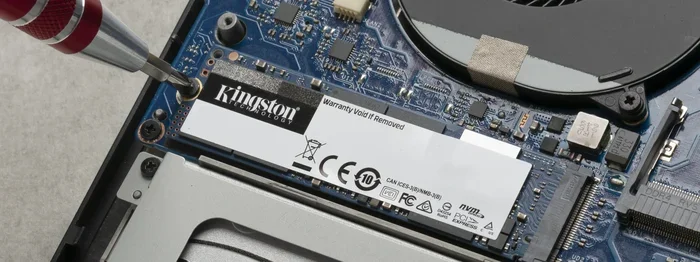
- Insert the Drive: Align the notch on the NVMe drive with the key in the M.2 slot. Push the drive in at a 30-degree angle and press it down flat. Secure it with the small screw.
- Replace the Heat Sink: If you removed one, put it back on. Some drives come with their own small heatsink that you can apply instead.
- Boot and Initialize: Power on your PC, enter BIOS to confirm the drive is detected, and then initialize it in your operating system.
For a more detailed walkthrough on installing an NVMe M.2 SSD, check out our guide on SSD NVMe PCIe M.2 which covers the process step by step.
If you are considering a Gen5 upgrade down the road, the Crucial T705 PCIe Gen5 NVMe M.2 SSD shows where the technology is heading. But for most users right now, a Gen4 drive provides more than enough speed.
Common Mistakes to Avoid When Buying a 1tb Pcie Gen4 Nvme Ssd
Avoid these common pitfalls so you get the best drive for your needs.
- Buying a Gen3 Drive by Mistake: Always check that the drive is PCIe Gen4, not Gen3. The speed difference is significant.
- Ignoring Thermal Performance: Some Gen4 drives get very hot under load. Without proper cooling, they may throttle and slow down.
- Overlooking Compatibility: Not all M.2 slots support NVMe. Some only support SATA M.2 drives. Check your motherboard manual.
- Choosing QLC Over TLC: QLC drives are cheaper but have lower endurance and slower sustained writes. TLC is the better choice for most users.
- Ignoring Warranty Terms: A good warranty reflects the manufacturer’s confidence in their product. Look for at least a 3-year warranty, preferably 5 years.
Expert Insights on 1tb Pcie Gen4 Nvme Ssd Technology
The NVMe SSD market has evolved rapidly. PCIe Gen4 has been the mainstream standard for a couple of years now, and prices continue to fall. According to industry trends, Gen4 drives now offer some of the best price-to-performance ratios in the storage market.
One thing to keep in mind is that PCIe Gen5 is emerging, but Gen4 remains the sweet spot for most buyers. Gen5 drives are still expensive and not yet widely supported on all motherboards. For the best value today, a 1tb pcie gen4 nvme ssd is hard to beat.
Another expert tip is to keep your drive’s firmware updated. Manufacturers regularly release firmware updates that improve performance, fix bugs, and enhance compatibility. Check the manufacturer’s website periodically for the latest updates.
Also, remember that your real-world speeds depend on more than just the drive. Your CPU, motherboard chipset, and even the type of work you are doing all affect performance. A Gen4 NVMe drive will not reach its maximum speeds if your system has a bottleneck elsewhere.
Conclusion
A 1tb pcie gen4 nvme ssd is one of the most impactful upgrades you can make to any computer. The speed gains are immediately noticeable whether you are booting your system, loading games, or working with large files. These drives offer incredible performance at a very reasonable price point today.
With read speeds exceeding 7000 MB/s, compact M.2 form factors, and wide compatibility across modern systems, there is really no reason to stick with older storage technology. Whether you pick the Crucial P310 1TB for a budget-friendly option or invest in a higher-end model, you will love the difference a Gen4 NVMe drive makes.
Take the time to choose a drive that fits your needs, install it correctly, and enjoy the fastest storage experience your computer can deliver. The era of slow storage is over, and 1tb pcie gen4 nvme ssd technology is leading the way.
Frequently Asked Questions
What is a 1tb pcie gen4 nvme ssd?
A 1TB PCIe Gen4 NVMe SSD is a high-speed solid state drive that uses the PCIe Gen4 interface and NVMe protocol to deliver fast data transfer speeds. It typically offers read speeds of 5000 to 7000 MB/s and comes in a compact M.2 2280 form factor.
How much faster is PCIe Gen4 than Gen3?
PCIe Gen4 offers roughly double the bandwidth of Gen3. This means Gen4 NVMe SSDs can achieve read speeds around 7000 MB/s compared to about 3500 MB/s on Gen3 drives. The real-world difference is especially noticeable when transferring large files or loading games.
Can I use a 1tb pcie gen4 nvme ssd in any laptop?
Not all laptops support Gen4 NVMe drives. Your laptop needs an M.2 slot that supports PCIe Gen4. Check your laptop’s specifications or motherboard manual to confirm compatibility before purchasing.
Do I need a heatsink for a Gen4 NVMe SSD?
It depends on your workload. For light everyday use, most Gen4 NVMe drives run cool enough without a heatsink. However, if you do heavy sustained writes or run demanding applications, a heatsink helps maintain optimal performance by preventing thermal throttling.
How long does a 1tb PCIe Gen4 NVMe SSD last?
Most quality Gen4 NVMe SSDs have a lifespan of 5 to 10 years under normal use. The TBW (Terabytes Written) rating gives you a good estimate. A drive rated for 400 TBW can handle several hundred terabytes of writes over its lifetime.
Is a 1tb Gen4 NVMe SSD good for gaming?
Absolutely. A 1TB PCIe Gen4 NVMe SSD is excellent for gaming. It dramatically reduces game load times, minimizes stuttering in open-world titles, and provides plenty of fast storage for multiple modern games that can each be 50GB or larger.