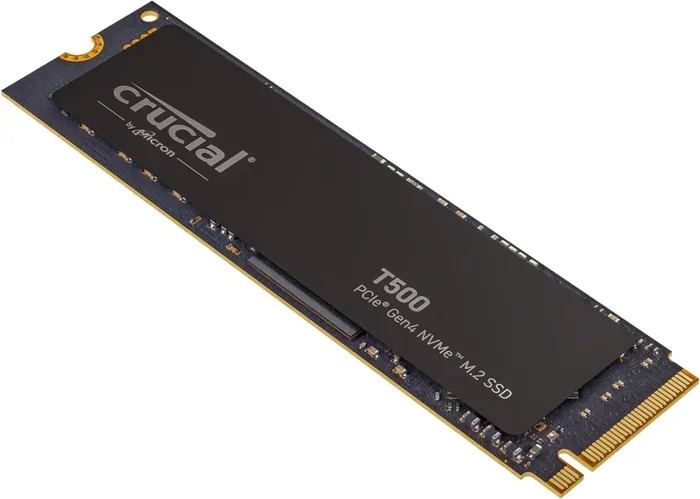
Ssd M 2 Nvme 2280

The ssd m 2 nvme 2280 is one of the most popular storage drives today. It fits into a standard M 2 slot on your motherboard and delivers blazing fast NVMe speeds over PCIe. This guide covers everything you need to know, from form factor basics to choosing the right drive for your needs.
The ssd m 2 nvme 2280 has become the go-to storage choice for modern PCs, laptops, and workstations. If you have ever opened up a computer and spotted a small, slim stick plugged into the motherboard, there is a good chance it was this type of drive. It is compact, fast, and incredibly convenient.
But what exactly makes the m 2 2280 ssd so special? And how do you know which one to buy? In this guide, we break it all down in simple terms. Whether you are a gamer, a creative professional, or just someone looking to speed up an older computer, this article has you covered.
The nvme 2280 form factor uses the PCIe interface to transfer data at speeds that leave traditional hard drives and even SATA SSDs in the dust. Let us dive into everything you need to know about this powerful little drive.
Key Takeaways
- The 2280 size is the most common M 2 form factor, measuring 22mm wide and 80mm long.
- NVMe protocol over PCIe offers much faster speeds than traditional SATA SSDs.
- Most modern motherboards and laptops support M 2 NVMe 2280 drives.
- Gen4 and Gen5 NVMe drives offer even higher speeds for demanding tasks.
- Always check your motherboard manual for M 2 slot compatibility before buying.
- The Crucial P310 and similar drives are great budget-friendly options for this form factor.
📑 Table of Contents
- What Is an SSD M 2 NVMe 2280?
- Speed and Performance of M 2 NVMe 2280 Drives
- Compatibility: Does Your System Support M 2 NVMe 2280?
- How to Choose the Right SSD M 2 NVMe 2280
- Installing an SSD M 2 NVMe 2280
- Common Mistakes When Buying M 2 NVMe 2280 Drives
- Best Use Cases for M 2 NVMe 2280 Drives
- Final Thoughts
What Is an SSD M 2 NVMe 2280?
The term ssd m 2 nvme 2280 tells you three important things at once. First, it is a solid state drive (SSD), meaning it has no moving parts. Second, it uses the M 2 form factor, which is a small, rectangular shape that plugs directly into your motherboard. Third, it uses the NVMe protocol, which stands for Non-Volatile Memory Express, to communicate with your system.
The “2280” part refers to the physical size: 22 millimeters wide and 80 millimeters long. This is the most common M 2 size you will find. Other sizes exist, like 2260 or 22110, but the 2280 is the standard for most consumer devices.
M 2 vs NVMe: What Is the Difference?
People often confuse M 2 and NVMe, but they are not the same thing. M 2 refers to the physical shape and size of the drive. NVMe refers to the communication protocol the drive uses. An M 2 drive can use either SATA or NVMe, but NVMe is much faster. When you see m 2 nvme ssd 2280, you know you are getting the fastest version of this small form factor.
Why the 2280 Size Matters
The 2280 size has become the industry standard for a reason. It fits perfectly into most M 2 slots on motherboards. It offers enough storage capacity without taking up too much space inside your case. Most drives in the m 2 nvme 2280 category range from 500GB to 4TB, giving you plenty of options.
Speed and Performance of M 2 NVMe 2280 Drives
One of the biggest reasons people choose the ssd m 2 nvme 2280 is raw speed. These drives are incredibly fast compared to older storage options. Let us look at what makes them so quick.
How Fast Can They Go?
Standard SATA SSDs top out around 550MB/s. The nvme 2280 drives blow past that. A typical PCIe Gen3 NVMe drive can reach speeds of 3,500MB/s or more. The newer PCIe Gen4 drives push that even further, hitting 7,000MB/s or higher. And Gen5 drives are pushing past 10,000MB/s.
Here is a quick comparison:
| Drive Type | Max Read Speed | Max Write Speed |
|---|---|---|
| SATA SSD | ~550MB/s | ~520MB/s |
| NVMe Gen3 (M 2 2280) | ~3,500MB/s | ~3,000MB/s |
| NVMe Gen4 (M 2 2280) | ~7,000MB/s | ~5,000MB/s |
| NVMe Gen5 (M 2 2280) | ~10,000MB/s+ | ~8,000MB/s+ |
These numbers show why the m 2 nvme 2280 has become the default choice for anyone who wants top-tier performance.
Real-World Performance Benefits
In everyday use, you will notice faster boot times, quicker app launches, and snappier file transfers. Video editors benefit from rapid read and write speeds when working with large footage. Gamers enjoy shorter load screens. Even general office work feels more responsive on a fast nvme ssd m 2 2280 drive.
Quick Tip: If you are upgrading an older PC, swapping in an m 2 2280 ssd is one of the single best upgrades you can make. It feels like getting a brand new computer.
Compatibility: Does Your System Support M 2 NVMe 2280?
Before you rush out to buy one, you need to make sure your system supports the ssd m 2 nvme 2280 form factor. The good news is that most modern hardware does, but there are a few things to check.
Motherboard Support
Most modern motherboards come with at least one M 2 slot. These slots are usually located near the CPU socket or along the bottom edge of the board. Look for a slot that supports NVMe over PCIe, not just SATA. Some boards have M 2 slots that only support SATA drives, so you need to check your manual or specs.
If your motherboard has an M 2 slot that supports PCIe, you can use a m 2 nvme 2280 drive without any extra adapters.
Laptop Compatibility
Many modern laptops also support M 2 NVMe drives. Brands like Dell, HP, Lenovo, and Apple have adopted the m 2 nvme ssd 2280 standard in many of their models. However, some laptops only have one M 2 slot, and others use different sizes. Always check your laptop’s specifications before purchasing.
What If Your System Does Not Support NVMe?
Some older systems only have SATA connections or M 2 slots that only support SATA SSDs. In these cases, you cannot use a true NVMe drive. You would need to stick with a SATA M 2 SSD or use a standard 2.5-inch SSD instead. Always double-check your motherboard or laptop manual for the exact M 2 slot type it supports.
How to Choose the Right SSD M 2 NVMe 2280
With so many options on the market, picking the right ssd m 2 nvme 2280 can feel overwhelming. Here are the key factors to consider.
Capacity Options
M 2 NVMe 2280 drives come in a wide range of capacities. Here is what you should think about:
- 500GB: Good for an OS drive with a few programs. Tight on space for large files.
- 1TB: The sweet spot for most users. Plenty of room for games, apps, and documents.
- 2TB: Great for creators, gamers with large libraries, and professionals who need lots of fast storage.
- 4TB: Overkill for most people but perfect for workstations and servers. If you want serious storage, check out the 2Tb Nvme M 2 Ssd options available.
PCIe Generation: Gen3 vs Gen4 vs Gen5
The PCIe generation affects how fast your drive can go. Gen3 is still very fast and often more affordable. Gen4 offers a noticeable boost and is now mainstream. Gen5 is the newest and fastest but comes at a premium price. For most users, a Gen4 m 2 nvme 2280 drive offers the best balance of speed and value.
Brand and Reliability
Stick with trusted brands when choosing your drive. Look for drives with good warranty coverage and solid endurance ratings. Some popular choices include Crucial, Samsung, Kingston, and WD. For example, the Crucial P310 1Tb Pcie Gen4 Nvme 2280 M 2 Ssd is a well-regarded budget option that delivers solid performance.
Price vs Performance
You do not need to spend a fortune to get a great nvme m 2 2280 drive. Prices have dropped significantly over the past few years. A quality 1TB Gen4 NVMe drive can be found for around $60 to $90. The key is finding the right balance between speed, capacity, and cost for your specific needs.
Installing an SSD M 2 NVMe 2280
One of the best things about M 2 NVMe drives is how easy they are to install. No cables, no mounting brackets, no fuss. Here is a quick overview of the process.
Step-by-Step Installation
- Find the M 2 slot: Locate the M 2 slot on your motherboard. It is a small horizontal slot with a small screw nearby.
- Remove the screw: Unscrew the retention screw slightly. You do not need to remove it completely.
- Insert the drive: Hold the m 2 nvme 2280 drive at a 30-degree angle and slide it into the slot. The gold connectors should face down.
- Press it down: Gently press the drive flat and secure it with the retention screw.
- Boot up: Power on your PC, enter BIOS, and make sure the drive is detected. Then format and install your operating system or use it as additional storage.
Expert Insight: Some motherboards have M 2 slots that share bandwidth with SATA ports. If you plug in an NVMe drive, it might disable a nearby SATA port. Always check your motherboard manual for these shared lane details before installing.
Do You Need a Heat Sink?
NVMe drives can generate heat, especially during heavy workloads. Many m 2 2280 ssd drives come with a small aluminum heat sink attached. If yours does not, you can buy a separate M 2 heat sink for a few dollars. This is especially important if you are using a Gen4 or Gen5 drive in a tight case with limited airflow.
Common Mistakes When Buying M 2 NVMe 2280 Drives
Even experienced builders sometimes make mistakes when shopping for an ssd m 2 nvme 2280. Here are the most common pitfalls to avoid.
Buying the Wrong Size
Not all M 2 slots fit all M 2 drives. The 2280 is the most common, but some laptops or compact PCs only support 2242 or 2230 drives. Always verify the compatible size before you buy.
Ignoring PCIe Lane Sharing
As mentioned above, some M 2 slots share PCIe lanes with other components. Running two M 2 NVMe drives on shared lanes can reduce performance. Plan your setup carefully.
Skipping the BIOS Update
Older motherboards may need a BIOS update to properly support newer NVMe drives, especially Gen4 and Gen5 models. Check the motherboard manufacturer’s website for the latest firmware before installing.
Forgetting About Endurance Ratings
Every NVMe drive has a TBW (Terabytes Written) rating. This tells you how much data you can write to the drive over its lifetime. For heavy workloads, choose a drive with a higher TBW rating to ensure longevity.
Best Use Cases for M 2 NVMe 2280 Drives
The nvme m 2 2280 form factor fits perfectly into a variety of use cases. Here is where these drives shine the most.
- Gaming PCs: Fast load times and smooth performance make these drives ideal for gaming setups.
- Content Creation: Video editing, 3D rendering, and photo editing all benefit from the rapid read and write speeds.
- Operating System Drives: A fast m 2 nvme 2280 as your boot drive makes everything on your PC feel snappier.
- Laptop Upgrades: Many modern laptops support M 2 NVMe, making it an easy and effective upgrade path.
- Workstations and Servers: High-capacity NVMe drives like the 2Tb Nvme M 2 Ssd options are perfect for demanding professional environments.
The versatility of the ssd m 2 nvme 2280 is one of its biggest strengths. Whether you are building a new PC from scratch or upgrading an existing one, this form factor delivers excellent value and performance.
Final Thoughts
The ssd m 2 nvme 2280 is the standard for modern fast storage. It is small, fast, and compatible with most current hardware. Whether you are a casual user or a power user, there is an NVMe 2280 drive that fits your needs and budget.
Take the time to check your system compatibility, choose the right capacity and PCIe generation, and follow the simple installation steps. Once you experience the speed difference that a m 2 nvme 2280 ssd brings, you will never want to go back to older storage solutions.
If you are still deciding between form factors, check out our guide on Ssd M 2 Nvme Pcie for a deeper comparison of PCIe-based M 2 drives. And for those looking at larger capacities, our 2Tb Nvme M 2 Ssd review covers the best options in that range.
Upgrade your storage today and feel the difference that a fast NVMe drive makes in your daily computing experience.
Frequently Asked Questions
What does 2280 mean in SSD M 2 NVMe 2280?
The 2280 refers to the physical dimensions of the drive: 22mm wide and 80mm long. This is the most common M 2 size used in desktops and laptops today.
Can I use an NVMe M 2 2280 SSD in any computer?
Not all computers support NVMe. You need an M 2 slot on your motherboard that supports PCIe NVMe. Check your motherboard or laptop manual to confirm compatibility before purchasing.
Is M 2 NVMe 2280 faster than a regular SATA SSD?
Yes, significantly faster. NVMe drives over PCIe can reach speeds of 3,500MB/s or more, while SATA SSDs are limited to around 550MB/s. The speed difference is noticeable in everyday use.
Do I need a heat sink for my M 2 NVMe 2280 drive?
It depends on your workload and case airflow. Gen4 and Gen5 drives generate more heat. If your case has limited airflow or you do heavy workloads, a heat sink is a good idea. Many drives come with one included.
What is the difference between M 2 NVMe and M 2 SATA?
M 2 is the physical shape. NVMe and SATA are two different protocols. NVMe is much faster than SATA. An M 2 slot can support either type, so always check which protocol your slot supports.
How much does an SSD M 2 NVMe 2280 cost?
Prices vary by capacity and speed. A 1TB Gen4 NVMe drive typically costs between $60 and $90. 2TB drives range from $100 to $150. Budget options like the Crucial P310 offer great value for everyday use.