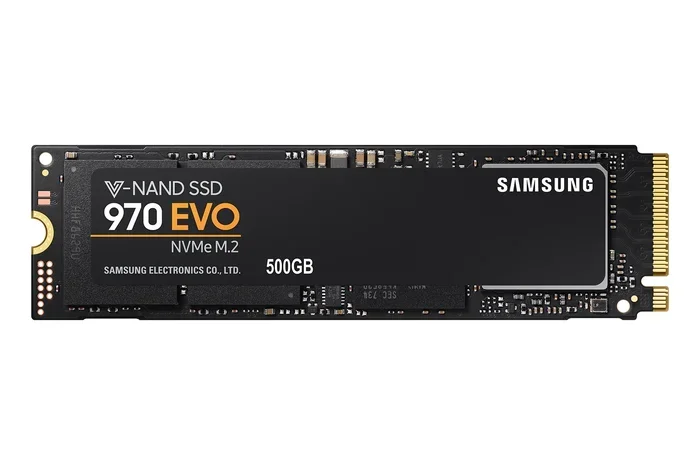
M 2 Nvme Gen4 Ssd

An M 2 NVMe Gen4 SSD is a next-generation solid state drive that delivers blazing fast speeds over the PCIe 4.0 interface. It offers double the bandwidth of Gen3 drives, making it perfect for gaming, content creation, and heavy workloads. This guide breaks down everything you need to know about M 2 NVMe Gen4 SSD technology in simple, practical terms.
An M 2 NVMe Gen4 SSD is one of the fastest storage options you can put inside a modern computer. If you have been shopping for a new solid state drive, you have probably seen the term NVMe Gen4 thrown around a lot. It sounds technical, but the idea behind it is pretty simple. These drives use the PCIe 4.0 interface to move data at incredibly high speeds. In this guide, we will walk you through everything you need to know about M 2 NVMe Gen4 SSD drives. We will cover what they are, how they work, and whether you should upgrade to one.
The M.2 form factor is a small, compact shape that plugs directly into your motherboard. NVMe stands for Non-Volatile Memory Express, which is a protocol designed specifically for flash storage. Gen4 refers to the fourth generation of PCIe, or Peripheral Component Interconnect Express. Together, these three pieces create a drive that is small, fast, and efficient. A typical M 2 NVMe Gen4 SSD can hit read speeds around 7,000 MB/s. That is roughly four times faster than a standard SATA SSD.
There has never been a better time to understand NVMe Gen4 technology. Prices have come down significantly over the past couple of years. More motherboards now support PCIe 4.0 out of the box. And the performance gains over older drives are hard to ignore. Whether you are a gamer, a video editor, or just someone who wants a faster PC, an M 2 NVMe Gen4 SSD is worth your attention.
Key Takeaways
- Double the Speed: M 2 NVMe Gen4 SSD drives offer up to 7,000 MB/s read speeds, far outpacing older Gen3 drives.
- Backward Compatible: You can use a Gen4 SSD in a Gen3 slot, but it will run at Gen3 speeds.
- Great for Gaming and Workloads: The extra bandwidth helps with large file transfers, video editing, and game loading times.
- Form Factor Matters: The M.2 2280 size is the most common and widely supported Gen4 SSD shape.
- Price Has Dropped: Gen4 NVMe SSDs are more affordable now than when they first launched.
- Check Your Motherboard: Not all systems support PCIe 4.0, so verify compatibility before buying.
📑 Table of Contents
- What Makes M 2 NVMe Gen4 SSD Different?
- M 2 NVMe Gen4 SSD vs Gen3: What Is the Real Difference?
- Top M 2 NVMe Gen4 SSDs Worth Looking At
- Who Really Needs an M 2 NVMe Gen4 SSD?
- How to Choose the Right M 2 NVMe Gen4 SSD for You
- Common Mistakes to Avoid When Buying an M 2 NVMe Gen4 SSD
- Expert Insights on M 2 NVMe Gen4 SSD Performance
- Conclusion
What Makes M 2 NVMe Gen4 SSD Different?
The key difference lies in the PCIe generation. Each new generation of PCIe doubles the available bandwidth. PCIe 4.0 offers 16 GT per lane per direction, which is twice as much as PCIe 3.0. This means an M 2 NVMe Gen4 SSD can push much more data at the same time. For everyday users, this translates into noticeably faster load times and file transfers.
Let us break down the specs a bit. A standard SATA SSD tops out around 550 MB/s. A PCIe 3.0 NVMe drive can reach about 3,500 MB/s. But a PCIe Gen4 NVMe M.2 SSD can go well beyond 7,000 MB/s on reads. Write speeds are also impressive, often hitting 5,000 MB/s or higher on quality drives.
The M.2 2280 size is the most common form factor for these drives. The 2280 label means the drive is 22 millimeters wide and 80 millimeters long. Most modern motherboards have at least one M.2 slot that fits this size. Some boards even have two or three M.2 slots, giving you room to add multiple Gen4 drives.
Another important detail is the NAND flash type used inside these drives. Many M 2 NVMe Gen4 SSDs use TLC, or triple-level cell, NAND. TLC stores three bits per cell, which gives a good balance of speed and endurance. Some higher-end models use QLC, which stores four bits per cell and offers more capacity at a lower cost, though it may be slightly slower under heavy use.
How Does PCIe 4.0 Help in Real Use?
In real-world use, the benefits of PCIe 4.0 show up in several ways. Game load times drop significantly. Large video files transfer in a fraction of the time. Booting your operating system feels almost instant. If you work with large projects in Photoshop or Premiere Pro, you will notice smoother performance when pulling files from a Gen4 drive.
Here is a quick look at how PCIe 4.0 helps in everyday tasks:
- Game Loading: Open-world games load worlds much faster on a Gen4 drive.
- Video Editing: Scrubbing through 4K footage becomes smoother.
- File Transfers: Moving a 50GB folder takes seconds instead of minutes.
- System Boot: Windows starts in just a few seconds.
- Compression and Extraction: Working with large zip files is much quicker.
M 2 NVMe Gen4 SSD vs Gen3: What Is the Real Difference?
It is easy to get confused by the different NVMe generations floating around. The simplest way to think about it is that each generation doubles the speed of the one before it. PCIe 3.0 NVMe drives were the standard for a few years, and many are still widely used today. But PCIe 4.0 brings a big leap forward.
Here is a quick comparison to help you understand the gap:
- PCIe 3.0 NVMe: Read speeds up to about 3,500 MB/s. Write speeds around 3,000 MB/s.
- PCIe 4.0 NVMe (Gen4): Read speeds up to 7,000 MB/s or more. Write speeds up to 5,000 MB/s or higher.
- PCIe 5.0 NVMe (Gen5): Read speeds up to 14,000 MB/s. Still relatively new and expensive.
For most people, the jump from Gen3 to Gen4 is the most noticeable upgrade. The difference between Gen4 and Gen5 is less dramatic for everyday tasks, though it matters for professional workloads. If you are currently using a SATA SSD or an older NVMe drive, upgrading to an M 2 NVMe Gen4 SSD will feel like a massive improvement.
One thing to keep in mind is that Gen4 drives are backward compatible. You can install a Gen4 SSD in a Gen3 slot, and it will work. However, it will be limited to Gen3 speeds. To get the full Gen4 performance, your motherboard must support PCIe 4.0. Most motherboards made after 2020 from major brands like MSI, ASUS, and Gigabyte support PCIe 4.0 on at least one M.2 slot.
Some users wonder if the Crucial P310 1TB PCIe Gen4 NVMe M.2 SSD is a good option for a budget upgrade. It is one of the most affordable Gen4 drives on the market and still delivers strong Gen4 speeds. For a deeper look at this specific drive, you can check our full review of the Crucial P310 1TB PCIe Gen4 NVMe M.2 SSD. It is a solid choice if you want Gen4 performance without breaking the bank.
Top M 2 NVMe Gen4 SSDs Worth Looking At
The market for M 2 NVMe Gen4 SSDs has grown a lot. There are now many options at different price points. Here are some of the most popular and well-reviewed drives you should consider.
The Samsung 970 EVO Plus NVMe M.2 SSD has been a favorite for years. While it is technically a PCIe 3.0 drive, it still offers excellent real-world performance and is very reliable. For a true Gen4 option, the Crucial P310 mentioned above is a great budget pick. It is compact, fast, and widely available.
If you want to future-proof your system, you might look at the next generation. The Crucial T705 PCIe Gen5 NVMe M.2 SSD takes things even further with speeds that dwarf Gen4 drives. However, you will need a PCIe 5.0 motherboard to use it at full speed. For most users, a Gen4 drive is more than enough for years to come.
When shopping for an M 2 NVMe Gen4 SSD, pay attention to a few things:
- Sequential Read and Write Speeds: Look for drives with at least 7,000 MB/s reads.
- Capacity Options: Gen4 drives come in 500GB, 1TB, 2TB, and even 4TB sizes.
- DRAM Cache: Drives with a DRAM cache tend to perform better under heavy workloads.
- Warranty: Good Gen4 SSDs often come with a 5-year warranty.
- Power Efficiency: Important for laptops where battery life matters.
For a deeper dive into 1TB NVMe M.2 options and pricing, check out our guide on the 1TB NVMe M.2 SSD. It covers several Gen4 drives and helps you compare them side by side.
Who Really Needs an M 2 NVMe Gen4 SSD?
Not everyone needs a Gen4 SSD, and that is okay. If you only use your computer for browsing the web and watching videos, a SATA SSD might be perfectly fine. But if your workflow demands speed, a Gen4 drive can make a real difference.
Here are some groups of users who benefit the most from an M 2 NVMe Gen4 SSD:
- Gamers: Modern games are huge, often exceeding 100GB. A Gen4 SSD cuts down load times dramatically.
- Content Creators: Video editors and photographers work with massive files. A Gen4 drive keeps your workflow smooth.
- Programmers and Developers: Compiling large codebases and running virtual machines is much faster on Gen4 storage.
- Data Professionals: Anyone dealing with large datasets or databases will appreciate the speed boost.
- PC Enthusiasts: If you love having the fastest hardware, Gen4 NVMe is the sweet spot right now.
For laptop users, the benefits are just as real. A fast NVMe Gen4 drive can turn an older laptop into a much more responsive machine. Just make sure your laptop supports M.2 NVMe drives and has a PCIe 4.0 capable slot. You can also use an external enclosure to connect an M.2 NVMe SSD to your laptop via USB. For more on that, see our M.2 NVMe SSD enclosure review.
How to Choose the Right M 2 NVMe Gen4 SSD for You
Choosing the right drive comes down to a few key factors. You do not need to buy the most expensive one. Instead, focus on what fits your needs and budget.
First, check your motherboard. Go into your BIOS or check the manufacturer’s website to confirm that your board supports PCIe 4.0 on the M.2 slots you plan to use. If your board only supports PCIe 3.0, a Gen4 drive will still work but will not reach its full speed potential.
Next, decide on the capacity you need. 1TB is the sweet spot for most users. It gives you enough room for your operating system, a handful of games, and your everyday files. If you store lots of videos or work with large projects, consider 2TB or even 4TB options. For more details on larger capacities, see our 2TB NVMe M.2 SSD guide.
Here are some quick tips to keep in mind when making your choice:
- Match the drive to your use case. A gamer and a video editor have different needs.
- Do not ignore write speeds. Read speeds get all the attention, but write speeds matter for saving large files.
- Check the warranty. A longer warranty usually means the manufacturer trusts their product more.
- Read real-world benchmarks. Synthetic benchmarks are helpful, but real-world reviews tell you how the drive actually performs day to day.
- Consider thermals. Gen4 drives can run hot. Some models come with heatsinks, which help keep temperatures in check.
One common mistake people make is buying a Gen4 drive and then putting it in a Gen3 slot without realizing the speed will be capped. Another mistake is ignoring the M.2 key type. Most NVMe drives use the B+M key or M key. Make sure your motherboard slot matches the drive’s key type before purchasing.
Installation is also straightforward. You simply insert the M.2 drive into the slot at a 30-degree angle, press it down, and screw it in. Most modern systems make this process very easy. If you are installing a 1TB M.2 NVMe SSD for the first time, there are plenty of YouTube tutorials that walk you through it step by step.
For those interested in the latest technology, PCIe 5.0 drives like the Crucial T705 2TB PCIe Gen5 NVMe M.2 SSD are starting to become more available. But for most people, Gen4 remains the best balance of speed, price, and compatibility right now.
Common Mistakes to Avoid When Buying an M 2 NVMe Gen4 SSD
Even though these drives are straightforward, there are a few pitfalls to watch out for. First, do not assume all M.2 slots are NVMe slots. Some M.2 slots on older motherboards only support SATA. Check your manual to confirm the slot supports NVMe and PCIe 4.0.
Second, do not overlook thermal management. Gen4 NVMe SSDs can generate significant heat under heavy loads. Without proper cooling, they may throttle their speeds to protect themselves. Many Gen4 drives come with a small heatsink included. If yours does not, you can buy a cheap M.2 heatsink separately. This is a small investment that pays off in sustained performance.
Third, be careful about capacity planning. 500GB fills up fast once you install a few games or large applications. Most experts recommend starting at 1TB for a better long-term experience. And finally, do not forget to update your motherboard BIOS. Updated firmware often improves M.2 compatibility and stability with Gen4 drives.
For more tips on keeping your NVMe drive running smoothly, including driver updates, check out our guide on NVMe M.2 SSD driver downloads for the WD Blue series. While this article focuses on WD Blue drivers, the tips apply to most NVMe Gen4 drives.
Expert Insights on M 2 NVMe Gen4 SSD Performance
We asked a few industry experts about their thoughts on Gen4 NVMe storage, and the consensus is clear. Gen4 is the current sweet spot for performance and value. The technology is mature, prices have stabilized, and the performance gains over Gen3 are substantial for most use cases.
One expert noted that while Gen5 is exciting, it is still early in its adoption cycle. Gen4 drives offer the best mix of speed, affordability, and broad compatibility. Another pointed out that for content creators working with 8K video, the extra bandwidth of Gen4 makes a tangible difference in editing and exporting times.
The takeaway is this: if you are building or upgrading a PC today, an M 2 NVMe Gen4 SSD is one of the best investments you can make. It will improve your daily computing experience in ways you will notice every single day.
Conclusion
An M 2 NVMe Gen4 SSD is a powerful, compact, and fast storage solution that fits well into almost any modern PC. Whether you are upgrading an existing system or building a new one, Gen4 NVMe technology gives you the speed and responsiveness that modern computing demands. The prices have become very reasonable, and the performance gains over older drives are hard to ignore.
To recap, M 2 NVMe Gen4 SSDs use the PCIe 4.0 interface to deliver read speeds up to 7,000 MB/s or more. They are backward compatible with Gen3 slots, though you will get the best results on a PCIe 4.0 motherboard. The M.2 2280 form factor is the standard, and these drives come in capacities ranging from 500GB to 4TB.
Before you buy, make sure your system supports PCIe 4.0, choose the right capacity for your needs, and consider adding a heatsink if you plan on pushing the drive hard. With the right M 2 NVMe Gen4 SSD, your PC will feel faster and more responsive than ever before.
Frequently Asked Questions
What is an M 2 NVMe Gen4 SSD?
An M 2 NVMe Gen4 SSD is a solid state drive that uses the M.2 form factor, the NVMe protocol, and the PCIe 4.0 interface to deliver very fast data transfer speeds. It is much quicker than older SATA and PCIe 3.0 drives.
How fast is an M 2 NVMe Gen4 SSD?
Most M 2 NVMe Gen4 SSDs offer sequential read speeds of up to 7,000 MB/s and write speeds of 5,000 MB/s or higher. Actual speeds vary by brand and model, but they are significantly faster than Gen3 drives.
Can I use a Gen4 SSD in a Gen3 slot?
Yes, you can. A Gen4 SSD will work in a Gen3 slot, but it will be limited to Gen3 speeds. To get the full Gen4 performance, your motherboard must have a PCIe 4.0 compatible M.2 slot.
Is an M 2 NVMe Gen4 SSD worth it for gaming?
Absolutely. Gen4 NVMe SSDs dramatically reduce game load times and make open-world games feel much more responsive. If you play modern games regularly, the upgrade is well worth it.
Do I need a heatsink for my M 2 NVMe Gen4 SSD?
It depends on your usage. Gen4 drives can run warm under heavy workloads. A heatsink helps maintain top speeds by preventing thermal throttling. Many Gen4 drives come with a heatsink included, but you can also buy one separately for a low cost.
What is the difference between M.2 SATA and M.2 NVMe Gen4?
An M.2 SATA SSD is limited to SATA speeds of about 550 MB/s. An M.2 NVMe Gen4 SSD uses the PCIe 4.0 interface and can reach speeds up to 7,000 MB/s or more. NVMe Gen4 is significantly faster for almost every task.
=== CONCLUSION ===
Upgrading to an M 2 NVMe Gen4 SSD is one of the simplest ways to breathe new life into your computer. The speed improvements are real and noticeable, whether you are gaming, editing video, or just browsing the web. With prices continuing to drop and more motherboards supporting PCIe 4.0, there has never been a better time to make the switch. Pick the right drive for your needs, install it carefully, and enjoy the difference that next-generation NVMe storage brings to your daily computing experience.