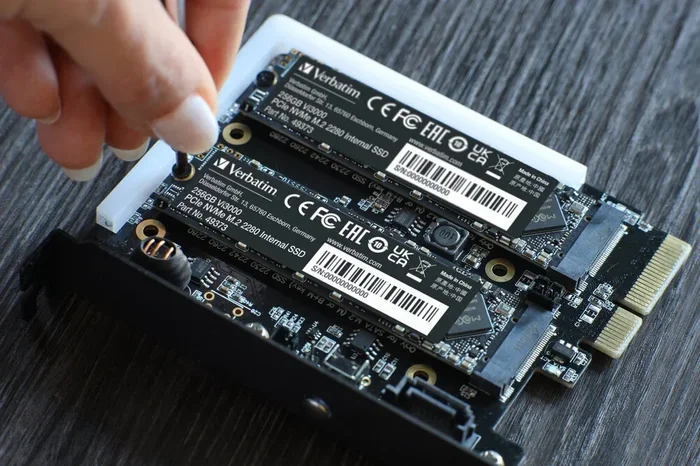
2tb Nvme Ssd for Ps5

A 2tb nvme ssd for ps5 is the best way to expand your PlayStation 5 storage and keep all your games in one place. This guide covers compatibility, installation, performance benefits, and top picks to help you choose the right drive. You will learn exactly how to upgrade your PS5 storage without any hassle.
A 2tb nvme ssd for ps5 changes the way you play games on your console. Running out of space is frustrating. You delete a game you love just to make room for something new. A solid state drive solves that problem completely.
The PlayStation 5 comes with 825GB of internal storage. After system files and updates, you really only have about 667GB left. Modern games easily take up 100GB or more each. That means you can only hold a handful of titles at once. A 2TB NVMe M.2 SSD gives you plenty of room to grow your library.
In this guide, we will walk you through everything you need to know. We cover compatibility, installation, performance, and the best drives to buy. Whether you are a casual gamer or a hardcore collector, this guide has you covered.
Key Takeaways
- Easy Expansion: A 2tb nvme ssd for ps5 lets you store more games without deleting old ones.
- Fast Speeds: NVMe M.2 SSDs deliver load times that match or beat the PS5’s internal drive.
- Simple Installation: Swapping in a new SSD takes just a few minutes with basic tools.
- Heat Management Matters: A heatsink keeps your SSD cool during long gaming sessions.
- Cost Effective: 2TB drives offer great value per terabyte compared to smaller capacities.
- Check Compatibility First: Always verify your SSD meets Sony’s official specs before buying.
📑 Table of Contents
Why a 2tb Nvme Ssd for Ps5 Makes Sense
The PS5 uses a custom NVMe M.2 SSD for expansion. This is the same type of fast storage inside the console itself. Adding a 2TB NVMe M.2 SSD gives you extra space without sacrificing speed. Here is why it matters.
More Space for Your Game Library
Modern games are huge. Call of Duty, Final Fantasy VII, and Spider-Man 2 all take over 100GB. With a 2TB drive, you can store 15 to 20 large games at the same time. You will never have to delete a game again just to install a new one.
Think about how much time you spend managing storage. You download a game, play it for a week, delete it, and repeat. A 2tb ssd m 2 nvme setup breaks that cycle. You keep your favorites ready to go whenever you want to play.
Speed That Matches Your Console
The PS5’s internal SSD delivers incredible load times. A compatible NVMe M.2 drive keeps that speed. You get near-instant game launches and fast travel times. No more staring at loading screens.
Sony designed the PS5 expansion slot specifically for NVMe M.2 drives. This means any compatible SSD will work at the same speeds as the internal drive. You do not lose any performance by adding external storage.
PS5 SSD Compatibility Requirements
Not every M.2 SSD works with the PS5. Sony has strict requirements. Using the wrong drive can cause problems or simply not work at all. Here is what you need to know.
Size and Form Factor
The PS5 expansion slot uses the M.2 2230 form factor. This is a specific size for M.2 drives. The drive must be 22mm wide, 30mm long, and 2.38mm thick. Many M.2 SSDs on the market use different lengths, so always check the specs before buying.
When shopping for a 2tb nvme m 2 ssd, look for the 2230 size specifically. Some drives come in 2242 or 2280 sizes, which will not fit the PS5 slot. Always double-check the product description.
Interface and Protocol
The PS5 requires PCIe Gen4 NVMe SSDs. PCIe Gen3 drives will not work. NVMe is the communication protocol that allows the SSD to talk directly to the console’s motherboard. This is what gives NVMe drives their speed advantage over SATA SSDs.
Here are the key compatibility specs to check:
- Form Factor: M.2 2230
- Interface: PCIe Gen4 NVMe
- Capacity: 250GB to 4TB (1TB and 2TB are most popular)
- Sequential Read Speed: 5,500MB/s or higher recommended
- Sequential Write Speed: 4,000MB/s or higher recommended
Heatsink Considerations
The PS5 has a built-in heatsink in the expansion slot. Some M.2 SSDs come with their own heatsink included. Others do not. A heatsink prevents the drive from overheating during long gaming sessions.
If your drive does not have a heatsink, you can buy an M.2 NVMe SSD enclosure or a standalone heatsink. The PS5’s built-in heatsink handles most drives fine, but a hot climate or heavy use may benefit from extra cooling.
How to Install a 2tb Nvme Ssd in Your Ps5
Installing an M.2 NVMe SSD in the PS5 is straightforward. You do not need advanced technical skills. Here is a step-by-step guide to walk you through it.
What You Need
- A Phillips-head screwdriver (small size)
- A compatible M.2 2230 NVMe SSD
- A clean, flat workspace
- An anti-static wrist strap (optional but recommended)
Step-by-Step Installation
First, turn off your PS5 completely. Unplug the power cable from the back of the console. Let it sit for a few minutes to cool down. This keeps your console safe during the process.
Locate the expansion slot on the bottom of the PS5. It is a small rectangular cover held by one screw. Use your screwdriver to remove the screw. Gently lift the cover off.
Take your M.2 SSD out of its packaging. Hold it by the edges to avoid touching the gold contacts. Align the notch on the SSD with the key in the expansion slot. Press the drive in at a slight downward angle. It should slide in smoothly.
Secure the SSD with the small screw that came in the expansion slot cover. Replace the cover and screw it back in. Plug your PS5 back in and turn it on.
The console should recognize the new drive automatically. Go to Settings > Storage to see your expanded storage. You can now move games to the new drive and start playing.
Quick Tips for a Smooth Install
- Do not force the SSD into the slot. It should slide in gently.
- Keep the screw safe. Losing it means opening the console again.
- Update your PS5 firmware before installing a new drive.
- Format the new SSD through the PS5 settings before moving games.
Performance Benefits of a 2tb Nvme Ssd for Ps5
One of the biggest reasons to upgrade is the performance boost. A 2tb nvme ssd for ps5 delivers the same blazing speeds as the internal drive. Here is what you can expect.
Faster Load Times
Games load almost instantly on an NVMe SSD. Open-world games like Hogwarts Legacy and Horizon Forbidden West benefit the most. You spend less time waiting and more time playing.
Fast travel in games that use it becomes nearly instantaneous. You jump between locations without staring at a loading bar. This makes the overall gaming experience much more enjoyable.
Smoother Game Installation
Installing large games takes less time on a fast NVMe drive. A 100GB game that might take 10 minutes on a slow drive installs in just a few minutes on an M.2 NVMe SSD. You get back to playing faster.
Better Multitasking
With more storage space, you can keep multiple games installed at once. Switch between games without re-downloading anything. This is a huge quality-of-life improvement for gamers with large libraries.
When you install a 2tb m 2 nvme ssd, you also get the benefit of the PS5’s Quick Resume feature working across more games. You can jump between titles seamlessly without any storage-related hiccups.
Best 2tb Nvme Ssds for Ps5
The market is full of M.2 NVMe SSDs. Not all of them are the right fit for the PS5. Here are some of the best options for a 2TB setup.
Top Picks for PS5 Expansion
Look for drives that meet the 2230 form factor and PCIe Gen4 NVMe requirements. Some popular choices include drives from brands like Crucial, Samsung, and Kingston. Always verify the exact model number against Sony’s official compatibility list.
When comparing options, look at read and write speeds, thermal performance, and price per terabyte. A 2tb nvme m 2 ssd typically costs between $120 and $200 depending on the brand and features. Drives with built-in heatsinks may cost a bit more but offer better long-term reliability.
For the best value, check out options that balance speed and price. You do not need the absolute fastest drive on the market. A drive with read speeds of 5,500MB/s or higher is more than enough for the PS5.
Common Mistakes to Avoid
Installing a new SSD is simple, but mistakes can happen. Here are common errors to avoid when setting up a 2tb nvme ssd for ps5.
Buying the Wrong Form Factor
The most common mistake is buying an M.2 2280 drive instead of a 2230. The PS5 expansion slot only fits 2230 drives. Always triple-check the size before you purchase.
Skipping the Heatsink
Some people skip the heatsink to save money. This can cause thermal throttling in hot environments. If your console is in a warm room or you game for hours at a time, a heatsink is worth the investment.
Forgetting to Format
A new SSD will not work until you format it through the PS5 settings. Do not try to move games to an unformatted drive. The console will not recognize the storage.
Not Backing Up Save Data
Before you swap drives, back up your save data to the cloud or an external drive. Formatting the new SSD wipes everything. You do not want to lose hours of progress.
Final Thoughts
A 2tb nvme ssd for ps5 is one of the best upgrades you can make for your console. It gives you more space, faster load times, and a better overall gaming experience. The installation process is simple and takes only a few minutes.
Make sure your drive meets Sony’s compatibility requirements. Check the form factor, interface, and speed specs before you buy. Once installed, you can enjoy your expanded library without any compromises.
Whether you are a casual player or a dedicated collector, extra storage always helps. A 2TB NVMe M.2 SSD keeps all your favorite games ready to go. You spend less time managing storage and more time doing what you love: playing games.
Take the time to choose the right drive for your needs. A 2tb ssd m 2 nvme upgrade is a small investment that pays off every time you boot up your PS5. Your game library deserves the space and speed it needs.
Frequently Asked Questions
Can I use any 2TB NVMe SSD with my PS5?
No, the PS5 requires a specific M.2 2230 form factor with PCIe Gen4 NVMe support. Not all 2TB NVMe drives meet these requirements. Always check the drive specs and Sony’s official compatibility list before purchasing.
Do I need a heatsink for my PS5 NVMe SSD?
The PS5 expansion slot has a built-in heatsink, so most drives work fine without one. However, if you live in a warm environment or game for long sessions, adding a heatsink can help maintain optimal performance and prevent thermal throttling.
How long does it take to install a 2TB SSD in a PS5?
The entire installation process takes about 5 to 10 minutes. You need to remove one screw, slide in the drive, secure it, and format it through the console settings. No technical expertise is required.
Will a 2TB NVMe SSD make my PS5 games load faster?
Yes, a compatible NVMe M.2 SSD delivers the same fast load speeds as the PS5’s internal drive. You will notice quicker game launches, faster open-world loading, and smoother fast travel compared to external USB storage.
How many games can I fit on a 2TB SSD?
It depends on game size, but a 2TB drive can typically hold 15 to 25 modern games. Larger titles like Call of Duty or Final Fantasy VII take over 100GB each, while smaller indie games may only use 10 to 20GB.
Can I move my existing PS5 games to a new NVMe SSD?
Yes, you can move games from the internal drive to the new M.2 SSD through the PS5 settings. Go to Settings > Storage and select the games you want to transfer. The process is simple and does not require re-downloading.