Why Are Usb Hubs So Expensive
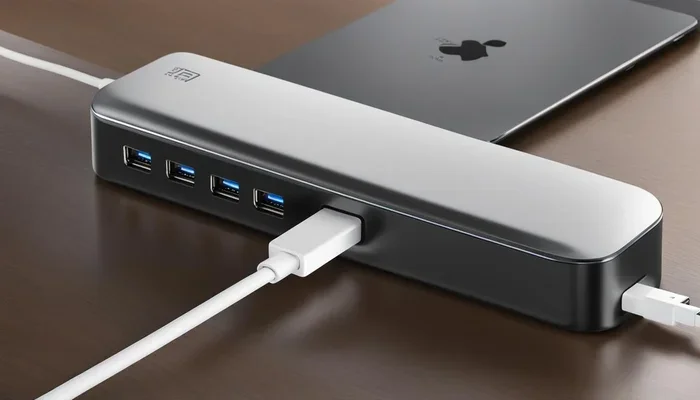
So why are USB hubs so expensive? The answer comes down to chipset costs, power delivery technology, build quality, and brand reputation. A USB hub might look simple, but the engineering and components inside tell a different story. Understanding these factors helps you decide if the USB hub pricing is justified for your needs.
You probably have noticed something strange. A small box with a few USB ports can cost as much as a decent keyboard or mouse. When you look at a USB hub, it looks so simple. So why are USB hubs so expensive? There is more going on inside that little box than meets the eye.
The truth is, USB hub pricing comes from a mix of technology, materials, and hidden costs. Chipsets, power management, and build quality all play a role. In this article, we break down every reason behind the high cost. By the end, you will understand exactly what you are paying for and whether the price is worth it.
Key Takeaways
- Chipsets drive costs: The USB controller chips inside hubs are one of the biggest expenses.
- Powered hubs cost more: Active hubs with power supplies and power delivery circuits add significant cost.
- Build quality matters: Premium materials, shielding, and design raise the price of quality hubs.
- Brand and research: Established brands invest in R&D, testing, and warranty support.
- USB hub pricing varies widely: Prices range from under $10 to over $200 depending on features and quality.
- You get what you pay for: Cheap hubs may damage devices or underperform over time.
📑 Table of Contents
- What Makes USB Hubs So Expensive
- Types of USB Hubs and How They Affect Price
- Hidden Costs Behind USB Hub Manufacturing
- Are Expensive USB Hubs Worth the Money
- Comparing USB Hub Prices: What You Actually Get
- Common Mistakes When Buying USB Hubs
- Quick Tips for Getting the Best USB Hub
- Expert Insights on USB Hub Pricing
- Final Thoughts
What Makes USB Hubs So Expensive
At first glance, a USB hub seems like a basic gadget. Plug it in, connect your devices, and go. But the reality is far different. Several key factors push the cost up significantly. Let us look at each one closely.
The Heart of the Hub: Chipset Costs
Every USB hub needs a controller chipset. This tiny chip manages data flow between your computer and connected devices. Good chipsets are not cheap. Companies like Texas Instruments, VIA Labs, and Renesas design high-quality USB controllers that cost manufacturers real money.
Cheap hubs often use low-grade chipsets. These may overheat, drop connections, or fail to deliver full speed. Quality chipsets ensure stable USB hub performance and reliable data transfer. That engineering cost gets passed on to you.
For example, a USB 3.0 chipset that handles 5 Gbps speeds requires more advanced circuitry than a basic USB 2.0 chip. The difference in chipset quality is one of the main reasons why are USB hubs so expensive compared to other simple accessories.
Power Delivery and Active Power Supplies
Not all USB hubs are created equal when it comes to power. Unpowered hubs draw all their power from your computer’s USB port. This works fine for low-power devices like keyboards and mice.
But powered USB hubs need internal power supplies. These include transformers, voltage regulators, and capacitors. A quality power delivery system ensures each port gets consistent power without voltage drops. This is especially important for devices like external hard drives and monitors.
If you have ever plugged in a power-hungry device and seen it disconnect, you know how frustrating weak power delivery can be. USB hub power delivery circuits solve this problem, but they add real cost to the product.
Types of USB Hubs and How They Affect Price
The type of USB hub you buy has a huge impact on the price. Let us look at the main categories and what makes each one different.
Unpowered Hubs: The Budget Option
Unpowered hubs are the cheapest option on the market. They typically cost between $5 and $20. These hubs work well for basic tasks like connecting a mouse, keyboard, or USB drive.
However, they have limitations. They cannot power devices that need more energy than a single USB port provides. If you try to connect multiple power-hungry devices, you will run into problems. The USB hub affordability of unpowered models comes with trade-offs in reliability and capability.
Powered Hubs: More Features, More Cost
Powered USB hubs include an external power adapter. This gives each port enough energy to run demanding devices. USB hub pricing for powered models starts around $25 and can go well over $100 for premium options.
These hubs are essential for professionals. Video editors, musicians, and developers rely on powered hubs to keep all their gear connected and working. The extra cost reflects the better components and power management inside.
USB-C Hubs: The New Standard
USB-C hubs are the newest trend in connectivity. They offer faster speeds, reversible plugs, and often include video output and charging pass-through. The USB hub technology inside a USB-C hub is more advanced, which explains the higher price.
USB-C hubs can cost anywhere from $30 to $250 or more. The price depends on features like Thunderbolt support, 4K video output, and power delivery wattage. If you have a modern laptop with only USB-C ports, a quality hub becomes almost essential.
Hidden Costs Behind USB Hub Manufacturing
There is more to the cost of a USB hub than just the parts. Several hidden factors contribute to the final price tag.
Research and Development
Before a USB hub hits the market, companies invest heavily in R&D. They test compatibility with different operating systems, devices, and use cases. Ensuring a hub works flawlessly with Windows, macOS, and Linux takes time and money.
Brands also invest in designing compact form factors that fit in your bag without breaking. All of this R&D gets factored into the retail price. So when you wonder why are USB hubs so expensive, remember that a lot of invisible work goes into every product.
Quality Control and Testing
Reliable brands test every unit before shipping. They run stress tests, check data transfer speeds, and verify power delivery stability. Cheap hubs skip these steps, which leads to early failures and frustrated users.
Quality control adds cost, but it also gives you peace of mind. A well-tested hub will last years without issues. Think of it as paying for long-term reliability rather than a short-term fix.
Premium Materials and Build Quality
Look at the construction of a premium USB hub. Many use aluminum casings, reinforced ports, and internal shielding. These materials reduce electromagnetic interference and protect against physical damage.
Cheap plastic hubs feel flimsy and may crack after a few months. The USB hub components inside a well-built hub are also higher quality. Gold-plated connectors resist corrosion and maintain a strong connection over time.
Are Expensive USB Hubs Worth the Money
This is the question everyone wants answered. The short answer is: it depends on what you need. Let us break it down.
If you just need to connect a couple of low-power devices, a budget unpowered hub works fine. You do not need to spend big money for basic connectivity. However, if you rely on your hub for work or creative projects, investing in a quality model makes sense.
Here are some situations where spending more on a USB hub is worth it:
- You use external drives: Powered hubs keep hard drives running without disconnects.
- You connect monitors: USB-C hubs with video output cost more but deliver essential functionality.
- You travel frequently: Compact, durable hubs with premium builds survive the rigors of travel.
- You work professionally: Reliable connectivity prevents costly downtime and frustration.
When you compare this to other tech purchases, the logic becomes clear. A $50 USB hub that lasts five years costs just $10 per year. A $10 hub that fails after six months costs you more in the long run. USB hub value is not just about the sticker price.
Comparing USB Hub Prices: What You Actually Get
Price ranges for USB hubs vary a lot. Here is a simple breakdown of what you can expect at different price points.
- Under $15: Basic unpowered hubs with 4-7 ports. Good for keyboards, mice, and flash drives. Expect plastic construction and basic chipsets.
- $15 to $50: Mid-range powered hubs with better build quality. These include aluminum housings, individual port power switches, and reliable chipsets.
- $50 to $150: Premium USB-C hubs with advanced features. Think Thunderbolt support, 4K video output, fast charging, and compact designs.
- $150 and above: Professional-grade hubs for enterprise use. These offer the best components, extensive testing, and top-tier customer support.
The jump from budget to mid-range makes the biggest difference in daily use. A mid-range hub from a reputable brand will serve most users well for years. Premium hubs shine for professionals who need maximum reliability and features.
Some people wonder if they can find alternatives to traditional USB hubs. For example, if you are working with storage devices, you might consider an M.2 NVMe SSD in USB enclosures as a direct storage solution. Similarly, an NVMe SSD to USB adapter can provide high-speed connectivity without needing a full hub setup. For those needing portable connectivity, an M.2 NVMe to USB C SSD enclosure offers a compact alternative for external storage needs.
These alternatives do not replace a USB hub entirely, but they serve specific purposes at competitive prices. Understanding your actual needs helps you decide where to spend your money wisely.
Common Mistakes When Buying USB Hubs
Avoiding these mistakes can save you money and frustration. Here is what to watch out for.
- Buying the cheapest option: Ultra-cheap hubs often use poor chipsets that overheat or disconnect. The savings are temporary.
- Ignoring power requirements: Check if your devices need more power than an unpowered hub can provide. Mismatched power leads to constant frustration.
- Overlooking port types: Make sure the hub has the right ports for your devices. USB-A, USB-C, HDMI, and SD card slots serve different needs.
- Skipping brand research: Well-known brands often offer better support and longer warranties. Cheap no-name brands leave you on your own.
- Ignoring compatibility: Some hubs work better with certain operating systems or devices. Always check compatibility before buying.
Quick Tips for Getting the Best USB Hub
Here are some practical tips to help you make the right choice.
- Check the chipset brand: Look for hubs using Renesas, VIA, or Texas Instruments chipsets for reliability.
- Read reviews carefully: Real user experiences reveal overheating issues and connection drops that specs alone will not show.
- Match the hub to your needs: Do not pay for features you will never use, but do not skimp on essentials either.
- Consider warranty length: Longer warranties signal confidence in the product’s build quality.
- Test right away: When your hub arrives, test all ports with different devices to catch any issues early.
Expert Insights on USB Hub Pricing
Industry experts agree that USB hub pricing reflects real costs. The components inside a quality hub are significantly more expensive than the plastic shell suggests. Chipset manufacturers, PCB designers, and quality assurance teams all contribute to the final product.
According to hardware analysts, the USB hub market has seen steady growth as more devices adopt USB-C connectivity. This demand drives innovation but also keeps costs elevated. Companies that invest in better materials and testing pass those costs to consumers.
However, the market is also becoming more competitive. As more brands enter the space, prices for mid-range hubs are gradually coming down. This is good news for consumers who want reliable USB hub connectivity without paying a premium.
Final Thoughts
The next time you see a USB hub priced higher than you expected, remember what is inside. Quality chipsets, robust power delivery, premium materials, and rigorous testing all add up. Why are USB hubs so expensive? Because they do more than they look like they do.
Investing in a well-made USB hub pays off in reliability and performance. Whether you are a student, a professional, or a casual user, choosing the right hub makes your daily tech life smoother. Focus on your actual needs, pick a reputable brand, and you will get a hub that serves you well for years to come.
The best USB hub is not always the cheapest or the most expensive one. It is the one that fits your workflow, connects your devices without issues, and holds up over time. Keep these factors in mind, and you will never overpay for a USB hub again.
Frequently Asked Questions
Why do some USB hubs cost so much more than others?
The price difference comes down to chipsets, power delivery, build materials, and brand reputation. Premium hubs use better components and undergo more rigorous testing, which drives up the cost. Cheap hubs cut corners on these areas to offer lower prices.
Is it worth paying more for a USB-C hub?
Yes, if you need advanced features like video output, fast charging, or Thunderbolt support. USB-C hubs with these capabilities require more advanced technology inside, which justifies the higher USB hub pricing. For basic connectivity, a simpler model works fine.
Can a cheap USB hub damage my devices?
In rare cases, yes. Low-quality hubs may deliver inconsistent power or poor data management, which can stress connected devices over time. This is why checking reviews and choosing reputable brands is so important for your device safety.
How long should a good USB hub last?
A quality USB hub should last three to five years or more with regular use. Build quality, chipset reliability, and proper power management all contribute to the lifespan. Budget hubs may fail much sooner.
Do I need a powered USB hub for everyday use?
It depends on what you connect. If you use low-power devices like keyboards and mice, an unpowered hub works fine. But if you connect external drives, monitors, or other power-hungry devices, a powered hub is essential for stable performance.
Are expensive USB hubs better for gaming setups?
They can be. Gaming setups often involve multiple peripherals that need reliable and fast connectivity. A quality powered hub ensures all your devices stay connected without lag or disconnects. However, the hub itself does not directly affect gaming performance.
=== CONCLUSION ===
Understanding why USB hubs are so expensive comes down to knowing what goes into making them work well. The chipsets, power delivery systems, build quality, and research behind every hub all add real cost. While budget options exist for basic needs, investing in a quality hub pays off in reliability and performance. Consider your actual usage, pick the right type of hub, and you will get the best value for your money every time.