Does a Usb Splitter Slow Down Speed
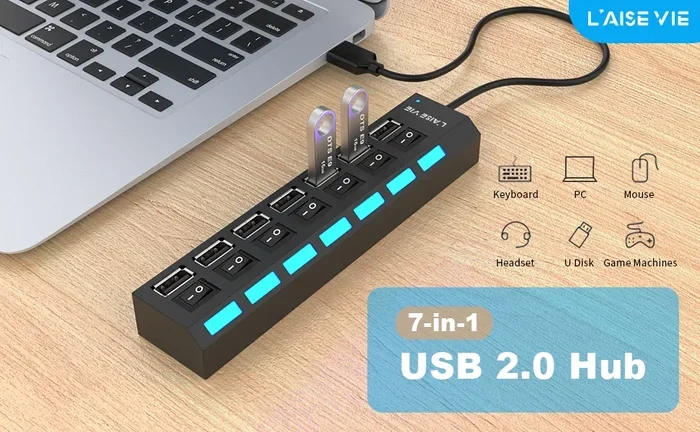
A USB splitter can affect your device’s speed depending on the type and how you use it. USB splitters divide available bandwidth between connected devices, which may slow down both data transfer and charging speeds. Understanding how USB splitters work helps you avoid slowdowns and get the most from your devices.
Have you ever plugged a USB splitter into your laptop and noticed that your external drive or phone charges slower than before? You are not alone. Many people wonder whether a USB splitter slows down speed, and the answer is not as simple as yes or no. A USB splitter splits the connection, but what happens to the speed depends on several factors. In this guide, we will break it all down so you can make smart decisions about your USB setup.
Whether you use a USB splitter to connect multiple peripherals, charge several devices at once, or expand your ports on a laptop, understanding how speed is affected matters. A USB splitter is a convenient accessory, but it comes with trade-offs. Let us explore exactly how a USB splitter impacts your devices and what you can do about it.
Key Takeaways
- USB splitters share bandwidth: Every device connected to a splitter competes for the same data path, which can reduce speed.
- USB 3.0 splitters are faster: Newer USB versions offer more bandwidth, so a USB 3.0 splitter slows down less than older versions.
- Powered splitters perform better: A powered USB splitter provides more stable speeds and better charging than unpowered ones.
- Signal degradation is real: Adding cables and connectors to a USB splitter can weaken the signal over distance.
- Not all splitters are equal: Cheap splitters often use lower-quality components that hurt performance more than premium ones.
- You can minimize speed loss: Using short cables, powered hubs, and the right USB version keeps slowdowns to a minimum.
📑 Table of Contents
How Does a USB Splitter Work?
A USB splitter takes one USB port and turns it into multiple connection points. Think of it like a power strip for USB devices. Instead of plugging one device into your computer, you can plug in two, three, or more. But here is the catch: all those devices share the same connection to your computer.
When you connect a USB splitter, the data and power from the single port get divided among all the connected devices. This sharing is the main reason a USB splitter can slow things down. The more devices you add, the more the available bandwidth gets split up.
USB Bandwidth Basics
Every USB port has a maximum bandwidth, which is the amount of data it can handle at one time. USB 2.0 ports offer up to 480 Mbps. USB 3.0 ports jump to 5 Gbps. And USB 3.1 and USB 3.2 ports go even higher. When you use a USB splitter, all connected devices share this total bandwidth. So if one device is transferring a large file, other devices on the same USB splitter will slow down.
Think of it like a highway. A single lane works fine for one car. But when you add more cars to the same lane, traffic builds up. A USB splitter works the same way. More devices mean more traffic on the same data lane.
Does a USB Splitter Slow Down Speed?
The short answer is yes, a USB splitter can slow down speed. But the real question is how much it slows things down. The answer depends on what you are doing, what type of splitter you use, and which USB version your port supports.
For basic tasks like connecting a keyboard, mouse, or USB flash drive, a USB splitter may not cause any noticeable slowdown. These devices use very little bandwidth. But for data-heavy tasks like transferring large files from an external hard drive or syncing photos, a USB splitter can make a real difference.
Real-World Speed Differences
Here is what you can expect when using a USB splitter in everyday situations:
- Light use (keyboard, mouse): No noticeable speed loss. These devices barely use any bandwidth.
- Medium use (flash drives, small file transfers): Slight slowdown. You might notice a small delay when copying files.
- Heavy use (external SSDs, large file transfers): Significant slowdown. A USB splitter can cut transfer speeds by 30 to 50 percent or more.
- Charging multiple devices: Charging speed drops because the power gets shared. Each device charges slower than it would on its own port.
For example, if you plug an external SSD into a USB splitter along with a flash drive, the SSD transfer speeds will drop. This happens because both devices compete for the same data path. If you have ever used a USB splitter with an external drive, you may have noticed files copying much slower than expected.
Types of USB Splitters and Their Impact on Speed
Not all USB splitters are the same. The type of splitter you choose plays a big role in how much speed loss you experience. Let us look at the main types.
Powered USB Splitters
A powered USB splitter plugs into its own power source, usually a wall outlet or a USB-C power adapter. This type of splitter provides its own power to connected devices, which means it does not drain power from your computer’s port. Powered USB splitters generally maintain better speeds because they can deliver consistent power to each device.
If you plan to connect devices that need a lot of power, like external hard drives or tablets, a powered USB splitter is the better choice. It keeps speeds more stable and prevents your computer from struggling to supply enough power.
Unpowered USB Splitters
An unpowered USB splitter draws all its power from the computer’s USB port. This means the more devices you connect, the more the available power and bandwidth get stretched thin. Unpowered splitters are fine for low-power devices like keyboards and mice. But they can cause noticeable slowdowns when used with power-hungry devices.
One common problem with unpowered USB splitters is that devices may disconnect randomly if the port cannot supply enough power. This is especially common with external drives and larger peripherals.
USB Hub vs. USB Splitter
People often use the words “USB hub” and “USB splitter” interchangeably, but they are slightly different. A USB hub usually has its own power management and can handle more devices without major speed loss. A basic USB splitter is often a simpler cable or adapter that just splits the connection. The quality of the device matters more than the label.
Factors That Affect USB Splitter Speed
Several factors determine how much a USB splitter will slow down your devices. Understanding these can help you choose the right setup and avoid frustrating slowdowns.
USB Version Matters
The USB version on your port is one of the biggest factors. A USB 2.0 splitter will slow things down much more than a USB 3.0 splitter because USB 2.0 has far less bandwidth. If your computer has USB 3.0 or newer ports, use a USB 3.0 splitter to keep speeds as high as possible.
Here is a quick comparison of USB versions and their maximum speeds:
- USB 2.0: Up to 480 Mbps (about 60 MB/s)
- USB 3.0: Up to 5 Gbps (about 625 MB/s)
- USB 3.1: Up to 10 Gbps (about 1,250 MB/s)
- USB 3.2: Up to 20 Gbps (about 2,500 MB/s)
- USB4: Up to 40 Gbps (about 5,000 MB/s)
As you can see, the USB version makes a huge difference. A USB splitter on a USB 3.0 port will perform much better than one on a USB 2.0 port.
Cable Length and Quality
The cables you use with a USB splitter also affect speed. Longer cables mean more signal loss, which leads to slower transfer rates. Short, high-quality cables keep your speeds closer to the maximum. If you need a longer run, consider a powered USB splitter with quality cables to reduce signal degradation.
Number of Connected Devices
The more devices you connect to a USB splitter, the more the speed gets divided. If you plug five devices into one splitter, each one gets a fraction of the available bandwidth. Keeping the number of connected devices low helps maintain better speeds.
Device Power Requirements
Some devices need more power to run at full speed. External hard drives, for example, often need more power than a simple flash drive. If your USB splitter cannot supply enough power, these devices may throttle their speed or disconnect altogether.
Tips to Maximize USB Speed When Using a Splitter
You do not have to accept slow speeds just because you use a USB splitter. Follow these practical tips to keep your connection as fast as possible.
- Choose a powered USB splitter. A powered USB splitter provides dedicated power to each port, which keeps speeds stable and prevents power-related slowdowns.
- Use USB 3.0 or newer splitters. Always match your splitter to your port’s USB version. A USB 3.0 splitter on a USB 3.0 port gives you the best performance.
- Keep cables short. Use the shortest cables you can. Shorter cables mean less signal loss and faster speeds.
- Limit the number of connected devices. Only connect what you need. Fewer devices mean more bandwidth for each one.
- Avoid cheap, no-name splitters. Low-quality splitters often use poor components that hurt performance more than a premium splitter would.
- Check for driver updates. Sometimes slow speeds come from outdated drivers. Keep your system updated to ensure the best performance.
- Use a high-quality external drive. If you are connecting external storage, a fast drive like the SanDisk Extreme Portable 2TB External USB C NVMe SSD can help offset some of the speed loss from a splitter. This drive uses USB C and NVMe technology, which delivers excellent speeds even when shared across a USB splitter.
When Should You Avoid Using a USB Splitter?
While USB splitters are handy, they are not the right choice for every situation. Here are some cases where you should skip a splitter and use a direct connection instead.
If you are doing heavy file transfers, like moving a 50 GB video project from an external drive, always plug the drive directly into your computer. A USB splitter will slow this process down significantly. Direct connections give you the full bandwidth of the port, which means faster transfers and less waiting.
Similarly, if you are using an NVMe SSD in a USB enclosure or connected through an NVMe SSD to USB adapter, you want the fastest possible connection. These devices are built for speed, and a USB splitter can bottleneck their performance. For best results, connect them directly to a USB 3.0 or USB-C port without any splitter in between.
Gaming is another case where you should avoid a USB splitter. While most gaming peripherals like mice and keyboards use very little bandwidth, a USB splitter can introduce slight input lag. For competitive gaming, every millisecond counts, so direct connections are always better.
Also, if you are using multiple external drives at the same time for backups or media editing, skip the splitter. Each drive should have its own dedicated USB port for optimal performance. Sharing bandwidth across drives through a USB splitter will slow down both drives and extend your workflow time.
Conclusion
So, does a USB splitter slow down speed? Yes, it can, but the amount of slowdown depends on several factors. The type of splitter, the USB version, the number of connected devices, and the quality of cables all play a role. A powered USB splitter with a high USB version will cause less slowdown than a cheap, unpowered splitter on an older USB port.
The key takeaway is that USB splitters are useful tools, but they are not magic. They share bandwidth and power, which means some speed loss is inevitable. By choosing the right splitter, keeping cables short, and limiting connected devices, you can minimize the impact on your speed.
If you need maximum speed for demanding tasks, always use a direct USB connection. Save the USB splitter for lighter tasks where a small slowdown does not matter. With the right approach, you can enjoy the convenience of a USB splitter without sacrificing too much performance.
Frequently Asked Questions
Can a USB splitter slow down charging speed?
Yes, a USB splitter can slow down charging speed because it divides the available power between connected devices. If you plug two phones into an unpowered USB splitter, each phone will charge slower than it would on its own port. A powered USB splitter helps reduce this problem by providing its own power source.
Is a USB hub the same as a USB splitter?
Not exactly. A USB hub usually has its own power management and can handle more devices better than a basic USB splitter. A USB splitter is often a simpler cable or adapter that divides the connection. Both share bandwidth, but a quality USB hub tends to maintain better speeds across multiple devices.
Does a USB 3.0 splitter slow down speed less than a USB 2.0 splitter?
Yes, a USB 3.0 splitter has much more bandwidth than a USB 2.0 splitter, so it slows down less. USB 3.0 offers up to 5 Gbps compared to USB 2.0’s 480 Mbps. If you need a USB splitter, always choose one that matches or exceeds your port’s USB version for the best performance.
Will a USB splitter affect external SSD speeds?
Yes, a USB splitter can reduce external SSD speeds because the SSD must share bandwidth with other connected devices. External SSDs are designed for fast data transfer, and a USB splitter can bottleneck that speed. For the fastest SSD performance, connect it directly to a USB port without a splitter.
How can I reduce speed loss when using a USB splitter?
Use a powered USB splitter, choose a high USB version like USB 3.0 or newer, keep your cables short, and limit the number of connected devices. These steps help reduce the bandwidth sharing effect and keep your speeds as high as possible when using a USB splitter.
Can a bad USB splitter damage my devices?
A low-quality USB splitter is unlikely to damage your devices, but it can cause unstable connections, random disconnections, or slower performance. Cheap splitters may not provide enough power or maintain consistent data speeds. Always buy a USB splitter from a reputable brand to ensure safe and reliable performance.