Does Usb Mean Charger
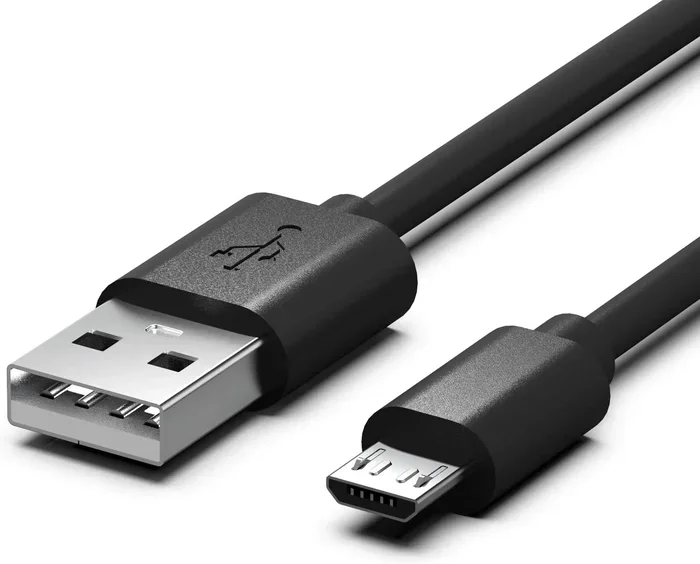
No, USB does not mean charger. USB stands for Universal Serial Bus, and it is a connection standard used for data transfer and power delivery. While USB cables can charge devices, the USB port itself is not a charger — the power source is what does the work.
Have you ever plugged a cable into your laptop or phone and wondered, does USB mean charger? It is a simple question, but the answer is not as straightforward as you might think. USB is everywhere. It is on your laptop, your phone charger, your external hard drive, and even your wireless mouse. But just because a cable has a USB connector does not mean it is only for charging.
The truth is that USB stands for Universal Serial Bus. It is a standard for connecting devices and transferring data. Charging is just one of the many things USB can do. In this article, we will break down everything you need to know about USB and charging. You will learn what USB really means, how it powers your devices, and why not all USB connections are the same.
Key Takeaways
- USB means Universal Serial Bus: It is a connection standard, not a charger itself.
- USB cables carry power: But the wall adapter or power source is what actually charges your device.
- USB-A and USB-C are different: Each has unique specs for power delivery and data transfer speeds.
- Not all USB ports charge at the same speed: Charging speed depends on the port version and power source.
- You can use USB for more than charging: Data transfer, connecting peripherals, and more are all USB functions.
📑 Table of Contents
What Does USB Actually Stand For?
USB stands for Universal Serial Bus. It is a technical standard that was created in the mid-1990s. The goal was simple. Make it easier to connect devices to computers. Before USB, you had a mess of different cables and ports. Printers used one type of connection. Mice used another. Keyboards used yet another.
USB changed all of that. It became the one connector to rule them all. Over the years, USB has evolved through several versions. Each version brought faster speeds and more power. Today, USB is used far beyond computers. It is in smartphones, cameras, gaming consoles, and even cars.
The Different Types of USB Connectors
Not all USB connectors look the same. Here are the most common types you will encounter:
- USB-A: The classic rectangular connector. You will find this on most wall chargers and computers.
- USB-B: A square-shaped connector often used for printers and older devices.
- USB-C: The modern, reversible connector. It is small, fast, and can carry a lot of power.
- Mini-USB and Micro-USB: Older connectors used for phones and portable devices before USB-C took over.
Each connector type plays a role in how your device charges and transfers data. The connector shape does not change what USB means, but it does affect performance.
So, Does USB Mean Charger?
Here is the short answer. No, USB does not mean charger. USB is a connection standard. A charger is a power source. The USB cable simply carries the power from the charger to your device. Think of it like a highway. The road (USB cable) lets the cars (electricity) travel from the power plant (charger) to your home (device).
When you plug your phone into a wall adapter using a USB cable, the charger is the brick plugged into the wall. The USB cable just delivers the power. This is an important distinction. Many people confuse the cable with the charger because they come together in one package.
USB Power Delivery Explained
USB cables can carry electrical power, and this is where the confusion starts. USB ports on computers and wall adapters supply power to connected devices. But the amount of power varies a lot. A standard USB-A port on an older computer might only deliver about 2.5 watts of power. A modern USB-C port can deliver up to 100 watts or more with USB Power Delivery.
Here is what affects how much power your USB connection provides:
- The USB version (USB 2.0, 3.0, USB4)
- The connector type (USB-A vs USB-C)
- The charger or power source
- The device being charged
So when you ask does USB mean charger, remember that USB is the delivery method, not the source of power.
How USB Charging Works in Everyday Devices
USB charging is all around us. Your smartphone charges through a USB cable. Your wireless earbuds come with a USB charging case. Even some laptops now charge entirely through a USB-C port. But how does it actually work?
When you connect a device to a power source via USB, the voltage flows through the cable’s internal wires. The device’s battery management system regulates the incoming power to safely charge the battery. This is why you can plug the same USB cable into different chargers and get different results. A weak charger will charge slowly. A powerful charger will charge faster.
For example, if you use a Sandisk Extreme Portable SSD with USB-C, it draws power from the USB connection to function. It does not need a separate charger because the USB port provides enough power for the drive to work. But that does not mean the SSD is a charger. It is simply receiving power through the USB standard.
Fast Charging and USB
Fast charging has changed the game. Technologies like Qualcomm Quick Charge and USB Power Delivery allow USB connections to deliver much more power than before. A USB-C cable with Power Delivery can charge a laptop in under two hours. The same cable can also charge a phone in about 30 minutes.
The key thing to remember is that fast charging depends on three things working together:
- The charger must support fast charging
- The cable must be capable of handling higher power
- The device must accept fast charging
USB is just the bridge between all three. It is not the charger itself.
USB vs Charger: Understanding the Difference
Let us clear up the confusion once and for all. A charger is a device that converts AC power from your wall outlet into DC power that your device can use. A USB cable is a connector that transfers both data and power between devices.
Here is a simple comparison to make it crystal clear:
- Charger: Converts wall outlet power into device-safe power. It plugs into the wall.
- USB Cable: Carries power and data between the charger and your device. It plugs into both the charger and the device.
- USB Port: The opening on your device or charger where the cable connects.
When you buy a phone charger in the store, you are usually buying a charger with a USB cable attached. The charger part is the block. The USB part is the cable and connector. They work together, but they are not the same thing.
Can You Charge Without USB?
Yes, you can. Some devices use proprietary chargers that do not have USB connections at all. Many older devices came with their own unique charging cables. However, USB has become the universal standard for a reason. It is convenient, widely available, and works across many devices.
Even when a device uses a non-USB charger, it often still has a USB port for data transfer. For instance, many cameras use a proprietary charging cable that plugs directly into the camera body. But the same camera might also have a USB port for connecting to a computer. The USB port handles data, while the proprietary port handles charging.
Common Myths About USB and Charging
There are a lot of myths floating around about USB and charging. Let us debunk some of the most common ones.
Myth 1: All USB Ports Charge at the Same Speed
This is simply not true. A USB 2.0 port delivers much less power than a USB 3.0 or USB-C port. The version of USB and the power source both matter. If you plug your phone into a USB 2.0 port on an old computer, it will charge very slowly compared to a USB-C wall charger.
Myth 2: USB Cables Are All the Same
Not even close. USB cables come in different versions and are rated for different power levels. A cheap USB cable might not support fast charging at all. It could also be a data-only cable with no power wires inside. Always use quality cables from reputable brands.
Myth 3: If It Has a USB Port, It Can Charge Anything
While USB is universal, not every USB port can charge every device. A USB port on a keyboard might only provide enough power to light up a small LED. It would not charge a laptop. The power output must match the device’s requirements.
How to Choose the Right USB Charger
Now that you know USB does not mean charger, how do you pick the right one? Here are some practical tips:
- Check the wattage: Higher wattage means faster charging. Look for 18W or more for smartphones and 60W or more for laptops.
- Go for USB-C if possible: USB-C is faster, more versatile, and supports Power Delivery.
- Match the cable to the charger: A USB-C charger needs a USB-C cable to deliver full speed.
- Buy from trusted brands: Cheap knockoff chargers can damage your devices or even pose safety risks.
- Consider a USB adapter for versatility: Adapters let you connect different types of devices and expand your charging and data options.
If you are using an external drive like a M.2 NVMe to USB-C SSD enclosure, you already know that USB connections serve many purposes beyond just charging. They enable data transfer, device expansion, and connectivity across different platforms.
The same goes for NVMe SSD to USB adapters. These tools show how versatile the USB standard really is. It is not just about powering your phone. It is about creating a universal connection ecosystem for all your tech.
Quick Tips for Better USB Charging
Here are some simple tips to get the most out of your USB charging setup:
- Always use the cable and charger that came with your device, or a certified replacement.
- Avoid charging through a computer USB port if you need fast charging.
- Remove thick phone cases while charging to prevent overheating.
- Unplug your device once it reaches 100% to protect battery health.
- Use a high-quality USB-C cable for best results with modern devices.
These small habits can make a big difference in how long your devices last and how safely they charge.
Conclusion
So, does USB mean charger? The answer is a clear no. USB is a connection standard that allows devices to communicate and share power. It is not a charger itself. The charger is the power source. The USB cable is the bridge between the charger and your device.
Understanding this difference helps you make better choices about your tech. You will know which cables to buy, which chargers to use, and why some devices charge faster than others. USB has revolutionized the way we connect and power our devices. But it is important to use the term correctly.
Next time someone asks you does USB mean charger, you can give them a clear, confident answer. USB is universal, yes. But it is not a charger. It is the standard that makes charging and data transfer possible across millions of devices worldwide.
Keep your cables organized, choose quality chargers, and enjoy the convenience that USB brings to your everyday tech life.
Frequently Asked Questions
Is a USB cable the same as a charger?
No, a USB cable and a charger are not the same thing. The charger converts wall outlet power into device-safe power, while the USB cable simply carries that power from the charger to your device. Think of the charger as the power source and the USB cable as the delivery method.
Can I charge my phone with any USB cable?
You can plug any USB cable into your phone, but not all cables will charge it at the same speed. The cable must support the right power level, and the charger must be capable of delivering enough wattage. Using a low-quality or damaged cable can result in slow charging or no charging at all.
What is USB Power Delivery?
USB Power Delivery, or USB PD, is a standard that allows USB connections to deliver higher amounts of power. It is commonly found in USB-C cables and chargers. USB PD can deliver up to 100 watts, which is enough to charge laptops, tablets, and even some monitors through a single USB-C connection.
Why does my USB charger not work sometimes?
There are several reasons a USB charger might not work. The cable could be damaged, the charger might not be compatible with your device, or the USB port could be dirty or loose. Try using a different cable or charger first, as these are the most common causes of charging issues.
Do all USB-C ports support fast charging?
Not all USB-C ports support fast charging. The port must be rated for USB Power Delivery or a similar fast-charging standard. Additionally, the charger and cable must also support fast charging for the full speed to work. Check your device specifications to confirm what charging speeds your USB-C port supports.
Can I use a USB charger to power other devices?
Yes, you can use a USB charger to power many different devices, including phones, tablets, earbuds, portable batteries, and even some laptops. As long as the charger provides the right voltage and wattage, and the device accepts USB charging, it should work. Always check compatibility before plugging in a new device.