Is Anything Faster Than Usb C

USB C is incredibly fast, but technologies like Thunderbolt 4 and NVMe SSDs can surpass its standard speeds. Whether you are transferring large files or backing up data, understanding what outpaces USB C helps you choose the right gear. This guide breaks down real-world speed comparisons so you can make informed decisions.
USB C has become the go-to connector for modern devices. Laptops, phones, tablets, and external drives all use it. But here is the big question many tech users ask: is anything faster than USB C?
The short answer is yes. Several technologies push past the standard USB C speed limits. Thunderbolt 4, NVMe SSDs, and USB4 all offer faster data transfer rates in specific scenarios. If you have ever waited for a large file to copy, you know how important speed matters.
In this article, we break down exactly what can beat USB C. We compare real-world speeds, explain the technology behind each option, and help you decide what fits your needs. Whether you are a creative professional moving huge video files or a gamer loading massive titles, this guide has you covered.
Key Takeaways
- Thunderbolt 4 outpaces standard USB C: Thunderbolt 4 offers up to 40Gbps, doubling the base USB C speed.
- NVMe SSDs deliver blazing internal speeds: NVMe drives can reach speeds far beyond what USB C can handle externally.
- USB4 matches Thunderbolt 4 speeds: The newer USB4 protocol brings USB C closer to Thunderbolt performance.
- Adapters can bottleneck speed: Using a M.2 NVMe to USB 3.1 adapter limits your transfer rate.
- Your cable matters: Not all USB C cables support the same speeds.
📑 Table of Contents
Understanding USB C Speed Basics
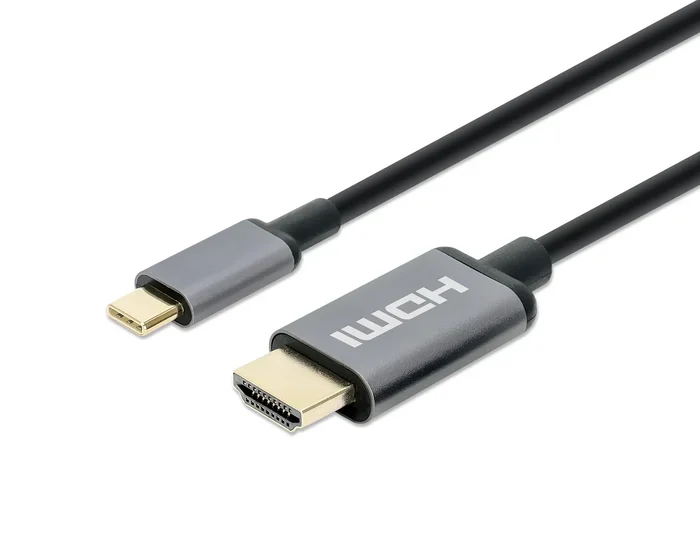
Before we talk about what is faster, let us understand what USB C actually delivers. USB C is a connector type, not a speed standard. This is a common point of confusion. The connector shape does not tell you the speed by itself.
USB C can support different protocols. The speed depends on the protocol and the cable you use. Here are the most common USB C speed tiers:
- USB 3.2 Gen 1: Up to 5Gbps. This is the older USB 3.0 standard wrapped in a USB C connector.
- USB 3.2 Gen 2: Up to 10Gbps. This is the most common USB C speed today.
- USB4 Gen 2: Up to 20Gbps. USB4 brings a big jump in bandwidth.
- USB4 Gen 3: Up to 40Gbps. This matches Thunderbolt 4 speeds.
So when someone says “USB C,” they could mean any of these speeds. A cheap USB C cable might only run at 5Gbps even if your device supports 40Gbps. Always check what protocol your cable and port support.
For most everyday tasks like charging your phone or syncing photos, USB C is more than enough. But when you need to move terabytes of data quickly, the limits become obvious. That is where faster alternatives come into play.
Thunderbolt 4: The Speed King for USB C Devices
Thunderbolt 4 is currently the fastest option that uses the USB C connector. It delivers up to 40Gbps of bandwidth. That is four times faster than standard USB 3.2 Gen 2. If you are asking “is anything faster than USB C,” Thunderbolt 4 is the most direct answer.
Thunderbolt 4 is not just about speed. It also supports charging up to 100W and connecting to multiple 4K displays. This makes it a powerhouse for professionals. Here is what sets Thunderbolt 4 apart:
- 40Gbps data transfer: Move a 1TB file in under 20 seconds.
- Universal compatibility: Works with USB C devices and Thunderbolt devices.
- Daisy-chaining support: Connect up to six devices in a chain.
- Secure docking: Meets strict security requirements for enterprise use.
Thunderbolt 4 uses the same USB C shape as standard USB C. But the technology inside is completely different. A Thunderbolt 4 cable costs more than a regular USB C cable, and that is because it supports much higher speeds and power delivery.
Thunderbolt 3 vs Thunderbolt 4
Thunderbolt 3 also runs at 40Gbps using a USB C connector. So what makes Thunderbolt 4 better? Thunderbolt 4 guarantees minimum performance standards. Thunderbolt 3 could vary in its minimum specs. Thunderbolt 4 also supports longer cables without losing speed and requires wake-from-sleep support.
If you are buying a new external drive or dock, look for Thunderbolt 4 support. It gives you the best future-proofing. The speed difference between NVMe and traditional SSDs is huge, and Thunderbolt 4 lets you access NVMe speeds externally.
NVMe SSDs: Internal Speeds That Leave USB C Behind
When we talk about raw storage speed, NVMe SSDs are in a different league. These drives connect directly to the motherboard through the PCIe bus. They do not rely on the USB C bottleneck at all.
A standard NVMe Gen 3 SSD can read at around 3,500MB/s. Gen 4 NVMe drives push that to 7,000MB/s. And Gen 5 NVMe drives can reach speeds over 10,000MB/s. Compare that to USB 3.2 Gen 2, which maxes out at 1,250MB/s in real-world transfer.
The gap is enormous. Even the best USB C connection cannot keep up with a modern NVMe drive. Here is a quick comparison:
- USB 3.2 Gen 2: ~1,000MB/s real-world
- NVMe Gen 3 SSD: ~3,500MB/s
- NVMe Gen 4 SSD: ~7,000MB/s
- Thunderbolt 4 external NVMe: ~2,800MB/s (capped by the Thunderbolt 4 limit)
The NVMe vs SSD speed comparison shows why internal NVMe drives are so much faster. They bypass the USB controller entirely and speak directly to the system.
Can You Get NVMe Speeds Over USB C?
You can get close with a Thunderbolt 4 external NVMe enclosure. But you will still be capped at 40Gbps. The NVMe drive itself wants to go faster, but the connection limits it. If you need the absolute fastest speeds, internal NVMe is the way to go.
For external needs, a NVMe SSD to USB adapter gives you portability. Just remember that the adapter itself becomes the speed limit. A USB 3.0 adapter will cap you at 5Gbps no matter how fast your NVMe drive is.
USB4: The New Standard Closing the Gap
USB4 is the newest USB protocol, and it brings significant speed improvements. USB4 is built on the Thunderbolt 3 protocol. It supports up to 40Gbps, which matches Thunderbolt 4 speeds.
Here is the good news: USB4 uses the same USB C connector. You do not need a special port on your device, though both sides of the connection need to support USB4 for full speed. Many newer laptops and monitors now include USB4 support.
USB4 also features protocol tunneling. This means it can handle data, display signals, and power all at the same time without interference. It is a smarter way to use a single cable for everything.
So is USB4 faster than standard USB C? Absolutely. But it is not faster than Thunderbolt 4. USB4 and Thunderbolt 4 share the same 40Gbps ceiling. The difference is that Thunderbolt 4 has stricter certification requirements and guarantees minimum performance.
Real-World Speed Comparisons
Theory is great, but what does this mean in everyday use? Let us look at practical scenarios where speed matters most.
Transferring a 100GB video project:
- USB 3.2 Gen 2 (USB C): About 1 minute 20 seconds
- Thunderbolt 4: About 20 seconds
- Internal NVMe Gen 4: About 14 seconds
Backing up a 2TB hard drive:
- USB 3.2 Gen 2 (USB C): About 27 minutes
- Thunderbolt 4: About 7 minutes
- Internal NVMe Gen 4: About 5 minutes
These numbers show why professionals care about speed. Video editors, photographers, and data analysts save hours every week by using faster connections. A M.2 NVMe SSD in a USB enclosure can get you close to internal NVMe speeds, but the enclosure’s controller and the USB protocol still create a ceiling.
When USB C Speed Is Enough
Not everyone needs the fastest possible speeds. For most daily tasks, USB C is perfectly fine. Backing up documents, transferring photos, and charging devices all work great at USB C speeds. You only need to look beyond USB C when you are dealing with very large files or time-sensitive workflows.
Common Mistakes That Slow Down USB C
Many users think they have a fast USB C setup but are actually getting slow speeds. Here are the most common mistakes:
- Using the wrong cable: A USB 2.0 cable in a USB C shape will limit you to 480Mbps. Always check the cable specification.
- Plugging into the wrong port: Not all USB C ports on a laptop are equal. Some only support USB 3.2, while others support Thunderbolt 4.
- Using a low-quality adapter: Cheap adapters can cut speeds dramatically. Invest in certified adapters from reputable brands.
- Ignoring the drive’s speed: A slow hard drive in a fast USB C cable will still be slow. The bottleneck might be the drive, not the connection.
- Assuming all USB C is the same: USB C is just a connector. The protocol underneath determines the real speed.
Avoiding these mistakes can instantly improve your transfer experience. Sometimes the fix is as simple as swapping to a better cable or plugging into a different port.
The Future: What Comes After USB C?
Technology never stands still. USB4 Version 2.0 is already on the horizon, promising speeds up to 80Gbps. That would double the current Thunderbolt 4 ceiling. And Intel continues to develop Thunderbolt 5, which could push speeds even further.
Wireless technologies are also catching up. Wi-Fi 7 offers theoretical speeds of up to 46Gbps. While it will never match a wired connection for raw speed, it provides incredible convenience for everyday transfers.
For now, Thunderbolt 4 and USB4 represent the fastest practical standards available. They use the USB C connector but deliver speeds that far exceed traditional USB C. The future is bright for fast data transfer, and the USB C ecosystem continues to evolve.
Final Thoughts
So is anything faster than USB C? The answer depends on what you mean. Thunderbolt 4 is faster than standard USB C when using the same connector. NVMe SSDs are faster because they bypass the USB connection entirely. USB4 brings USB C closer to Thunderbolt speeds.
The best choice for you depends on your needs. If you need portability and convenience, a Thunderbolt 4 external drive over USB C is excellent. If you need absolute maximum speed, an internal NVMe SSD cannot be beaten. Understanding your options helps you make the right choice every time.
Speed matters, but so does compatibility. Always check what your devices support before buying cables, adapters, or drives. The right setup saves you time and frustration in the long run.
Frequently Asked Questions
Is Thunderbolt 4 the same as USB C?
Thunderbolt 4 uses the same USB C connector shape, but the technology inside is different. Thunderbolt 4 supports up to 40Gbps, while standard USB C may only support 5Gbps or 10Gbps. Not all USB C ports are Thunderbolt 4 ports.
Can I use any USB C cable for fast transfers?
No, not all USB C cables support the same speeds. A basic USB C cable may only handle USB 2.0 speeds. Look for cables that explicitly state USB 3.2 or Thunderbolt 4 support for the best performance.
Are NVMe SSDs faster than USB C external drives?
Yes, NVMe SSDs are significantly faster because they connect directly to the motherboard via PCIe. External drives are limited by the USB connection. Internal NVMe Gen 4 drives can reach speeds over 7,000MB/s, while USB C external drives top out around 2,800MB/s.
Do I need Thunderbolt 4 for fast external storage?
Thunderbolt 4 gives you the best speeds for external storage at 40Gbps. But USB4 also supports 40Gbps. If your device supports either standard, you will get excellent external storage performance.
What is the fastest USB C speed available today?
The fastest USB C speed today is 40Gbps, supported by Thunderbolt 4 and USB4 Gen 3. This is four times faster than the standard USB 3.2 Gen 2 speed of 10Gbps.
Will USB C ever be replaced by a faster connector?
USB C is likely to remain the standard connector for years to come. The protocol inside the connector keeps improving. USB4 and Thunderbolt continue to push speeds higher while using the same USB C shape.