Can My Laptop Run Lethal Company
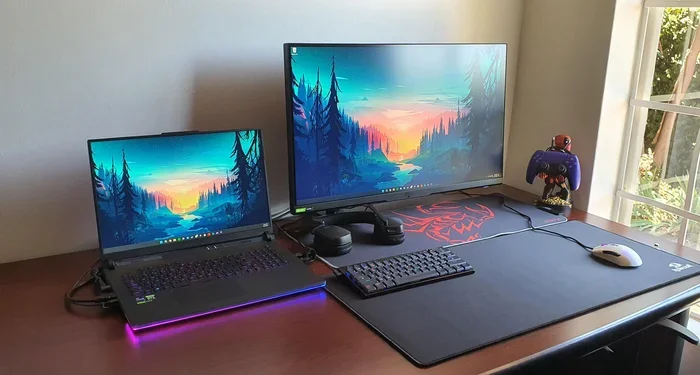
Lethal Company is an indie horror game that has taken the gaming world by storm, but can your laptop handle it? The good news is that Lethal Company has relatively modest system requirements, making it playable on a wide range of laptops. In this guide, we break down the exact specs you need, how to check your current setup, and simple ways to boost your laptop performance so you can enjoy the game without frustration.
Have you been hearing about Lethal Company everywhere? This spooky indie game has become a massive hit, and for good reason. It is fun, terrifying, and perfect for playing with friends. But before you jump in, you might be wondering: can my laptop run Lethal Company? The short answer is probably yes, but let us dig deeper into what your laptop needs to handle this game without any headaches.
Lethal Company is not a heavy AAA title. It does not demand a super expensive gaming rig. However, that does not mean every laptop will run it perfectly. Some older or very budget models might struggle. Knowing your laptop’s capabilities before you start playing can save you from frustration and lag.
In this article, we will walk through everything you need to know. We will cover the exact system requirements, explain which laptops work best, and share practical tips to improve performance. Whether you have a budget laptop or a high-end machine, you will find useful information here.
Key Takeaways
- Low System Requirements: Lethal Company runs on most modern laptops, even budget-friendly models.
- RAM Matters: Having at least 8GB of RAM ensures smooth gameplay and fewer crashes.
- Graphics Card Is Key: A dedicated GPU greatly improves frame rates and visual quality.
- Simple Upgrades Help: Adding more RAM or upgrading your storage can make a big difference.
- Optimization Tips Exist: Lowering in-game settings can boost performance on weaker hardware.
- Check Compatibility First: Always verify your laptop specs before purchasing or downloading the game.
📑 Table of Contents
- What Is Lethal Company and Why Is It So Popular?
- Lethal Company System Requirements
- Can Budget Laptops Run Lethal Company?
- How to Check If Your Laptop Can Run Lethal Company
- How to Improve Laptop Performance for Lethal Company
- Lethal Company Performance Tips and Settings Guide
- Final Verdict: Can Your Laptop Run Lethal Company?
What Is Lethal Company and Why Is It So Popular?
Lethal Company is an indie horror game developed by Zeekerss. Players join a crew and explore abandoned moons to collect scrap and meet profit quotas. The game blends scary moments with dark humor and cooperative gameplay. It has become one of the most popular indie games on Steam in recent years.
One reason Lethal Company has gained so much attention is its low barrier to entry. The game does not require expensive hardware. This makes it accessible to a huge audience, including casual gamers and people who only own a standard laptop. You do not need a top-of-the-line gaming laptop to enjoy it.
The game runs on the Unity engine, which is known for being efficient and lightweight. This is good news for laptop users who want to play without upgrading their entire system. Even laptops that are a few years old can often handle it just fine.
Lethal Company System Requirements
Understanding the system requirements is the first step in figuring out if your laptop can run Lethal Company. The developers have listed both minimum and recommended specs. Let us break them down in simple terms.
Minimum System Requirements
- Operating System: Windows 10 (64-bit)
- Processor: Intel Core i5 or equivalent
- RAM: 4GB
- Graphics Card: NVIDIA GTX 960 or equivalent
- Storage: 5GB of free space
- DirectX: Version 11
The minimum requirements are quite forgiving. If your laptop has at least 4GB of RAM and a basic dedicated graphics card, you should be able to run the game. However, you might need to lower some visual settings for the best experience.
Recommended System Requirements
- Operating System: Windows 10 or 11 (64-bit)
- Processor: Intel Core i7 or equivalent
- RAM: 8GB or more
- Graphics Card: NVIDIA GTX 1060 or better
- Storage: 5GB of free space on an SSD
- DirectX: Version 11 or higher
The recommended specs will give you a much smoother experience. With 8GB of RAM and a decent graphics card, you can enjoy the game at higher settings without worrying about frame drops. Most laptops made in the last 3 to 4 years should meet these requirements.
Can Budget Laptops Run Lethal Company?
The good news is that Lethal Company is one of the more forgiving games when it comes to hardware. Budget laptops that are primarily used for school or work can often run this game surprisingly well.
Let us talk about what makes a budget laptop capable of running Lethal Company. First, the processor matters. Most modern Intel Core i3 or AMD Ryzen 3 processors can handle the game. You do not need an expensive i7 or Ryzen 7 to enjoy it. Second, the graphics card. Many budget laptops come with integrated graphics like Intel UHD or AMD Vega. These can run Lethal Company, but you may need to adjust settings for the best performance.
RAM is another important factor. If your budget laptop only has 4GB of RAM, you can still run the game, but you might experience some stuttering. Upgrading to 8GB makes a noticeable difference. If you are wondering can I add more RAM to my laptop, the answer is usually yes. Many budget laptops have accessible RAM slots that make upgrades simple and affordable.
Storage also plays a role. If you have a traditional hard drive (HDD), the game might load slower than on a solid-state drive (SSD). Upgrading from an HDD to an SSD is one of the best and easiest upgrades you can make for any laptop. It improves boot times, game loading, and overall responsiveness.
How to Check If Your Laptop Can Run Lethal Company
Not sure what your laptop specs are? You do not need to be a tech expert to find out. Windows makes it very easy to check your system information.
Here is how to do it:
- Press the Windows key and type “System Information.”
- Open the app and look for your processor, RAM, and system type.
- To check your graphics card, press Windows key + R, type “dxdiag,” and press Enter.
- Go to the Display tab to see your GPU details.
Once you know your specs, compare them to the requirements listed above. If your laptop meets or exceeds the minimum requirements, you should be able to run Lethal Company. If you are close but not quite there, do not worry. There are ways to improve performance without spending a lot of money.
For those who want a more detailed analysis, websites like Can You Run It or PCGameBenchmark allow you to check compatibility with just a few clicks. These tools scan your system and compare it against game requirements automatically.
How to Improve Laptop Performance for Lethal Company
If your laptop barely meets the minimum requirements or if you are experiencing lag, there are several things you can do to improve performance. These tips apply to Lethal Company and many other games as well.
Lower In-Game Graphics Settings
The simplest way to boost performance is to reduce the graphics quality inside the game. Lower the resolution, turn off shadows, reduce draw distance, and disable anti-aliasing. These changes can dramatically increase your frame rate without completely ruining the visual experience.
Close Background Applications
Before launching Lethal Company, close any unnecessary programs running in the background. Web browsers, music apps, and other software consume RAM and processing power. Freeing up these resources gives your laptop more power to focus on the game.
Update Your Graphics Drivers
Keeping your graphics drivers up to date can improve performance and fix bugs. Visit the website of your GPU manufacturer (NVIDIA or AMD) and download the latest drivers. This is a quick and free step that many people overlook.
Adjust Windows Power Settings
Your laptop might be running in a power-saving mode that limits performance. Switch to the “High Performance” or “Best Performance” power plan in your Windows settings. This tells your laptop to use its full capabilities while gaming.
Upgrade Your Hardware
If software tweaks are not enough, consider a hardware upgrade. Adding more RAM is one of the most impactful upgrades you can make. Many laptops benefit greatly from going from 4GB to 8GB or from 8GB to 16GB of RAM. If you are wondering how can I upgrade my laptop RAM, it is often easier than you think. Most laptops have a bottom panel that screws off, giving you access to the RAM slots.
Another great upgrade is switching to an SSD if your laptop currently uses an HDD. The speed difference is enormous. Games load faster, and the overall system feels much more responsive. If you are concerned about compatibility, you can check how to know what RAM is compatible with my laptop before making a purchase.
Lethal Company Performance Tips and Settings Guide
Getting the best experience in Lethal Company comes down to finding the right balance between visuals and performance. Here are some practical tips to help you get the most out of your laptop.
Start with the default settings and play for a few minutes. If the game runs smoothly, great. If you notice lag or frame drops, go into the settings menu and adjust one setting at a time. This helps you identify exactly which setting is causing the problem.
For laptops with integrated graphics, try lowering the render scale to 0.7 or 0.8. This reduces the internal resolution and can significantly boost FPS. You might notice a slight drop in image sharpness, but the gameplay will feel much smoother.
If you are playing with friends online, a stable internet connection matters just as much as your hardware. Lethal Company is a multiplayer game, so lag from a poor connection can feel like your laptop is struggling when it is actually your internet.
One more tip: keep your laptop cool. Overheating can cause performance drops and even shutdowns. Use a cooling pad, keep the vents uncovered, and make sure your laptop is on a hard surface rather than a bed or couch. Heat is the enemy of performance.
Final Verdict: Can Your Laptop Run Lethal Company?
So, can my laptop run Lethal Company? For the vast majority of laptops, the answer is yes. Lethal Company is designed to be accessible, and its modest system requirements mean that even older or budget-friendly machines can handle it. As long as your laptop has at least 4GB of RAM, a decent processor, and a graphics card that supports DirectX 11, you should be good to go.
If your laptop falls short of the requirements, do not give up just yet. Simple upgrades like adding more RAM or switching to an SSD can breathe new life into an older machine. And adjusting in-game settings can make a surprising difference on hardware that is just barely able to run the game.
Lethal Company is a fantastic game that does not demand expensive hardware. It is a great entry point for anyone who wants to get into PC gaming without spending a fortune on a new laptop. Check your specs, try the game, and enjoy the spooky adventure with friends.
Remember, the best way to know for sure is to check your own laptop against the requirements listed in this guide. Every laptop is different, and actual performance can vary based on the specific model, age, and cooling capabilities. But with the tips and information provided here, you are well-equipped to make an informed decision and get started with Lethal Company.
Frequently Asked Questions
What is the minimum RAM needed to run Lethal Company?
The minimum RAM requirement for Lethal Company is 4GB. However, having at least 8GB of RAM will provide a much smoother and more enjoyable experience. If your laptop has only 4GB, you may need to close other applications while playing to avoid performance issues.
Can I play Lethal Company on a laptop without a dedicated graphics card?
Yes, you can. Lethal Company can run on laptops with integrated graphics such as Intel UHD or AMD Vega. You may need to lower the graphics settings for the best performance, but the game is designed to be accessible on a wide range of hardware.
Is Lethal Company a resource-heavy game?
No, Lethal Company is not resource-heavy. It is an indie game built on the Unity engine, which is known for being lightweight and efficient. This makes it one of the more accessible games for laptop users, including those with older or budget-friendly devices.
Will upgrading my laptop RAM help Lethal Company run better?
Yes, upgrading your RAM can significantly improve performance. If you currently have 4GB of RAM, upgrading to 8GB or more will reduce stuttering and improve overall stability. Many laptops allow easy RAM upgrades, and checking how can I increase my laptop RAM is a great first step toward better gaming performance.
What laptop specs are best for Lethal Company?
The best laptop specs for Lethal Company include an Intel Core i5 or better processor, 8GB of RAM or more, a dedicated NVIDIA GTX 1060 or better graphics card, and at least 5GB of free storage space on an SSD. These specs will allow you to play the game at higher settings with smooth frame rates.
Can older laptops run Lethal Company?
Older laptops can run Lethal Company if they meet the minimum system requirements. Laptops from around 2015 or newer with at least 4GB of RAM and a basic dedicated graphics card should be able to handle the game. Performance may vary, and lowering graphics settings can help older machines run the game more smoothly.