Best Ram For Msi Gf63 That Will Supercharge Your Gaming
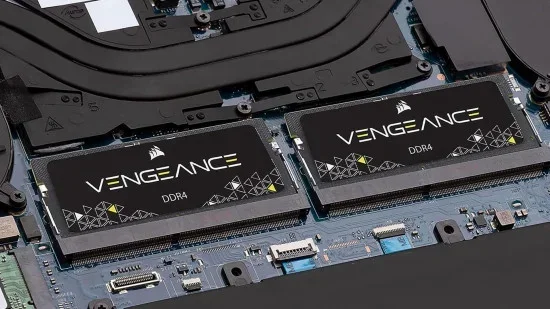
The MSI GF63 is a solid gaming laptop, but the right RAM can make or break your experience. Choosing the best RAM for MSI GF63 means matching speed, capacity, and compatibility to your gaming needs. This guide breaks down everything you need to know, from DDR4 SODIMM specs to the ideal RAM capacity for modern games. You will walk away with clear, actionable advice to upgrade your setup today.
If you own an MSI GF63, you already know it is a capable gaming machine. But did you know that upgrading the RAM can dramatically improve your gaming experience? The right memory modules can reduce lag, speed up load times, and help your system run more smoothly. In this guide, we will walk you through everything you need to know about choosing the best RAM for MSI GF63.
Whether you are a casual gamer or a hardcore enthusiast, this article covers you. We will look at RAM types, speeds, capacities, and what works best with your MSI laptop. By the end, you will know exactly which memory upgrade to buy and why.
Key Takeaways
- DDR4 3200MHz SODIMM RAM is the sweet spot for the MSI GF63, offering great speed and compatibility.
- 16GB of RAM is the recommended minimum for smooth gaming and multitasking on this laptop.
- Dual-channel configuration boosts performance significantly compared to single-channel setups.
- Upgrading RAM is one of the easiest and cheapest upgrades you can do on the MSI GF63.
- Check your laptop’s RAM slots before buying to avoid compatibility issues.
- 32GB RAM is future-proofing if you plan to play demanding titles or run heavy applications.
📑 Table of Contents
Understanding RAM and Why It Matters for Gaming
RAM stands for Random Access Memory. Think of it as your laptop’s short-term workspace. When you open a game, your system loads game data into RAM so it can access it quickly. The more RAM you have, and the faster it is, the smoother your gaming experience will be.
For the MSI GF63, RAM plays a huge role in frame rates and loading times. If your system does not have enough memory, your game will stutter. Your frame rates will drop. Your multitasking will suffer. That is why picking the right memory upgrade matters so much.
How RAM Affects Gaming Performance
When you play a modern game, your CPU and GPU work together to render graphics. But they need quick access to data. That is where memory modules come in. Faster RAM means your processor can fetch data more quickly. This leads to better frame rates and less stuttering.
Here are a few ways RAM impacts your gaming:
- Faster load times: Games boot up quicker when your system has sufficient memory.
- Smoother frame rates: More RAM helps your CPU manage game data without bottlenecks.
- Better multitasking: You can run a game while streaming or browsing without slowdowns.
- Reduced stuttering: Enough RAM prevents your system from freezing mid-game.
For the MSI GF63, the best RAM for MSI GF63 setup will depend on what games you play and what else you run on your laptop. Most modern titles recommend at least 8GB, but 16GB is the real sweet spot right now.
MSI GF63 RAM Specifications
Before you buy any RAM, you need to understand what your MSI GF63 supports. Every laptop has specific requirements, and the GF63 is no different. Let us break down the key specs you need to know.
RAM Type: DDR4 SODIMM
The MSI GF63 uses DDR4 SODIMM memory modules. SODIMM stands for Small Outline Dual In-Line Memory Module. It is a smaller form factor designed for laptops, not desktops. You cannot use desktop RAM in an MSI laptop. Always make sure you buy SODIMM modules.
DDR4 is the current standard for modern laptops. It offers faster speeds and better power efficiency than older DDR3 memory. The MSI GF63 supports DDR4 RAM, so you should look for DDR4 modules when upgrading.
RAM Speed and Frequency
RAM speed is measured in megahertz (MHz). The MSI GF63 supports DDR4 RAM at various speeds, but the most common and compatible option is 3200MHz. Some models can also handle 2666MHz or 2933MHz modules.
Higher speed RAM can give you a slight performance boost in games. However, the difference between 2666MHz and 3200MHz is not huge. What matters more is matching the speed to what your laptop supports. Do not buy RAM that is faster than your laptop can handle.
RAM Capacity Options
The MSI GF63 typically comes with 8GB of RAM, but many models have upgradeable slots. You can add more memory to reach 16GB or even 32GB. The ideal capacity depends on your use case:
- 8GB: Enough for casual gaming and older titles. But modern AAA games will struggle.
- 16GB: The sweet spot for most gamers. Smooth performance in current and upcoming titles.
- 32GB: Future-proofing for heavy gaming, video editing, and multitasking.
If you want the ultimate setup, check out our guide on MSI Gaming Laptop 32GB RAM for more details on building a high-capacity system.
Best RAM Options for MSI GF63
Now that you understand the specs, let us look at the best RAM options available for your MSI GF63. We have picked out the top choices based on compatibility, speed, and value.
Option 1: 16GB DDR4 3200MHz SODIMM (Dual Channel)
This is the top recommendation for most MSI GF63 users. A 16GB DDR4 3200MHz setup in dual-channel configuration delivers excellent gaming performance. Dual-channel means you use two 8GB sticks instead of one 16GB stick. This doubles the data bandwidth and improves performance significantly.
Most gaming laptops, including the MSI GF63, benefit greatly from dual-channel memory. If your laptop has two RAM slots, buy a matched pair of 8GB sticks. This setup will handle virtually every modern game with ease.
Option 2: 8GB DDR4 3200MHz SODIMM (Single Stick)
If you are on a tight budget, an 8GB DDR4 3200MHz stick is a decent starting point. It will run most games, but you may need to lower some graphics settings for newer titles. This option also leaves room for a future upgrade. You can always add a second 8GB stick later to reach 16GB.
For more budget-friendly options, you might want to check out our article on 8GB RAM Laptop For Gaming to understand what to expect from an 8GB setup.
Option 3: 32GB DDR4 3200MHz SODIMM (Dual Channel)
For power users and enthusiasts, 32GB of RAM is the ultimate choice. This setup is overkill for gaming alone, but it is fantastic if you also do video editing, 3D rendering, or streaming. If you plan to future-proof your MSI GF63, 32GB is the way to go.
Want to explore more about 32GB setups? Our 32GB RAM Laptop For Gaming guide has detailed insights on high-capacity RAM configurations.
Comparison Table: RAM Options for MSI GF63
| Configuration | Capacity | Speed | Best For | Price Range |
|---|---|---|---|---|
| Single 8GB Stick | 8GB | DDR4 3200MHz | Budget gaming | $25-$40 |
| Dual 8GB Sticks | 16GB | DDR4 3200MHz | Optimal gaming | $50-$80 |
| Dual 16GB Sticks | 32GB | DDR4 3200MHz | Heavy multitasking and future-proofing | $100-$150 |
The dual 8GB setup is the best value for most gamers. It gives you the performance boost of dual-channel memory without breaking the bank.
How to Upgrade RAM in Your MSI GF63
Upgrading the RAM in your MSI GF63 is one of the easiest laptop upgrades you can do. You do not need to be a tech expert. With a few simple tools and about 15 minutes, you can have your new memory installed and running.
Step-by-Step Upgrade Guide
- Turn off your laptop and unplug it from the power source. Remove the battery if possible.
- Find the RAM access panel on the bottom of your laptop. It is usually a small rectangular cover held by screws.
- Remove the screws and carefully take off the panel.
- Locate the RAM slots. The MSI GF63 typically has two SODIMM slots.
- Remove the old RAM by gently pulling the metal clips on either side. The stick will pop up at an angle.
- Insert the new RAM at a 45-degree angle. Push it down firmly until it clicks into place.
- Replace the access panel and screw it back in.
- Power on your laptop and check that the new RAM is recognized in your system.
If you want more detailed instructions for HP laptops, which share similar upgrade processes, check out our RAM Upgrade For Laptop HP guide. The steps are very similar.
Quick Tips for a Smooth Upgrade
- Always ground yourself before touching internal components to avoid static damage.
- Buy RAM that matches your existing modules in speed and type for best compatibility.
- If your laptop has one slot occupied, buy a matching stick for dual-channel mode.
- Check your MSI GF63 user manual for the maximum supported RAM capacity.
- Use a soft, clean workspace to avoid losing small screws.
Common Mistakes to Avoid When Buying RAM
Not all RAM is created equal, and buying the wrong type can cause problems. Here are the most common mistakes people make when upgrading their MSI GF63.
Buying Desktop RAM Instead of Laptop RAM
This is the number one mistake. Desktop RAM and laptop RAM look similar but are different sizes and pin configurations. The MSI GF63 requires SODIMM modules. Never buy desktop DDR4 RAM for a laptop.
Ignoring Dual-Channel Benefits
Many people buy a single 16GB stick instead of two 8GB sticks. While a single stick works, it runs in single-channel mode. This cuts your memory bandwidth in half and hurts gaming performance. Always go for a matched pair when possible.
Overlooking Speed Compatibility
Buying RAM that is faster than your laptop supports is a waste of money. The MSI GF63 works best with DDR4 3200MHz modules. Faster RAM will not run at its advertised speed and will not give you extra performance.
Not Checking the Number of Slots
Before you buy RAM, check how many free slots your MSI GF63 has. Some models come with 8GB soldered to the motherboard and one free slot. In that case, you can only add one more stick, not replace the existing one.
Expert Insights: Maximizing Your MSI GF63 Performance
RAM is just one piece of the puzzle. To get the most out of your MSI GF63, consider these expert tips:
- Keep your drivers updated: MSI regularly releases BIOS and driver updates that can improve memory management.
- Enable XMP profiles: If your BIOS supports it, enabling the XMP profile will automatically set your RAM to its rated speed.
- Close background apps: Even with plenty of RAM, running too many programs in the background can affect gaming performance.
- Monitor your RAM usage: Use Task Manager to check how much memory your games are using. If you are consistently above 80%, an upgrade is needed.
- Pair RAM upgrades with an SSD: If your MSI GF63 still has an HDD, upgrading to an SSD will dramatically improve load times alongside your RAM upgrade.
For more information on how much RAM you actually need for your laptop, check out our comprehensive guide on How Much RAM Do You Need For A Laptop. It covers everything from basic tasks to intensive gaming.
Conclusion
Choosing the best RAM for MSI GF63 does not have to be complicated. The key is to match your RAM type, speed, and capacity to your laptop’s specifications and your gaming needs. For most users, a 16GB DDR4 3200MHz dual-channel setup is the ideal choice. It offers excellent performance at a reasonable price.
If you are on a budget, start with a single 8GB stick and upgrade later. If you want maximum performance and future-proofing, go for 32GB. Whatever you choose, upgrading your RAM is one of the easiest and most cost-effective ways to supercharge your MSI GF63 gaming experience.
Do not let slow memory hold you back. Upgrade today and feel the difference in every game you play. Your MSI GF63 will thank you.
Frequently Asked Questions
What is the best RAM for MSI GF63?
The best RAM for MSI GF63 is DDR4 3200MHz SODIMM in a dual-channel configuration. A matched pair of 8GB sticks giving you 16GB total is the sweet spot for most gamers. This setup delivers excellent performance and smooth gameplay in modern titles.
Can I upgrade the RAM in my MSI GF63?
Yes, the MSI GF63 has upgradeable RAM slots. Most models come with two SODIMM slots that accept DDR4 memory modules. You can easily add or replace RAM sticks to increase your total memory capacity up to the maximum supported by your specific model.
How much RAM do I need for gaming on the MSI GF63?
16GB is the recommended amount for smooth gaming on the MSI GF63. 8GB will work for older or less demanding titles, but modern AAA games benefit greatly from 16GB. If you also stream or do content creation, 32GB is a great investment.
Does RAM speed matter for gaming?
Yes, RAM speed does matter for gaming, though the difference is not huge. Faster RAM can improve frame rates slightly and reduce stuttering in CPU-bound scenarios. For the MSI GF63, DDR4 3200MHz is the ideal speed to target for the best balance of performance and compatibility.
Can I mix different RAM brands or speeds?
You can mix RAM brands, but it is not recommended. Different speeds and timings can cause compatibility issues and force your system to run at the slowest module’s speed. Always buy matching RAM sticks from the same brand, model, and speed for the best results.
Is 32GB RAM overkill for the MSI GF63?
For gaming alone, 32GB is overkill right now. Most modern games use 8GB to 16GB of RAM. However, if you also do video editing, 3D rendering, or run multiple heavy applications at once, 32GB is a worthwhile investment that will future-proof your MSI GF63 for years to come.
=== CONCLUSION ===
The best RAM for MSI GF63 depends on your budget and gaming goals, but the clear winner for most users is a 16GB DDR4 3200MHz dual-channel setup. It delivers smooth performance, fast load times, and excellent multitasking without breaking the bank. Whether you are upgrading from 8GB or building a new setup from scratch, the right memory choice will transform your gaming experience on the MSI GF63. Take action today, follow the upgrade steps in this guide, and enjoy a faster, smoother gaming laptop.