Choosing a Laptop That Can Run Steam and Play Games
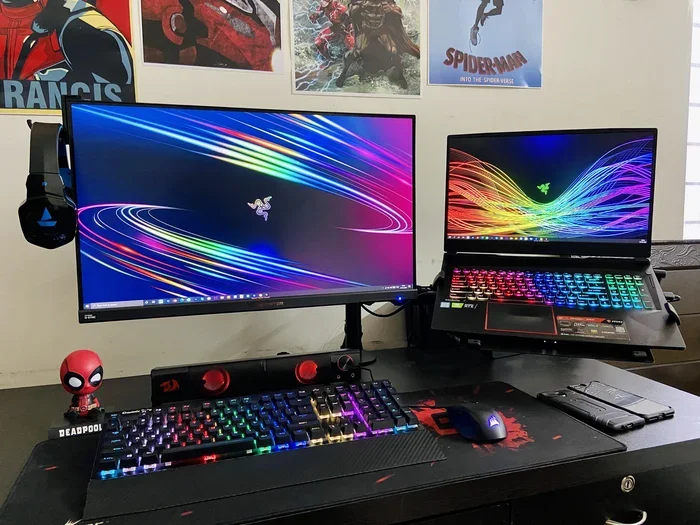
Choosing a laptop for Steam games means balancing performance, price, and portability. You need a strong processor, a dedicated graphics card, and enough RAM to handle modern titles. This guide walks you through everything you need to know to pick the right machine.
Finding the right laptop for Steam games can feel overwhelming. There are so many brands, specs, and price points to consider. But the good news is that you don’t need to be a tech expert to make a smart choice. This guide breaks everything down into simple, actionable steps. By the end, you will know exactly what to look for and how to avoid common pitfalls.
Steam is one of the biggest gaming platforms in the world. It offers thousands of titles, from indie gems to AAA blockbusters. But not every laptop can handle these games smoothly. The right machine depends on your budget, the games you want to play, and how portable you need it to be. Let’s dive into what actually matters when you are choosing a laptop for Steam gaming.
Key Takeaways
- GPU matters most: A dedicated graphics card is the single biggest factor for smooth Steam gaming.
- RAM and storage count: Aim for at least 8GB of RAM and an SSD for fast load times.
- Cooling is often overlooked: A laptop that overheats will throttle performance during long gaming sessions.
- Budget options exist: You don’t need to spend a fortune to enjoy popular Steam titles at good settings.
- Display quality enhances gameplay: Higher refresh rates and better color accuracy make a real difference.
- Upgradeability extends lifespan: Choosing a laptop you can upgrade later saves money in the long run.
📑 Table of Contents
What Makes a Laptop Good for Steam Games
Not all laptops are built for gaming. Some are designed for work, others for casual browsing. A Steam gaming laptop needs specific hardware to deliver a great experience. Here is what sets a gaming-capable machine apart from an ordinary one.
Graphics Processing Unit (GPU)
The GPU is the heart of any gaming laptop. It handles rendering, textures, and frame rates. Without a strong GPU, even simple games will stutter or lag. For Steam titles, a dedicated graphics card from NVIDIA or AMD is essential. Integrated graphics can handle older or lighter games, but they will struggle with modern releases.
Look for laptops with at least an NVIDIA GTX 1650 or RTX 3050. These cards offer solid performance for most Steam games at medium to high settings. If you want to play at 1080p with smooth frame rates, aim higher. The RTX 3060 or better will give you headroom for demanding titles.
Central Processing Unit (CPU)
The CPU works alongside the GPU to keep your game running smoothly. It handles game logic, physics, and background tasks. A weak CPU can bottleneck a powerful GPU, causing frame drops even when the graphics card is capable.
For Steam gaming, look for at least an Intel Core i5 or AMD Ryzen 5 processor. These chips offer a great balance of performance and price. If your budget allows, an i7 or Ryzen 7 will give you extra power for streaming, multitasking, and future-proofing your setup.
Memory and Storage
RAM and storage play a big role in how well your laptop handles Steam games. Modern titles demand more memory than ever before. How much RAM a laptop can have depends on the model, but 8GB is the minimum for gaming today. Ideally, you should aim for 16GB to ensure smooth performance.
Storage speed matters just as much as capacity. An SSD loads games significantly faster than a traditional hard drive. Many laptops with SSD and 16GB RAM offer the perfect balance of speed and capacity for Steam gaming. Aim for at least a 256GB SSD, though 512GB or more is better if you plan to install several large titles.
Key Hardware Specs to Look For
When comparing laptops, the spec sheet can be confusing. Here is a breakdown of the most important components for Steam gaming.
Display Quality
Your screen affects how much you enjoy your games. A Full HD (1080p) display is the standard for most gaming laptops. It offers sharp visuals without being too demanding on the GPU. If you want a more immersive experience, look for a 1440p or even 4K display, but keep in mind that higher resolutions require a stronger graphics card.
Refresh rate is another critical factor. A 60Hz screen works fine for casual gaming. But if you play fast-paced action games or competitive shooters, a 120Hz or 144Hz display will make a noticeable difference. Smoother motion means better visibility and a more responsive feel.
Battery Life and Portability
Gaming laptops tend to have shorter battery life than regular ones. When you are running demanding games, the battery drains quickly. Most gaming laptops last between 3 and 6 hours on light tasks. If portability matters to you, look for models that balance performance with battery efficiency.
Weight is another consideration. Some gaming laptops are bulky and heavy, making them hard to carry around. If you plan to game on the go, choose a thinner and lighter model. Just remember that lighter laptops sometimes sacrifice cooling or raw performance.
Keyboard and Input
You will spend hours typing and clicking during gaming sessions. A comfortable keyboard with good key travel makes a big difference. Backlit keyboards are helpful if you game in dim rooms. Some laptops also offer programmable macro keys, which can give you an edge in certain games.
If you prefer using a mouse, consider whether you will game on a surface that supports one. Using a mouse with a touchscreen laptop is possible, but a dedicated mouse pad gives you better precision and comfort during long sessions.
Cooling and Performance Considerations
Heat is the enemy of performance. When a laptop gets too hot, it slows down to protect itself. This is called thermal throttling, and it can ruin your gaming experience. A laptop for Steam games needs an effective cooling system to maintain high performance over time.
Why Overheating Matters
Gaming pushes your laptop’s hardware to its limits. The CPU and GPU generate a lot of heat, especially during long sessions. If your laptop lacks proper cooling, it will reduce its clock speeds to stay safe. This means lower frame rates, stuttering, and frustration.
Some laptops are prone to overheating more than others. Thin and light models often have smaller fans and less airflow. If you are worried about heat, you can check whether your current setup is safe. Can a laptop explode from overheating is a common concern, and while it is rare, excessive heat can still damage components over time.
Tips for Keeping Your Laptop Cool
- Use a cooling pad underneath your laptop during gaming sessions.
- Keep the vents clear and unobstructed by placing the laptop on a hard surface.
- Clean the fans and vents regularly to prevent dust buildup.
- Adjust your in-game settings to reduce the workload on your hardware.
- Monitor your laptop’s temperature using built-in tools or third-party apps.
Best Budget Options for Steam Gaming
You do not need to spend a fortune to enjoy Steam games. Several laptops offer great performance at affordable prices. Here are some tips for finding the best value.
Where to Save Money
You can cut costs by choosing a slightly older generation processor or a mid-range GPU. Many modern budget laptops still handle popular Steam titles very well. Focus on getting at least 8GB of RAM and an SSD, as these have the biggest impact on overall performance.
Refurbished laptops can also be a smart choice. They often come with warranties and cost significantly less than brand-new models. Just make sure to check the specs and condition before buying.
What to Avoid
Stay away from laptops with only 4GB of RAM or a traditional hard drive. These will struggle with modern Steam titles. Also, avoid ultra-thin laptops that prioritize style over performance. They may look sleek, but they often lack the cooling and power needed for gaming.
Tips for Optimizing Your Steam Gaming Experience
Once you have your laptop, a few simple tweaks can make a big difference. Here are some practical tips to get the most out of your setup.
Update Your Drivers
Keep your GPU drivers up to date. Manufacturers release regular updates that improve game compatibility and performance. NVIDIA and AMD both offer free tools that make this process easy.
Adjust In-Game Settings
Not every game needs to run on the highest settings. Lowering options like shadows, anti-aliasing, and draw distance can significantly boost your frame rate. You can always turn up the settings if your laptop handles them well.
Close Background Apps
Other programs running in the background take away resources from your games. Close unnecessary apps before launching Steam. This includes web browsers, music players, and any software that updates automatically.
Consider Upgrading Over Time
As new games come out, your laptop might start to feel slower. Upgrading your RAM or switching to a larger SSD can breathe new life into an older machine. Can gaming laptops run VR is a question many people ask, and the answer often depends on whether you have upgraded your components over time.
Final Thoughts on Choosing Your Steam Gaming Laptop
Choosing the right laptop for Steam games comes down to understanding what you need and what you can afford. Focus on the GPU, CPU, RAM, and storage first. These four components determine the bulk of your gaming performance. From there, consider extras like display quality, cooling, and portability.
Take your time when shopping. Read reviews, compare specs, and think about the games you actually want to play. A laptop that works great for one person might not be the best fit for you. Trust your research, and you will find a machine that delivers a great Steam gaming experience for years to come.
Remember, the best laptop is the one that meets your specific needs. Whether you are a casual player or a dedicated gamer, there is a perfect machine out there for you. Start with the basics, prioritize what matters most, and enjoy the journey of building your ideal Steam gaming setup.
Frequently Asked Questions
What is the minimum RAM needed for Steam games?
Most modern Steam games require at least 8GB of RAM to run properly. However, 16GB is recommended for a smoother experience, especially if you play demanding titles or keep multiple apps open while gaming. Having enough RAM prevents stuttering and long load times during gameplay.
Can I play Steam games on a laptop without a dedicated GPU?
Yes, but with limitations. Laptops with integrated graphics can run older or less demanding Steam titles at lower settings. Newer and more graphically intense games will likely struggle or not run at all. A dedicated GPU is strongly recommended for a good Steam gaming experience.
How important is the display refresh rate for Steam gaming?
Refresh rate matters a lot for fast-paced games like shooters or racing titles. A 144Hz display provides noticeably smoother motion compared to a standard 60Hz screen. For casual or slower-paced games, 60Hz is usually sufficient and more budget-friendly.
How do I know if a laptop will overheat during gaming?
Look at reviews and thermal test results before buying. Laptops with dual fans, heat pipes, and good ventilation tend to handle heat better. You can also monitor your laptop’s temperature during use. If it gets too hot to touch or slows down significantly, it may need better cooling solutions.
Is it worth buying a refurbished gaming laptop for Steam?
It can be a great way to save money. Refurbished laptops often cost much less than new ones while still offering solid performance. Just make sure to buy from a reputable seller, check the warranty, and verify the specs meet your gaming needs before purchasing.
What is the best screen resolution for a Steam gaming laptop?
Full HD (1080p) is the sweet spot for most gaming laptops. It offers clear visuals without putting too much strain on your GPU. If your budget allows and you have a strong graphics card, a 1440p display provides sharper images and a more immersive experience.
=== CONCLUSION ===
Choosing a laptop that can run Steam and play games does not have to be complicated. Focus on the core components like the GPU, CPU, RAM, and storage. Pay attention to cooling, display quality, and portability based on your lifestyle. With the right knowledge, you can find a machine that delivers great performance without breaking the bank. Start your search today and get ready to enjoy your favorite Steam titles on the go.