How Much Water Can Damage a Laptop
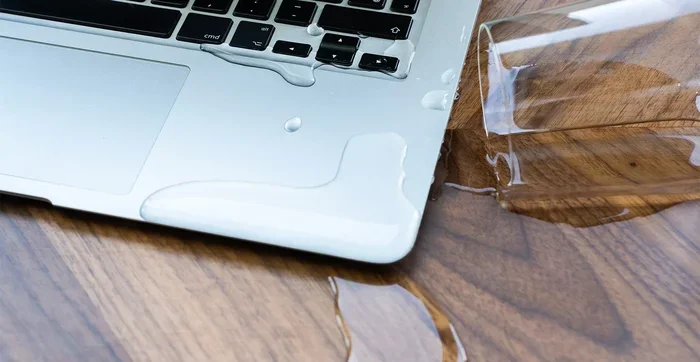
Even a small amount of water can cause serious damage to a laptop, potentially ruining the motherboard, keyboard, and internal components. Acting fast and knowing the right steps can mean the difference between a repairable issue and a total loss. This guide covers everything from immediate response to long-term recovery.
We have all been there. You are working on your laptop, sipping your morning coffee, and then — disaster. Your hand slips, and the entire cup tips over onto the keyboard. In that moment, your mind races with one question: how much water can damage a laptop?
The answer might surprise you. Water damage to a laptop can range from a minor inconvenience to a completely destroyed device. Even a small spill can seep into places you cannot see and cause problems days or even weeks later. Understanding what happens when liquid meets your laptop is the first step toward protecting your investment.
In this guide, we will walk you through exactly what water does to a laptop, how to respond in the critical first minutes, what repairs might cost, and how to prevent future damage. Whether you spilled a glass of water or your laptop fell into a sink full of water, this article has you covered.
Key Takeaways
- Even a few drops of water can short-circuit sensitive laptop components and cause lasting damage.
- Turning off the laptop immediately and disconnecting power is the single most important step after a spill.
- Do not use rice as a drying method — it is ineffective and can introduce dust into ports.
- Professional repair costs vary widely, but early intervention can save hundreds of dollars.
- Water-resistant laptops offer some protection, but no laptop is fully waterproof.
- Back up your data regularly so that liquid damage does not result in permanent data loss.
📑 Table of Contents
- What Happens When Water Gets Inside a Laptop
- How Much Water Does It Actually Take to Cause Damage?
- Immediate Steps to Take After a Water Spill
- Common Myths About Drying a Wet Laptop
- Can a Water Damaged Laptop Be Repaired?
- How to Prevent Water Damage to Your Laptop
- When to Seek Professional Help
- Conclusion
What Happens When Water Gets Inside a Laptop
Laptops are complex machines filled with sensitive electronic components. Water may seem harmless, but it is an excellent conductor of electricity. When water bridges two parts of a circuit that should not be connected, it creates a short circuit. This can instantly fry delicate parts of your laptop.
The Role of the Motherboard
The motherboard is the heart of your laptop. It connects every component together. When water reaches the motherboard, it can corrode the thin copper traces that carry electrical signals. This corrosion does not always happen immediately. Sometimes, it develops over days or weeks, slowly eating away at the connections until the laptop suddenly stops working.
Damage to the Keyboard and Internal Components
The keyboard is the most exposed part of a laptop. When liquid spills on it, the moisture seeps down between the keys and reaches the underlying membrane or circuit board. From there, it can drip further into the laptop chassis, reaching the hard drive, RAM, or battery connector. Each of these components reacts differently to water exposure.
For example, if water reaches the RAM module, it can corrode the gold contacts and cause memory failures. If it reaches the hard drive or SSD, it can cause complete data loss. This is why checking whether your laptop RAM survived a spill is so important after the device dries out.
How Much Water Does It Actually Take to Cause Damage?
Here is the honest truth: there is no safe amount of water for a laptop. Even a few drops can be harmful. However, the extent of damage depends on several factors.
Small Spills vs. Large Spills
A small spill, like a few drops from a water bottle, might only affect the keyboard surface. If you act quickly, you can often prevent the liquid from reaching deeper components. However, a large spill — such as an entire glass or cup — almost certainly means the liquid has penetrated the base of the laptop and reached internal parts.
The Type of Liquid Matters
Not all liquids are the same when it comes to laptop liquid damage. Pure distilled water is relatively less harmful because it does not contain minerals that cause corrosion. However, coffee, soda, juice, and salt water are far more dangerous. They contain sugars, acids, and salts that accelerate corrosion and leave sticky residue behind. Even a small amount of coffee spill can cause more damage than a large splash of pure water.
Here is a quick comparison of common liquids and their damage potential:
- Distilled Water: Lower corrosion risk, but still causes short circuits while wet.
- Coffee or Tea: High risk due to sugars and acids that leave conductive residue.
- Soda or Juice: Very high risk. Sugary, acidic, and extremely corrosive to circuits.
- Salt Water: Extremely corrosive. Causes rapid oxidation of metal components.
- Alcohol: Evaporates quickly and is less corrosive, but still risky when wet.
Immediate Steps to Take After a Water Spill
Time is everything when dealing with a water spill on a laptop. The first few minutes determine whether your device survives or dies. Follow these steps in order, and do not skip any of them.
Step 1: Power Off Immediately
Do not try to save your work. Do not try to close any programs. Hold down the power button and force the laptop to shut off completely. Every second the laptop stays powered on while wet increases the chance of a short circuit destroying components.
Step 2: Unplug Everything
Disconnect the power adapter, unplug any USB devices, remove external monitors, and take out any connected peripherals. If the laptop is plugged into the wall, unplug it from the wall outlet as well. Removing all power sources reduces the risk of electrical damage.
Step 3: Flip the Laptop Upside Down
Carefully turn the laptop upside down in a tent or inverted V shape. This helps prevent the liquid from spreading deeper into the device. Let gravity pull the water out through the keyboard and ports rather than letting it seep toward the motherboard.
Step 4: Remove the Battery (If Possible)
Some laptops allow you to remove the battery from the bottom. If yours does, take it out. A battery connected to a wet motherboard is a recipe for disaster. The battery provides constant power, which means even a small amount of moisture can cause ongoing electrical damage.
If you want to learn more about how power flows through your laptop, check out this guide on how much power a laptop uses when plugged in to better understand what is at risk during a liquid spill.
Step 5: Do Not Turn It On to Test
Many people make the mistake of pressing the power button after a spill to see if the laptop still works. This is one of the worst things you can do. If moisture remains inside, turning it on will likely cause a short circuit and make the damage much worse. Always let the laptop dry completely first.
Common Myths About Drying a Wet Laptop
There is a lot of bad advice floating around about what to do with a wet laptop. Let us clear up some of the most common myths.
Myth 1: Putting Your Laptop in Rice Will Save It
This is perhaps the most widespread and harmful myth. Rice does not effectively absorb moisture from inside a sealed device. In fact, rice grains and dust can get into the laptop ports and openings, causing additional problems. The moisture inside the laptop simply does not have enough time to evaporate into the rice before corrosion sets in.
Myth 2: Using a Hair Dryer on High Heat Is Fine
High heat from a hair dryer can warp plastic components, damage the screen, and push moisture deeper into the device. If you must use forced air, use a cool setting and keep the dryer at least a foot away from the laptop.
Myth 3: A Laptop Will Dry Itself Fine if You Just Leave It
While some evaporation will happen naturally, waiting too long allows the water to corrode components. Corrosion begins almost immediately upon contact. The best approach is a combination of gentle blotting with a microfiber cloth and allowing air circulation, followed by professional inspection if needed.
Can a Water Damaged Laptop Be Repaired?
The short answer is: it depends. The extent of the damage, how quickly you responded, and what type of liquid was involved all play a role in determining whether your laptop can be repaired.
Best Case Scenario
If you spilled a small amount of pure water and acted within seconds, the laptop might dry out completely without any lasting damage. Some users report their laptops working perfectly fine after a quick response and thorough drying. However, this is not guaranteed, and hidden moisture can still cause problems later.
Moderate Damage
In cases of moderate damage, you might need to replace the keyboard or a specific component. For instance, if the keyboard is ruined but the motherboard is intact, a keyboard replacement is relatively affordable. You may also want to check whether your laptop RAM was affected, since corroded RAM contacts can cause boot failures and memory errors.
Worst Case Scenario
Severe water damage, especially from sugary or salty liquids, can destroy the motherboard beyond repair. In these cases, the cost of replacement often exceeds the value of the laptop. This is why laptop insurance or a protection plan can be a lifesaver. Many third-party insurance policies cover accidental liquid damage, saving you from paying out of pocket for a full replacement.
If you are considering upgrading components after a repair, you might explore whether upgrading the RAM on your repaired laptop is a good option to restore or improve performance.
How to Prevent Water Damage to Your Laptop
Prevention is always better than cure. While accidents happen, there are several steps you can take to reduce the risk of water damage to your laptop.
Use a Spill-Resistant Keyboard Cover
A thin silicone keyboard cover can protect your laptop from accidental spills. These covers are inexpensive and do not significantly affect typing feel. They act as a barrier that catches liquid before it reaches the keyboard switches and underlying circuits.
Keep Drinks Away from Your Laptop
It sounds simple, but keeping beverages on a separate surface from your laptop makes a huge difference. Use a desk or table with enough space for both your laptop and your drink. Better yet, use a spill-proof travel mug to minimize the risk of accidental pouring.
Consider a Water-Resistant or Rugged Laptop
Some laptops come with a degree of spill protection built in. These models feature sealed keyboards and drainage channels that direct liquid away from internal components. While they are not fully waterproof, they offer significantly better protection than standard laptops. If you work in environments where spills are common, this is a worthwhile investment.
Back Up Your Data Regularly
No prevention method is foolproof. The best way to protect yourself from permanent loss is to back up your data regularly. Use cloud storage, an external hard drive, or both. If your laptop suffers water damage and the storage drive is affected, you will still have access to your important files.
When to Seek Professional Help
If your laptop has suffered significant water exposure, do not wait to see if it works on its own. Take it to a professional repair service as soon as possible. Technicians can open the laptop, clean the internal components with isopropyl alcohol, and identify damage that is not visible from the outside.
Professional laptop repair after water damage typically costs between $100 and $500, depending on the severity. Replacing a keyboard might cost $50 to $150, while a motherboard replacement can range from $200 to $800 or more. In extreme cases, a full laptop replacement is the only option, which could cost $500 to $1500 or higher.
The key takeaway is this: the faster you seek professional help, the better your chances of a successful repair. Delaying increases the risk of corrosion spreading and causing irreversible damage to multiple components.
After any repair, you may want to verify that all your components are functioning properly. You can check your current memory configuration by visiting a guide on how much RAM is good for a laptop to make sure everything is running as it should.
Conclusion
Water damage is one of the most common and preventable causes of laptop failure. Even a small amount of liquid can cause significant harm, but your response in the first few minutes can make all the difference. Remember to power off immediately, disconnect all power sources, flip the laptop upside down, and avoid common myths like the rice trick.
Prevention goes a long way. Use spill-resistant covers, keep drinks at a safe distance, and consider a water-resistant model if your work environment puts your laptop at risk. And most importantly, back up your data regularly so that no liquid disaster can take away your precious files.
If your laptop has already suffered water damage, do not panic. Act quickly, seek professional help, and explore your repair options. With the right approach, there is a good chance your laptop can be saved.
Frequently Asked Questions
Can a small drop of water damage a laptop?
Yes, even a small drop of water can damage a laptop. Water conducts electricity and can create short circuits on the motherboard or keyboard circuits. The damage may not be immediate, but corrosion can develop over time and cause the laptop to fail weeks later.
How long should I wait before turning on a laptop after a water spill?
You should wait at least 24 to 48 hours before turning on a laptop after a water spill. This gives the internal components enough time to dry completely. However, it is best to have a professional inspect the laptop before powering it on, even after drying.
Is rice really effective for drying a wet laptop?
No, rice is not an effective method for drying a wet laptop. It does not absorb moisture from inside the device, and rice dust can enter ports and openings, causing additional problems. Using silica gel packets or allowing natural air circulation is a much better approach.
Does water damage void a laptop warranty?
Most laptop warranties do not cover liquid damage. Manufacturers typically classify water damage as accidental damage, which falls outside standard warranty coverage. However, some extended protection plans and third-party insurance policies do cover accidental spills.
Can water damage to a laptop be repaired at home?
Minor water damage, such as a small spill that only affected the keyboard surface, might be manageable at home with careful drying. However, for any significant liquid exposure, professional repair is strongly recommended. Opening the laptop yourself can void warranties and risk further damage.
What is the average cost to repair a water damaged laptop?
Repair costs for water damaged laptops range from $100 for simple keyboard replacement to $500 or more for motherboard repairs. The final cost depends on the severity of the damage, the laptop model, and the specific components affected. In some cases, replacement is more cost-effective than repair.