Do Usb C Headphone Adapters Work
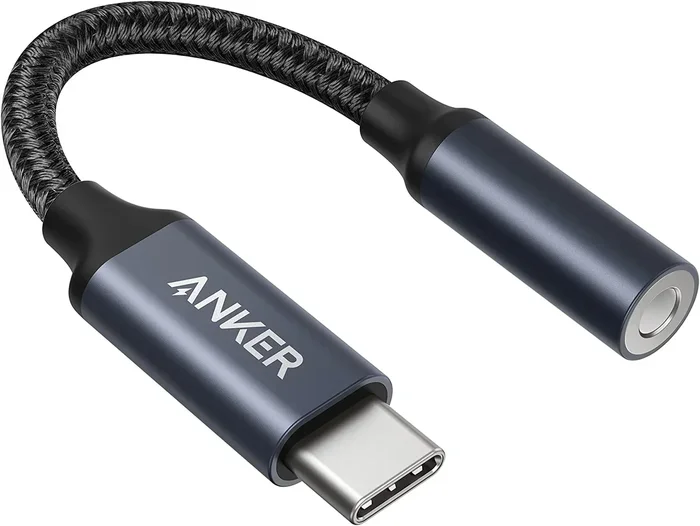
USB C headphone adapters do work and are a simple way to connect your favorite headphones to modern laptops, phones, and tablets that lack a traditional 3.5mm jack. These small USB C audio adapters convert digital signals into analog sound, letting you use wired headphones with USB C devices. Whether you need a USB C to 3.5mm adapter for your laptop or a USB C headset adapter for gaming, the right adapter solves the problem fast and affordably.
USB C has become the standard charging and data port on most modern devices. But here is the problem. Many people still love their wired headphones. They do not want to deal with Bluetooth pairing, battery life, or connection drops. So what do you do when your favorite pair of wired headphones has a 3.5mm plug and your new laptop or phone only has a USB C port?
The answer is simple. You use a USB C headphone adapter. But do these little dongles actually work? And if they do, how well? Let us walk through everything you need to know about USB C headphone adapters, from how they work to which ones to buy and what common problems to watch out for.
Key Takeaways
- USB C headphone adapters work reliably: They convert digital audio from USB C ports into analog signals your headphones can use.
- Compatibility depends on your device: Some devices need specific adapter types, so check your port and audio output before buying.
- Audio quality varies by adapter: Built-in DACs in better adapters deliver cleaner, richer sound than cheap alternatives.
- Common issues are easy to fix: Problems like no sound or static noise usually have simple solutions.
- USB C adapters work with many devices: Laptops, smartphones, tablets, and even some gaming consoles support them.
- Look for adapters with built-in DACs: A digital-to-analog converter improves sound quality significantly.
📑 Table of Contents
- What Is a USB C Headphone Adapter?
- Do USB C Headphone Adapters Really Work?
- Types of USB C Headphone Adapters
- Common Problems and How to Fix Them
- USB C Headphone Adapters vs. Bluetooth Headphones
- Quick Tips for Getting the Best Performance
- Expert Insights
- Common Mistakes to Avoid
- Do You Need a USB C Headphone Adapter?
- Conclusion
What Is a USB C Headphone Adapter?
A USB C headphone adapter is a small device that plugs into the USB C port on your laptop, phone, or tablet. It has a standard 3.5mm headphone jack on the other end. This lets you plug in wired headphones or earbuds that would not otherwise connect to a USB C device.
Inside the adapter, there is a tiny chip called a DAC, which stands for digital-to-analog converter. Your USB C device sends a digital audio signal. The DAC converts that signal into an analog sound wave that your headphones can play. Without this conversion, your headphones would not produce any sound.
Some adapters are very basic and cheap. Others include higher-quality DACs that produce much better audio. The difference is easy to hear, especially if you use good headphones.
How Does the Adapter Connect to the Device?
The adapter plugs directly into the USB C port on your device. It uses the USB protocol to receive the digital audio signal. Then it sends the converted analog signal out through the 3.5mm jack. The whole process happens almost instantly. You plug it in, and you should hear sound right away.
Most adapters are plug-and-play. This means you do not need to install any software or drivers. Just plug it in and go. However, some adapters on the market require a driver or app to work properly. This is more common with adapters that offer extra features like volume control or microphone support.
Do USB C Headphone Adapters Really Work?
The short answer is yes. USB C headphone adapters work in most situations. They are a proven, reliable way to connect wired headphones to devices that only have USB C ports. But there are some important details to understand before you buy one.
Not all adapters are the same. Some work perfectly with every device. Others only work with certain brands or operating systems. And some adapters look the same but offer very different audio quality. Let us break down the factors that determine whether a USB C audio adapter will work for you.
Device Compatibility
The first thing to check is whether your device supports audio output through USB C. Most modern laptops, smartphones, and tablets do. But some devices use the USB C port only for charging and data. They do not support audio output through USB.
Here are some common devices and their compatibility:
- MacBooks: Most MacBooks support USB C audio natively. A simple adapter works great.
- Windows Laptops: Most Windows laptops with USB C ports support audio output through USB C.
- Android Phones: Many newer Android phones support USB C headphone adapters. Check your phone specs to be sure.
- iPads: Some iPads with USB C support audio adapters. Others do not. Check your model.
- Chromebooks: Most Chromebooks support USB C audio output with a simple adapter.
If your device does not support audio through USB C, no adapter in the world will fix that. Always check your device specifications before purchasing.
Adapter Quality Matters
The quality of the USB C headphone adapter you buy makes a big difference. Cheap adapters with low-quality DACs may produce weak, tinny, or distorted sound. Better adapters with built-in DACs deliver clear, rich audio that sounds much closer to what you would hear from a dedicated audio device.
If you care about sound quality, spend a little more on an adapter with a good DAC. You will notice the difference, especially if you use headphones that cost more than $50.
Types of USB C Headphone Adapters
Not all USB C audio adapters are the same. There are several types on the market, and each one serves a slightly different purpose. Understanding the differences helps you pick the right one for your needs.
Basic USB C to 3.5mm Adapter
This is the most common type. It has a USB C plug on one end and a standard 3.5mm headphone jack on the other end. It does one thing and does it well. It converts digital audio from your USB C device into analog sound for your wired headphones.
These adapters are small, lightweight, and affordable. They work great for everyday use. If you just need to plug in your headphones and listen to music or watch videos, a basic adapter is all you need.
USB C Adapter with Microphone Support
Some USB C headset adapters include a microphone input. These adapters have both a headphone jack and a microphone jack, or they use a combined TRRS connector. They are perfect for gaming, video calls, and voice recording.
If you need to use a headset with a built-in microphone, make sure the adapter you buy supports microphone input. Not all adapters do.
USB C DAC Adapter
A USB C DAC adapter includes a higher-quality digital-to-analog converter. These adapters produce noticeably better sound than basic adapters. They are ideal for audiophiles and anyone who wants the best possible audio from their wired headphones.
DAC adapters are a bit larger and more expensive. But if sound quality matters to you, they are worth every penny. Some DAC adapters also include volume controls and other features that make them more convenient to use.
Common Problems and How to Fix Them
Even though USB C headphone adapters work well, you may run into issues from time to time. Here are the most common problems and how to solve them.
No Sound at All
If you plug in your adapter and hear nothing, try these steps:
- Make sure the adapter is fully plugged into the USB C port.
- Check your device volume and make sure it is not muted.
- Go to your device sound settings and select the USB C audio output as the default device.
- Try a different USB C port if your device has more than one.
- Unplug and replug the adapter to reset the connection.
On some devices, the operating system does not automatically switch to the adapter as the audio output. You may need to go into your sound settings and manually select it. On Windows, this is in the Sound Control Panel. On macOS, it is in the Sound Preferences.
Static or Crackling Noise
Static noise is frustrating but usually easy to fix. Try these solutions:
- Check that your headphones are plugged in fully to the adapter.
- Try a different pair of headphones to rule out a headphone problem.
- Move away from other electronic devices that may cause interference.
- Update your device audio drivers if you are on Windows.
- Try a different USB C adapter if the problem persists.
Cheap adapters are more prone to static and interference. If you keep getting noise, upgrading to a better adapter with a built-in DAC often solves the problem.
Adapter Not Recognized by Device
Sometimes your device does not recognize the adapter at all. This can happen for several reasons:
- The adapter may not be compatible with your device.
- The adapter may need a driver or firmware update.
- The USB C port on your device may be damaged or dirty.
- The adapter may be defective.
Try cleaning the USB C port with a soft brush or compressed air. If that does not work, try the adapter on a different device to see if it works there. If it does not work anywhere, the adapter is likely defective.
USB C Headphone Adapters vs. Bluetooth Headphones
Many people wonder whether they should just use Bluetooth headphones instead of buying a USB C headphone adapter. Both options have pros and cons. Here is a quick comparison:
| Feature | USB C Headphone Adapter | Bluetooth Headphones |
|---|---|---|
| Sound Quality | Excellent with good DAC | Good, but compressed |
| Latency | Zero latency | Slight delay possible |
| Battery Required | No | Yes |
| Compatibility | Works with wired headphones | Works with Bluetooth headphones only |
| Portability | Small and lightweight | Headphones must be charged |
| Cost | Low to moderate | Moderate to high |
If you already own a good pair of wired headphones, a USB C audio adapter is the smarter choice. You get better sound quality, zero latency, and no battery to charge. Bluetooth headphones are convenient, but they cannot match the audio quality of a wired pair with a good adapter.
For gaming, video editing, and music production, a USB C headphone adapter is almost always the better option. The zero latency alone makes a huge difference in these use cases.
Quick Tips for Getting the Best Performance
Here are some practical tips to get the most out of your USB C headphone adapter:
- Buy a reputable brand. Cheap no-name adapters often have poor DACs and cause audio problems. A trusted brand delivers better sound and reliability.
- Check for a built-in DAC. Adapters with built-in digital-to-analog converters produce much better sound than those without.
- Keep your adapter clean. Dust and lint can build up in the ports and cause connection issues. Clean your adapter regularly.
- Avoid cheap extension cables. They can degrade the audio signal. Use a direct connection whenever possible.
- Update your audio drivers. On Windows, keeping your audio drivers up to date prevents many common issues.
- Test with different headphones. If you have trouble, try a different pair of headphones to rule out a headphone issue.
Expert Insights
Audio engineers and tech reviewers agree that USB C headphone adapters are a practical and effective solution for connecting wired headphones to modern devices. The key is choosing the right adapter for your specific needs.
According to experts at UGR Technology, the best adapters include a dedicated DAC chip that handles the digital-to-analog conversion with minimal signal loss. This results in cleaner, more detailed sound compared to adapters that rely on the device’s internal audio processing.
When shopping for an adapter, look for these features:
- A dedicated DAC chip from a reputable manufacturer like Cirrus Logic or ESS.
- Support for high-resolution audio formats.
- A sturdy build quality with a solid USB C connector.
- Compatibility with your specific device and operating system.
- Positive user reviews and reliable customer support.
These features may cost a little more upfront, but they pay off in better sound quality and long-term reliability. A good adapter lasts for years and makes your daily listening experience much more enjoyable.
Common Mistakes to Avoid
Here are some mistakes people make when using USB C headphone adapters and how to avoid them:
- Buying the cheapest adapter you can find. Cheap adapters often have poor DACs that degrade your audio quality. You get what you pay for.
- Not checking device compatibility. Some devices do not support audio output through USB C. Always verify before you buy.
- Ignoring driver updates. On Windows, outdated audio drivers can cause adapter issues. Keep them up to date.
- Using a damaged or dirty adapter. A dirty USB C port or a bent connector can cause problems. Keep everything clean.
- Expecting the adapter to fix bad headphones. An adapter cannot improve the quality of cheap headphones. It converts the signal; it does not upgrade it.
Do You Need a USB C Headphone Adapter?
The answer depends on your situation. If you have a device with only USB C ports and you want to use wired headphones, then yes. A USB C headphone adapter is the simplest and most affordable solution.
You do not need an adapter if you already use Bluetooth headphones. But if you prefer the sound quality and reliability of wired headphones, an adapter is essential. It is also a great choice if you travel frequently and do not want to worry about charging headphones.
Gamers, musicians, and content creators will especially benefit from a quality USB C DAC adapter. The improved sound quality and zero latency make a real difference in these demanding use cases.
Conclusion
USB C headphone adapters do work, and they work well. They are a simple, affordable way to connect your favorite wired headphones to modern devices that only have USB C ports. Whether you need a basic adapter for everyday listening or a premium USB C DAC adapter for audiophile-quality sound, there is an option that fits your needs and budget.
The key is to choose a quality adapter with a good DAC, check your device compatibility, and avoid the common mistakes outlined in this guide. With the right USB C audio adapter, you can enjoy the best of both worlds: the superior sound quality of wired headphones and the convenience of modern USB C devices.
So yes, USB C headphone adapters work. And now you have all the information you need to pick the right one and get the best performance out of it. Plug in, listen, and enjoy.
Frequently Asked Questions
Can I use any USB C headphone adapter with my laptop?
Most USB C headphone adapters work with any laptop that has a USB C port and supports audio output. However, some laptops may require specific drivers or may not support audio through USB C at all. Always check your laptop specifications before purchasing an adapter to ensure compatibility.
Why does my USB C headphone adapter have no sound?
No sound is usually caused by the device not recognizing the adapter as an audio output. Check your sound settings and make sure the USB C audio output is selected as the default device. Also make sure the adapter is fully plugged in and try a different USB C port if available.
Do USB C headphone adapters affect audio quality?
The quality of the USB C audio adapter directly affects audio quality. Cheap adapters with low-quality DACs may produce weaker or tinny sound. Better adapters with dedicated DAC chips deliver clearer, richer audio. If sound quality matters to you, invest in an adapter with a good built-in DAC.
Can I use a USB C headphone adapter for gaming?
Yes, USB C headphone adapters work great for gaming. In fact, they are often better than Bluetooth for gaming because they offer zero audio latency. For the best gaming experience, look for an adapter with a built-in DAC and microphone support if you need voice chat.
Are USB C headphone adapters compatible with Android phones?
Many modern Android phones support USB C audio output and work well with USB C headphone adapters. However, not all Android phones support this feature. Check your phone specifications to confirm that your device can output audio through the USB C port before buying an adapter.
Do I need to install drivers for a USB C headphone adapter?
Most USB C headphone adapters are plug-and-play and do not require any drivers. You plug them in and they work immediately. However, some adapters with advanced features like volume controls or microphone support may need a driver or companion app. Check the product documentation before purchasing if you want to avoid software installations.