Do Wireless Hdmi Need Wifi
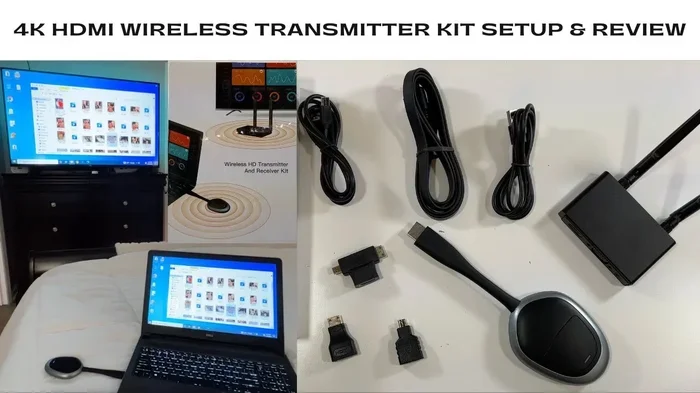
Wireless HDMI does not need WiFi to transmit audio and video signals. These systems use their own proprietary point-to-point wireless technology in the 5GHz band. You can set up a cable-free home theater without touching your WiFi network at all.
Have you ever wondered if a wireless HDMI system needs WiFi to work? The short answer is no. Wireless HDMI transmitters and receivers create their own direct wireless connection between two devices. You do not need an internet connection or a WiFi router to send high-definition video and audio from one place to another.
This confusion is very common. Many people assume that anything “wireless” must connect to WiFi. But wireless HDMI works differently. It uses proprietary wireless technology built into the transmitter and receiver. Think of it like a private bridge between two devices. No outside network is needed.
In this guide, we will break down exactly how wireless HDMI works, why it does not need WiFi, and what you should know before buying one. Whether you want to stream your TV to another room or set up a projector without running cables, this article covers everything you need.
Key Takeaways
- Wireless HDMI works independently: It does not rely on your WiFi network or internet connection.
- Proprietary wireless signals are used: Most systems transmit on dedicated 5GHz or 60GHz frequencies.
- Setup is simple: You just plug in a transmitter and receiver near your devices.
- Latency is low: Modern wireless HDMI kits offer near real-time video with minimal delay.
- Range matters: Most kits work within 30 to 100 feet depending on the model.
- Interference can happen: Walls and electronic devices may weaken the signal.
- No internet is required: You do not need an active WiFi connection for wireless HDMI to function.
📑 Table of Contents
What Is Wireless HDMI?
Wireless HDMI is a system that sends high-definition audio and video signals through the air instead of using a physical cable. It typically includes two parts: a transmitter and a receiver. You plug the transmitter into your source device, like a laptop or cable box. Then you plug the receiver into your display, like a TV or projector.
The transmitter sends the signal wirelessly to the receiver. This gives you the same quality you would get from a standard HDMI cable. The big difference is that there are no cables running across your floor or walls. It is a clean, cable-free setup that looks great and works well.
Most wireless HDMI kits support resolutions up to 4K or even 8K. They also carry surround sound audio. The range varies by model, but most work within 30 to 100 feet. Some premium systems can go even further.
How Wireless HDMI Differs From WiFi Streaming
It is important to understand the difference between wireless HDMI and WiFi streaming. WiFi streaming uses your home network to send content. Apps like Netflix or YouTube use WiFi to pull video from the internet. Wireless HDMI does not use the internet at all. It sends a direct, real-time signal from one device to another.
With WiFi streaming, you depend on your network speed and stability. If your WiFi is weak, your video may buffer or drop in quality. With wireless HDMI, the signal goes straight from point A to point B. There is no buffering from the internet because there is no internet involved.
This is similar to how some devices work without needing external connections. For example, how trail cameras work without wifi shows that many wireless devices operate independently of WiFi networks. They use their own dedicated signals to function.
How Does Wireless HDMI Work Without WiFi?
Wireless HDMI systems use point-to-point wireless technology. This means the transmitter talks directly to the receiver. They do not need a middleman like a WiFi router. The signal travels through the air on a specific frequency that is reserved for this purpose.
Most wireless HDMI systems operate on the 5GHz band. Some newer models use the 60GHz band. These frequencies are different from your home WiFi. Your WiFi typically runs on 2.4GHz or 5GHz, but the wireless HDMI system uses its own dedicated channel within that range. It does not share bandwidth with your other devices.
The transmitter encodes the HDMI signal into a wireless format. The receiver decodes it back into a standard HDMI signal. This all happens in real time. You get full HD or 4K video with very little delay. The process is fast and efficient because it does not rely on any external network.
The Role of Proprietary Wireless Protocols
Each wireless HDMI brand uses its own proprietary wireless protocol. This is a custom-built communication method designed specifically for sending high-bandwidth video and audio. Brands like WirelessHD, WHDI, and Miracast each have their own approach.
These proprietary protocols are optimized for low latency and high quality. They are not the same as your WiFi protocol. That is why wireless HDMI does not need WiFi. The system is self-contained. It carries everything it needs within the transmitter and receiver pair.
Think of it like a private radio channel. Your WiFi router broadcasts on a shared channel that many devices use. Wireless HDMI uses its own private channel that only the transmitter and receiver can access. This keeps the signal strong and interference-free.
Do You Need Internet for Wireless HDMI?
The short answer is no. You do not need internet or WiFi for wireless HDMI to work. The system creates its own closed wireless connection. As long as the transmitter and receiver are powered on and within range, they will send and receive the signal.
Some people confuse wireless HDMI with smart streaming devices. A device like a Roku or Chromecast needs WiFi to stream content from the internet. Wireless HDMI just moves an existing HDMI signal from one place to another. It does not access the internet.
This makes wireless HDMI great for situations where you do not have WiFi access. For example, you might want to project a presentation in a room with no wireless network. Or you might want to send video to a screen in a garage or backyard. Wireless HDMI works in all these cases because it does not depend on any external connection.
This is also similar to how some devices function without needing specific external conditions. Just like do solar powered cameras need direct sunlight is a common question about device independence, people often ask whether wireless devices need a network. The answer is often no.
Benefits of Using Wireless HDMI
Wireless HDMI offers several real advantages over traditional cables and WiFi streaming. Here are the main benefits you get from using a wireless HDMI system:
- No cables needed: You eliminate the hassle of running long HDMI cables across rooms or through walls.
- Clean setup: Your living space looks tidier without cables stretching everywhere.
- High quality: You get the same picture and sound quality as a wired HDMI connection.
- Low latency: Modern wireless HDMI systems have very little delay, making them great for gaming and live video.
- No internet required: You do not need WiFi or an active internet connection.
- Easy to set up: Most kits plug and play with no software or network configuration needed.
- Flexible placement: You can place your TV or projector anywhere within range of the transmitter.
Wireless HDMI vs. WiFi Streaming: A Quick Comparison
It helps to compare wireless HDMI directly with WiFi streaming. Here is a side-by-side look at how they differ:
- Connection type: Wireless HDMI uses a direct point-to-point link. WiFi streaming uses your home network.
- Internet needed: Wireless HDMI does not need internet. WiFi streaming does.
- Signal quality: Wireless HDMI maintains full HDMI quality. WiFi streaming may compress the signal.
- Latency: Wireless HDMI has very low latency. WiFi streaming can have higher delays.
- Range: Wireless HDMI works within 30 to 100 feet. WiFi streaming depends on your router range.
- Setup complexity: Wireless HDMI is simple plug-and-play. WiFi streaming requires app setup and network pairing.
For most people who want to send a clean HDMI signal without cables, wireless HDMI is the better choice. It gives you reliability and quality that WiFi streaming simply cannot match.
Common Wireless HDMI Problems and How to Fix Them
While wireless HDMI is straightforward, you may run into a few issues. Here are the most common problems and simple solutions.
Signal Interference
Wireless HDMI signals can be disrupted by other electronic devices. Microwaves, cordless phones, and even Bluetooth devices can cause interference. If your video flickers or drops out, try moving the transmitter and receiver away from other electronics.
Short Range
Every wireless HDMI kit has a maximum range. Walls, doors, and furniture can weaken the signal. If you are pushing the limits of the range, try to keep the path between the transmitter and receiver as clear as possible. Avoid placing the signal path through thick concrete walls.
Latency or Delay
Some wireless HDMI systems have a slight delay. This is usually not noticeable for watching movies. But if you are using it for gaming or live presentations, even a small delay can be a problem. Look for systems that advertise low latency or “zero latency” performance.
No Signal After Setup
If you get no picture after connecting everything, try these steps. First, make sure both the transmitter and receiver are powered on. Second, check that the HDMI cables from your source device and display are secure. Third, try unplugging both units and plugging them back in. A simple reset often fixes the issue.
What to Look for When Buying Wireless HDMI
Not all wireless HDMI kits are the same. Here are the key features to consider before you buy:
- Resolution support: Make sure the kit supports 1080p, 4K, or 8K depending on your needs.
- Range: Check the advertised range and compare it to the distance you need.
- Latency: If you plan to game or present live, look for low-latency models.
- Audio support: Ensure the kit supports your audio format, like Dolby Atmos or surround sound.
- Brand reputation: Stick with well-known brands that offer good customer support.
- Price: Wireless HDMI kits range from affordable to premium. Set a budget before shopping.
Reading reviews from other buyers can also help you pick the right kit. Look for feedback on signal quality, ease of setup, and long-term reliability.
Final Thoughts
Wireless HDMI is a fantastic technology that gives you freedom from cables without sacrificing quality. The most important thing to remember is that wireless HDMI does not need WiFi. It uses its own dedicated wireless connection to send video and audio directly from your source device to your display.
Whether you are setting up a home theater, giving a presentation, or gaming on a big screen, wireless HDMI makes it easy. You get high-quality performance without the hassle of cables or the dependency on a WiFi network. It is a simple, reliable solution for anyone who wants a cleaner, more flexible setup.
Before you buy, make sure you understand the range, resolution, and latency of the kit you choose. With the right system, you will enjoy a seamless wireless experience every time.
Frequently Asked Questions
Do wireless HDMI transmitters need WiFi to work?
No, wireless HDMI transmitters do not need WiFi. They create their own direct wireless connection between the transmitter and receiver using proprietary technology. You can use them without any internet connection at all.
Can I use wireless HDMI in a room with no WiFi?
Yes, you absolutely can. Wireless HDMI works independently of WiFi. It sends a direct signal between two devices, so an internet connection is not required. This makes it great for rooms or locations without wireless networks.
Is wireless HDMI the same as WiFi streaming?
No, they are very different. WiFi streaming uses your home network to pull content from the internet. Wireless HDMI sends a direct HDMI signal from one device to another without using the internet. The quality and reliability are typically much better with wireless HDMI.
How far can wireless HDMI reach?
Most wireless HDMI kits work within 30 to 100 feet. The exact range depends on the model and the environment. Walls and obstacles can reduce the effective range, so keep the path between devices as clear as possible.
Does wireless HDMI have any delay?
Most modern wireless HDMI systems have very low latency, often imperceptible to the human eye. However, some budget models may have noticeable delay. If you are gaming or doing live presentations, look for kits that specifically advertise low or zero latency.
What frequency does wireless HDMI use?
Most wireless HDMI systems operate on the 5GHz band. Some newer models use the 60GHz band. These frequencies are dedicated to video transmission and do not interfere with your regular WiFi network.
=== CONCLUSION ===
Wireless HDMI does not need WiFi to transmit high-quality video and audio. It uses its own proprietary point-to-point wireless connection that works independently of your home network. This makes it a reliable and high-quality alternative to running long HDMI cables across your home or office.
Now that you know the truth about wireless HDMI and WiFi, you can make a confident buying decision. Look for a kit that matches your resolution needs, offers good range, and fits your budget. With the right wireless HDMI system, you will enjoy a clean, cable-free setup that delivers excellent performance every time.