How Do Speakers Get Blown
Speakers get blown when they receive too much power, face physical damage, or suffer from poor wiring. This guide explains exactly how do speakers get blown and what you can do to prevent it. You will learn the warning signs, common mistakes, and easy fixes. Understanding speaker care helps you enjoy clear sound for years. Protect your audio investment with simple, proven tips.
Key Takeaways
- Overpowering causes damage: Sending too much amplifier power through speakers is the fastest way to blow them out.
- Clipping distorts sound: Pushed amplifiers create clipped signals that fry speaker coils and cones quickly.
- Physical stress matters: Dropping speakers, exposing them to heat, or forcing heavy bass strains internal parts.
- Poor wiring risks failure: Wrong gauge wires, loose connections, and reversed polarity can overheat or damage drivers.
- Watch for warning signs: Crackling, buzzing, distorted bass, and sudden volume drops often mean a speaker is failing.
- Match gear properly: Pairing amps and speakers with compatible power ratings prevents most blowing issues.
- Regular care extends life: Clean connections, moderate volume, and proper storage keep your audio system running strong.
📑 Table of Contents
How Do Speakers Get Blown? The Main Causes
Speakers are built to handle sound, but they have clear limits. When you push them past those limits, parts fail. Many people ask how do speakers get blown because the damage often happens slowly. You might not notice the problem until the sound changes. Understanding the main causes helps you avoid costly mistakes.
The most common cause is too much power. Every speaker has a maximum power rating. When an amplifier sends more energy than the speaker can handle, the voice coil overheats. The coil sits inside a magnetic gap and moves back and forth to create sound. Too much heat warps the coil or melts the surrounding material. Once that happens, the speaker can no longer move smoothly. You will hear distortion, buzzing, or complete silence.
Another major cause is clipping. Clipping happens when an amplifier runs out of clean headroom. The signal gets cut off at the top and bottom. This creates a harsh, squared waveform instead of a smooth wave. That sharp waveform forces the speaker cone to jump suddenly. The sudden movement stresses the suspension and the coil. Over time, clipping tears internal parts apart. Even moderate volume can cause clipping if your amp is too small for the job.
Mechanical stress also plays a big role. Speakers move air to create sound. Heavy bass demands large cone movement. If you play deep bass at high volume for long periods, the cone travels too far. This is called over-excursion. The cone can hit the frame, tear the surround, or detach from the coil. Physical drops, rough handling, and poor mounting add more stress. Heat and moisture can also weaken glue, foam, and paper parts.
Power Mismatch and Amplifier Stress
Power mismatch is a silent killer. Many buyers assume bigger amps always mean better sound. That is not true. A massive amp can fry a small speaker if you turn it up too high. A tiny amp can also cause damage because it clips easily. You need a balanced setup. The amplifier should deliver clean power within the speaker range.
Think of the speaker as a muscle. Light exercise makes it stronger. Heavy strain tears it. Clean power at normal levels keeps the voice coil cool. Dirty power from a clipping amp burns it. The same idea applies to subwoofers, tweeters, and full-range drivers. Each driver has its own limits. Tweeters are especially fragile because they handle high frequencies with small, light parts. Even a short burst of clipped power can damage them.
Clipping, Distortion, and Heat Buildup
Heat is the enemy of speaker life. Voice coils are usually made of copper or aluminum wire. They resist electrical flow and create heat as they work. Normal use keeps heat manageable. Clipping and overpowering push heat past safe levels. The coil expands, loses clearance, and rubs against the magnet gap. That rubbing creates more heat and more damage. Soon the speaker starts crackling.
Distortion is another warning sign. If your music sounds fuzzy at high volume, the system may be struggling. Distortion can come from the amp, the speaker, or both. A blown speaker often sounds muddy in the bass and harsh in the highs. You may notice rattling, buzzing, or a loss of clarity. These sounds mean parts are no longer moving the right way. Ignoring them usually makes the damage worse.
How Do Speakers Get Blown From Daily Use?

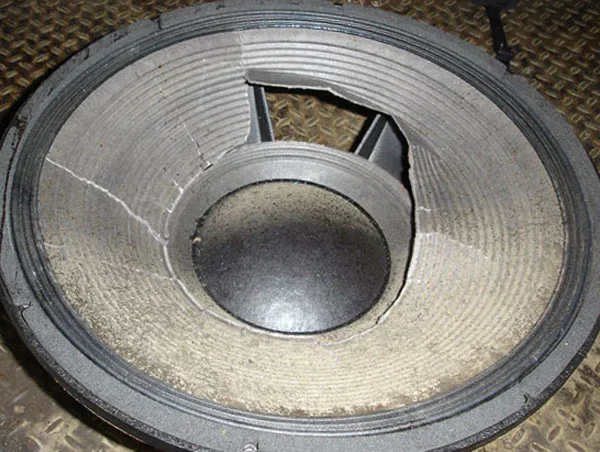
Visual guide about blown speaker cone closeup
Image source: thumbs.dreamstime.com
You do not need a huge concert system to damage speakers. Everyday habits can cause problems too. Many people blow speakers without realizing it. The damage builds up over weeks or months. Small mistakes become big failures. Learning better habits protects your gear.
One common habit is turning the volume up too high for too long. Loud playback forces the cone to move constantly. The coil heats up faster than it can cool down. If you enjoy loud music, give the system breaks. Let the speakers rest between long sessions. This simple step reduces heat stress.
Another issue is poor source quality. Low-quality audio files, bad streaming settings, and damaged recordings can contain harsh peaks. Those peaks may push your amp into clipping even at moderate volume. Clean sources help your system stay smooth. Good recordings also sound better, so your speakers work less hard to reproduce messy signals.
Volume Habits That Damage Drivers
Volume habits matter more than many people think. Sudden volume jumps are risky. If you start quiet and then crank the knob fast, the amp may spike. That spike can shock the speaker. A gradual volume increase is safer. It gives the system time to settle.
Bass-heavy listening also needs care. Deep bass feels great, but it asks a lot from the driver. If your speaker is not designed for heavy low-end output, it will strain. You may hear flapping, rattling, or loose vibration. Those sounds mean the cone is reaching its limit. Lower the bass slightly or use a speaker built for that workload.
Environmental Factors and Physical Stress
Environment affects speaker life too. Heat dries out foam surrounds and weakens adhesives. Cold can make some materials brittle. Moisture can corrode terminals and damage coils. Dust gets into the magnet gap and creates friction. Even direct sunlight can fade and crack outer materials.
Physical handling matters as well. Portable speakers get dropped. Home speakers get bumped during cleaning. Car speakers vibrate in rough vehicles. All of these events add stress. A strong enclosure helps, but it does not stop every impact. Mount speakers securely. Use proper brackets. Avoid placing heavy objects near them.
How Do Speakers Get Blown by Wiring and Setup Mistakes?
Wiring problems are often overlooked. People focus on amps and speakers, but the connection path matters too. Bad wiring creates resistance, heat, and signal loss. In some cases, it can even cause driver failure. A good setup starts with proper cables and clean connections.
Wire gauge is important. Thin wires struggle with high current. They heat up and reduce power delivery. The amp may work harder, and the speaker may not get clean power. Use the right wire thickness for your run length and system power. Longer runs usually need thicker wire.
Loose connections are another risk. A poor terminal contact creates arcing and heat. It also causes intermittent sound. You might hear popping or crackling when the connection shifts. Tighten terminals properly. Check them from time to time. Clean corrosion with a suitable contact cleaner if needed.
Impedance Mismatch and Power Handling
Impedance mismatch can cause trouble. Speakers have a rated impedance, often four ohms, eight ohms, or similar values. Amplifiers are designed to work with certain loads. If the load is too low, the amp may overheat or shut down. If the load is too high, the amp may deliver less power than expected. Either way, the system can behave badly.
Power handling ratings also need attention. RMS power is the continuous level a speaker can handle. Peak power is a short-term maximum. Many people focus on peak numbers and get misled. RMS is the more useful guide. Match your amp output to the speaker RMS range for safer performance. You do not need exact numbers, but you do need a sensible balance.
Common Setup Errors to Avoid
Here are some frequent setup mistakes:
- Using very thin wire for long runs
- Leaving terminals loose or dirty
- Mixing speakers with very different impedance in one channel
- Turning up the amp to fix weak source audio
- Placing speakers where walls or corners overboost bass
- Ignoring ventilation around hot amplifiers
Each mistake can reduce performance and increase risk. A careful setup prevents many problems before they start.
How To Check If Speakers Are Blown
Sometimes you need to confirm damage. You may suspect a problem, but you want to be sure. There are simple checks you can do at home. These tests help you understand what is happening. If you want a deeper walkthrough, you can also read our guide on how to check if speakers are blown.
Start with a careful listening test. Play music you know well. Use a moderate volume at first. Listen for distortion, buzzing, or missing frequencies. Then slowly raise the volume. If the sound gets harsh quickly, something may be wrong. Compare both left and right channels if you have a stereo setup. A bad driver often stands out against a good one.
Next, inspect the speaker visually. Look at the cone, surround, and dust cap. Check for tears, cracks, or uneven movement. Gently press the cone with very light pressure if the speaker is off and not powered. It should move smoothly and return evenly. Scraping or sticky movement can mean coil damage. Do not press hard. You can make a real problem worse.
Visual Signs of Damage
Visual checks reveal a lot. Common signs include:
- Torn foam surround
- Separated cone edges
- Burn marks near terminals
- Melted or warped voice coil area
- Rattling parts inside the enclosure
Some damage is obvious. Some is hidden. A speaker can sound bad even when it looks fine. That is why listening tests matter too.
Sound Tests and Listening Checks
Use familiar tracks with clear vocals, steady bass, and bright highs. These elements make problems easier to hear. If vocals sound fuzzy, the midrange may be strained. If bass sounds loose or weak, the woofer may be damaged. If highs crackle, the tweeter may be failing. Swap drivers or channels if possible. This helps isolate the issue.
You can also test with a gentle tone generator or test track. Keep volume low. Listen for smooth response instead of loud output. A blown speaker often behaves unevenly. It may sound weak in one range and harsh in another. That mismatch is a strong clue.
How Long Do Speakers Last and When To Replace Them
Speaker lifespan depends on use, build quality, and care. Some speakers last many years with light use. Others fail sooner because they were pushed hard. If you are wondering how long do speakers last, the answer is simple: it varies. Good habits can double or triple the useful life.
A well-built speaker used at moderate levels can last a long time. The surround may wear first, especially in foam designs. Voice coils can fail if they overheat often. Tweeters can burn out from clipped highs. Woofers can tear from over-excursion. Each part has its own weak point. Regular care reduces the chance of early failure.
Repair vs Replacement Decisions
Not every problem means you need a full replacement. Some issues are repairable. A torn surround may be fixable. A loose terminal may only need cleaning. But a burnt voice coil is harder to deal with. Re-coning is possible in some cases, but it requires skill and the right parts. For many people, replacement is easier and more reliable.
Consider these points before deciding:
- Is the speaker still under warranty?
- Is the damage limited to one replaceable part?
- Is the rest of the speaker in good condition?
- Will a repair cost less than a new speaker?
- Do you need better performance than the old model offers?
If the speaker is old and weak, upgrading may make more sense. Newer models can offer better clarity, power handling, and durability.
Upgrading Your Setup Safely
If you want better sound, upgrade with balance in mind. Choose speakers that match your room size and listening habits. Pick an amplifier that delivers clean power without strain. Use proper wiring and secure mounting. If you enjoy loud music or heavy bass, select drivers built for that demand.
A smarter setup does not just sound better. It also lasts longer. You reduce the chance of asking how do speakers get blown because your gear stays within safe limits. That means less distortion, less heat, and fewer repairs.
Quick Tips To Prevent Speaker Damage
You can protect your speakers with a few simple habits. These tips work for home audio, car audio, and portable systems.
- Keep volume at a sensible level for long listening sessions
- Use clean audio sources with stable levels
- Match amplifier power to speaker ratings
- Avoid constant clipping and sudden volume spikes
- Check wire connections and terminal tightness regularly
- Give speakers space to breathe and cool down
- Store portable speakers away from heat and moisture
Common Mistakes To Avoid
Many speaker problems come from repeated small errors. Avoid these habits:
- Running an underpowered amp at max volume
- Ignoring distortion and hoping it will go away
- Using damaged cables or corroded connectors
- Mounting speakers loosely in vibrating spaces
- Playing extreme bass on drivers not meant for it
These mistakes add stress. Stress leads to failure. Better habits save money and protect sound quality.
Expert Insights on Speaker Care
Experienced audio users focus on control, not just power. Clean signal flow matters. Stable volume matters. Proper ventilation matters. A good system should sound smooth at normal levels. If you need extreme volume all the time, the setup may be wrong for the room or the speakers.
It also helps to think about usage patterns. Background listening is easier on speakers than party-level playback. If you listen often, give the system breaks. If you host events, use speakers designed for that load. Matching the tool to the job is one of the best ways to prevent damage.
Key Takeaways for Long-Term Speaker Health
Here is the simplest way to think about speaker care:
- Use clean power within safe limits
- Watch for distortion and heat buildup
- Protect speakers from physical and environmental stress
- Check wiring and connections often
- Replace or repair problems early
These steps reduce the chance of blowouts. They also improve daily sound quality.
Final Thoughts on How Do Speakers Get Blown
Speakers fail when they are pushed past their design limits. Too much power, clipping, bad wiring, and physical stress all play a part. The good news is that most of these problems are preventable. If you understand how do speakers get blown, you can make smarter choices with your audio gear. Listen carefully, match your equipment well, and handle your speakers with care. That approach keeps your sound clear and your system reliable for the long run.
Frequently Asked Questions
How do speakers get blown most often?
Speakers most often get blown from too much amplifier power, clipped signals, or long periods of heavy use. These problems overheat the voice coil and strain the cone, surround, and suspension.
Can a speaker be blown and still make sound?
Yes, a damaged speaker can still produce sound, but the audio may sound distorted, buzzy, or weak. The speaker might work at low volume and fail when the level rises.
What does a blown speaker sound like?
A blown speaker often sounds fuzzy, rattling, or unbalanced. You may hear crackling highs, loose bass, or a sudden drop in volume on one side.
Does turning the volume up too high always blow speakers?
Not always, but it increases the risk a lot. Loud volume can overheat the coil and cause over-excursion, especially if the amp clips or the speaker is not built for that load.
How can I prevent my speakers from blowing out?
Match your amplifier to the speaker power range, avoid constant clipping, and keep volume at reasonable levels. Check wiring, tighten connections, and give the speakers room to cool.
Should I repair a blown speaker or replace it?
It depends on the damage and the speaker value. A torn surround or loose terminal may be repairable, but a burnt voice coil often means replacement is the better choice.