Is It Worth Spending Money on Hdmi Cables
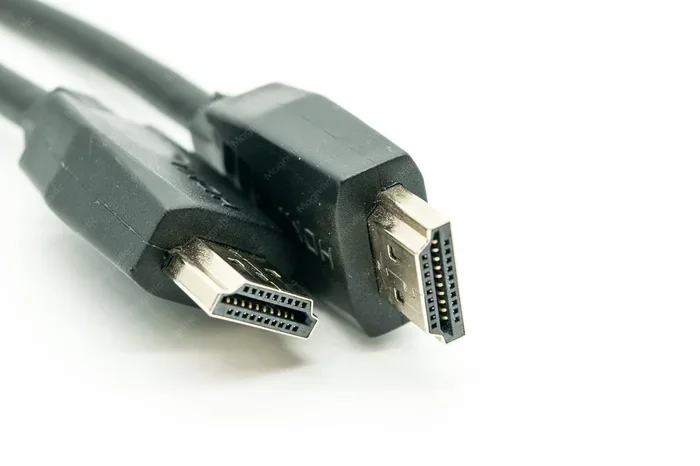
You don’t need to spend a fortune on HDMI cables. Most standard cables handle 4K and even 8K just fine. The real difference comes down to cable length, certification, and your specific setup needs.
HDMI cables connect almost every modern entertainment device. From your gaming console to your smart TV, these small cables carry both audio and video signals. But here’s the big question most people ask: is it worth spending money on HDMI cables?
The short answer is: it depends. A basic HDMI cable costs just a few dollars and works perfectly for most people. But a premium HDMI cable can run you twenty dollars or more. That’s a huge price gap for something that looks basically the same on the outside. So why do some cables cost so much, and do you really need to spend extra?
In this guide, we’ll break down everything you need to know. We’ll cover cable types, what certifications mean, and when it actually makes sense to spend more. By the end, you’ll know exactly what kind of HDMI cable you need and where you can save money.
Key Takeaways
- Standard HDMI cables work great for most setups: You rarely need to pay premium prices for everyday use.
- Cable certification matters more than brand name: Look for HDMI Premium High Speed certification to ensure quality.
- Longer cables may need better shielding: Cables over 15 feet can benefit from higher quality construction.
- HDMI 2.1 cables are worth it for gamers: If you need 4K at 120Hz or VRR, invest in a certified HDMI 2.1 cable.
- Expensive doesn’t always mean better: Many overpriced cables offer no real performance gain over budget options.
- Check your devices first: Match your cable to your TV, console, or PC capabilities before buying.
- Save money by buying smart: Reputable budget brands often deliver the same performance as luxury brands.
📑 Table of Contents
- What Does an HDMI Cable Actually Do?
- Types of HDMI Cables and What You Need to Know
- When Is It Worth Spending Money on HDMI Cables?
- When Is Spending Extra on HDMI Cables NOT Worth It?
- HDMI Cable Certifications Explained
- Quick Tips for Buying the Right HDMI Cable
- Common Mistakes People Make When Buying HDMI Cables
- How to Tell If Your Current HDMI Cable Is Holding You Back
- The Bottom Line: Is It Worth Spending Money?
What Does an HDMI Cable Actually Do?
An HDMI cable sends digital audio and video from one device to another. Think of it like a highway for data. Your Blu-ray player, laptop, or game console sends a signal through the cable to your display. The cable doesn’t “improve” the signal. It just carries it from point A to point B.
Here’s something many people don’t realize. HDMI cables are digital. That means the signal either arrives perfectly or it doesn’t arrive at all. There’s no in-between. Unlike analog cables, you won’t get a “slightly better” picture from a more expensive cable. The signal is either perfect or there’s no signal at all.
So why do people pay so much for premium options? Often, it’s because of marketing and branding. A flashy package and a fancy name don’t change the digital signal. But there are some real situations where cable quality does matter, and we’ll get into those below.
Types of HDMI Cables and What You Need to Know
Not all HDMI cables are the same. There are different versions designed for different purposes. Understanding these categories helps you make a smart buying decision without overspending.
Standard HDMI Cable
A standard HDMI cable handles resolutions up to 1080p. This is fine for older TVs and basic setups. If you have a 1080p monitor or an older television, a standard cable will work perfectly. These cables are cheap and widely available. For most casual users, this is all you need.
High Speed HDMI Cable
A high-speed HDMI cable supports 4K resolution at 30Hz or 60Hz. This covers most modern TVs and monitors. If you watch streaming content or play games on a 4K TV, this is the cable you want. High-speed cables are still affordable, usually under ten dollars for a good one.
Premium High Speed HDMI Cable
Premium High Speed cables support 4K at 60Hz with higher bandwidth. They also include better shielding to reduce interference. These cables are certified by the HDMI Licensing Administrator. Look for the official certification label on the packaging. This is where spending a little extra actually makes sense.
Ultra High Speed HDMI Cable (HDMI 2.1)
Ultra High Speed cables support 8K resolution and 4K at 120Hz. They also handle features like Variable Refresh Rate (VRR) and Auto Low Latency Mode (ALLM). These cables are essential for next-gen gaming. If you own an PlayStation 5, Xbox Series X, or a high-end gaming PC, an HDMI 2.1 cable is worth considering.
When Is It Worth Spending Money on HDMI Cables?
Now let’s get to the heart of the question. Are there situations where paying more actually makes sense? Yes, but only in specific cases. Here’s when spending extra on a premium HDMI cable is justified.
You Need HDMI 2.1 Features for Gaming
If you’re a serious gamer, an Ultra High Speed HDMI cable is a smart investment. Modern consoles and PCs support 4K at 120Hz. This requires an HDMI 2.1 connection. A certified HDMI 2.1 cable ensures you get the full frame rate and resolution your device supports. Without it, you might miss out on smoother gameplay.
Think of it this way. If you spent five hundred dollars on a gaming setup, spending fifteen dollars on the right cable is a small price to pay. It unlocks the full potential of your hardware. This is very similar to how are premium case fans worth it for your PC build. Small upgrades can make a big difference in performance.
You Have Long Cable Runs
Cable length matters more than most people think. If your HDMI cable runs longer than 15 feet, signal degradation becomes a real concern. A longer cable needs better shielding and construction to maintain a strong signal. In this case, a higher-quality cable is not a waste of money. It’s a necessity.
For runs between 10 and 25 feet, look for cables with braided shielding and gold-plated connectors. These features reduce interference and ensure a stable connection. For runs over 25 feet, consider an active HDMI cable with a built-in signal booster.
You’re Setting Up a Professional Display
If you work with video editing or professional displays, cable quality matters. Color accuracy and signal integrity are critical in these environments. A certified premium cable ensures no data loss during transmission. For home offices and creative studios, this extra investment pays off in reliability.
When Is Spending Extra on HDMI Cables NOT Worth It?
On the flip side, there are many situations where expensive HDMI cables are a waste of money. Knowing when to save cash is just as important as knowing when to spend.
For Short Distances Under 6 Feet
If your devices sit close together, any decent HDMI cable will work. A six-foot cable under ten dollars handles 4K perfectly for most setups. You’re paying for the signal quality you already get for free with digital technology. Don’t fall for the myth that a sixty-dollar cable looks better than a ten-dollar one at short distances.
When You’re Paying for Brand Name Only
Some HDMI cables cost extra because of the brand name, not the quality. Monster cables and similar luxury brands often charge a premium for the logo. The actual performance difference between a fifty-dollar brand-name cable and a ten-dollar certified cable is virtually nonexistent for most users.
Do your research before buying. Look for certification labels rather than brand reputation. Many lesser-known brands offer excellent quality at a fraction of the price. Just like with are expensive office chairs worth it, sometimes you’re paying for the name, not the product.
When Your Devices Don’t Support High Resolution
If your TV only supports 1080p, there’s no benefit to buying an Ultra High Speed HDMI 2.1 cable. Match your cable to your device’s capabilities. Buying a top-tier cable for an older setup is like putting racing tires on a bicycle. It won’t make your ride faster.
HDMI Cable Certifications Explained
The HDMI Licensing Administrator created certification programs to help consumers make informed choices. These labels tell you exactly what a cable can handle. Here’s what the key certifications mean.
| Certification | Max Resolution | Best For |
|---|---|---|
| Standard HDMI | 1080p | Basic setups, older devices |
| High Speed HDMI | 4K at 30Hz | Most home entertainment |
| Premium High Speed | 4K at 60Hz | Modern TVs, streaming |
| Ultra High Speed (HDMI 2.1) | 8K at 60Hz / 4K at 120Hz | Gaming, professional use |
Always check for the official certification label. This guarantees the cable meets specific performance standards. Cables without certification may claim high speeds but fail to deliver. Stick with certified products from reputable sellers.
Quick Tips for Buying the Right HDMI Cable
Here are some practical tips to help you buy the right HDMI cable without overspending:
- Check your device specs first. Know what resolution and features your TV or monitor supports before buying a cable.
- Look for the HDMI certification label. This is the most reliable indicator of cable quality.
- Don’t overpay for gold-plated connectors. They reduce corrosion but don’t improve signal quality for most users.
- Buy from reputable retailers. Avoid random sellers on marketplaces with suspiciously low prices.
- Measure your cable run first. Buy the right length. Don’t use excessively long cables if you don’t need them.
- Consider cable management. Braided cables are more durable and easier to route behind furniture.
- Read reviews before buying. Even budget brands can have excellent products based on real user feedback.
These simple steps save you money and ensure you get a cable that actually works for your setup. A little research goes a long way in avoiding unnecessary expenses.
Common Mistakes People Make When Buying HDMI Cables
Avoid these common pitfalls to make a smarter purchase decision.
Buying the Most Expensive Option
Many people assume expensive equals better. This is rarely true with HDMI cables. A twenty-dollar certified cable often performs identically to a eighty-dollar luxury cable. Save your money for upgrades that actually matter, like a better display or more RAM. Speaking of which, if you’re upgrading your laptop, check out what amount of RAM is good on a laptop before spending on cables.
Ignoring Cable Version Compatibility
An HDMI 2.1 cable works with older devices. But an older cable won’t unlock HDMI 2.1 features on newer devices. Always match the cable version to the newest device in your setup. This future-proofs your connection and avoids the need to replace cables later.
Choosing the Wrong Length
Too short means you can’t position your devices comfortably. Too long creates unnecessary cable clutter and potential signal issues. Measure your setup carefully and buy the right length the first time. If you need to go beyond standard lengths, consider an active extension cable.
Falling for Marketing Hype
Terms like “oxygen-free copper” and “dual-layer shielding” sound impressive. But for most home setups, these features provide negligible benefits. Focus on certifications and real-world specs instead of marketing buzzwords. A simple certified cable will outperform a hyped-up cable in most cases.
How to Tell If Your Current HDMI Cable Is Holding You Back
Sometimes the cable you already have is the problem. Here are signs your current HDMI cable might be limiting your setup.
- Flickering screen: This often indicates a loose connection or a cable that can’t handle the bandwidth.
- No sound: A faulty cable can carry video but drop audio entirely.
- Resolution drops unexpectedly: If your 4K TV shows 1080p, the cable might be the bottleneck.
- Input lag or stuttering: This is especially common with gaming setups that need HDMI 2.1 bandwidth.
- Intermittent signal loss: A damaged cable or poor shielding causes random disconnections.
If you experience any of these issues, try a different cable before blaming your devices. A new certified cable often solves problems that seem hardware-related. And if you’re also dealing with display issues, check whether is overclocking your monitor worth it as an alternative solution to improve performance.
The Bottom Line: Is It Worth Spending Money?
So, is it worth spending money on HDMI cables? The answer comes down to your specific needs. For most everyday users, a standard or high-speed certified cable under ten dollars does the job perfectly. You don’t need to spend more.
But if you’re a gamer chasing 4K at 120Hz, a content creator working with professional displays, or someone with long cable runs, investing in a better cable makes real sense. In those cases, spending fifteen to twenty-five dollars on a certified premium or Ultra High Speed cable delivers genuine value.
The key is knowing what your setup requires and matching your purchase to those needs. Don’t overspend on features you won’t use. Don’t underspend and end up with a cable that can’t handle your devices. A little research and honest assessment of your setup saves both money and frustration.
Think of it like buying are gaming glasses worth it. The right accessory enhances your experience, but only if it matches what you actually need. The same principle applies to HDMI cables. Buy for your setup, not for the hype.
In the end, the best HDMI cable is the one that works with your devices, fits your setup, and fits your budget. Spend smart, and you’ll enjoy great picture and sound quality without wasting a single dollar.
Frequently Asked Questions
Do expensive HDMI cables really make a difference?
For most users, no. Digital signals either work perfectly or they don’t work at all. Expensive cables often offer the same performance as budget options. The difference only becomes noticeable with long cable runs, HDMI 2.1 features, or professional setups.
What HDMI cable do I need for 4K TV?
A Premium High Speed HDMI cable handles 4K at 60Hz perfectly. If you want 4K at 120Hz or gaming features like VRR, you need an Ultra High Speed HDMI 2.1 cable. Always check your TV’s specs to confirm what it supports.
Can a bad HDMI cable damage my TV or other devices?
No. HDMI cables carry digital signals and cannot damage your devices. A bad cable might cause no picture, no sound, or intermittent issues, but it won’t harm your TV, console, or computer in any way.
How long should my HDMI cable be?
Buy the length you actually need plus a few extra inches for cable management. For most living rooms, six to ten feet works well. For setups where devices are farther apart, 15 to 25 feet is common. Avoid excessively long cables unless necessary.
Is gold-plated better on HDMI cables?
Gold-plated connectors resist corrosion and last longer. However, they don’t improve signal quality or picture resolution. The gold plating is a durability feature, not a performance upgrade. It’s nice to have but not essential.
Do I need an HDMI 2.1 cable for the PS5 or Xbox Series X?
Not strictly necessary, but recommended. An HDMI 2.1 cable unlocks 4K at 120Hz and VRR features. If you plan to use these features, an Ultra High Speed cable is worth the investment. For 4K at 60Hz gaming, a Premium High Speed cable is sufficient.