Is Mini Usb Outdated
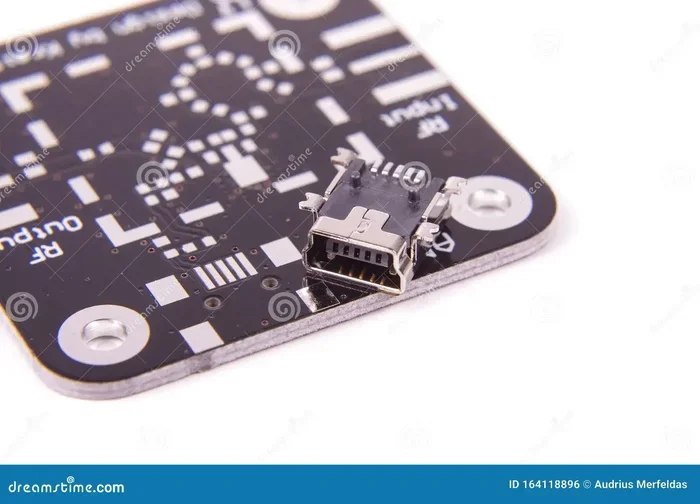
Mini USB was once a standard connector for cameras, MP3 players, and portable devices, but it is now largely considered outdated. Most modern devices have moved to Micro USB and USB Type-C for faster data transfer and better power delivery. If you still have older gadgets, Mini USB may still work, but new devices no longer use it.
Let us talk about something you might not think about every day: the Mini USB connector. You have probably seen it on old cameras, MP3 players, or even some older gaming controllers. But here is the big question — is Mini USB outdated? The short answer is yes, for the most part. But the full story is more interesting than you might think.
USB connectors have come a long way over the past two decades. From the original Standard USB to Mini USB, Micro USB, and now USB Type-C, each generation brought improvements in speed, size, and convenience. Mini USB was a stepping stone in this evolution. It served us well for many years. But today, it is slowly fading into the background.
In this article, we will explore the history of Mini USB, why it fell out of favor, where it is still used, and what has replaced it. Whether you are trying to figure out if your old devices still matter or you are shopping for cables, this guide has you covered. Let us dive in.
Key Takeaways
- Mini USB is mostly outdated: Newer devices use Micro USB and USB Type-C instead.
- Mini USB still has niche uses: Some older cameras, gaming controllers, and medical devices still rely on it.
- USB Type-C offers major upgrades: Faster data speeds, reversible design, and higher power delivery.
- Adapters can bridge the gap: You can still use Mini USB devices with modern setups using the right adapter.
- Understanding USB evolution helps you choose: Knowing the differences saves money and avoids compatibility headaches.
- Mini USB cables are still available: But finding quality ones is getting harder as demand drops.
- Legacy devices need care: If you own Mini USB gadgets, proper maintenance keeps them running longer.
📑 Table of Contents
What Is Mini USB and Where Did It Come From?
The Mini USB connector was introduced in the early 2000s as a smaller alternative to the standard USB Type-A and Type-B connectors. At the time, portable electronics were growing fast. Phones, digital cameras, and MP3 players needed a compact connector that could handle both data transfer and charging.
The Two Types of Mini USB
There were two main versions of Mini USB. The first was Mini-A, which was designed for On-The-Go (OTG) devices. The second was Mini-B, which became the most common type. Most people simply called it Mini USB. The Mini-B connector had a trapezoidal shape and five pins. It was small enough to fit in compact devices but sturdy enough for daily use.
How Mini USB Compared to Standard USB
Standard USB connectors were bulky for small devices. Mini USB solved that problem. It was about 60% smaller than a standard USB Type-A connector. This made it perfect for slim gadgets of that era. Data transfer speeds were limited by the USB 2.0 standard, which capped out at 480 Mbps. That was fast enough for the devices of that time, but it looks slow by today’s standards.
Why Is Mini USB Considered Outdated?
The rise of Micro USB and later USB Type-C made Mini USB largely obsolete. Here is why the industry moved on.
Size Limitations
Mini USB was a great improvement over standard USB, but it was still too large for the trend toward thinner and lighter devices. Smartphones and tablets needed even smaller connectors. Micro USB was about 30% smaller than Mini USB, which made it a much better fit for modern mobile devices.
Slower Data Speeds
Most Mini USB devices operated on USB 2.0. This means data transfer speeds topped out at 480 Mbps. Compare that to USB 3.0, which offers speeds up to 5 Gbps, or USB 3.1 Gen 2, which reaches 10 Gbps. The gap is massive. For tasks like transferring large files or backing up data, Mini USB simply cannot keep up.
Poor Power Delivery
Mini USB was designed for low-power devices. It can deliver up to 2.5 watts of power at 5 volts. Modern devices like tablets and laptops need much more. USB Type-C, for example, can deliver up to 240 watts through USB Power Delivery. This makes Mini USB impractical for anything beyond basic charging of small gadgets.
The Reversible Connector Advantage
One of the biggest frustrations with Mini USB is that it is not reversible. You have to flip it to find the right orientation. USB Type-C solved this problem with a reversible design. This small improvement made a huge difference in everyday convenience. Users no longer have to fumble with cables in the dark.
Where Is Mini USB Still Used Today?
Even though Mini USB is outdated, it has not disappeared completely. Several devices and industries still rely on it.
Older Cameras and Camcorders
Many digital cameras from the 2000s and early 2010s use Mini USB ports. Brands like Canon, Sony, and Olympus included Mini-B connectors in their entry-level and mid-range cameras. If you own an older camera, there is a good chance it still uses Mini USB. These cameras can still take great photos, and the Mini USB port works fine for transferring images to a computer.
Gaming Controllers and Peripherals
Some older gaming controllers and peripherals use Mini USB. Certain racing wheels, flight sticks, and legacy gamepads still rely on this connector. If you are a retro gaming enthusiast, you might run into Mini USB more often than you think.
Medical and Industrial Devices
In some medical and industrial settings, Mini USB is still used for data logging and device communication. These devices often have long lifecycles and are not replaced frequently. Manufacturers may stick with proven connector types rather than redesigning hardware for newer standards.
Portable Music Players
Old MP3 players and portable music gadgets from brands like iPod Classic or early Sansa players sometimes use Mini USB for charging and syncing. While these devices are niche now, there is still a loyal user base that keeps them running.
What Replaced Mini USB?
The evolution of USB connectors has been a journey toward smaller, faster, and more versatile designs. Here is how the replacements stack up.
Micro USB: The Bridge Connector
Micro USB became the standard for most smartphones and portable devices from about 2010 to 2017. It was smaller than Mini USB and offered the same USB 2.0 speeds. Micro USB came in two forms: Micro-A and Micro-B. Micro-B was the most common. It dominated the Android phone market for years and is still found in many budget devices and accessories today.
If you are looking to connect older devices, you might want to check out articles about modern USB connectivity options that show how far the technology has come.
USB Type-C: The Modern Standard
USB Type-C is the connector of the present and future. It is tiny, reversible, and incredibly fast. It supports USB 3.1 and USB 4 standards, with speeds up to 40 Gbps. It also supports video output, meaning a single cable can charge your device, transfer data, and connect to a display. Many modern laptops, phones, and tablets now use USB Type-C exclusively.
USB Type-C also works with external storage devices. For example, you can connect portable SSDs using USB Type-C enclosures that deliver incredible speeds. If you are interested in how USB connectivity has evolved for storage, check out M.2 NVMe SSDs in USB enclosures for a deep dive into modern portable storage.
Comparison: Mini USB vs. Micro USB vs. USB Type-C
| Feature | Mini USB | Micro USB | USB Type-C |
|---|---|---|---|
| Release Year | 2000s | 2007 | 2014 |
| Size | Medium | Small | Very Small |
| Reversible | No | No | Yes |
| Max Data Speed | 480 Mbps (USB 2.0) | 480 Mbps (USB 2.0) | Up to 40 Gbps (USB4) |
| Max Power Delivery | 2.5W | 10W | Up to 240W |
| Common Devices | Old cameras, MP3 players | Android phones, budget tablets | Modern phones, laptops, tablets |
| Still in Active Use | Limited (legacy devices) | Yes (many devices still use it) | Yes (growing rapidly) |
Can You Still Buy Mini USB Cables and Adapters?
Yes, you can still find Mini USB cables, but the selection is shrinking. Major retailers are phasing them out in favor of Micro USB and Type-C options. Online marketplaces still carry them, but quality can vary. When shopping for Mini USB cables, look for reputable brands and read reviews carefully. Cheap cables can cause charging issues or even damage your devices.
Using Adapters to Connect Mini USB to Modern Devices
If you have a Mini USB device but only have USB Type-C ports on your modern computer, do not worry. Adapters exist. You can find Mini USB to USB Type-C adapters that let you connect older devices to new computers. These adapters are inexpensive and widely available. They are a great way to keep legacy devices in use without upgrading everything.
For those who work with external storage, you might also be interested in how USB adapters connect modern SSDs. For example, NVMe SSD to USB adapters show how versatile modern USB connectivity has become compared to older standards.
Quick Tips for Using Mini USB Devices
- Always inspect your Mini USB cable for fraying or damage before each use.
- Clean the Mini USB port on your device with compressed air to remove dust.
- Use a high-quality cable to avoid slow charging or data transfer errors.
- Store Mini USB cables coiled loosely to prevent internal wire damage.
- Consider buying a Mini USB to USB Type-C adapter for future-proofing.
The Future of USB Connectors
The USB standard continues to evolve. USB Type-C is becoming the universal connector across all device categories. The USB Power Delivery standard is making it possible to charge laptops, monitors, and even some desktop computers through a single USB-C cable. Data speeds are improving with each new USB generation.
Mini USB has done its job. It helped bridge the gap between bulky standard connectors and the ultra-compact devices we use today. But it has been surpassed by better alternatives. The connector market moves fast, and what is cutting-edge today may be legacy tomorrow. That is the nature of technology.
If you are dealing with older devices that use Mini USB, there is no need to panic. With the right adapters and cables, you can keep them working alongside your modern gear. The key is understanding what you have and what it needs to connect properly.
For readers curious about how newer USB standards compare in real-world performance, you might want to explore how USB Type-C enclosures and adapters are changing the game for portable storage and connectivity. The shift from older connectors like Mini USB to modern standards is one of the most visible improvements in consumer electronics over the past decade.
Final Thoughts
So, is Mini USB outdated? By modern standards, absolutely. It is slower, larger, and less convenient than the connectors we use today. But it is not useless. Many devices still rely on it, and adapters make it easy to integrate legacy gear into modern setups. The next time you dig out an old camera or MP3 player, do not throw it away just because it uses Mini USB. With the right cable or adapter, it can still serve you well.
Technology moves fast, and connectors evolve constantly. The important thing is to stay informed and make smart choices based on your actual needs. Whether you are holding onto older devices or upgrading to the latest USB Type-C gear, understanding the connector landscape helps you get the most out of your tech.
Embrace the past when it makes sense, but do not be afraid to move forward. The world of USB connectivity has come a long way from Mini USB, and there is no sign of it slowing down. Keep your cables organized, your adapters handy, and your devices charged. That is the best way to make any connector, old or new, work for you.
Frequently Asked Questions
Is Mini USB the same as Micro USB?
No, Mini USB and Micro USB are different connectors. Mini USB is larger than Micro USB and was introduced earlier. Micro USB replaced Mini USB as the standard for most portable devices starting around 2007. They are not interchangeable without an adapter.
Can I charge a Mini USB device with a USB Type-C charger?
Yes, you can charge a Mini USB device with a USB Type-C charger, but you will need a Mini USB to USB Type-C adapter. The adapter converts the connector type while still delivering power. Make sure the adapter supports the voltage and current your device requires.
Are Mini USB cables still being manufactured?
Yes, Mini USB cables are still being manufactured, but they are much harder to find than Micro USB or USB Type-C cables. Many retailers have stopped stocking them. Online marketplaces and specialty electronics stores are your best bet for finding quality Mini USB cables.
What is the data transfer speed of Mini USB?
Mini USB typically operates at USB 2.0 speeds, which max out at 480 Mbps. This is significantly slower than USB 3.0 (5 Gbps) and USB 3.1 Gen 2 (10 Gbps). For basic file transfers like photos and documents, Mini USB is still functional, but it is not suitable for large files or fast backups.
Should I upgrade my Mini USB devices to newer technology?
If your Mini USB devices still work well and meet your needs, there is no urgent reason to replace them. However, if you are experiencing slow data transfer, charging issues, or difficulty finding replacement cables, it may be time to consider upgrading to a device with USB Type-C or Micro USB support.
Can I use a Mini USB to USB Type-C adapter for external SSDs?
Yes, you can use a Mini USB to USB Type-C adapter with external SSDs, but the speed will be limited by the Mini USB 2.0 standard. If you need faster transfer speeds, consider upgrading to an SSD with a USB Type-C connection. You can learn more about modern SSD connectivity options in articles about M.2 NVMe SSDs and USB connectivity.