Is Usb 3 0 Faster Than Nvme
USB 3.0 and NVMe serve very different purposes. NVMe drives use the PCIe interface for blazing-fast speeds, while USB 3.0 caps transfer rates at around 5 Gbps. An NVMe SSD will always be faster than USB 3.0 in raw performance, but USB 3.0 offers unmatched convenience for portable storage.
Have you ever wondered whether your USB 3.0 connection is holding back your storage? Maybe you have an external drive and you are not sure if you are getting the most out of it. Or perhaps you are shopping for a new setup and trying to figure out which interface wins.
The short answer is that NVMe is significantly faster than USB 3.0. But the full picture is more interesting than a simple yes or no. In this guide, we will break down exactly how these two technologies compare, where each one shines, and what you should choose for your setup.
We will look at real numbers, practical use cases, and common mistakes people make when picking between USB 3.0 and NVMe storage. By the end, you will know exactly which option fits your workflow best.
Key Takeaways
- NVMe is faster: NVMe uses PCIe lanes directly, offering speeds far beyond what USB 3.0 can deliver.
- USB 3.0 has a 5 Gbps cap: Real-world transfer speeds max out around 400-500 MB/s on USB 3.0.
- NVMe SSDs hit 3,500+ MB/s: Even entry-level NVMe drives significantly outperform USB 3.0 connections.
- Enclosures bridge the gap: You can use an M.2 NVMe SSD enclosure adapter USB 3.1 to make NVMe portable, but speed is still limited by USB.
- Choose based on your needs: Speed matters for editing and gaming; portability matters for on-the-go storage.
📑 Table of Contents
What Is USB 3.0?
USB 3.0 is a universal connection standard that most people use every day. It connects everything from flash drives to external hard drives. USB 3.0 was introduced back in 2008 and brought a big speed upgrade over USB 2.0.
The maximum theoretical bandwidth of USB 3.0 is 5 Gbps, which sounds impressive on paper. In real-world testing, you typically see transfer speeds between 400 and 500 MB/s. That is plenty for everyday tasks like moving documents, photos, and small video files.
How USB 3.0 Connects to Storage
Most external drives use USB 3.0 or its newer versions like USB 3.1 and USB 3.2. These connections share the same basic design. A cable links your drive to the computer, and data travels through that cable using the USB protocol.
The bottleneck here is the USB controller. Even if your internal drive is incredibly fast, the USB connection limits how fast data can actually move. This is why USB flash drives and external HDDs feel slow compared to internal NVMe drives, even when the drive inside is decent.
If you want to use an NVMe drive over USB, you need an M.2 NVMe SSD to USB 3.1 adapter or an enclosure. These devices let you plug an NVMe drive into a USB port. However, the speed is still capped by the USB connection itself.
What Is NVMe?
NVMe stands for Non-Volatile Memory Express. It is a storage protocol designed specifically for flash storage like SSDs. Unlike older protocols such as AHCI, NVMe was built from the ground up to take full advantage of modern NAND flash technology.
NVMe drives connect directly to the motherboard through the PCIe interface. This means they bypass the bottlenecks that affect SATA and USB connections. The result is incredibly fast read and write speeds that make everyday computing feel instant.
How NVMe Achieves Its Speed
NVMe uses PCIe lanes to communicate with the CPU. Each PCIe lane offers much higher bandwidth than a USB connection. A standard M.2 NVMe SSD on PCIe 3.0 x4 can reach sequential read speeds of around 3,500 MB/s.
Newer NVMe drives on PCIe 4.0 and PCIe 5.0 push even further. Top-tier models exceed 7,000 MB/s or even 10,000 MB/s in some cases. These speeds are simply impossible to achieve over any USB connection today.
The NVMe protocol also reduces latency significantly. Commands are processed much faster than with older protocols, which is why NVMe drives feel so responsive when booting up or loading large applications.
USB 3.0 vs NVMe: Speed Comparison
This is where things get really clear. When you compare USB 3.0 directly against NVMe storage, the difference is dramatic.
| Feature | USB 3.0 | NVMe (PCIe 3.0 x4) |
|---|---|---|
| Max Theoretical Bandwidth | 5 Gbps | ~32 Gbps (PCIe 3.0 x4) |
| Real-World Read Speed | 400-500 MB/s | 3,000-3,500 MB/s |
| Real-World Write Speed | 300-450 MB/s | 2,000-3,200 MB/s |
| Latency | Higher (USB protocol overhead) | Very low (direct PCIe connection) |
| Best Use Case | Portable storage, backups | Gaming, video editing, OS drives |
| Portability | Excellent | Requires enclosure for portability |
As you can see, NVMe is roughly 7 to 10 times faster than USB 3.0 in real-world scenarios. This gap matters a lot when you are copying large files, editing 4K video, or loading heavy games.
Even when you put an NVMe drive inside a USB 3.1 enclosure, the speed is still limited to USB 3.0 or USB 3.1 levels. The NVMe drive itself is fast, but the USB connection becomes the bottleneck. This is an important thing to understand before you buy an external NVMe setup.
Why the Speed Gap Matters
Let us put this into perspective. Transferring a 50 GB file over USB 3.0 takes roughly two minutes. The same file on an NVMe drive connected directly takes less than 15 seconds. That is a huge difference if you work with large datasets, raw video footage, or massive game libraries.
For casual users who just want to carry documents and photos around, USB 3.0 is perfectly fine. But for anyone who needs speed, NVMe is the clear winner.
How NVMe Drives Connect to USB Ports
You might be wondering how NVMe drives work with USB connections. The answer is simple: you need a bridge device.
An M.2 NVMe SSD to PCIe 4.0 adapter card connects an NVMe drive directly to a PCIe slot on your motherboard. This gives you full NVMe speeds with no USB bottleneck. But if you want portability, you need an enclosure.
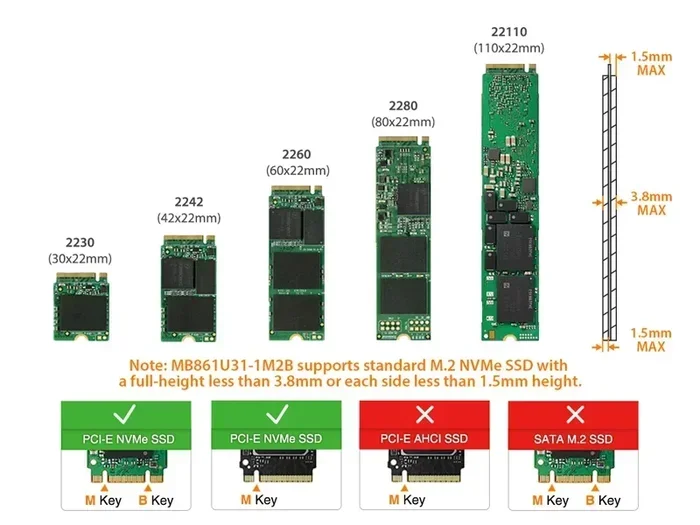
An M.2 NVMe enclosure houses the NVMe drive and connects to your computer through USB. Popular options include the M.2 NVMe SSD enclosure adapter USB 3.1 and similar products. These enclosures are compact and easy to carry around.
The USB Enclosure Trade-Off
Here is the trade-off. When you use an NVMe drive inside a USB enclosure, you get the portability of USB but the speed of NVMe only up to the USB limit. If your enclosure uses USB 3.0, the fastest you will ever go is about 500 MB/s. That is still much faster than a traditional external HDD, but it is nowhere near full NVMe speed.
For the best of both worlds, look for enclosures that support USB 3.1 Gen 2 or USB-C with higher bandwidth. These can push speeds closer to 1,000 MB/s, which is better but still not the full NVMe potential.
If you want to learn more about using NVMe drives in portable setups, check out our guide on M2 NVMe SSD in USB enclosures.
When to Use USB 3.0 Storage
Despite being slower, USB 3.0 storage has real advantages. Not everyone needs the raw speed of NVMe. Here are the situations where USB 3.0 makes perfect sense.
1. Portable Backup Drives
If you need a drive to back up your files on the go, USB 3.0 is ideal. External HDDs and smaller SSDs with USB 3.0 connections are affordable and easy to carry. You plug them in, copy your files, and you are done.
2. Sharing Files Between Devices
USB 3.0 flash drives work great for moving files between computers. Whether you are at the office or traveling, a USB stick gives you instant access to your data without any special setup.
3. Media Storage and Playback
For storing movies, music, and photos, USB 3.0 is more than fast enough. Streaming and playback do not require extreme speeds. A USB 3.0 drive handles these tasks smoothly.
4. Budget-Friendly Storage
USB 3.0 external drives are generally cheaper than NVMe enclosures and portable NVMe SSDs. If you are on a tight budget and just need extra storage, USB 3.0 is the smarter choice.
When NVMe Is the Better Choice
There are plenty of situations where NVMe storage is the right pick. If any of these sound like your use case, you should strongly consider going with NVMe.
1. Gaming
Modern games are huge and load times matter. An NVMe drive dramatically reduces load screens and texture streaming times. If you are a serious gamer, NVMe is a must-have.
2. Video Editing and Content Creation
Working with 4K or even 8K video files requires fast read and write speeds. NVMe drives handle these workloads with ease. USB 3.0 simply cannot keep up with the data demands of video editing.
3. Running Your Operating System
Installing your operating system on an NVMe drive makes your entire computer feel faster. Boot times drop, apps open instantly, and file operations are nearly instantaneous.
4. Professional Workstations
For anyone working with large datasets, 3D rendering, or scientific computing, NVMe provides the bandwidth and low latency that these tasks demand.
Common Mistakes People Make
Here are a few mistakes that people often make when choosing between USB 3.0 and NVMe storage.
- Assuming USB 3.0 enclosures give full NVMe speed: They do not. The USB connection always limits the top speed.
- Buying a slow enclosure for a fast NVMe drive: If you invest in a fast NVMe SSD, pair it with a quality enclosure that supports higher USB speeds.
- Ignoring the protocol overhead: USB has more protocol overhead than PCIe. This means even at the same bandwidth, USB is less efficient.
- Choosing storage based on price alone: Speed matters too. A cheap USB drive might save you money but cost you hours of waiting.
Expert Tips for Getting the Best Performance
Want to squeeze every bit of speed out of your setup? Here are some tips that actually work.
- Always use the latest USB port available. USB 3.1 and USB 3.2 offer better bandwidth than USB 3.0. If your computer supports it, use the newer port.
- Check your enclosure’s specs. Not all enclosures are created equal. Look for ones that support UASP (USB Attached SCSI Protocol) for better performance.
- Keep your NVMe drive cool. High-speed NVMe drives generate heat. Use enclosures with built-in thermal management to maintain top speeds.
- Update your drivers. For NVMe drives, keeping the firmware and drivers up to date ensures you get the best performance and stability.
- Use the right cable. A cheap or damaged USB cable can bottleneck your speeds. Invest in a quality cable that supports the full bandwidth of your connection.
Final Verdict
So, is USB 3.0 faster than NVMe? Absolutely not. NVMe is far faster than USB 3.0 in every meaningful way. The PCIe interface gives NVMe drives a massive advantage in both bandwidth and latency.
That said, USB 3.0 still has its place. It is convenient, portable, and affordable. For everyday tasks and casual storage needs, USB 3.0 works just fine. But if you need speed for gaming, editing, or professional work, NVMe is the clear choice.
The best approach is to understand your needs. If you want a fast internal drive for your computer, go NVMe. If you need a portable drive for on-the-go storage, USB 3.0 is a solid option. And if you want the best of both worlds, consider a portable NVMe enclosure with USB 3.1 or USB-C for a nice balance of speed and portability.
Storage technology keeps evolving fast. What is fast today may be standard tomorrow. But no matter what, NVMe will always be faster than USB 3.0 when it comes to raw performance. Keep that in mind the next time you are shopping for storage.
Frequently Asked Questions
Can I use an NVMe SSD with a USB 3.0 port?
Yes, you can use an NVMe SSD with a USB 3.0 port by using an enclosure or adapter. However, the speed will be limited to USB 3.0 levels, which maxes out around 500 MB/s. You will not get the full speed of the NVMe drive this way.
Is USB 3.0 fast enough for gaming?
USB 3.0 is fast enough for casual gaming, but it will not match the load times of an NVMe drive. If you play large modern games, an NVMe SSD will give you a noticeably better experience with faster loading and smoother performance.
What is the fastest USB connection available?
The fastest USB connection currently available is USB 3.2 Gen 2×2, which offers up to 20 Gbps. However, even this is still slower than a direct NVMe connection over PCIe. For maximum speed, a direct PCIe connection is always better.
Do I need a special enclosure for NVMe drives?
Yes, you need an M.2 NVMe enclosure to use an NVMe SSD externally. Not all enclosures support NVMe, so make sure you buy one that specifically lists NVMe or M.2 PCIe support. A quality enclosure can make a big difference in performance and reliability.
Why is NVMe faster than USB storage?
NVMe is faster because it connects directly to the PCIe bus on the motherboard. This gives it much higher bandwidth and lower latency compared to USB connections. USB adds protocol overhead and bandwidth limitations that slow down data transfer significantly.
Should I buy a USB 3.0 external drive or a portable NVMe SSD?
If you need speed and performance, go with a portable NVMe SSD. If you need affordable, simple storage for everyday use, a USB 3.0 external drive is a great choice. Consider your budget, your speed needs, and how often you will be moving the drive around.
=== CONCLUSION ===
USB 3.0 and NVMe are both important storage technologies, but they serve different needs. NVMe wins hands down in speed, with PCIe connections delivering multiple times the performance of USB 3.0. USB 3.0 wins in convenience and affordability for everyday portable storage.
Now that you understand the differences, you can make a confident choice for your next storage purchase. Whether you pick a USB 3.0 external drive or invest in a fast NVMe SSD, you are making a smart decision based on what matters most to you.