Kingston Nv1 M 2 Nvme Ssd
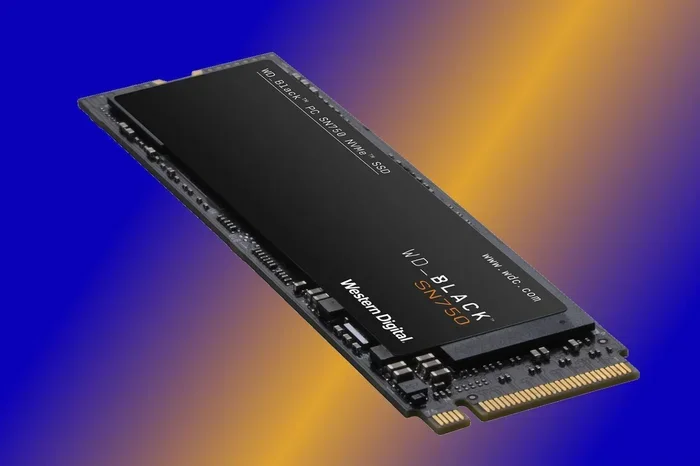
The Kingston NV1 M.2 NVMe SSD is a budget-friendly solid state drive that delivers solid performance for everyday computing and light gaming. It uses a DRAM-less design with PCIe Gen3 x4 speeds, offering up to 1TB of storage in a compact 2280 form factor. If you want a fast and affordable storage upgrade for your laptop or desktop, this drive is worth a close look.
The Kingston NV1 M.2 NVMe SSD has become one of the most talked-about budget storage drives on the market. If you are building a new PC or upgrading an older laptop, this little drive packs a punch that punches well above its price tag. In this guide, we will break down everything you need to know about the Kingston NV1 M.2 NVMe SSD, from its specs and speed to real-world performance and who should buy it.
Storage upgrades can feel overwhelming. There are so many options out there. But the good news is that the Kingston NV1 makes the decision easier. It is a straightforward solid state drive that uses the NVMe protocol over a PCIe Gen3 x4 connection. This means you get significantly faster speeds than a traditional SATA SSD, all at a price that does not break the bank.
Whether you are a student, a casual gamer, or someone who just wants a faster boot drive, the Kingston NV1 M.2 NVMe SSD deserves your attention. Let us dive into the details and see what this drive can do.
Key Takeaways
- Affordable NVMe Speed: The Kingston NV1 M.2 NVMe SSD offers PCIe Gen3 x4 performance at a budget-friendly price point.
- Compact 2280 Form Factor: This M.2 SSD fits most modern laptops and desktops with an M.2 slot.
- DRAM-Less Design: It uses Host Memory Buffer (HMB) technology, which keeps costs low but may affect sustained write speeds.
- Multiple Capacity Options: Available in 250GB, 500GB, 1TB, and 2TB variants to suit different needs.
- Great for Everyday Use: Ideal for boot drives, casual gaming, and general productivity tasks.
- Limited Endurance: The TBW rating is lower than premium NVMe drives, so heavy workloads may wear it out faster.
- Good Alternative to the Kingston NV2: The NV1 offers better sustained performance in some scenarios compared to its successor.
📑 Table of Contents
- What Is the Kingston NV1 M.2 NVMe SSD?
- Performance: How Fast Is the Kingston NV1?
- Kingston NV1 vs Kingston NV2: What Is the Difference?
- Who Should Buy the Kingston NV1 M.2 NVMe SSD?
- Installation and Setup Guide
- Pros and Cons of the Kingston NV1
- How Does the Kingston NV1 Compare to Other Budget NVMe Drives?
- Final Verdict
What Is the Kingston NV1 M.2 NVMe SSD?
The Kingston NV1 is a budget NVMe solid state drive designed for users who want fast storage without spending a fortune. It belongs to Kingston’s entry-level NVMe lineup and uses a Phison E.M.I controller paired with 3D NAND flash memory. The drive comes in the M.2 2280 form factor, which is the most common size for modern desktops and laptops.
Unlike higher-end drives that include a dedicated DRAM cache chip, the Kingston NV1 relies on Host Memory Buffer technology. This means it borrows a small portion of your system RAM to help manage data mapping. The result is a drive that is very affordable but still delivers respectable NVMe speeds.
One of the standout features of the Kingston NV1 M.2 NVMe SSD is its wide availability. You can find it in capacities ranging from 250GB all the way up to 2TB. This makes it a versatile choice whether you need a compact boot drive or a larger storage solution for games and media files.
Key Specifications
- Interface: PCIe Gen3 x4 NVMe
- Form Factor: M.2 2280
- Controller: Phison E.M.I
- NAND Type: 3D NAND (TLC)
- Sequential Read: Up to 2,100 MB/s
- Sequential Write: Up to 1,700 MB/s
- Random Read (IOPS): Up to 200,000 IOPS
- Random Write (IOPS): Up to 210,000 IOPS
- Capacity Options: 250GB, 500GB, 1TB, 2TB
- DRAM: None (uses HMB)
- Endurance (1TB): 200 TBW
- Warranty: 5 years
These specs put the Kingston NV1 M.2 NVMe SSD in a strong position for its price range. The sequential read and write speeds are competitive with other drives in this tier, and the 5-year warranty gives you peace of mind.
Performance: How Fast Is the Kingston NV1?
When it comes to real-world performance, the Kingston NV1 M.2 NVMe SSD delivers a solid experience for most users. The sequential read speeds of up to 2,100 MB/s mean that opening large files, loading applications, and booting your operating system happens in a flash.
Sequential Read and Write Speeds
The NV1’s sequential read speed of 2,100 MB/s is impressive for a DRAM-less drive. This is fast enough to handle 4K video playback, large file transfers, and even some light video editing. The write speed of 1,700 MB/s is also very good, though you may notice it slows down slightly when the drive is nearly full or during sustained write tasks.
For comparison, a typical SATA SSD maxes out around 550 MB/s. The Kingston NV1 M.2 NVMe SSD is nearly four times faster in sequential reads. That is a huge difference you will feel every time you boot up or open a heavy application.
Random Read and Write Performance
Random IOPS performance matters a lot for everyday computing. The NV1 delivers up to 200,000 random read IOPS and 210,000 random write IOPS. This translates to snappy multitasking, fast app launches, and responsive system performance.
However, because the NV1 lacks a dedicated DRAM cache, its sustained random write performance can dip during heavier workloads. If you are running workloads that constantly write small files, you might see some slowdowns compared to a drive with DRAM. For most regular users, though, this is not a noticeable issue.
Gaming Performance
Gamers will appreciate the Kingston NV1 M.2 NVMe SSD for its fast load times. Modern games benefit greatly from NVMe speeds, and the NV1 handles most titles with ease. You will notice shorter loading screens and quicker level transitions compared to a traditional hard drive or SATA SSD.
That said, if you are comparing the NV1 directly to a PCIe Gen4 drive like the Crucial P310 1TB, you will see a gap in sustained write performance. The Gen4 drive offers higher peak speeds and better sustained writes, but it also costs more.
Kingston NV1 vs Kingston NV2: What Is the Difference?
Kingston released the NV2 as a successor to the NV1, and many users wonder which one to choose. The Kingston NV2 1TB M.2 2280 NVMe uses a newer controller and offers slightly better sustained write performance. However, the NV1 still holds its own in sequential read speeds and overall value.
If you find the NV1 at a lower price point, it is a great deal. The NV2 is a fine upgrade, but the NV1 remains a strong choice for budget-conscious buyers. Both drives use the M.2 2280 form factor and PCIe Gen3 x4 interface, so they are compatible with the same systems.
Head-to-Head Comparison
| Feature | Kingston NV1 | Kingston NV2 |
|---|---|---|
| Controller | Phison E.M.I | Phison E.V.12 |
| Sequential Read | Up to 2,100 MB/s | Up to 3,500 MB/s |
| Sequential Write | Up to 1,700 MB/s | Up to 3,000 MB/s |
| DRAM | None (HMB) | None (HMB) |
| Warranty | 5 years | 5 years |
| Best For | Budget upgrades | Better sustained writes |
As you can see from the table, the Kingston NV2 pulls ahead in raw speed, but the NV1 offers excellent value for users who do not need the extra performance. If you are on a tight budget, the NV1 is hard to beat.
Who Should Buy the Kingston NV1 M.2 NVMe SSD?
The Kingston NV1 M.2 NVMe SSD is ideal for a specific type of user. Let us break down who will benefit the most from this drive.
Great For:
- Budget PC Builders: If you are assembling a new desktop on a tight budget, the NV1 gives you NVMe speed at a very low cost.
- Laptop Upgrades: Many older laptops have M.2 slots but still use slow SATA SSDs or HDDs. Swapping in the Kingston NV1 M.2 NVMe SSD can breathe new life into an aging machine.
- Students: Fast boot times and quick app launches make studying and researching much smoother.
- Casual Gamers: The NV1 handles modern games well and keeps load times short.
- Office and Productivity Users: Spreadsheets, documents, and web browsing all run faster on an NVMe drive.
Not Ideal For:
- Heavy Video Editors: Sustained write speeds may bottleneck large file exports.
- Workstations with Constant Write Loads: The DRAM-less design can lead to performance dips under heavy sustained writes.
- Enthusiast Gamers: If you want the absolute fastest load times, a PCIe Gen4 or Gen5 drive like the Samsung 970 EVO Plus would be a better fit.
Installation and Setup Guide
Installing the Kingston NV1 M.2 NVMe SSD is straightforward if your system has an M.2 slot. Most modern motherboards and laptops support this form factor natively. Here is a quick overview of the process.
For Desktop PCs
- Turn off your PC and unplug it from the power outlet.
- Open the case and locate an available M.2 slot on your motherboard.
- Remove the M.2 heatsink or retention bracket if needed.
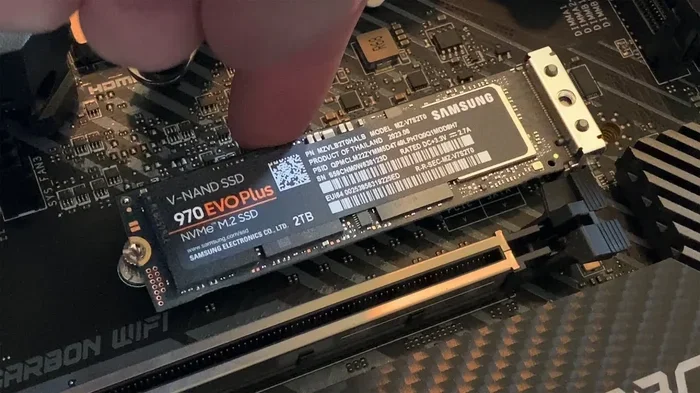
- Insert the NV1 at a 30-degree angle into the M.2 slot.
- Press it down flat and secure it with the mounting screw.
- Close the case and boot into your BIOS or operating system.
- Initialize and format the drive through Disk Management (Windows) or Disk Utility (macOS).
For Laptops
Laptop installation varies by model, but the general process is similar. Find the M.2 slot, remove the bottom panel, insert the drive at an angle, and secure it. Some laptops may require you to remove the existing drive first. Always check your laptop’s manual before starting.
Quick Tips for Setup
- Make sure your motherboard BIOS is updated to the latest version for the best M.2 compatibility.
- Enable NVMe mode in BIOS if the drive is not detected.
- Use the Kingston SSD Manager software to monitor drive health and firmware updates.
- If your system does not recognize the NV1, try reseating it or testing it in a different M.2 slot.
Pros and Cons of the Kingston NV1
Pros
- Very affordable for an NVMe SSD
- Fast sequential read speeds up to 2,100 MB/s
- Compact M.2 2280 form factor fits most systems
- 5-year warranty provides solid coverage
- Available in multiple capacities from 250GB to 2TB
- Easy to install in both desktops and laptops
- Good enough for gaming and everyday use
Cons
- DRAM-less design can cause speed drops under heavy workloads
- Sustained write speeds are lower than premium NVMe drives
- Lower endurance rating compared to higher-end models
- No heatsink included in the retail box
- Not ideal for professional creative workloads
How Does the Kingston NV1 Compare to Other Budget NVMe Drives?
The budget NVMe SSD market is crowded, but the Kingston NV1 M.2 NVMe SSD holds its own against competitors. When compared to drives like the WD Blue SN580 or the Crucial P3, the NV1 offers similar sequential read speeds and a competitive price point.
One area where the NV1 shines is its warranty. A 5-year warranty is standard across Kingston’s NVMe lineup and gives buyers confidence in the drive’s longevity. The endurance rating of 200 TBW for the 1TB model is also respectable for a budget drive.
If you are looking for alternatives, the Kingston NV2 offers better sustained performance, and the 1TB NVMe M.2 SSD category as a whole has many great options. But for pure value, the NV1 is hard to ignore.
Final Verdict
The Kingston NV1 M.2 NVMe SSD is a fantastic budget storage upgrade that delivers real NVMe performance at a price that is hard to argue with. It is perfect for students, casual gamers, office users, and anyone who wants to speed up their system without spending a lot of money.
While it may not match the sustained write speeds of more expensive drives, and the DRAM-less design has its limitations, the Kingston NV1 M.2 NVMe SSD excels in everyday tasks. Boot times are fast, game load times are short, and file transfers are quick. The 5-year warranty and multiple capacity options add to its appeal.
If you are on the fence, consider this: for the price of a mid-range SATA SSD, you get NVMe speeds that feel like a massive upgrade. The Kingston NV1 M.2 NVMe SSD is one of the best value picks in the budget NVMe market right now.
Frequently Asked Questions
Is the Kingston NV1 M.2 NVMe SSD good for gaming?
Yes, the Kingston NV1 is a solid choice for gaming. It offers fast sequential read speeds that reduce game load times significantly. While it may not match premium Gen4 drives in sustained write performance, most gamers will not notice a meaningful difference in everyday gaming scenarios.
Does the Kingston NV1 come with a heatsink?
No, the Kingston NV1 does not include a heatsink in the retail box. However, it runs cool under normal workloads and typically does not require additional cooling. If you are running sustained heavy tasks, a third-party M.2 heatsink can help maintain optimal performance.
Can I use the Kingston NV1 in a laptop?
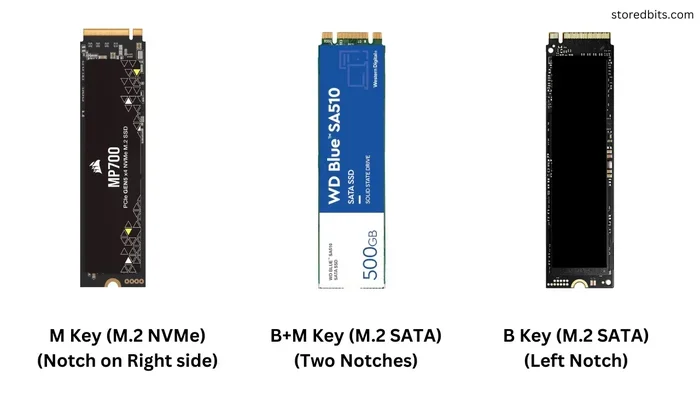
Absolutely. The Kingston NV1 M.2 NVMe SSD uses the M.2 2280 form factor, which is supported by most modern laptops with an M.2 slot. Just make sure your laptop has an M.2 key M slot that supports PCIe NVMe drives before purchasing.
What is the difference between NVMe and SATA SSDs?
NVMe SSDs like the Kingston NV1 use the PCIe bus for data transfer, which is much faster than the SATA interface used by traditional SSDs. The NV1 offers sequential read speeds up to 2,100 MB/s, while a typical SATA SSD maxes out around 550 MB/s. This means NVMe drives are roughly three to four times faster for most tasks.
How long does the Kingston NV1 last?
The Kingston NV1 comes with a 5-year warranty and an endurance rating of 200 TBW for the 1TB model. For an average user, this translates to many years of reliable use. The drive’s 3D NAND flash memory and conservative write strategy help maintain its longevity over time.
Is the Kingston NV1 better than the Kingston NV2?
The Kingston NV2 offers higher sequential speeds and better sustained write performance thanks to its newer controller. However, the NV1 is more affordable and still delivers excellent NVMe speeds for everyday use. If budget is your primary concern, the NV1 is the better value pick.